
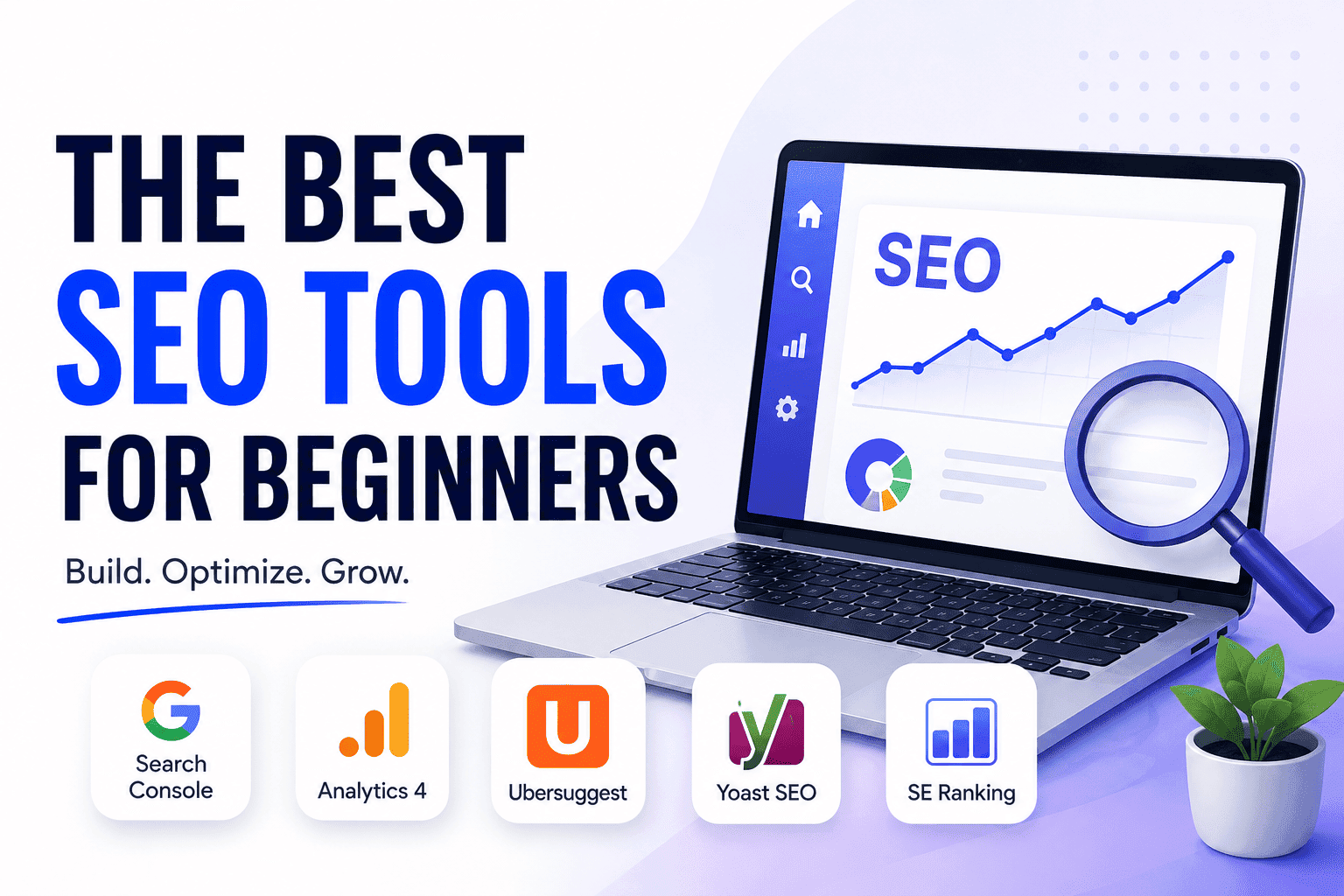
You just started a blog or small website. You’ve heard SEO matters, you’ve Googled it, and now you’re staring at a list of tools with monthly price tags that make no sense yet — Semrush, Ahrefs, Moz, Ubersuggest — with no idea which one to open first or whether you even need any of them right now.
This guide cuts through that.
The best SEO tools for beginners aren’t necessarily the most powerful ones. They’re the ones that give you useful information at the stage you’re actually at — without requiring a background in digital marketing to interpret or a $130 monthly subscription to access.
In this article, you’ll find ten tools explained in plain language, organized by what job they do, and introduced in the order that actually makes sense for a new site. No jargon. No upsells. No list of fifty tools that leaves you more confused than when you started.
By the end, you’ll know exactly which tools to set up this week, which ones to add later, and which ones to ignore until your site is ready for them.
Table of Contents
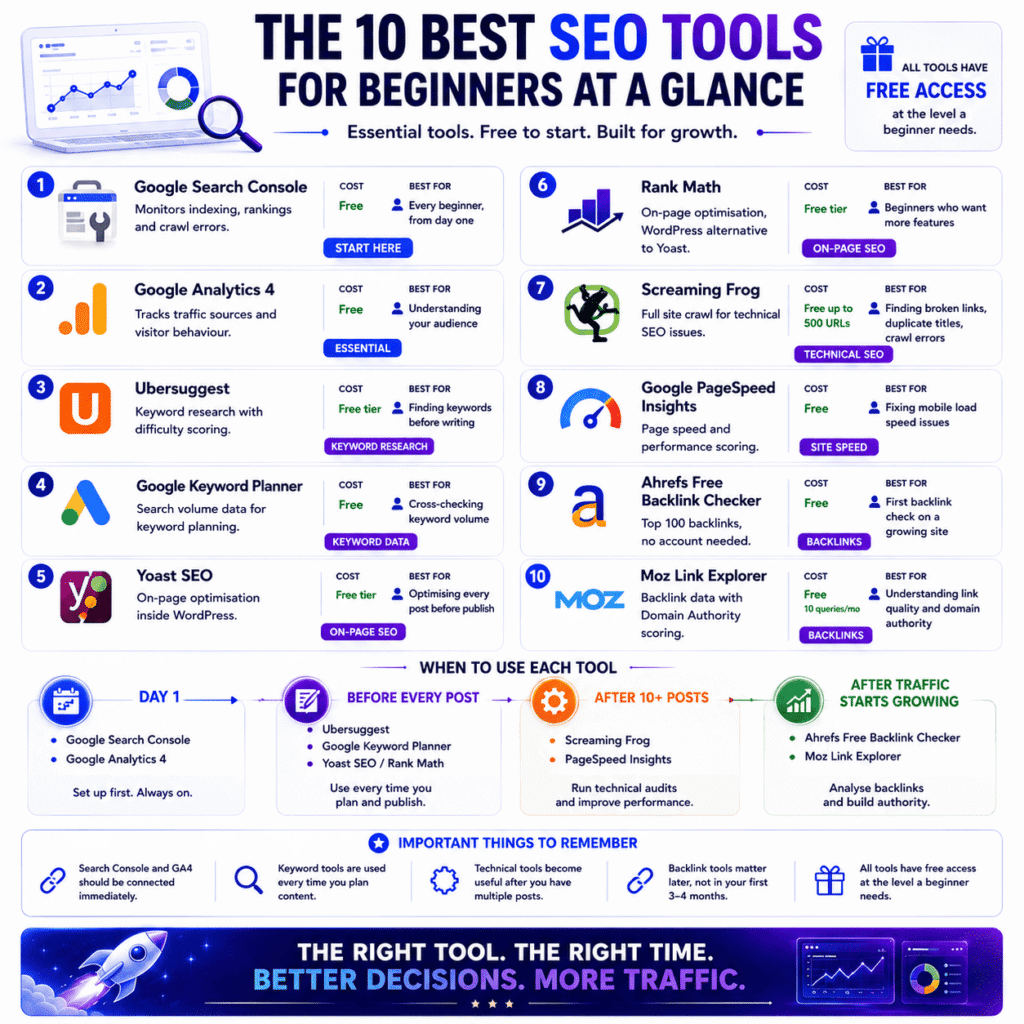
The 10 Best SEO Tools for Beginners at a Glance
Before diving into the detail, here’s the full list in one place. Every tool below is covered in depth further in this guide — this section gives you the snapshot so you know exactly what’s coming and can jump to whatever’s most relevant to where you are right now.
| # | Tool | What It Does | Cost | Best For |
|---|---|---|---|---|
| 1 | Google Search Console | Monitors indexing, rankings, crawl errors | Free | Every beginner, from day one |
| 2 | Google Analytics 4 | Tracks traffic sources and visitor behaviour | Free | Understanding where your audience comes from |
| 3 | Ubersuggest | Keyword research with difficulty scoring | Free tier available | Finding keywords before writing each post |
| 4 | Google Keyword Planner | Search volume data for keyword planning | Free | Cross-checking keyword volume estimates |
| 5 | Yoast SEO | On-page optimisation inside WordPress | Free tier available | Optimising every post before publishing |
| 6 | Rank Math | On-page optimisation, WordPress alternative to Yoast | Free tier available | Beginners who want more features at no cost |
| 7 | Screaming Frog | Full site crawl for technical SEO issues | Free up to 500 URLs | Finding broken links, duplicate titles, crawl errors |
| 8 | Google PageSpeed Insights | Page speed and performance scoring | Free | Fixing mobile load speed issues |
| 9 | Ahrefs Free Backlink Checker | Top 100 backlinks, no account needed | Free | First backlink check on a growing site |
| 10 | Moz Link Explorer | Backlink data with Domain Authority scoring | Free — 10 queries/month | Understanding link quality and domain authority |
A few things worth noting before the deeper sections:
- Tools 1 and 2 — Search Console and GA4 — are the only two that need to be connected before you publish anything. Every other tool on this list can be added when it becomes relevant.
- Tools 3 and 4 come into play every time you plan a new post. They’re active tools, not set-and-forget.
- Tools 5 and 6 are WordPress-specific. If you’re not on WordPress, look at similar on-page SEO plugins or extensions for your platform.
- Tools 7 and 8 are technical tools best introduced after your first 10 posts are live — not on a brand new site with three pages.
- Tools 9 and 10 are backlink tools. As covered later in this guide, beginners don’t need these in the first three to four months. They’re on the list because you’ll need them eventually — just not yet.
All ten tools have free access at the level a beginner needs. None of them require a paid subscription to get started. The paid upgrades exist, and they’re worth considering at the right stage — but that stage isn’t week one.
What Are SEO Tools and Why Do Beginners Actually Need Them?
Most people discover SEO tools the same way — they publish a few blog posts, wait, get almost no traffic, and then frantically Google “why is no one reading my blog.” Sound familiar? That’s usually the moment SEO tools stop being optional.
What does an SEO tool actually do?
An SEO tool shows you exactly how search engines see your website — which pages they’ve found, which keywords you’re ranking for, what’s broken, and what’s holding your content back from showing up on Google.
Without one, you’re writing for an audience you can’t see, on a platform you can’t measure. That’s not a strategy — that’s guessing.
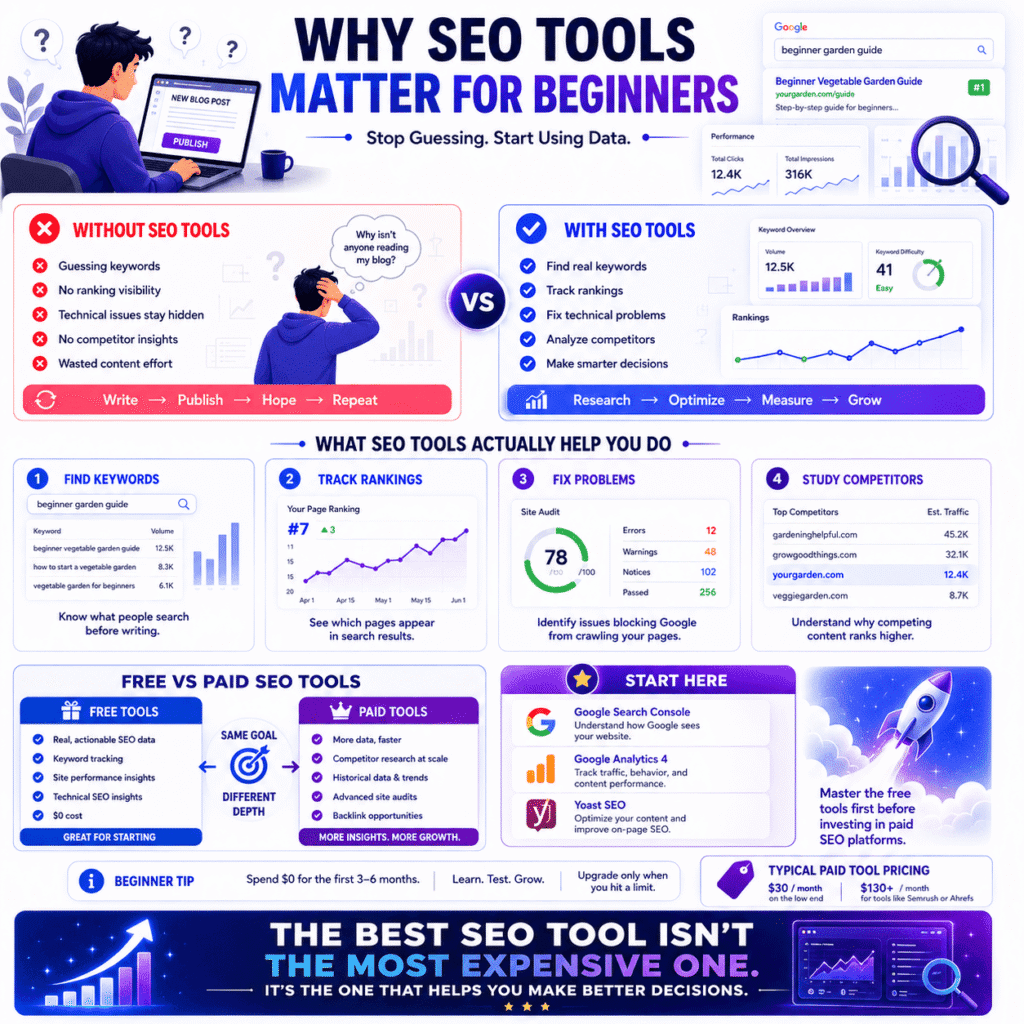
Here’s what the best SEO tools for beginners actually help you do in plain English:
- Find out what your target readers are typing into Google before you write anything
- See whether your published posts are actually showing up in search results
- Spot technical problems on your site that stop Google from crawling your pages
- Understand why a competitor’s article ranks above yours for the same topic
You don’t need all of these capabilities on day one. But even having visibility into one or two of them puts you miles ahead of someone publishing content completely blind.
Can you do SEO without tools as a beginner?
You can — but most beginners who try this end up stuck in the same loop: write, publish, wonder why nothing ranks, repeat. Tools aren’t a shortcut. They’re just the thing that tells you whether what you’re doing is actually working.
Here’s a real scenario. Say you write a post titled “tips for starting a garden.” Without a keyword research tool, you have no way of knowing that almost nobody searches that phrase — but thousands of people every month search “beginner vegetable garden guide.” Same topic. Completely different results.
That’s the gap search engine optimization tools close for beginners — not by doing the work for you, but by pointing you in the right direction before you waste weeks writing content nobody will ever find.
The good news? You don’t need to pay for anything to get started. Free tools alone are enough to make genuinely smarter decisions from day one.
What’s the difference between free and paid SEO tools?
Free SEO tools give you real, actionable data. Paid tools give you more of it — faster, deeper, and with fewer restrictions.
That’s really the whole difference. It’s not that free tools are weak — Google Search Console, for example, is one of the most accurate keyword tracking tools available, and it costs nothing. The limitation is scope, not quality.
A few things paid tools unlock that free ones typically don’t:
- Competitor research at scale — see exactly which keywords a competing blog ranks for
- Historical data — track how your rankings have moved over weeks or months
- Advanced site audits — catch technical SEO issues across hundreds of pages at once
- Backlink prospecting — find link-building opportunities your free tools won’t surface
For context, paid SEO platforms typically start around $30/month on the low end and climb to $130+/month for tools like Semrush or Ahrefs. That’s not nothing — especially when you’re just starting out.
Honest take? Spend zero dollars on SEO tools for your first three to six months. Master what Google gives you for free first. When you hit a specific problem a free tool can’t solve — that’s your signal to upgrade. Not before.
The Biggest Mistake Beginners Make When Choosing SEO Tools
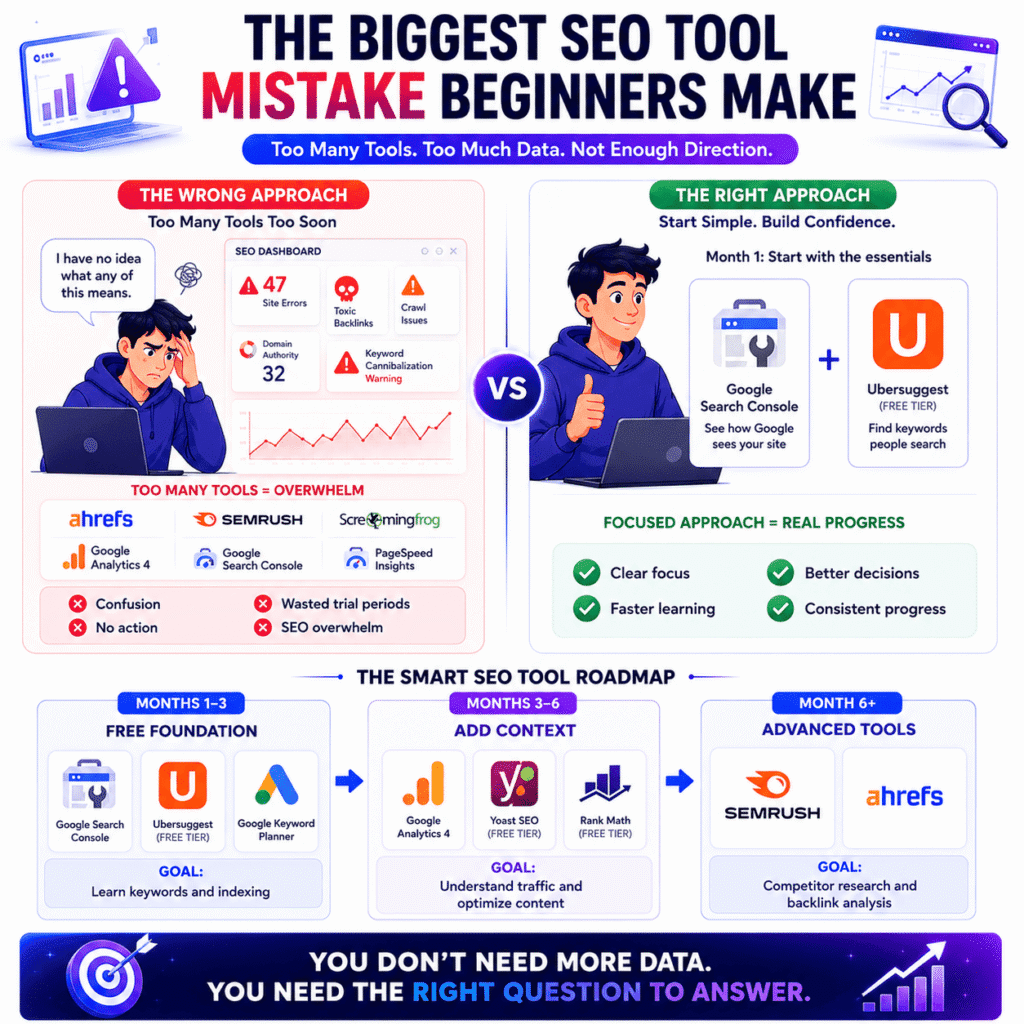
You now know what SEO tools do. Here’s the part most beginner guides skip entirely: the tools themselves aren’t the problem. Trying to use too many of them at once — before you even know what you’re measuring — is what derails most beginners before they ever see a result.
Why do most beginners quit SEO tools after one week?
Most beginners quit SEO tools within the first week because they open a professional dashboard and have no idea where to start. The tool isn’t broken. They just walked into something built for people who already know what question they’re trying to answer.
Here’s what that first login usually looks like. You sign up for a free trial, open the dashboard, and you’re immediately staring at a domain authority score, a crawl error count, something called “toxic backlinks,” a cannibalization warning, and a site audit showing 47 issues — all flagged in red. You don’t know what most of it means, but it all looks urgent.
Two hours later you’ve clicked through six different reports, fixed nothing, and you’re more confused than when you started. The tab gets closed. The free trial expires unused.
That’s not a you problem. That’s what happens when beginner SEO tools are marketed as simple but designed for professionals. The dashboards are built to show everything the tool can do — not to guide a new user toward the one thing they actually need right now.
What nobody tells you is this: you’re not supposed to understand all of it on day one. The bloggers and SEO practitioners who look comfortable in these tools didn’t start that way. They learned one feature, used it until it clicked, then moved to the next. That’s the only way this actually works.
How many SEO tools do you actually need to start?
Two. Google Search Console and one keyword research tool. That covers your two most important early jobs — confirming Google can find your site, and making sure you’re writing about things people actually search for.
Everything else is noise until those two are working.
Most experienced SEOs run a focused tool stack of three to four platforms total — and they didn’t build that stack on day one. Each tool got added when a specific problem came up that the existing setup couldn’t handle. That’s the model worth copying.
Here’s what that progression looks like in practice:
Months 1–3 — Free tools only:
- Google Search Console — see which pages Google has indexed, spot errors early
- Google Keyword Planner or Ubersuggest (free tier) — find what your audience is searching before you write
Months 3–6 — Still free, adding context:
- Google Analytics 4 — understand where your traffic actually comes from
- Yoast SEO or Rank Math — handle on-page optimization inside WordPress without guessing
Month 6 onwards — Paid tools, only when you hit a wall:
- Semrush or Ahrefs — competitor research, deeper keyword data, backlink tracking
Start at the top. Don’t skip to the bottom because someone on YouTube made Ahrefs look exciting.
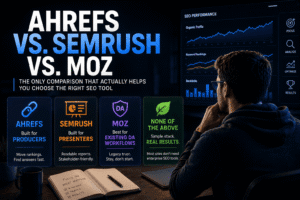
📖 Related: Ahrefs vs Semrush vs Moz: The Complete & Honest SEO Tool Comparison
Ignore everything except the one feature you came in to use. If you opened the tool to research a keyword, go straight to the keyword section. That’s it. The rest of the dashboard can wait — and honestly, most of it should wait for months.
Here’s what specifically isn’t worth your time yet:
- Backlink analysis — a new site has almost no backlinks. Running this report now gives you a depressing number and zero useful direction
- Competitor gap reports — these only make sense once you understand your own site’s baseline first. Skipping ahead here is like reading the last chapter of a book first
- Site audit red alerts — new sites almost always trigger a pile of warnings. Many of them are low priority. Spending your first week fixing audit flags instead of publishing content is the wrong order of operations
- Tracking 50+ keywords — pick five to ten keywords your published posts are targeting and track those. A bloated rank tracker tells you nothing useful at this stage
The most effective way to use any SEO platform as a beginner is to walk in with one specific question. “What keyword should my next post target?” is a good question to bring in. “Let me see what this tool can do” is how you lose a whole afternoon and leave with nothing actionable.
One question in. One answer out. Repeat that enough times and the tool starts making sense on its own.
The Best Free SEO Tools for Beginners (Google’s Own Tools First)
Before you spend anything on SEO software — and plenty of people will try to convince you to spend a lot — there are two tools Google gives away for free that most beginners either ignore completely or set up wrong. Used together, they cover more than most paid subscriptions beginners buy in their first six months and then cancel.
What is the best free SEO tool for a brand new website?
For a brand new website, Google Search Console is the single most important free SEO tool you can set up — and it should be connected before you publish your first post, not after. It pulls data directly from Google, which means nothing it shows you is an estimate. Every other tool on the market is making educated guesses about your rankings. Search Console is showing you the actual numbers.
What does it tell you? A few things that matter immediately:
- Whether Google has found and indexed your pages at all
- Which search queries are triggering your content to appear in results
- Your click-through rate — how many people see your page in results versus actually click it
- Crawl errors and indexing problems that are quietly stopping pages from ranking
That last one catches a lot of beginners off guard. You can write a genuinely good post, optimise it properly, wait three months — and it still won’t rank if Google flagged an indexing error on that URL. Search Console is the only place that tells you this is happening. No third-party SEO platform surfaces this data as accurately because none of them have direct access to Google’s index.
Google’s own Search Console documentation also confirms you can submit your sitemap directly through the tool, which helps new pages get discovered faster. For a site with no domain authority and no backlinks yet, anything that speeds up crawling is worth doing immediately.
What is the difference between Google Search Console and Google Analytics 4?
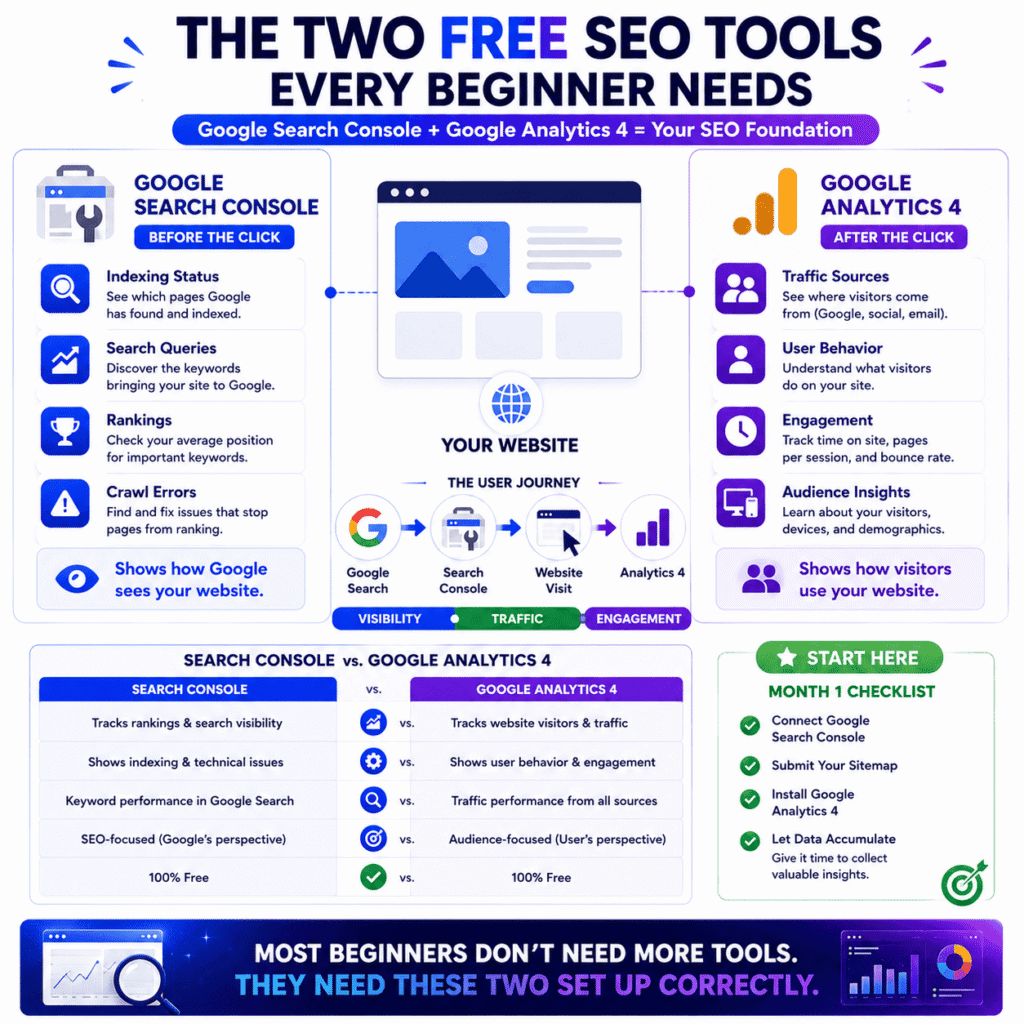
Google Search Console tracks what happens before someone lands on your site. Google Analytics 4 tracks what happens after. They’re not competing tools — they’re measuring two completely separate things, which is why every site eventually needs both running at the same time.
Search Console lives in the world of search visibility. It’s answering questions like: is Google finding my pages, what keywords am I appearing for, where do I rank, are there technical problems on my site? All of that happens before a single visitor arrives.
GA4 picks up the moment someone clicks through. It tracks where your traffic is coming from, which pages people actually read versus bounce off immediately, how long they stay, what device they’re on, and whether visitors from Google behave differently than visitors from Instagram or email.
One thing that trips up a lot of beginners: GA4 is not the same as the old Google Analytics. Google retired Universal Analytics in 2023 and replaced it with GA4, which has a noticeably different interface and works on a completely different data model. If you’ve watched any tutorial where the Analytics dashboard looks unfamiliar, they’re probably showing you the old version. The current one is GA4 — and yes, it has a steeper learning curve. You don’t need to master it right away. You just need it installed and collecting data.
The two tools don’t overlap much. Search Console won’t tell you whether visitors are bouncing. GA4 won’t tell you whether Google can crawl your pages. Used together, they give you a complete picture of your site’s SEO health — one showing what search engines see, the other showing what real visitors do when they arrive.
📖 Related: Free SEO Tools That Actually Help You Rank
Is Google Search Console enough for a beginner, or do you need GA4 too?
In your first month, Search Console alone is enough. After that, you need GA4 running alongside it — not because you’ll actively use it yet, but because it needs time to collect data before it becomes useful.
Here’s something most guides don’t mention: GA4 is only as valuable as the historical data behind it. If you install it six months into running your site, you’ve lost six months of behavioural data you can never recover. You won’t miss it immediately — but the moment you want to compare this month’s traffic to three months ago, or figure out which old posts are quietly dying, you’ll wish you’d set it up on day one.
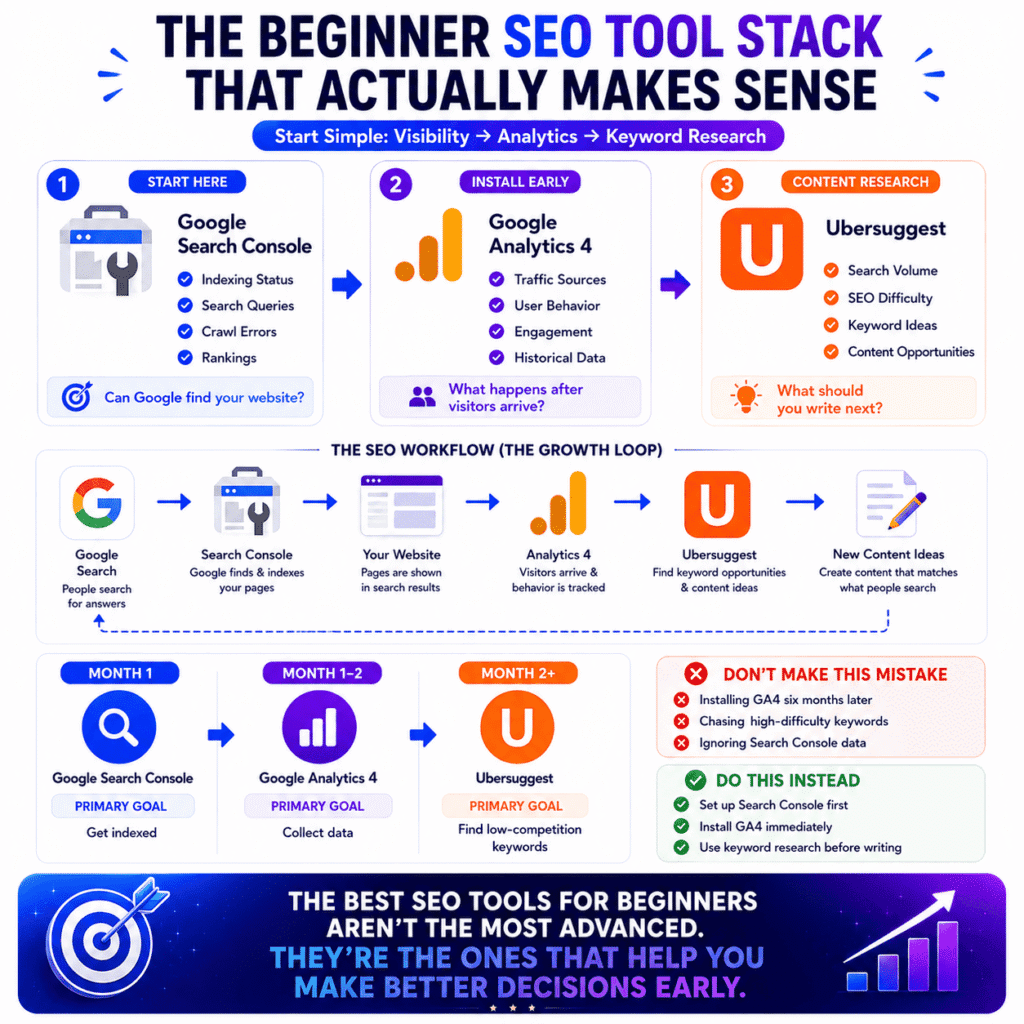
So the actual order of operations for free SEO tools for beginners looks like this:
- Set up Search Console before you publish anything — it needs to verify your site and start collecting impression data from the start
- Install GA4 within your first two weeks — even if you don’t look at it for months, it’s building a data history you’ll eventually need
- Come back to GA4 once you’re publishing consistently — when you have enough content and traffic to spot patterns, that’s when it stops being confusing and starts being genuinely useful
Search Console is the tool that tells you Google can’t find your content. GA4 is the tool that tells you Google found it but something’s wrong once people arrive — high bounce rate, short session times, no return visitors. Different problems, different tool. Neither one replaces the other.
One last thing — setting up GA4 is about fifteen minutes of work via Google Tag Manager, or even faster through a WordPress plugin like Site Kit. Don’t put it off because you’re not ready to use it. The data it starts collecting today is something you can’t go back and recreate.
Best Keyword Research Tools for Beginners (Find What People Are Actually Searching)
Google Search Console shows you what people searched after they found you. Keyword research tools flip that — they show you what people are searching before you write a single word. Get this part right and content starts pulling in traffic almost on its own. Get it wrong and you can spend months publishing posts that nobody ever finds.
What is the easiest keyword research tool for beginners?
For a complete beginner, Ubersuggest is the most approachable keyword research tool available — free to start, plain-language metrics, and built around content creators rather than advertisers or SEO agencies. You don’t need to understand domain ratings or SERP volatility scores to get value out of it on day one.
Type in any topic and it surfaces three things you actually need early on: monthly search volume, an SEO difficulty score, and a list of related keyword variations you probably wouldn’t have thought of yourself. That difficulty score is the part beginners should pay the most attention to. A score above 60 on a brand new site means you’re competing against pages with thousands of backlinks and years of authority behind them. You won’t win that fight yet — and Ubersuggest makes that clear upfront rather than burying it in a paid report.
You’ll notice the free tier starts limiting your daily searches after a few queries. That’s by design — Ubersuggest’s free plan is genuinely useful but intentionally capped. For most beginners doing keyword research a few times a week, the free limit is rarely a real problem. If you’re hitting it constantly, that’s actually a good sign — it means you’re doing enough research to warrant the $12/month upgrade.
One addition worth knowing about: Ubersuggest has a free Chrome extension that surfaces keyword data — search volume, SEO difficulty, and related keyword suggestions — directly inside Google search results as you browse. You don’t need to open a separate tab or log into anything. Search a keyword on Google and the data appears alongside the results automatically. For a beginner doing casual research while reading competitor content, it removes a step that adds up over time. Install it once from the Chrome Web Store and it runs quietly in the background.
📖 Related: Keyword Research for New Websites: How to Find Keywords You Can Actually Rank For
How do beginners find low-competition keywords with free tools?
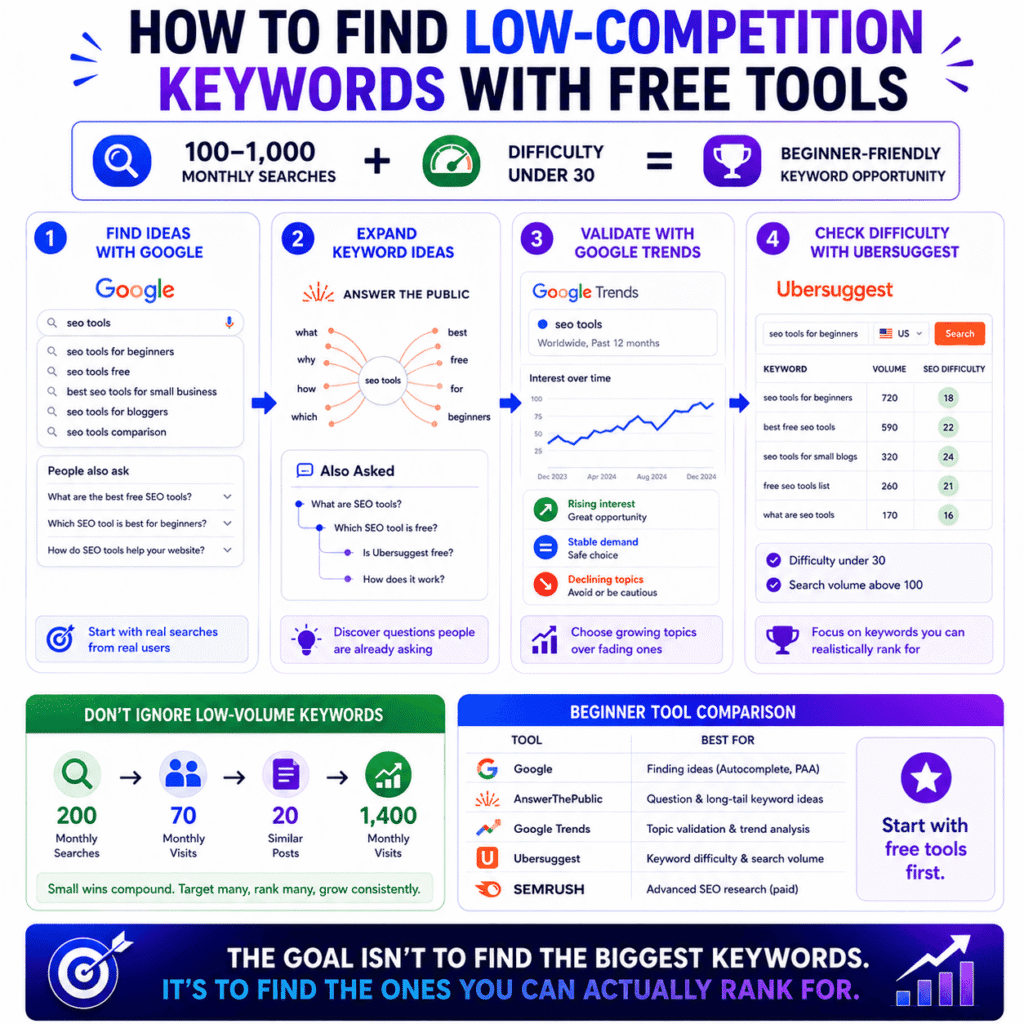
Beginners find low-competition keywords with free tools by targeting long-tail phrases — three words or longer — with monthly search volumes between 100 and 1,000 and difficulty scores under 30. Small numbers, but completely realistic rankings for a site that’s just getting started.
The process doesn’t need to be complicated. Here’s what actually works:
Start with Google itself, not a tool Type your topic into Google and read the autocomplete dropdown before you hit enter. Every suggestion is a real search pattern pulled from real user behaviour. The “People Also Ask” box halfway down the results page is even better — those are complete questions people are typing, and many of them are wide open competitively.
Two free tools automate this process at scale so you’re not manually scrolling through Google result pages one keyword at a time. AnswerThePublic visualises every question, comparison, and preposition-based search phrase people type around any topic — type in “SEO tools” and it returns dozens of question-format keywords you’d never think to search for manually. Also Asked works similarly but maps PAA questions in a branching tree format, showing how one question leads to related questions — which is useful for spotting content gaps and building out FAQ sections. Both have free tiers generous enough for beginner use. Neither requires a paid subscription to get real value from.
Validate the topic with Google Trends Before running any keyword through a research tool, check whether the topic itself is growing or dying. Google Trends is completely free, requires no account, and answers one question keyword planners don’t: is interest in this topic rising, flat, or declining?
Type your topic into Google Trends, set the timeframe to the last 12 months, and look at the trajectory. A keyword with 500 monthly searches and rising interest is a better bet than one with 800 searches and a downward trend over six months. Seasonal spikes matter too — “Christmas gift ideas for bloggers” might show high volume in a keyword tool but Google Trends will show you it’s relevant for six weeks a year, not year-round. That’s the kind of context no difficulty score captures on its own.
Run your shortlist through Ubersuggest Take the phrases you collected from Google and check them one by one. You’re filtering for two things only: difficulty under 30, volume above 100. Ignore everything else for now.
Look at who’s actually ranking Search your keyword on Google and scan the first page. If you see established media brands and high-authority sites across every result, that keyword isn’t for you yet. If you spot individual bloggers, small niche sites, or pages with thin content ranking — that’s a gap worth targeting.
Don’t dismiss low-volume keywords This is where most beginners go wrong. A keyword with 200 monthly searches sounds unimpressive until you rank first for it and it’s sending you 60–80 visits a month on autopilot. Multiply that across 20 posts and you have real traffic — built entirely on long-tail keyword targeting that bigger sites don’t bother competing for.
The goal in year one isn’t to rank for the biggest keywords in your niche. It’s to find the ones your site can actually win.
What’s the difference between Ubersuggest, Google Keyword Planner, and Semrush for beginners?
Ubersuggest is built for bloggers and content creators. Google Keyword Planner is built for people running Google Ads. Semrush is built for professional SEO teams. As a beginner, only one of those descriptions matches where you are right now.
That distinction matters more than most comparison articles let on. Google Keyword Planner is free and technically reliable — but its search volume data shows broad ranges instead of exact numbers unless you’re actively spending money on Google Ads. Searching “best running shoes for flat feet” might return a volume range of “1K–10K” which tells you almost nothing useful for content planning. Ubersuggest gives you an actual number. For a beginner trying to decide between two keyword options, that difference is significant.
Here’s how the three tools compare on what beginners actually care about:
| Features | Ubersuggest | Google Keyword Planner | Semrush |
|---|---|---|---|
| Cost to start | Free tier available | Free with Google account | Free trial, then $117+/month |
| Built for | Content creators, bloggers | Google Ads buyers | SEO professionals, agencies |
| Shows difficulty scores | Yes | No | Yes, very detailed |
| Beginner-friendly | High | Medium | Low without prior experience |
| Exact search volumes | Yes | Ranges only (without active ads) | Yes |
| Competitor research | Basic | None | Comprehensive |
Semrush deserves a direct mention here because it comes up constantly in beginner SEO content — including this article. It’s a genuinely excellent tool and one worth using eventually. But at $117/month, it’s a hard sell for someone who’s published eight blog posts and is still figuring out what a title tag is. The data it provides only becomes actionable once you have enough content, enough traffic, and enough competitive context to interpret it properly.
Use Ubersuggest to learn how keyword research actually works. Once that clicks — and you’ll know when it clicks — then the jump to a more powerful platform starts making real sense.
Best On-Page SEO Tools for Beginners (Optimize What You’ve Already Written)
Finding the right keyword gets you to the starting line. On-page SEO is what actually gets you into the race. It’s the part where you take a finished post and make sure it’s structured in a way Google can read, interpret, and rank — and for WordPress users, there’s a plugin that does most of that checking automatically while you’re still inside the editor.
What is the best on-page SEO tool for WordPress beginners?
For WordPress beginners, Yoast SEO is the most practical on-page SEO tool available — it installs in minutes, works directly inside your post editor, and gives you live feedback on your content without ever leaving the page you’re writing on.
No separate platform to log into. No CSV exports to interpret. You write, it checks, you fix — all in the same window.
Rank Math gets recommended just as often, and fairly so. Both plugins are free, both cover the same core on-page signals, and switching between them later isn’t a big deal. The reason Yoast tends to come up first for beginners is simply weight of presence — it has over 10 million active installations according to the WordPress plugin directory, which means more tutorials, more solved problems on forums, and more plain-language explanations when something in the plugin doesn’t make sense.
For a beginner, that support infrastructure matters as much as the features.
How does Yoast SEO help beginners optimize a blog post?
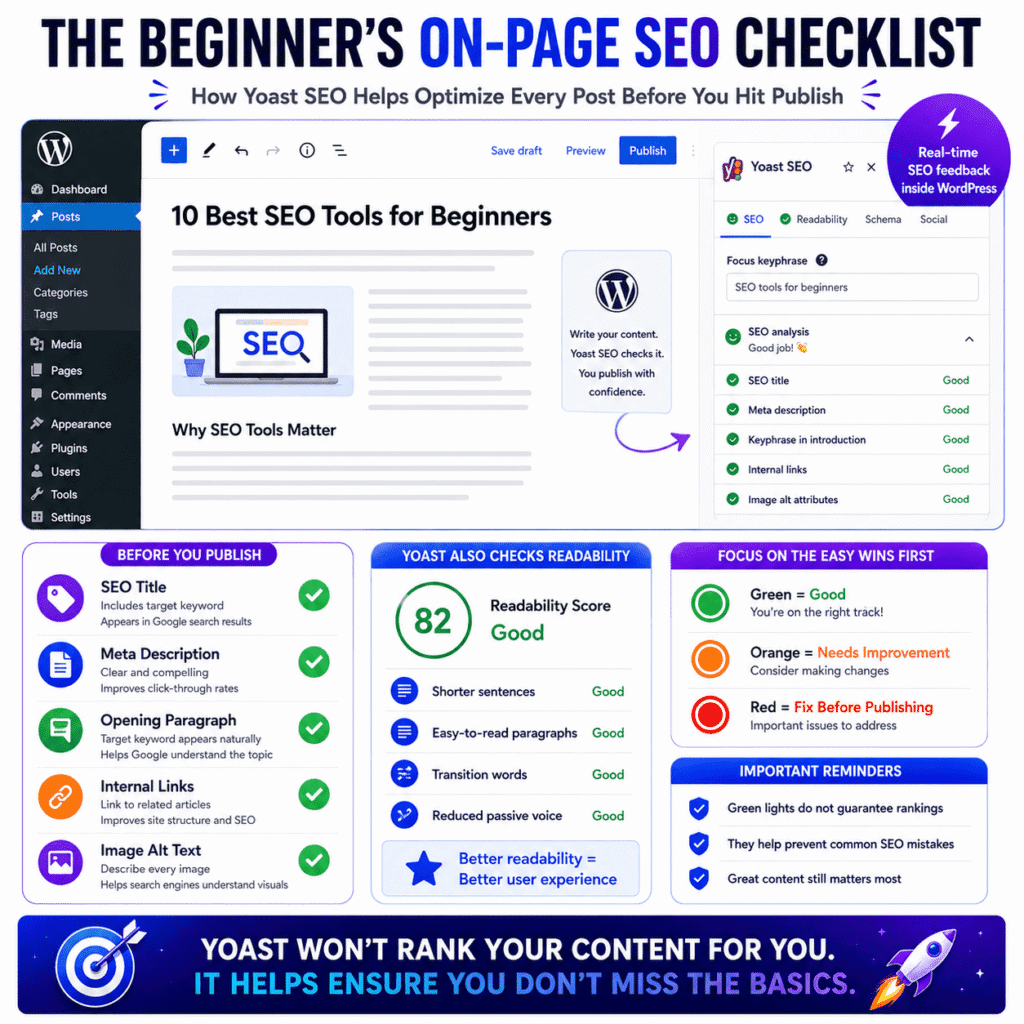
Yoast SEO analyses your post against a checklist of on-page ranking signals — keyword placement, meta description, readability, internal links, image alt text — and returns colour-coded indicators for each one so you know exactly what to fix before you publish.
You enter your target keyword into the focus keyphrase field and Yoast immediately starts scanning. It checks whether your keyword appears in your SEO title, your meta description, your opening paragraph, at least one subheading, and your image alt text. Green dot means that signal is covered. Red dot means it isn’t. Orange sits somewhere in between.
The checks beginners should pay closest attention to first:
- Meta title and description — these are literally what appear in Google search results. Getting them wrong means fewer people click even when you do rank
- Keyword in opening paragraph — Google reads your first 100 words closely. If your target phrase isn’t there, that’s a quick fix with a real impact
- Internal links — Yoast flags posts with zero internal links. This matters because internal linking is how Google understands the structure and depth of your site
- Image alt text — every image on your post should describe what’s in it. Search engines can’t see images, they read the alt text instead
The readability analysis surprises most people the first time they see it. Yoast scores your sentences for length, flags passive voice, checks paragraph structure, and measures transition word usage. That’s not just cosmetic polish — Google’s helpful content guidelines specifically reward pages that are genuinely easy for humans to read. A post that scores well on readability isn’t just more pleasant to read, it’s more likely to hold a reader’s attention long enough to signal quality to Google.
Worth saying directly: all-green Yoast indicators don’t guarantee rankings. What they do is confirm you haven’t left obvious on-page mistakes sitting in a post that might otherwise rank. That’s a meaningful baseline — just don’t confuse it for a finish line.
📖 Related: On-Page SEO: What Google Actually Rewards Now (and What It Ignores)
Can an AI writing tool replace an on-page SEO tool?
No — and conflating the two is one of the more common mistakes beginners make right now. An AI writing tool produces content. An on-page SEO tool audits whether that content is technically set up to rank. They operate at completely different stages of the publishing process.
Here’s where the confusion comes from. AI writing tools have gotten genuinely good at producing readable, structured, relevant content — good enough that some beginners assume the SEO side is being handled automatically. It isn’t. No AI writing tool checks whether your focus keyword is in your meta description. None of them verify that your images have alt text, that your post has internal links, or that your title tag isn’t getting cut off in search results at 73 characters.
Yoast and Rank Math aren’t content creation tools. They’re post-writing checklists with automation built in. The distinction sounds minor until you publish 20 posts without running them through either one and then wonder why nothing is ranking despite the content being solid.
The workflow that removes this problem entirely is straightforward:
- Research your keyword
- Write the post — AI-assisted or not, doesn’t matter
- Paste it into WordPress and run Yoast before touching the publish button
- Fix what’s flagged, then publish
Step three takes about four minutes. Skipping it regularly is the kind of habit that costs months of ranking potential on posts that were otherwise well-written. On-page optimisation isn’t the most exciting part of running a blog — but it’s one of the few parts where a free plugin does the heavy lifting for you automatically.
Best Technical SEO Tools for Beginners (Make Sure Google Can Actually Find Your Site)
Yoast handles what’s visible on your page. Technical SEO handles what’s underneath — the structural layer that determines whether Google can find, crawl, and index your content at all. Most beginner articles either skip this entirely or bury it at the end. It ends up here because it’s the category where silent problems live — the kind where you’ve done everything right and still aren’t ranking, and you have no idea why.
What is a technical SEO tool and does a beginner really need one?
A technical SEO tool scans your website for structural problems that stop search engines from properly crawling and indexing your pages — things like broken links, crawl errors, slow load times, missing sitemaps, and accidentally blocked URLs. These problems don’t show up in your content. They don’t show up in Yoast. They only surface when something specifically goes looking for them.
The word “technical” does a lot of damage here. It makes beginners assume this is the domain of developers and people who are comfortable editing server configurations. For a new blog or small site, that’s almost never true. The issues that actually affect rankings at the beginner stage are mundane — a page accidentally set to noindex, a sitemap that was never submitted, images so large they’re making the site load in seven seconds on a phone.
None of those require a developer to fix. All of them require a tool to find.
The real question isn’t whether beginners need a technical SEO tool. It’s whether they can afford to keep publishing content without knowing if Google can actually access it. A post that’s been accidentally blocked from indexing since the day you published it will never rank — not because the content is weak, but because Google has never been allowed to read it. That’s the problem technical SEO tools exist to catch.
What is the easiest free site audit tool for beginners?
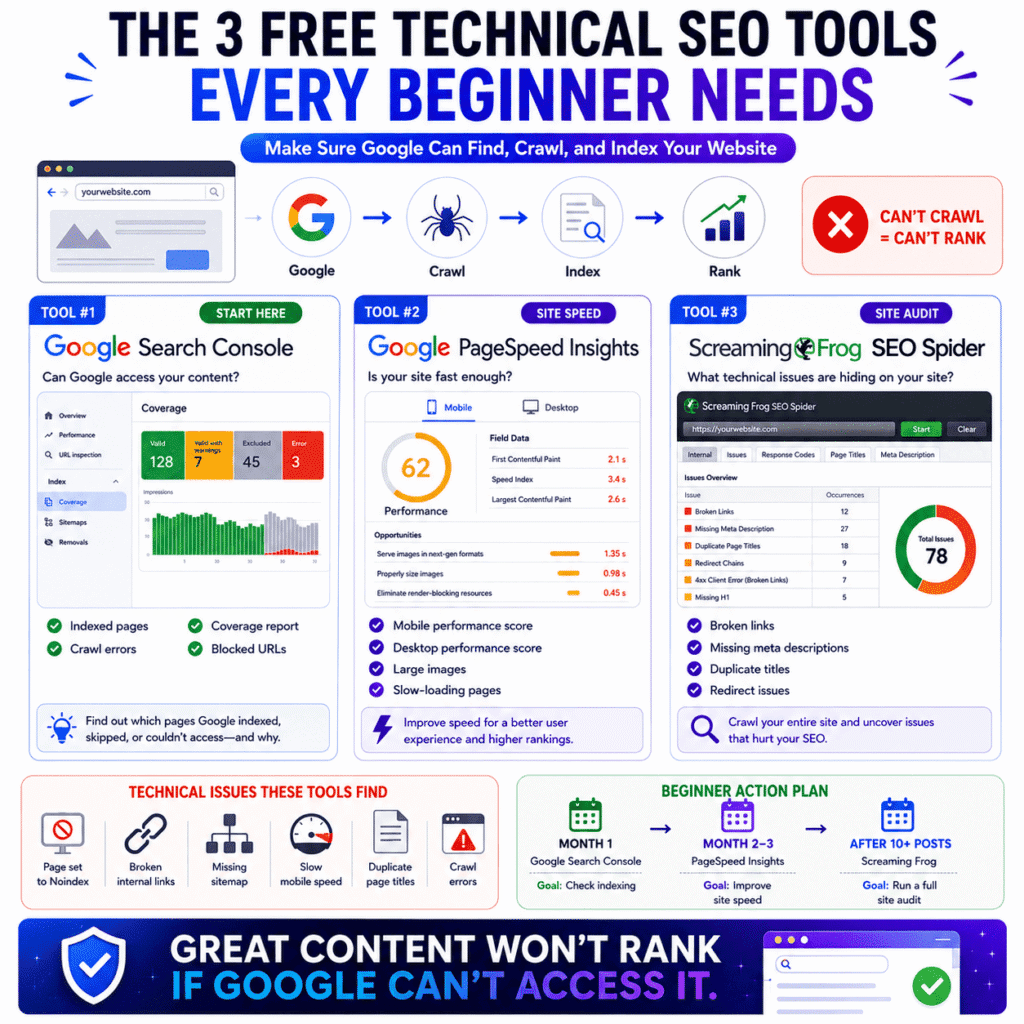
For beginners, the easiest free site audit tool is already sitting inside Google Search Console — specifically the Coverage report, which shows which pages Google has indexed, which ones it skipped, and the exact reason for each.
Go to the Index section in Search Console’s left sidebar and click Coverage. Your pages will be split into four groups: Valid, Valid with warnings, Excluded, and Error. Ignore Valid entirely. Start with Error — those are pages Google tried to crawl and couldn’t. Then check Excluded, which shows pages Google chose not to index and why.
For most new sites, this single report catches the majority of technical problems worth fixing. No additional tool needed yet.
When you’re ready to go further, two more free tools are worth adding:
Google PageSpeed Insights No account required. Paste a URL and it returns a performance score for mobile and desktop separately, with a prioritised list of what’s slowing the page down. Run your homepage and your three most important posts through it. Mobile score below 50 is worth addressing — oversized images are the culprit about 80% of the time on beginner blogs, and compressing them costs nothing.
Screaming Frog SEO Spider (free tier) The learning curve is steeper than the other two, but nothing else at this price point comes close for a full site crawl. The free version handles up to 500 URLs and surfaces broken links, duplicate page titles, missing meta descriptions, and redirect chains across your entire site in a single pass. It runs as a desktop app — download it, enter your domain, let it run while you make coffee. The report it produces will show you things about your site you didn’t know were there.
These three tools together — Search Console Coverage, PageSpeed Insights, Screaming Frog free — cover every technical SEO issue a new site is realistically going to face. All free. No credit card.
📖 Related: How to Do a Complete SEO Audit for a Small Business Website: A Proven Step-by-Step Guide
What technical SEO issues should a beginner fix first?
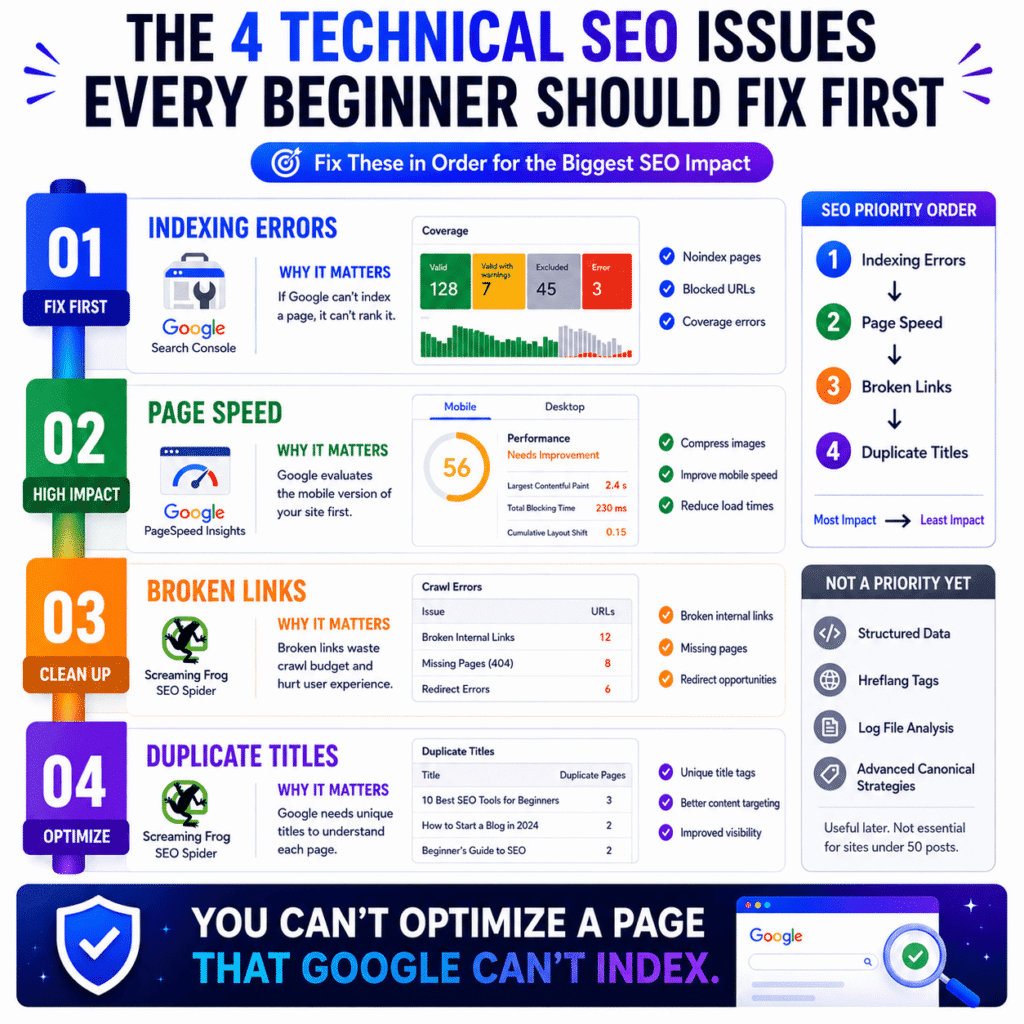
Fix in this order: indexing errors first, page speed second, broken links third, duplicate titles fourth. Sequence matters because an unindexed page makes every other fix irrelevant — you can’t optimise rankings for a page Google hasn’t found yet.
Indexing errors — fix these before anything else
Open the Coverage report in Search Console and work through every URL in the Error tab. The two most common causes on new sites: pages accidentally tagged noindex — which happens more than you’d think when testing WordPress plugins or theme settings — and URLs blocked in the robots.txt file. Both are straightforward to fix once you know they exist. The dangerous thing about indexing errors is they’re completely invisible from the front end of your site. The page looks fine. It loads fine. Google just isn’t allowed in.
Page speed — particularly on mobile
Google has used mobile-first indexing as its default for all new sites since 2019, confirmed in Google Search Central documentation. That means the mobile version of your site is what Google actually evaluates for rankings — not the desktop version most people design for. Run your top five pages through PageSpeed Insights and look at the mobile score specifically. Large images almost always account for the biggest speed losses on beginner sites — compressing them with a free tool like Squoosh before uploading takes two minutes per image.
Broken internal links
A link on your own site pointing to a page that no longer exists wastes crawling resources and creates a frustrating dead end for readers. Screaming Frog finds every broken link on your site in one crawl. Fix them by either updating the link destination or setting up a redirect.
Duplicate page titles
When two pages share identical title tags, Google has trouble determining which one to surface for a given search query. Screaming Frog flags these too. Every page needs a unique, descriptive title — this is one of the most overlooked on-page signals on beginner sites that have grown quickly without a consistent publishing system.
What’s not worth touching yet: structured data markup, hreflang tags, log file analysis, canonical tag strategy. Those are legitimate technical SEO disciplines that matter at scale. Right now they’re distractions. The four issues above are where the actual movement happens on a site with under 50 posts.
Best Rank Tracking Tools for Beginners (Know If Your SEO Is Actually Working)
Once your content is published and your technical setup is clean, one question takes over: is any of this actually working? Rank tracking is how you answer it. Not by refreshing Google and searching your own name — which gives you a personalised result nobody else sees — but by pulling real position data that shows where your pages actually sit in search results for the people you’re trying to reach.
What does a rank tracking tool show you as a beginner?
A rank tracking tool shows you the position your pages hold in Google search results for specific keywords, and how those positions shift over time. One day’s ranking data is almost meaningless. Eight weeks of position history starts telling you something real.
Here’s why manually Googling your own keywords doesn’t work: Google adjusts results based on your location, your search history, and your device. You’re not seeing what an unfamiliar reader in a different city sees when they search your keyword. A rank tracker bypasses that entirely — it pulls position data independently, so you’re looking at something closer to objective reality.
For a beginner, the data worth paying attention to early on breaks into three buckets:
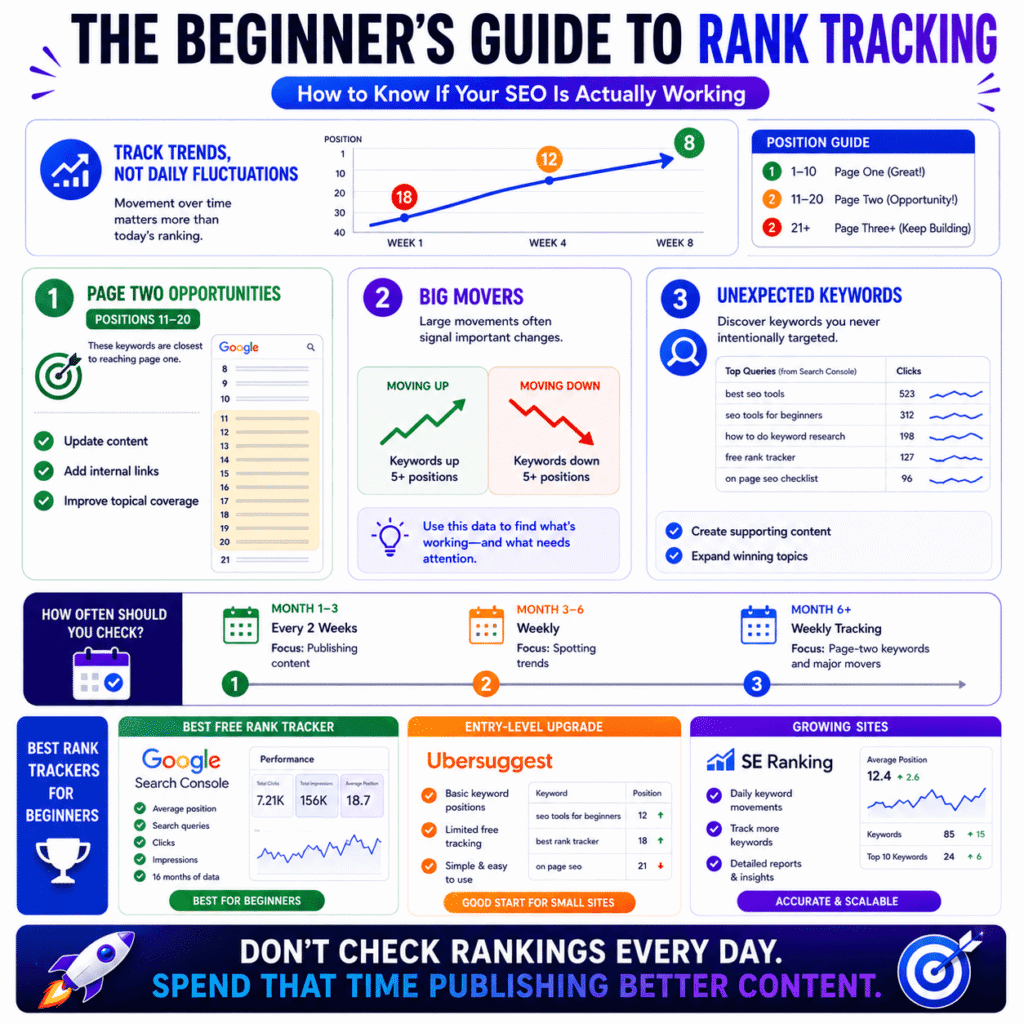
Posts ranking on page two — positions 11 to 20 This is the most underused insight in beginner SEO. A post sitting at position 14 isn’t failing — it’s close. Closer than most people realise. A focused update, fixing a content gap a competing post covers that yours doesn’t, can move it onto page one without rebuilding the post from scratch. These are the fastest wins available on a site that’s still building authority.
Posts that have moved significantly in the last 30 days A jump or drop of five or more positions usually means something changed — either on your site, on a competitor’s, or in how Google is weighting certain signals. Tracking these movements gives you early warning when something needs attention.
Keywords you’re ranking for that you didn’t target Search Console regularly surfaces queries you’re getting impressions for that you never explicitly optimised for. Some of those are worth building dedicated content around. This is free keyword research hiding inside your own data.
How often should beginners check their keyword rankings?
Beginners should check keyword rankings once every one to two weeks — not daily. Daily checking feels like working. It mostly isn’t.
Rankings move constantly for reasons that have nothing to do with your site. Google runs live experiments on search result layouts. Competitors publish new content. Seasonal patterns shift query volumes. A post at position 8 on Monday can sit at position 13 by Thursday and drift back to 9 by Sunday — with nothing on your end changing at all. If you’re checking every day, those fluctuations start to feel meaningful. They usually aren’t.
The practical problem with checking too often is what it does to your priorities. You start reacting to daily position noise instead of doing the publishing and linking work that actually compounds over time. The sites that grow consistently are almost always run by people who check rankings infrequently and publish frequently — not the other way around.
A rhythm that actually works:
- First three months: Check every two weeks. You don’t have enough data yet for weekly checks to show anything useful. Put that time into publishing
- Months three to six: Weekly is reasonable once you have 15 to 20 posts indexed and enough position history to spot real trends
- Beyond six months: Weekly tracking with a proper tool, focusing on the page-two cluster and significant movers rather than obsessing over individual positions
What is the best free rank tracker for a new blog?
For a new blog, the best free rank tracker is Google Search Console’s Performance report — already connected to your site, updated daily, and showing real position data for every keyword you’re ranking for going back 16 months.
Most beginners set up Search Console for the Coverage report and never explore the Performance tab. That’s leaving a lot of useful data unread. Open Performance, enable the Average Position metric by clicking its toggle at the top of the chart, then filter by individual pages to see which posts are ranking and for exactly which search queries. That’s a functional rank tracking setup — free, accurate, and already running.
Two things Search Console’s Performance report does that dedicated rank trackers often don’t:
- It shows you every query triggering impressions for your site, not just the ones you manually entered to track
- It pulls from Google’s actual index data, not a third-party estimate — so the numbers are as close to ground truth as you can get without working at Google
When Search Console starts feeling limited — usually when you’re tracking 40 or 50 keywords across a growing content library and want daily granular movement data — a few low-cost options are worth looking at. Ubersuggest’s free tier tracks up to three keywords with basic position history. SE Ranking starts at around $52 a month and offers accurate daily tracking with a cleaner interface than most tools at that price. Nightwatch is worth knowing about for its AI search visibility features if you eventually want to track how your content performs in Google’s AI Overviews, not just traditional results.
None of those are necessary yet. Search Console is enough for the first six months — longer if your site is growing steadily and the data it provides is still answering your questions.
Best Backlink Tools for Beginners (Do You Even Need to Worry About This Yet?)
Every SEO article eventually gets to backlinks and makes them sound simultaneously essential and impossible for a new site to acquire. Both parts of that framing are slightly wrong. Backlinks matter — genuinely — but where most beginner guides go wrong is recommending backlink tools at the same time as recommending keyword tools, as if both are equally urgent on day one. They’re not.
Do beginners need a backlink tool right away?
No. A new site with under 20 published posts has almost no backlink data worth analysing, and spending money on a backlink tool at this stage solves a problem you don’t have yet.
Google has confirmed publicly that links from other websites remain one of its strongest authority signals — this isn’t disputed. The issue is timing. A backlink analysis tool only starts earning its place once you have enough links to see patterns: which types of sites are linking to you, whether those links are topically relevant, whether any look spammy enough to warrant attention. On a site that’s three months old with a handful of posts, the answer to most of those questions is “nothing to see yet.”
The more uncomfortable truth is that most beginners reach for backlink tools because backlinks feel like the missing piece — the reason traffic hasn’t arrived yet. Sometimes that’s true. More often, the site doesn’t have enough quality content yet, and no amount of backlink analysis changes that.
Two situations where looking at backlink data earlier actually makes sense:
- You’re entering a competitive niche and want to understand what link profiles the top-ranking sites have built before you commit to a content strategy
- Someone reaches out about a guest post or link exchange and you want to check whether their site is worth engaging with before you spend time on it
Outside those two scenarios — wait. Build content first. The backlink data will be more useful and more readable once there’s something worth measuring.
📖 Related: Moz for SEO: What Most Tutorials Leave Out (And How to Finally Improve Your Rankings)
What is the easiest way for a beginner to check their backlinks?
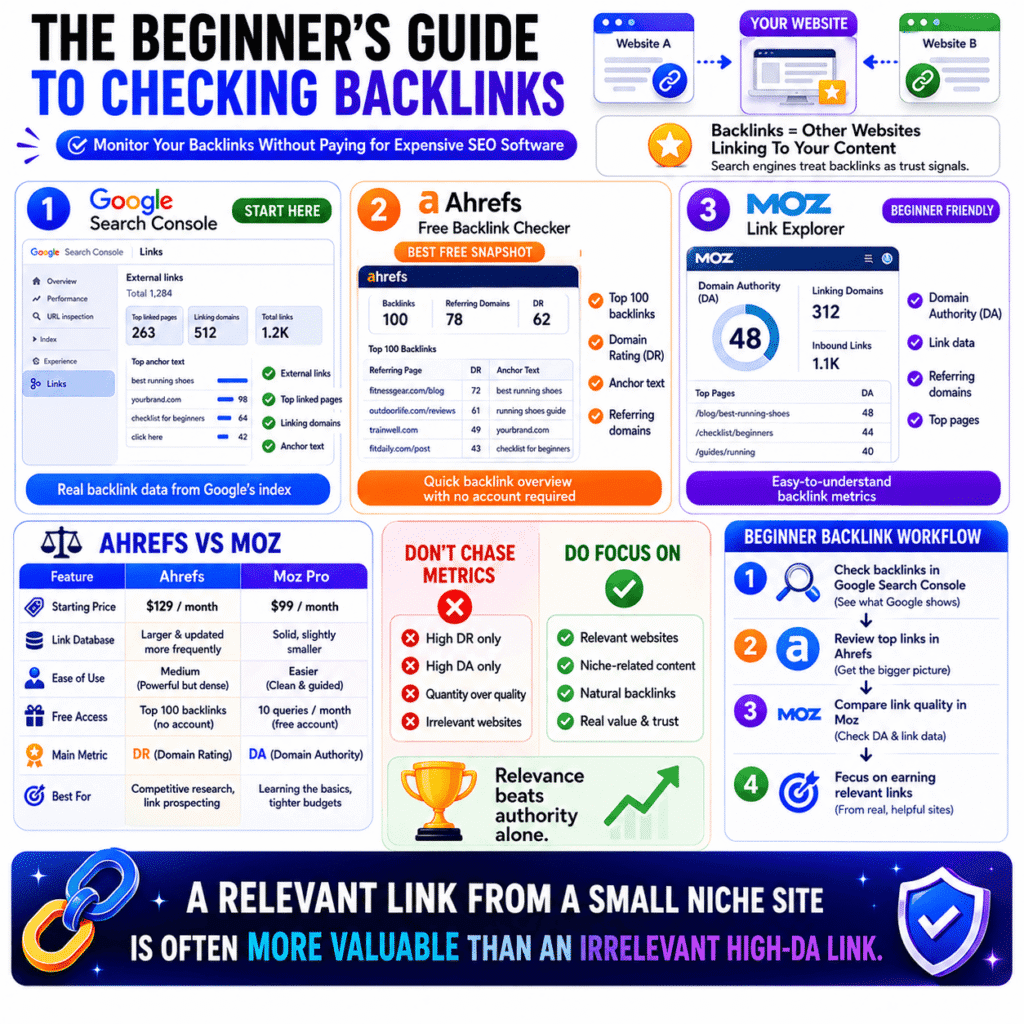
The easiest way for a beginner to check backlinks is the Links report inside Google Search Console — free, no extra setup, and showing real data from Google’s own index about which external sites are linking to your pages.
Go to Search Console, scroll to the bottom of the left sidebar, and click Links. The External links section shows you the domains pointing to your site, which of your pages have attracted the most links, and what anchor text other sites used when linking to you. That anchor text column is more useful than it looks — if every link to your site uses your brand name as the anchor, that tells a different story than links using keyword-rich phrases like “best running shoes for beginners.”
Search Console’s Links report does have a real limitation worth knowing: it shows a representative sample of your backlinks, not every single one Google has found. For a newer site this usually doesn’t matter — the sample covers most of what’s there. As the site grows, the gap between what Search Console shows and what actually exists in Google’s index gets wider.
When you want a more complete picture without paying anything, two free options are worth bookmarking:
Ahrefs Free Backlink Checker Go to ahrefs.com/backlink-checker, paste your domain, and it returns your top 100 backlinks with the domain rating of each linking site and the anchor text used. No account needed. Ahrefs maintains one of the largest link databases in the industry, so even the free snapshot is pulling from legitimate data — not estimates.
Moz Link Explorer (free account) Ten queries a month on the free tier, with basic backlink data and Moz’s Domain Authority score for each linking site. Less volume than Ahrefs’ free checker, but the DA metric is referenced so widely across SEO content that understanding how to read it is useful in itself.
Search Console plus one of those two covers everything a beginner genuinely needs to monitor their backlink profile. No subscription required.
What’s the difference between Ahrefs and Moz for someone just starting out?
For a beginner, Ahrefs has the larger and more current link database — Moz is easier to navigate and explains what you’re looking at more clearly. At the paid tier, both are serious professional tools. The choice between them matters more once you’re actively building links than it does when you’re just starting to understand what backlink data means.
Pricing context first, because it affects everything else: Ahrefs starts at $129 a month, Moz Pro at $99 a month. Neither makes sense as a beginner’s first SEO purchase — which is why the free tiers above are the right entry point regardless of which platform you eventually prefer.
Here’s how they compare on what beginners actually care about:
| Features | Ahrefs | Moz Pro |
|---|---|---|
| Starting price | $129/month | $99/month |
| Link database | Larger, updated more frequently | Solid, slightly smaller |
| Ease of use | Medium — powerful but dense | Higher — cleaner, more guided |
| Free access | Top 100 backlinks, no account | 10 queries/month, free account |
| Keyword research | Excellent | Good |
| Signature metric | Domain Rating (DR) | Domain Authority (DA) |
| Best starting point for | Competitive research, serious link prospecting | Learning backlink basics, tighter budgets |
Something both tools will show you prominently — and something worth understanding clearly before you start making decisions based on it: Domain Rating and Domain Authority are not Google metrics. Ahrefs invented DR. Moz invented DA. Google has stated it doesn’t use either score as a ranking signal. They’re useful for rough comparisons — a DR 70 site linking to you is generally more valuable than a DR 10 site — but chasing high-DR or high-DA links at the expense of relevance is a mistake beginners make constantly.
A link from a small but genuinely relevant site in your niche — a real blog run by someone who writes about your exact topic — will do more for your link building than a link buried in a high-DA directory that aggregates every industry imaginable. The tools won’t flag that distinction for you. You have to bring that judgement yourself.
The Beginner’s SEO Tool Stack — What to Use at Each Stage of Growth
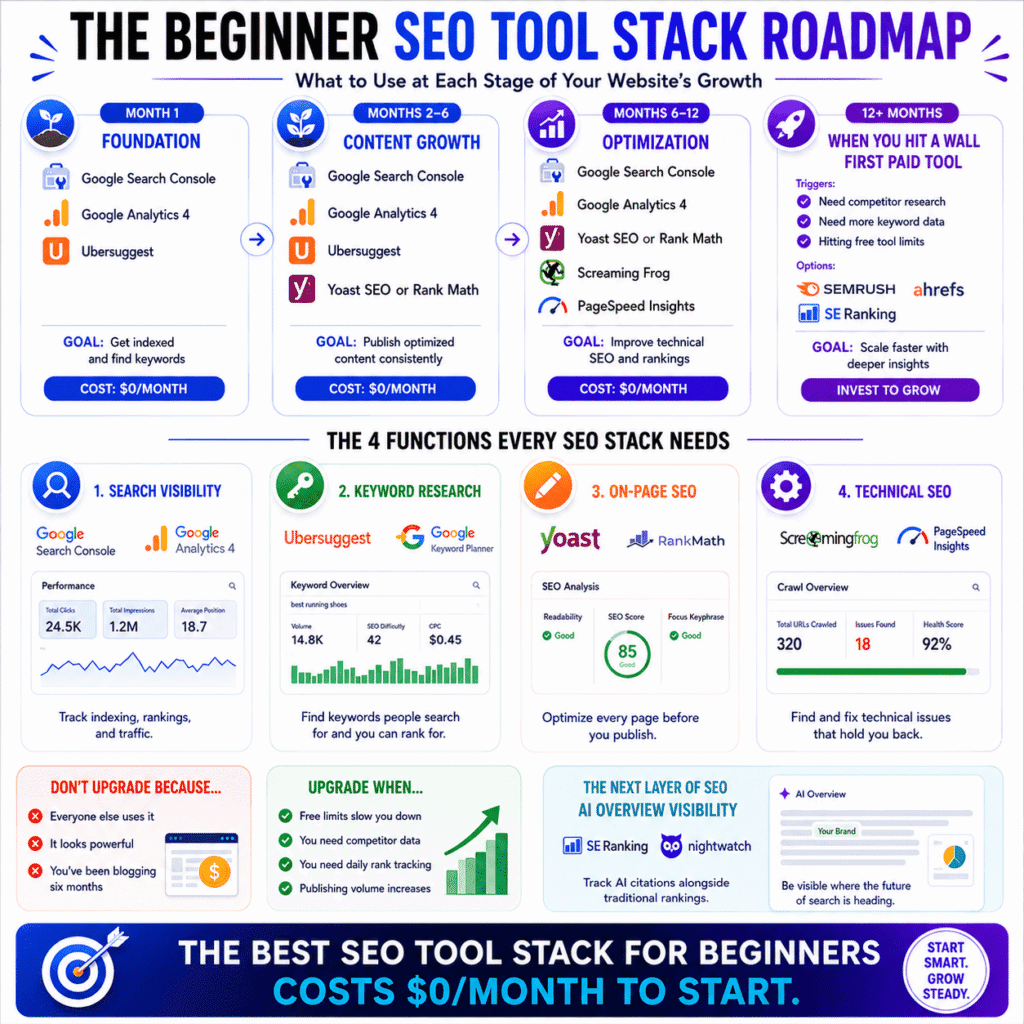
Every tool in this article has a right time to enter your workflow. The problem most beginner guides create — without meaning to — is presenting everything at once, as if you should be running Search Console, Semrush, Screaming Frog, Ahrefs, and Yoast simultaneously from week one. You shouldn’t. This section puts the whole picture together in the sequence that actually makes sense.
What SEO tools should a beginner use in their first 30 days?
In your first 30 days, use three tools only: Google Search Console, Google Analytics 4, and one keyword research tool. Everything else can wait. Those three cover the only things that genuinely matter in month one — confirming Google can access your site, capturing traffic data from day one, and making sure you’re writing about topics people actually search for.
Search Console gets connected before your first post goes live. Not after. The Coverage and Performance data it starts collecting from day one is something you can’t go back and recover — and you’ll want it as a baseline when you’re trying to understand why a post from month two is behaving differently from one published in month five.
GA4 gets installed the same week, even if you don’t look at it for two months. Same logic — it needs time to collect data before it becomes useful, and installing it late means losing historical context permanently.
Ubersuggest, or Google Keyword Planner if you prefer, gets opened every time you plan a new post. Check the search volume. Check the difficulty score. Make a decision based on actual data instead of instinct. That one habit alone separates beginners who start seeing traffic within six months from those still wondering why nothing is working at month ten.
What doesn’t belong in month one:
- Rank tracking tools — you need indexed, settled content before position data tells you anything real
- Backlink tools — nothing to measure yet
- Paid subscriptions of any kind — the free tier covers everything month one requires
- Screaming Frog or full site audits — run these after 10 or more posts are live, not on a brand new site with three pages
When should a beginner upgrade from free to paid SEO tools?
Upgrade when a specific free tool stops answering a question you’re asking every week. That’s the only reliable trigger. Upgrading because a tool looks powerful, or because someone in a Facebook group swears by it, or because you’ve been blogging for six months and feel like it’s time — none of those are reasons. They’re just spending.
The friction points that actually justify an upgrade look like this:
Ubersuggest’s free daily limit is slowing you down If you’re hitting the query cap regularly because you’re researching keywords at volume, that’s a real bottleneck. At that point, either Ubersuggest’s paid tier at around $12 a month or a move to Semrush makes sense depending on how much competitor data you need alongside it.
Worth knowing before that decision: Semrush has a free tier that allows ten keyword searches per day, one project, and limited site audit access — enough to test whether the platform makes sense for your workflow before committing to the $117 monthly Pro plan.
You need to see what competitors rank for — not just what you rank for This is the capability gap that most often pushes serious bloggers toward a paid platform. Search Console only shows your own data. Ubersuggest’s free tier barely scratches competitor research. The moment you’re trying to reverse-engineer a competing site’s content strategy, you need Semrush or Ahrefs.
Search Console’s Performance report isn’t granular enough anymore You have 40 or more posts indexed, you’re tracking dozens of target keywords, and you want daily position updates rather than aggregated weekly data. A dedicated rank tracker like SE Ranking at around $52 a month solves this specifically without requiring a full $117 Semrush subscription just for rank tracking.
You’re publishing two or more posts a week and want content briefs Surfer SEO’s content optimisation scoring becomes genuinely useful at publishing volume. At one post a week it’s overkill. At two or more, the time it saves on content structure research starts justifying the cost.
Most sites hit the first real upgrade trigger somewhere between month four and month eight. Some stay on free tools comfortably past a year, particularly in lower-competition niches. The calendar isn’t the signal — the friction is.
What does a simple beginner SEO tool stack look like?
A complete beginner SEO tool stack has four functions: search visibility monitoring, keyword research, on-page optimisation, and technical auditing. Every function has a free option that holds up for at least the first six months — and for many bloggers, considerably longer.
Mapped out practically:
Search visibility — free, always Google Search Console handles indexing, rankings, and crawl errors. GA4 handles traffic sources and on-site behaviour. Connect both before publishing anything and leave them running permanently. These two never get replaced — even professional SEO teams use them alongside paid platforms, not instead of them.
Keyword research — free to start, upgrade when volume demands it Ubersuggest free tier for most beginners. Google Keyword Planner as a backup for search volume cross-checking. Upgrade to a paid platform when competitor research becomes a regular need rather than an occasional curiosity.
On-page optimisation — free, WordPress-specific Yoast SEO or Rank Math installed from week one. Run every post through it before publishing. Neither costs anything at the level a beginner needs.
Technical auditing — free, introduced after first 10 posts Screaming Frog’s free tier for full site crawls up to 500 pages. Google PageSpeed Insights for mobile speed checks. Search Console’s Coverage report for indexing errors. All free, all covering the issues that actually affect new sites.
That’s the complete beginner SEO tool stack — four functions, zero monthly cost, and enough coverage to run a growing blog for the first six to twelve months without hitting a wall.
One thing worth adding that most beginner stack guides don’t mention: the tools above track traditional Google search rankings. In 2026, Google’s AI Overviews are appearing for a growing percentage of searches — and whether your content gets cited in those overviews is a separate visibility question that standard rank trackers don’t measure. You don’t need to act on this in month one. But tools like SE Ranking and Nightwatch have started tracking AI Overview appearances alongside traditional rankings, and knowing this layer of search visibility exists puts you ahead of most beginners who won’t discover it until much later.
📖 Related: Best SEO Tools for Small Businesses (Actually Worth Paying For)
Frequently Asked Questions About SEO Tools for Beginners
These are the questions that don’t fit cleanly into any single section — the ones people ask after reading a guide like this, when the concepts make sense but the application still feels unclear. Direct answers, no padding.
Are SEO tools worth it for beginners?
Free SEO tools are worth it unconditionally. Paid tools are worth it only when a specific free tool stops being enough.
That distinction matters because “are SEO tools worth it” is usually asked by someone who’s either about to spend money they don’t need to spend yet, or avoiding free tools they should already be using. Both situations have the same answer — start with what’s free, use it consistently, and let the limitations of those tools tell you when it’s time to upgrade.
Google Search Console and GA4 cost nothing and between them cover search performance monitoring, traffic analysis, indexing health, and keyword discovery. A beginner who uses both properly for six months will understand their site better than someone who bought Semrush on week one and never learned what the data actually means.
Paid tools aren’t a shortcut to results. They’re an amplifier for decisions you’re already making well. If the decisions aren’t there yet, the tool won’t create them.
Which SEO tool is best for absolute beginners?
Google Search Console — and it’s not particularly close.
Every other tool in this guide is measuring something about your site from the outside. Search Console is Google telling you directly what it sees when it looks at your site. That’s a fundamentally different category of information — and for a beginner trying to understand why content isn’t ranking, or whether Google has even found a page yet, direct information from the source beats third-party estimates every time.
Set it up before you publish your first post. Submit your sitemap. Check the Coverage report in your first week. Look at the Performance report after your first month of publishing. Those four actions alone will tell you more about your site’s search visibility than most beginners learn in their first year of guessing.
Can I learn SEO without using any tools?
You can learn what SEO is without tools. You cannot learn how to do it without them.
Concepts are learnable anywhere — search intent, crawlability, on-page signals, link building fundamentals. Good articles explain them clearly. But reading about keyword research is categorically different from opening Ubersuggest, typing in a topic you were about to write about, seeing a difficulty score of 74, and changing your approach because of what that number means. The second experience teaches something the first one can’t.
SEO is a feedback discipline. You make a decision, publish content, track what happens, and adjust. Tools are what make the feedback visible. Without them you’re still going through the motions — writing, publishing, waiting — but without the data layer that tells you whether any of it is working or why.
The fastest way to actually learn SEO isn’t a course. It’s setting up Search Console, using a keyword tool before every post, running Yoast before every publish, and watching what your rankings do over three to four months. That cycle teaches more than most paid programmes.
What is the #1 free SEO tool recommended for beginners?
Google Search Console.
It handles more functions in one place than any other free tool available — indexing status, keyword rankings, click-through rates, crawl errors, mobile usability issues, and sitemap management. All free. All pulling from Google’s own data rather than third-party estimates.
The part beginners tend to underuse is the Performance report. Most people glance at their total clicks and leave. The real value is in filtering by page — seeing exactly which queries each individual post is ranking for, what position it holds, and what the click-through rate looks like. A post ranking at position 6 with a 2% CTR has a title problem, not a ranking problem. Search Console is the tool that shows you that distinction — and no paid tool surfaces it more accurately because none of them have direct access to Google’s index the way Search Console does.
Ubersuggest is second for keyword research. Yoast is third for WordPress on-page optimisation. Search Console is first and the gap is wide.
Do beginners need to worry about AI search and Google AI Overviews?
Worry, no. Be aware of, yes — because it’s already affecting which sites get traffic and most beginners won’t notice until the impact shows up in their analytics.
Google’s AI Overviews now appear at the top of results for a large and growing percentage of informational searches — the exact type of content beginner bloggers publish most. When an overview appears, Google pulls from multiple sources, assembles a summarised answer, and some portion of searchers read it without clicking through to any website. Traditional rankings still matter. But a page that used to sit at position three and capture predictable traffic now sometimes sits below an AI Overview that partially answers the question before anyone reaches the organic results.
Two things worth knowing without losing sleep over them:
The content Google cites in AI Overviews isn’t some separate optimisation target. According to Google’s own documentation on how AI Overviews work, the sources it draws from are pages that already demonstrate clear expertise, direct answers to specific questions, and trustworthy structure — which is identical to what ranks well in traditional search. You’re not chasing two different standards. Writing genuinely useful, well-structured content serves both.
The monitoring side is straightforward once you’re ready for it. SE Ranking and Nightwatch both track AI Overview appearances alongside traditional rankings. Neither is necessary in month one. After six months of consistent publishing, checking whether your content is being cited in overviews for your target keywords is worth adding to your monthly review. Some posts that rank on page one are also appearing in AI Overviews. Some aren’t. Knowing which is which tells you something useful about where to focus your content optimisation next.
The beginner SEO tools covered throughout this guide — Search Console, GA4, Ubersuggest, Yoast, Screaming Frog — build exactly the foundation Google draws from when deciding what to cite. That hasn’t changed. The tools for tracking it have just gotten more specific.
Final Thoughts: The Best SEO Tools for Beginners Are the Ones You Actually Use
Every tool in this guide is free to start. None of them require a marketing degree to operate. And not a single one of them will do anything useful sitting in a browser bookmark unopened.
That’s the part most beginners miss. The conversation around best SEO tools for beginners tends to focus on which tools are best — and that’s a reasonable question. But the more important question is which tools you’ll actually open consistently, act on, and build a habit around. A beginner who checks Google Search Console every two weeks and adjusts their content based on what it shows will outrank someone running Semrush on autopilot without understanding what the data means.
Start small. Google Search Console and GA4 connected before your first post. Ubersuggest open before you write anything. Yoast running on every post before you hit publish. Screaming Frog after your tenth post is live. That’s a complete, functional SEO tool stack that costs nothing and covers every core need a new site has.
Add tools when friction forces you to — not before. The upgrade from free to paid isn’t a milestone to hit on a schedule. It’s a response to a specific problem a free tool can no longer solve. When that problem shows up, you’ll know exactly which tool addresses it because you’ll have spent enough time in the free versions to understand what’s missing.
SEO takes longer than most people expect. The sites that eventually rank are almost always the ones that stayed consistent — publishing regularly, fixing what the tools flagged, and resisting the urge to overhaul everything every time Google updates its algorithm. The tools in this guide won’t shortcut that timeline. What they will do is make sure every post you publish has the best possible chance of ranking — and that you’re not working blind while you wait for results.
Pick your first two tools from this list. Set them up today. Everything else can follow.
Disclosure: Some links in this article maybe affiliate links. If you purchase through them I may earn a commission — at no additional cost to you. This article reflects genuine practitioner experience with the tools discussed. Affiliate relationships don’t influence the analysis, including where I’ve been critical.
I like thatSEO Tools Comment Guide you framed SEO tools around the stage a site is actually in rather than assuming beginners need every feature from day one. A lot of new site owners spend more time comparing tools than creating content, so the idea of starting with the essentials and adding tools as specific needs come up is a practical approach.
Thanks for that — you’ve actually put your finger on the exact problem the article was trying to solve. Most “best SEO tools” lists are written as if every beginner is launching an agency on day one, which just creates analysis paralysis.
The stage-based framing came from watching too many new site owners burn their first 3 months on tool trials instead of publishing. A site with 5 posts doesn’t need a full backlink audit suite — it needs to get indexed and start producing content.
Glad it landed the way it was intended. If you ever hit that point where you’re ready to layer in the next tool, feel free to drop back — happy to point you in the right direction based on where your site actually is.