
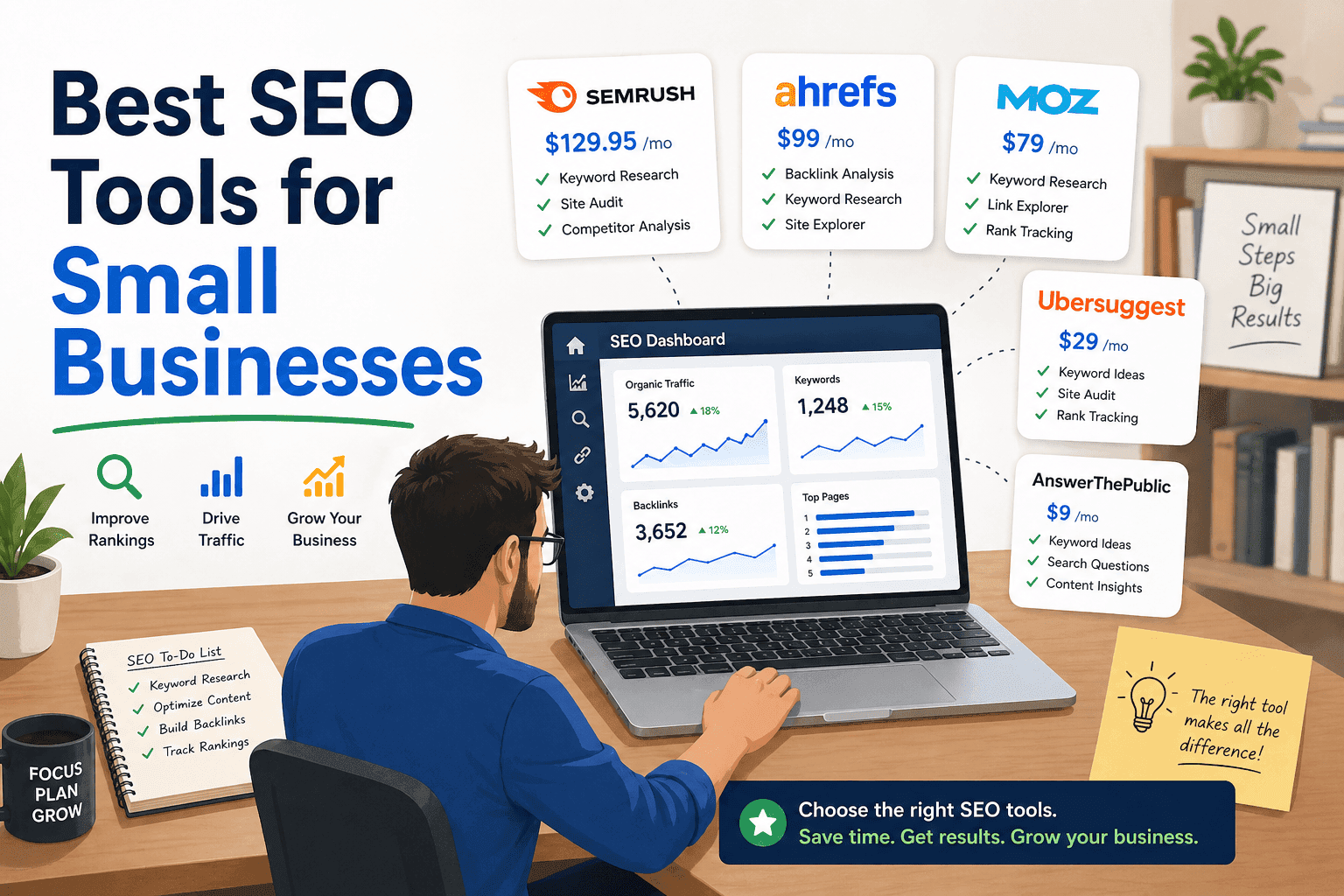
Every few months, a small business owner signs up for a $99/month SEO platform, spends a weekend trying to figure it out, and quietly cancels three months later having ranked for nothing and understood even less. It’s one of the most common and most avoidable mistakes in small business marketing — and it almost always starts with buying before thinking.
This guide is about thinking first. Specifically: which SEO tools are actually worth paying for if you’re running a small business without an agency budget or a dedicated SEO team, which free tools are better than most paid alternatives, and — perhaps most usefully — when the best SEO tools for small businesses are simply the wrong investment entirely.
No affiliate-driven rankings. No “tool X changed my life” hyperbole. Just an honest breakdown of what works, what doesn’t, and what to buy — if anything — depending on where your business actually is right now.
Table of Contents
Why Most Small Businesses End Up Paying for SEO Tools They Barely Use
Here’s something nobody in the SEO industry wants to say out loud: a lot of small businesses would be better off not buying an SEO tool at all. Not yet, anyway.
That’s a weird thing to say at the top of an article about the best SEO tools for small businesses. But it’s the honest starting point, because the way most people end up buying these tools has nothing to do with having a plan. It usually starts with panic. A competitor shows up above you on Google. Sales dip for a month. Someone in a Facebook group mentions Semrush and suddenly you’re on a free trial at 11pm trying to figure out what a “toxic backlink” is and whether yours are going to get you penalized.
A few weeks later you’re paying $99 a month and logging in less and less.
This isn’t a knock on the tools. Semrush is powerful. Ahrefs is genuinely impressive. But both were built for people who are inside SEO data every single day — agencies juggling 20 client accounts, in-house teams with dedicated content budgets, consultants who can actually turn a keyword gap report into a six-month content strategy. When a small business owner who’s also handling invoices, customer calls, and Instagram logs into one of these platforms, the experience is usually overwhelming in a way that feels like a personal failing. It isn’t. The tools aren’t designed for your situation — they’re designed for people whose full-time job is SEO.
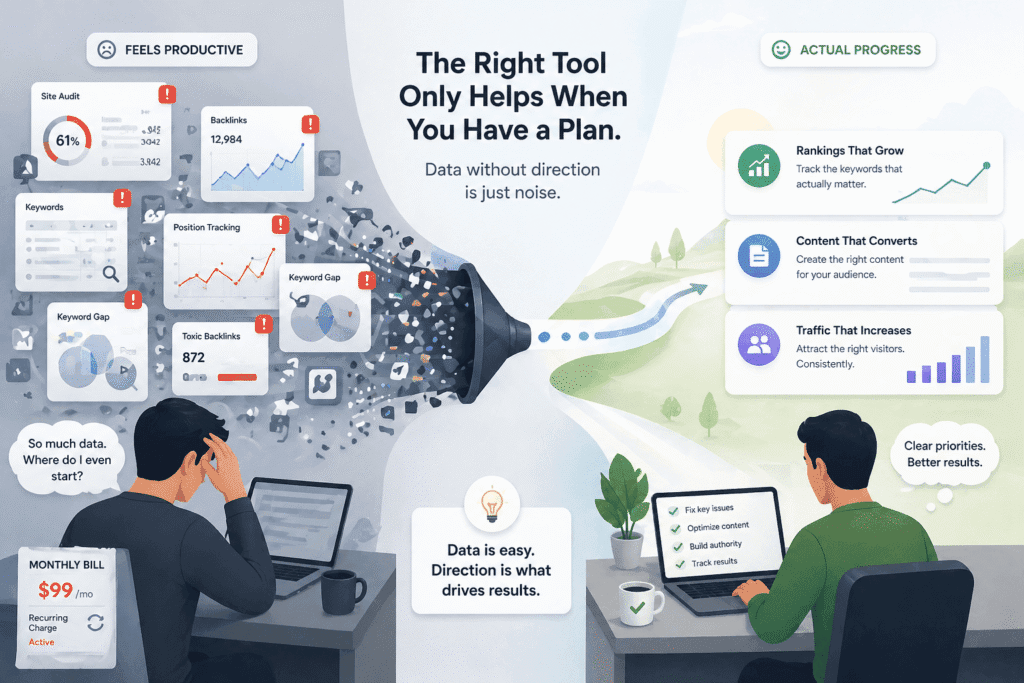
And here’s the part that genuinely frustrates me about how SEO software gets marketed: having data is not the same as being able to use it. A keyword research tool will happily show you 800 keywords your competitors rank for. Great. Now what? If you don’t have time to write consistently, a team to help you execute, or a clear sense of which pages on your site actually need work — that list of 800 keywords is just noise with a monthly subscription attached.
The businesses I’ve seen get real value from paid SEO tools almost always share one thing in common: they already had some traction. They were publishing regularly. They had a rough sense of what was working. The tool helped them move faster and make smarter decisions. For everyone else — especially businesses still trying to figure out the basics — the tool doesn’t create momentum, it just creates the feeling of momentum. You run an audit, your score goes from 61 to 74, you feel like you accomplished something. Meanwhile your actual rankings haven’t moved in four months.
That’s the uncomfortable truth about most SEO dashboards: they’re very good at keeping you engaged. The scores, the alerts, the weekly reports — it all feels productive. But SEO results are slow by nature, and it’s genuinely difficult to tell whether the tool is helping or whether you’re just paying for a more expensive way to feel busy.
So before we get into which tools are actually worth it — and some of them really are — it’s worth asking a more basic question first: do you know specifically what you need a tool to do for you? Not “improve my SEO” in general. Something concrete. Because the best SEO tool for a small business is the one that solves a problem you actually have, not the one with the most features or the flashiest comparison chart.
What You Actually Need Before Buying Any SEO Tool
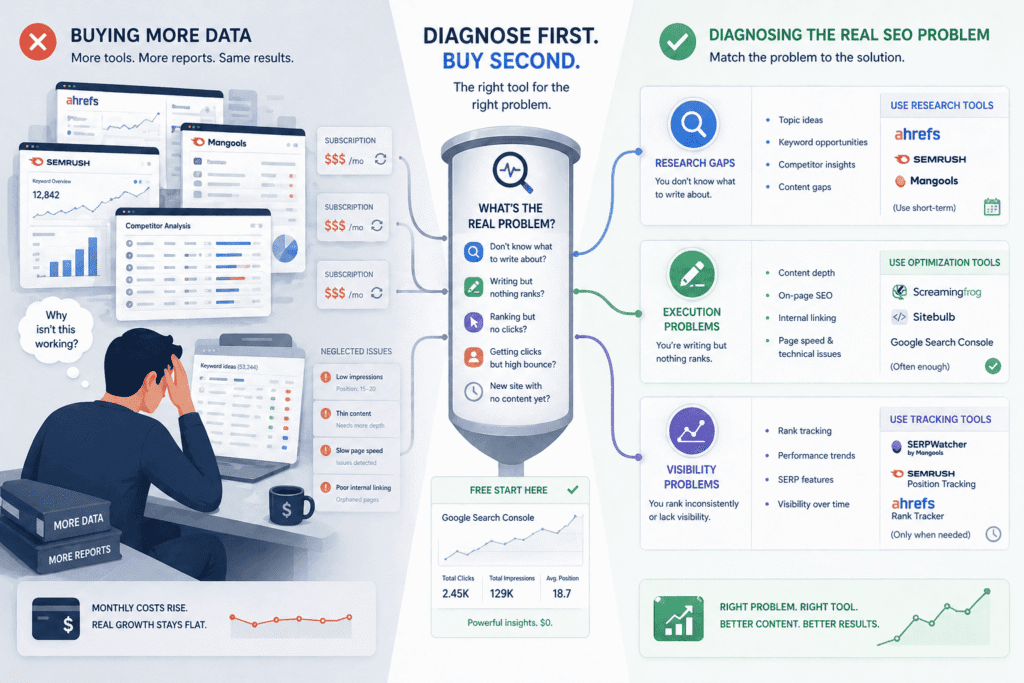
Before you spend a dollar on any SEO software, there’s one question worth asking yourself — and most people never do: what specifically is broken?
Not “my SEO isn’t great.” That’s not a diagnosis, that’s a feeling. I mean: do you not know what to write about? Are you writing but nothing ranks? Are you ranking but getting no clicks? Are you getting clicks but people leave in 10 seconds? These are completely different problems. And they need completely different solutions. Possibly no paid tool at all.
The reason this matters is that SEO tools are not general-purpose fixes. They’re specialized instruments. Buying a rank tracker when you don’t have content yet is like buying a speedometer before you’ve built the car. It’ll give you a reading — zero — and nothing else.
Do You Need Research, Execution, or Visibility?
I want to be careful here because I’ve seen this framing oversimplified in a lot of “how to pick an SEO tool” articles, so let me be more specific about what I actually mean.
If you’re genuinely stuck on what to write about — you don’t know which topics your audience searches for, you’re not sure how competitive your niche is, you have no idea what your competitors are ranking for — then yes, a keyword research tool makes sense. Something like Ahrefs, Semrush, or the much more affordable Mangools will give you that picture. But here’s what nobody tells you: you probably only need this for a few weeks, not forever. Most small businesses can do their core keyword research in a month, build a content plan, and then have very little reason to pay for the tool on an ongoing basis. The smarter move is to subscribe, do the research, export everything, cancel, and come back when you need a refresh.
If your problem is that you’re already writing but nothing is ranking, a keyword tool is probably not what you need. You have enough ideas. What you’re missing is clarity on why your existing content isn’t working — and that’s usually a content depth problem, an on-page issue, or something technical like internal linking or page speed. Google Search Console will show you more than most people realize, and it’s free. What you’ll notice when you dig into it is that a lot of “invisible” pages are actually getting some impressions — they’re just sitting at position 15 or 20 and need to be improved, not replaced. A site audit tool helps here, but honestly, fixing those existing pages manually is often more valuable than any software subscription.
The visibility problem — ranking inconsistently, not knowing if you’re going up or down, no clear picture of overall performance — is where rank tracking earns its place. But again, this is only useful once you actually have pages worth tracking. If you have 8 blog posts and a homepage, a rank tracker is going to depress you more than it helps you.
Here’s the thing that almost never gets said when people write about finding the best SEO tools for small businesses: a large percentage of small businesses are at the execution stage but keep buying research tools. They have more keyword ideas than they’ll ever use. What they don’t have is a clear answer to why the content they’ve already published isn’t performing. So they subscribe to another platform, get another list of keyword opportunities, and add more to the pile — when the actual problem is sitting right there in their existing pages, waiting to be fixed.
And if you’re completely new — no content, no authority, domain registered six months ago — I’ll be blunt: no tool is going to speed this up in any meaningful way. SEO for a brand new site is mostly a waiting game mixed with consistent effort. Google Search Console, a free version of Ubersuggest or Ahrefs Webmaster Tools, and a genuine commitment to writing useful content will take you further than any $150/month platform right now. Save the money. Come back to the paid tools when you have something for them to work with.
The five minutes you spend figuring out which of these situations actually describes you is worth more than any free trial.
If on-page optimization is the specific gap you’re trying to close — your content exists but isn’t ranking despite targeting the right keywords — a content optimization tool like Surfer SEO sits in a different category from the platforms discussed here. Our Surfer SEO review covers whether it’s worth adding to your workflow or whether it’s solving a problem you don’t actually have yet.
Best Free SEO Tools for Small Businesses (And Where They Fall Short)
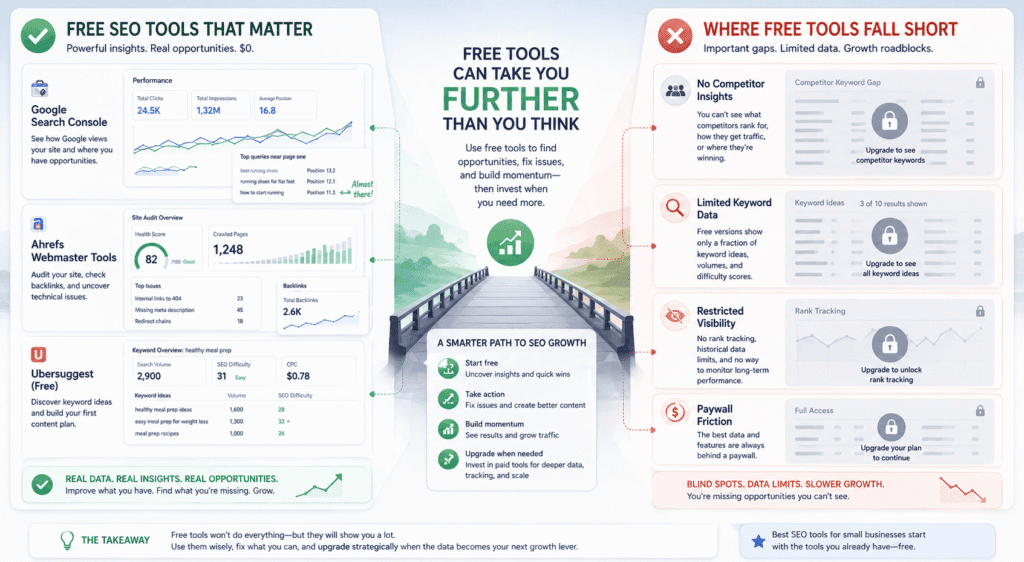
Let’s get something out of the way first: the “free tools are useless, you need to pay for real data” narrative is pushed almost exclusively by companies selling paid tools. That’s not a coincidence. The truth is that some free SEO tools are genuinely excellent — not “good for free,” just good. Others are free in the same way a casino is free to enter. Knowing the difference matters more than most SEO content will admit.
Google Search Console
I’ll say something that might sound like an exaggeration but isn’t: most small businesses that use Google Search Console don’t actually use Google Search Console. They set it up, verify the domain, glance at the overview dashboard occasionally, and call it a day. Which means they’re sitting on some of the most useful SEO data available — directly from Google — and completely ignoring it.
What Search Console actually shows you is which of your pages Google is surfacing in search results, for which keywords, at what positions, and how often people click through. That’s already more than most paid tools can tell you with the same accuracy, because no third-party platform has access to data as clean as what Google hands you directly. But the part that most people walk straight past is the performance filter by page. Pull up any page on your site and look at which queries are triggering it to appear. Nine times out of ten, you’ll find keywords you never consciously targeted — sometimes ones that are more interesting than what you were originally going for.
The other thing Search Console is genuinely good at, and this doesn’t get said enough: finding pages that are almost ranking. Positions 11 through 20 — just off page one — are showing up in the data as impressions with low clicks. Those pages aren’t failures. They’re unfinished. A meaningful rewrite, some added depth, better internal linking pointed at them — these things move pages from position 14 to position 6 faster than writing new content from scratch. For a small business with limited time and no content team, that’s an important shortcut.
Where it falls down: it won’t tell you what you’re missing. It only reflects what already exists on your site. No competitor data, no keyword research, no backlink information. The 16-month data window also becomes genuinely frustrating once you’re trying to understand longer patterns. And the interface, while not terrible, assumes a level of comfort with terms like “impressions” and “average position” that not everyone has starting out. It explains nothing. It just shows you numbers and lets you figure out what they mean.
Still — free, accurate, and directly from Google. There’s no version of “best SEO tools for small businesses” that doesn’t start here.
Ahrefs Webmaster Tools
This is the most underrated free tool in SEO and I genuinely don’t understand why it doesn’t come up more.
Verify your domain — takes two minutes — and Ahrefs gives you free access to your site’s backlink profile and a full technical audit. Not a preview. Not five results and then a paywall. An actual backlink report and a real site audit, free, for your own domain. The backlink data isn’t updated as frequently as what paying subscribers get, but for a small business trying to understand who’s linking to them and whether those links are doing anything useful, it’s more than enough.
The site audit is where I’ve seen this tool genuinely surprise people. Run it on a site that’s never been audited and you’ll almost always find things the owner had no idea about — redirect chains that slow down crawling, internal links pointing to pages that no longer exist, missing meta descriptions on pages that are actually getting traffic, images so large they’re quietly tanking page speed. None of these are dramatic problems on their own. Together they’re the kind of accumulated neglect that makes a site harder to rank than it needs to be, and fixing them costs nothing but time.
The ceiling is obvious though. You can’t research keywords, you can’t see what competitors rank for, you can’t track your positions over time. It looks inward only. But as a free tool for understanding the health and link profile of your own site, it’s hard to argue with.
Ubersuggest Free
Ubersuggest is the one I’m most conflicted about recommending, so let me just be honest about what it is.
Neil Patel is a very good marketer. Ubersuggest was built, at least in part, as a top-of-funnel asset — something that gets small business owners and bloggers into his ecosystem. The free version reflects that. You get enough to find it useful, and just enough friction to make the paid plan feel necessary. Daily search limits, cut-off competitor data, keyword results that stop before they get interesting. It’s not cynical exactly, but it’s not generous either.
Within those limits, it works fine for someone who is brand new to SEO and needs to get a rough sense of what people search for before they start writing. The interface is friendlier than anything Ahrefs or Semrush offers — it doesn’t assume you know what you’re looking at, and that matters when you’re just starting out. For a first content plan, built on a zero budget, Ubersuggest free will get you somewhere.
The problem shows up later. The keyword difficulty scores lean optimistic — they make keywords look more winnable than they are, which leads to content strategies built on faulty assumptions. Volume estimates are less reliable than what you’d get from a paid tool. A small business owner who builds six months of content around Ubersuggest data and then wonders why nothing ranks has a real grievance — the tool nudged them toward targets that were never as achievable as the numbers suggested.
Use it to get oriented when you have no budget. Don’t treat it as a source of truth once you have real decisions to make.
And then there’s the tool nobody lists in these roundups because it’s too obvious: searching Google yourself. Type in your target keyword. Read what’s ranking. Ask yourself honestly whether what you’re planning to write is better, more specific, or more useful than what’s already there. That process — unglamorous, free, takes ten minutes — will tell you more about whether a piece of content is worth writing than any keyword difficulty score from any platform. It sounds reductive. It isn’t.
Best Paid SEO Tools for Small Businesses in 2026
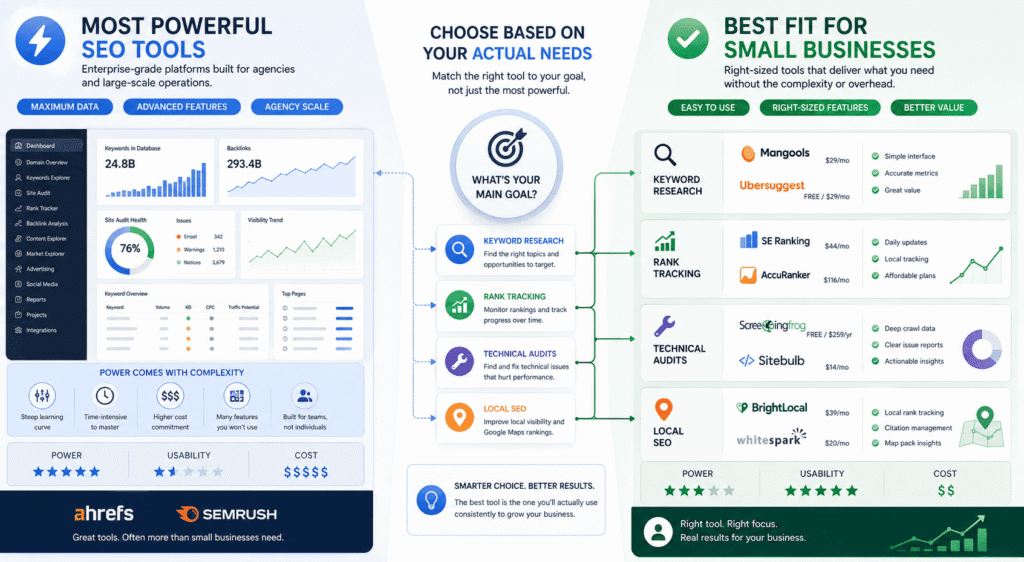
Here’s what most “best SEO tools” roundups won’t tell you: the tool that’s objectively most powerful is rarely the tool that’s most useful for a small business. Power and usefulness are different things. A Formula 1 car is more powerful than a Honda Civic. It’s also genuinely worse for getting to the grocery store.
What follows is less about features and more about fit — which tools actually make sense when you’re running your own SEO, paying your own bills, and don’t have six hours a week to spend inside a dashboard learning a platform that was designed for agencies.
The Comparison Table (Prices are approximate and change frequently-always refer to their websites to confirm prices)
| Tool | Starting Price | Best For | Free Version | Ideal For |
|---|---|---|---|---|
| Google Search Console | Free | Monitoring site performance | Yes — fully free | Every small business, no exceptions |
| Ahrefs Webmaster Tools | Free | Backlink analysis + site audit | Yes — own site only | Businesses wanting free technical data |
| Ubersuggest | Free / $29mo | Beginner keyword research | Limited free tier | Absolute beginners with zero budget |
| Mangools | ~$29/mo | Keyword research + rank tracking | No — trial only | Budget-conscious small businesses |
| SE Ranking | ~$44/mo | Rank tracking + site auditing | No — trial only | Businesses tracking 50–200 keywords |
| Ahrefs | ~$129/mo | Keyword research + competitive analysis | Webmaster Tools only | Businesses serious about content strategy |
| Semrush | ~$140/mo | All-in-one SEO + marketing | Limited free tier | Businesses wanting one platform for everything |
| Screaming Frog | Free / $259yr | Technical SEO audits | Yes — up to 500 URLs | Sites needing deep technical analysis |
| Sitebulb | ~$14/mo | Guided technical audits | No — trial only | Non-technical users needing audit clarity |
| BrightLocal | ~$39/mo | Local pack tracking + citations | No — trial only | Local businesses dependent on Google Maps |
| Whitespark | ~$20/mo | Citation building + local tracking | Limited free tier | Competitive local markets |
| AccuRanker | ~$116/mo | Dedicated rank tracking | No — trial only | Businesses where ranking accuracy is critical |
Best for Keyword Research
Ahrefs. That’s the answer. But the why matters more than the name.
Most keyword tools will give you a list of keywords. Ahrefs gives you a list of keywords and enough surrounding context — traffic potential, ranking difficulty, how the top results are structured, what other keywords those pages also rank for — that you can make an actual decision about whether a topic is worth pursuing. That combination of data in one place is what separates it from cheaper alternatives, not the size of the database or the brand name.
The thing reviewers consistently undersell about Ahrefs is how much it rewards clarity of purpose. Walk in knowing you want to find low-competition, informational keywords in a specific niche and it’s one of the most efficient tools you’ll ever use. Walk in with a vague goal of “finding good keywords” and you’ll spend two hours clicking around and leave with a tab full of exported data you’ll never open again. The tool doesn’t fail you in that scenario — your lack of a specific question does. That’s worth knowing before you subscribe.
Semrush is the comparison that always comes up, and it’s fair — the keyword database is large, the interface has improved, and the Topic Research feature is genuinely useful for content ideation in a way Ahrefs doesn’t really match. But Semrush at full price is a hard sell for a small business owner doing their own SEO because you’re essentially buying an agency platform and using maybe 20% of it. The rest — CRM features, social media tools, content optimization templates — just sits there making the dashboard feel busier than it needs to be.
If Ahrefs feels like too much of a financial commitment right now, Mangools KWFinder is the most honest budget alternative. Not because it’s as good — it isn’t — but because what it does, it does reliably, and the interface doesn’t make you feel like you need a tutorial before you can find a keyword. For a first content strategy built on a limited budget, that accessibility is worth something real.
If you want a deeper look at whether Semrush justifies the price for a business your size, our Semrush review breaks down every major feature, what it actually does well, and where it consistently disappoints — without the affiliate-driven enthusiasm most reviews can’t seem to avoid.
Best for Rank Tracking
Most rank trackers do roughly the same thing. The differences that actually matter for a small business are update frequency, local tracking capability, and whether the pricing assumes you’re an agency managing dozens of sites — because most tools in this category do assume exactly that, and price accordingly.
SE Ranking is the tool that keeps coming up when small business owners who’ve tried several options settle on one and stop switching. Daily updates, clean reporting, local pack tracking included, and pricing built around the assumption that you have one or two domains and a few hundred keywords — not 50 client accounts. For that specific situation, which describes most small businesses doing their own SEO, SE Ranking hits a price-to-value ratio that Ahrefs and Semrush don’t come close to matching for this specific use case.
AccuRanker deserves a mention if rank tracking is genuinely your primary need and accuracy is non-negotiable. It’s a dedicated tracker — does one thing, does it very well, updates on demand rather than on a schedule. The limitation is obvious: one thing. If you need keyword research alongside it, that’s a second subscription.
Something worth saying that most rank tracking content skips: the first 60 days of data are almost meaningless. Rankings fluctuate constantly, especially for newer content, and checking your positions daily in the first two months is mostly an anxiety generator. The tool becomes genuinely useful once you have enough history to spot actual trends — are these pages climbing slowly, stalling, or sliding? That question takes time to answer, and a lot of small businesses cancel before they get there.
Best for SEO Audits
Screaming Frog is the right answer and has been for years, which is either reassuring or boring depending on how you look at it.
The interface looks like enterprise software from 2009 — because it is, essentially — and it has never been updated to feel modern. None of that matters. What Screaming Frog does is crawl your website the way Google crawls it and surface every technical problem with more granularity than any cloud-based tool manages at any price. The free version handles up to 500 URLs, which covers a significant percentage of small business websites completely. The paid version is roughly $259 a year, which makes it one of the more defensible software purchases in this entire category when you consider what equivalent data costs inside Semrush.
The real limitation isn’t the tool — it’s the output. Screaming Frog will tell you that 34 pages have duplicate title tags and 12 pages return a 3xx redirect. It will not tell you which ones matter, in what order to fix them, or what fixing them will actually do for your rankings. The data is excellent. The interpretation is entirely on you. For someone comfortable with technical SEO, that’s fine. For someone who isn’t, a spreadsheet of 400 issues with no prioritization is more paralyzing than helpful.
Sitebulb solves exactly that problem — same crawling approach, but the findings are grouped by severity and explained in plain language. It costs more. For non-technical small business owners, the extra cost is often worth it because a tool you can actually act on beats a more powerful tool you stare at and close.
Best for Local SEO
If your business lives or dies on Google Maps rankings — restaurants, law firms, dentists, contractors, any service business tied to a geography — then the mainstream SEO tools are mostly not built for you. They weren’t designed with local search as the primary use case, and it shows.
Local rank tracking in BrightLocal means tracking where you appear in the local pack — the map results — not just organic blue links. That’s a completely different data set, and it’s the one that actually matters if most of your customers find you through Google Maps. Add citation management, Google Business Profile auditing, and review monitoring into the same platform and you have something that addresses the actual SEO reality of a local business in a way that Semrush’s local add-on or Ahrefs’ general toolset simply doesn’t.
The citation audit feature specifically is underappreciated. Run it once on a business that’s been operating for a few years without thinking about local SEO and you’ll almost always find the same thing — business name, address, or phone number listed incorrectly or inconsistently across dozens of directories. That inconsistency quietly undermines local rankings in ways that are invisible until you look for them. Fixing it doesn’t require any content production or link building. It’s pure cleanup, and BrightLocal makes that cleanup manageable.
Whitespark is the other serious option in local SEO, particularly strong for citation building and local rank tracking. Some practitioners use both. For a small business picking one starting point, BrightLocal is more complete out of the box.
Best Budget Option Under $50/Month
Mangools is the honest answer at this price point, and I want to be specific about why rather than just declaring a winner.
The suite — KWFinder for keyword research, SERPWatcher for rank tracking, LinkMiner for backlinks, SERPChecker for SERP analysis — covers the core bases without any single tool being class-leading. That trade-off is the whole point. At under $50 a month, you’re not getting Ahrefs-quality keyword data or Screaming Frog-depth technical auditing. You’re getting four functional tools that work reliably and an interface that doesn’t require a learning curve to navigate. For a small business owner who needs to do SEO alongside running an actual business, that combination of breadth and accessibility matters more than depth on any single feature.
Where Mangools genuinely falls short: competitive niches. If you’re in legal, finance, insurance, or real estate in a major market, the keyword difficulty scores will underestimate how hard your targets actually are, and the backlink data won’t give you the depth to understand why competitors with similar content dramatically outrank you. In those niches, the jump to Ahrefs isn’t optional — it’s the difference between having the information you need and operating on incomplete data.
SE Ranking also fits under $50 at its entry tier depending on keyword volume, and it’s worth a direct comparison if rank tracking is your primary need.
One thing that doesn’t get said enough when people write about finding the best SEO tools for small businesses on a tight budget: the switching cost is real and it’s not financial. Every time you change tools, you lose historical data, you restart a learning curve, and you spend mental energy on tool evaluation instead of actual SEO. Pick something at this price point, commit to it for at least a quarter, and judge it by whether your content is improving — not by whether a different interface might feel more interesting. The tool isn’t the variable that matters most. Consistency is.
Best SEO Tools for Local Businesses in 2026
Say you run a dental practice. Or a plumbing company. Or a law firm that serves one city. Your SEO problem is not the same SEO problem that a blogger or an e-commerce store has — and yet most SEO tool content treats local businesses as a footnote, a subsection, a “also, if you’re local…” afterthought at the end of a list built for people trying to rank nationally for informational keywords.
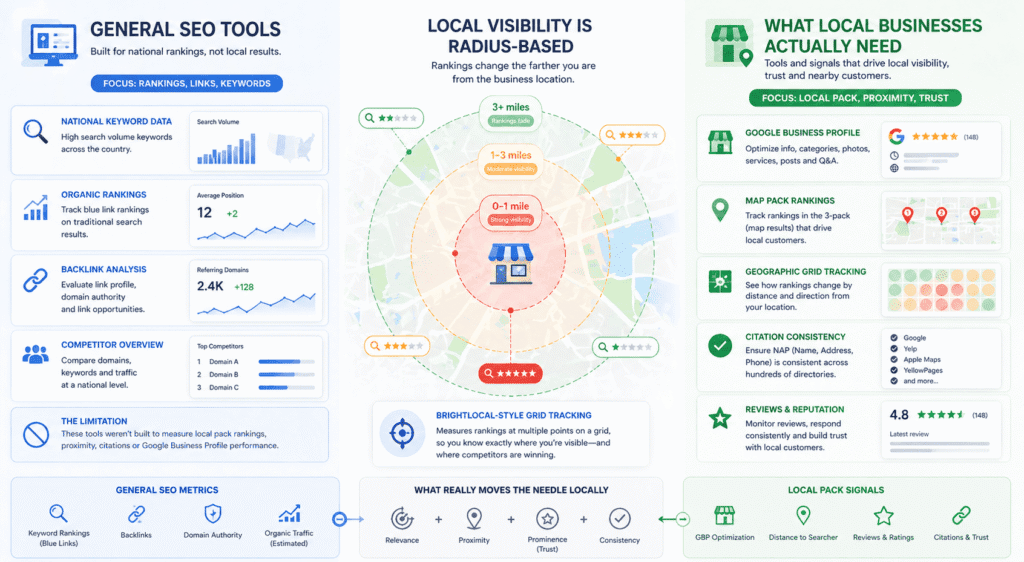
That’s a problem worth naming before anything else, because the tools that matter most for local businesses are almost entirely different from the tools that dominate mainstream SEO conversations. Ahrefs is excellent. It is also largely irrelevant if your entire customer base lives within 15 miles of your front door and finds you by typing “plumber near me” into Google at 9pm. The metrics that move your business are local pack rankings, citation consistency, and Google Business Profile performance — none of which Ahrefs was built to address in any serious way.
Start Here Before Spending Anything: Your Google Business Profile
This isn’t a tool. It’s the foundation that tools are supposed to help you manage — and most local businesses have it in a state that no software subscription can fix.
Wrong hours. Outdated photos. A description written in 2021 and never touched since. Review responses that happened enthusiastically for the first month and then stopped entirely. No posts, no Q&A, no products or services listed properly. This is the default state of most local business Google profiles, and it’s worth saying plainly because paying $50 a month for a local SEO tool while your Google Business Profile is half-finished is genuinely backwards. Fix the profile first. The tools exist to help you manage and track a foundation that’s already solid — they don’t build the foundation for you.
BrightLocal
Most serious local SEO practitioners end up here eventually, usually after trying to make a general SEO platform do something it was never designed for.
The thing that separates BrightLocal from every general-purpose SEO tool is that it tracks where you rank in the local pack — the map results — not just organic blue links. These are different ranking systems. They respond to different signals. A business can rank on page one organically and barely appear in the local pack, or dominate the map results and rank nowhere in organic. Understanding which situation you’re in requires data that Semrush, Ahrefs, and most mainstream tools don’t actually provide with any precision. BrightLocal was built specifically for this gap.
The grid tracking feature is the one that tends to surprise people when they first use it. Instead of telling you that you rank third for “dentist in Nairobi,” it shows you a geographic grid — your ranking at one mile from your location, two miles, three miles, across different directions. What most businesses discover when they first run this is that their local visibility drops off much faster geographically than they assumed. You might dominate searches within a mile of your office and be invisible to someone searching from four miles away in a different neighborhood. That’s not a small distinction if your competitors are picking up customers just outside your visible radius.
Citation management is the other reason BrightLocal earns its keep, and it’s the part that feels unglamorous until you understand what it’s actually fixing. Your business name, address, and phone number exist across hundreds of directories — Google, Yelp, Apple Maps, dozens of industry-specific and local directories you’ve never heard of. Many of these listings are wrong. Some have your old address. Some have a phone number you stopped using. Some list a slightly different version of your business name. Google sees all of this conflicting information and it creates a kind of trust deficit that quietly suppresses local rankings. BrightLocal’s citation audit finds all of it in one report. The cleanup isn’t exciting work, but it’s the kind of foundational fix that compounds over time.
The limitation worth being honest about: BrightLocal is a specialist. It won’t help you with content strategy, keyword research for your blog, or backlink analysis. If you need those things, you need a second tool. Most purely local businesses can accept that trade-off without much difficulty — but it’s worth knowing going in rather than discovering after you’ve subscribed.
Whitespark
Whitespark and BrightLocal overlap enough that most small businesses don’t need both — but Whitespark does specific things better, and those things matter in competitive local markets.
Citation building is where Whitespark has spent the most time and built the strongest reputation. The local citation finder is more comprehensive than most alternatives, the database goes deeper, and — this is the part that separates it — Whitespark offers a done-for-you citation building service where their team actually builds and corrects your listings manually. For a business owner who knows citation consistency matters but has no interest in doing the cleanup work themselves, that service is genuinely useful. BrightLocal gives you the report. Whitespark gives you the report and does the work.
The rank tracker is strong, particularly for tracking across multiple locations or cities — more relevant for businesses with several locations or agencies managing multiple clients than for a single-location small business.
If you’re choosing between the two for the first time: start with BrightLocal for the more complete platform experience. Come back to Whitespark if citation building becomes a specific priority or you’re in a competitive local market where the details genuinely move rankings.
The Semrush Local Question
A lot of small businesses already subscribe to Semrush for keyword research or competitor analysis and want to know whether the local features cover their bases. It’s a fair question.
Honest answer: Semrush Local is fine for simple situations and insufficient for competitive ones.
If you have one location, low local competition, and you mostly want to make sure your listings are consistent and your Google Business Profile is connected to something — the local features inside Semrush probably do enough to justify not paying for a separate tool. The listing management works, the basic review monitoring works, and the position tracking handles local keywords adequately.
But the geographic grid ranking, the citation audit depth, the local pack tracking precision — these are places where Semrush Local and BrightLocal aren’t even playing the same game. Semrush built local features because the market demanded them. BrightLocal was built by people who thought local search was interesting enough to build an entire company around. That difference in origin shows up in the product in ways that matter once your local SEO needs get specific.
What Google Gives You Free That Nobody Talks About
Here’s something that gets buried in every local SEO tool conversation: Google Business Profile Insights is more revealing than most paid tools about how real customers actually interact with your listing.
It shows you how people found your profile — directly searching your business name versus discovering you through a category search. It shows what they did after finding you — clicked for directions, called, visited your website. It shows how your photos perform compared to similar businesses. None of this data exists in any third-party tool because it comes directly from Google’s own systems.
Combined with Search Console filtered for local queries — which shows you exactly which location-specific searches are driving clicks to your site — you have a meaningful picture of local search performance without spending anything. For a local business not yet ready to pay for BrightLocal, these two free tools used seriously will tell you more than most people realize. They won’t track your competitors or manage your citations, but they’ll tell you what’s actually happening with your own local presence right now, which is the more urgent question for most businesses starting out.
The broader point — and this applies across the whole conversation about finding the best SEO tools for small businesses that operate locally — is that local SEO rewards consistency and accuracy more than sophistication. A plumber with a perfectly maintained Google Business Profile, consistent citations, and 40 genuine reviews will outrank a competitor with a fancier tool stack and a neglected profile almost every time. Tools help you maintain and scale what works. They don’t replace the work itself.
Free vs Paid SEO Tools: How to Know When It’s Time to Upgrade
Most of the content written on this topic is produced by companies selling paid tools. That’s not a conspiracy — it’s just math. And it means the answer to “when should you upgrade?” is almost always “sooner than you think, here’s a discount code.” So let me try to answer it from the other direction.
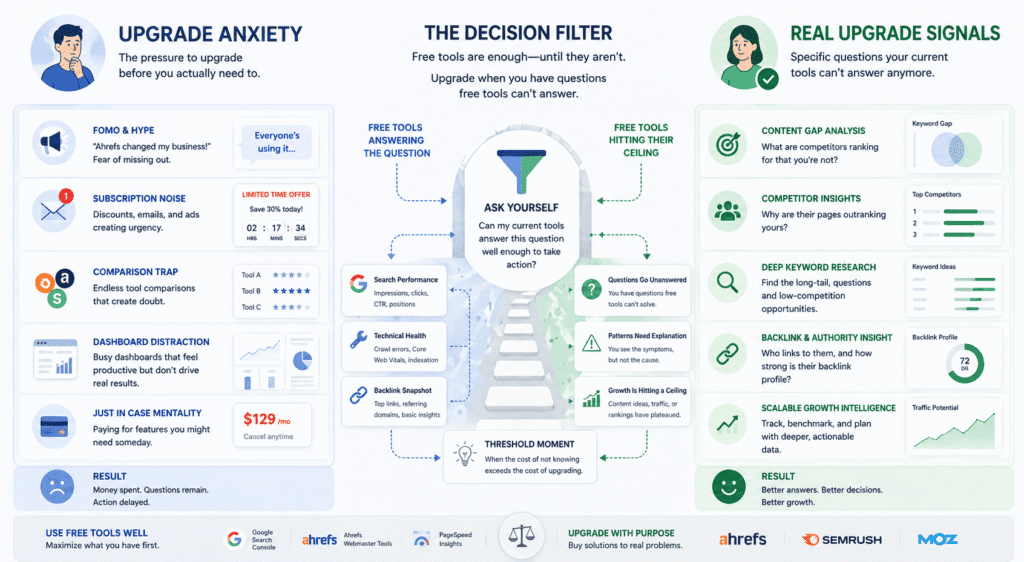
The free tools available right now are genuinely good. Not “good for free” — just good. Google Search Console, used properly, tells you more about your site’s search performance than most small business owners know what to do with. Ahrefs Webmaster Tools gives you real backlink data at no cost. PageSpeed Insights covers technical performance. The combination of these three tools, used consistently, will take most small businesses further than a paid subscription used inconsistently — and that second scenario is far more common than the SEO industry wants to acknowledge.
So the real question isn’t “free vs paid.” It’s whether you’ve genuinely exhausted what free tools can tell you, or whether you just feel like you should have better tools because everyone else seems to.
Those are very different situations and they lead to very different decisions.
The feeling of needing better tools usually arrives before the actual need does. You’re six months into publishing content. Some things are ranking, some aren’t. You read a thread where someone mentions Ahrefs changed their business and you feel a low-grade anxiety that you’re missing something. That anxiety is what most paid tool marketing is designed to produce and amplify. It doesn’t mean you’re wrong to feel it — it means you should interrogate it before acting on it.
The actual need looks different. It’s specific. It’s a question you’re trying to answer that your current tools genuinely cannot help you with.
For example: you’ve published 30 pieces of content, you can see in Search Console that some pages are getting impressions but barely any clicks, and you want to understand whether your titles are the problem, whether the keywords are too competitive, or whether your content is just thinner than what’s ranking above you. Search Console shows you the symptoms. It doesn’t give you the diagnostic tools to understand the cause. That gap — between seeing that something is wrong and understanding why — is where a paid tool earns its money. Ahrefs or Semrush can show you the pages ranking above yours, their word count, their backlink profiles, the exact keywords they’re capturing that you’re not. That’s a specific problem with a specific tool solution.
Or: you’ve covered all the obvious topics in your niche and you’re running out of ideas. Free keyword tools show you the same suggestions every time — variations on keywords you’ve already written about, autocomplete results you’ve already seen. The deeper long-tail opportunities, the question-based searches, the content gaps your competitors have quietly left open — finding these consistently requires a database that free tools don’t maintain. That’s a real ceiling, not a manufactured one.
What I’d push back on is the idea that these ceilings arrive on any predictable schedule. Some businesses hit them at 15 published pages. Others are still getting useful mileage out of free tools at 80 pages because their niche is narrow enough that the free data covers the territory adequately. The timeline varies so much that any advice like “upgrade after six months” or “once you hit X traffic” is essentially made up. The signal that matters is whether you can name a specific question that your current tools can’t answer — not whether you’ve been at this long enough that a paid tool feels appropriate.
There’s a timing problem that cuts the other way too, and almost nobody talks about it: most small businesses that do need a paid tool don’t need it permanently. The SEO industry is built on monthly subscriptions because recurring revenue is good for business. But a lot of what small businesses actually need from a paid tool is front-loaded — an initial competitor analysis, a thorough keyword research phase, a technical audit they can work from for the next six months. Subscribe, do the work, export everything, cancel. Come back when the next specific need arises.
This isn’t gaming the system. It’s just being honest about the fact that a $150/month ongoing subscription is only justified if you’re inside the tool regularly enough that the data stays fresh and actionable. If you’re checking it once a week and mostly looking at the same dashboards, you’re paying for access to information you’ve already absorbed. The best SEO tools for small businesses are the ones that answer a real question — not the ones that sit open in a browser tab making you feel like you’re on top of things.
One thing that genuinely surprised me when thinking through this: the businesses I’ve seen get the most out of free tools are almost always the ones that use them more deliberately than most people use paid ones. They have a specific reason to open Search Console. They know what they’re looking for before they log in. They export data and actually do something with it. Meanwhile some businesses paying $200 a month check their rank tracking dashboard, feel vaguely reassured or vaguely worried, and close the tab without taking any action. The tool tier matters less than what you do when you’re inside it. That sounds obvious. It turns out to be the thing that separates businesses that grow through SEO from businesses that just spend on it.
So if you’re trying to decide whether to upgrade right now — stop trying to make it a general decision. Ask yourself what you’d do differently tomorrow if you had the paid tool that you can’t do today. If you can answer that with something specific, the upgrade probably makes sense. If the answer is some version of “I’d just feel more informed” — you’re not ready, and no amount of comparison shopping is going to change that.
The Best SEO Tool Stack for Small Businesses on Any Budget
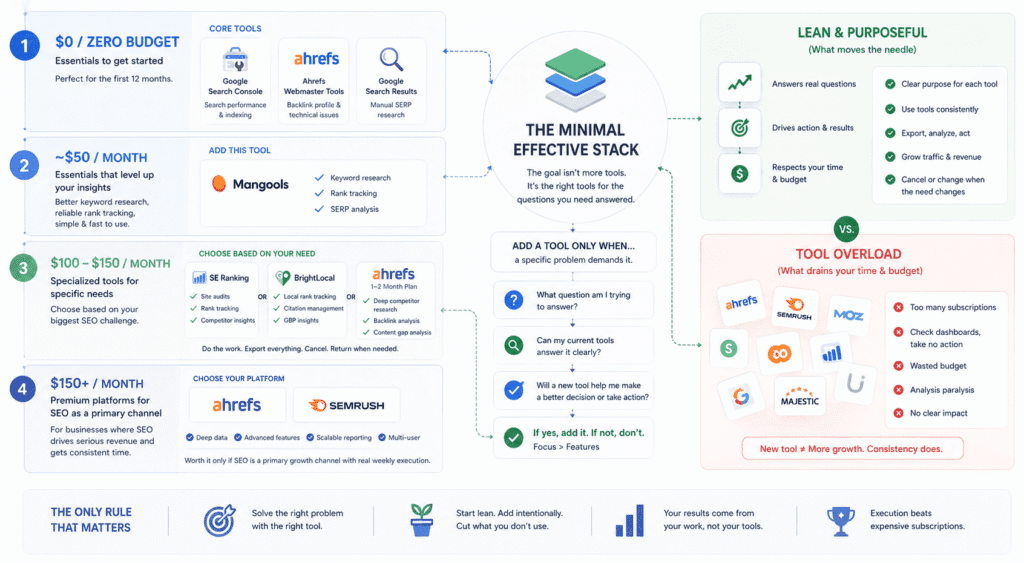
Nobody actually needs a “stack.” That word belongs to agencies managing 40 clients and venture-backed startups with a dedicated growth team. For most small businesses, the goal is simpler: find the smallest number of tools that answer the questions you actually have, and stop there.
Here’s what that looks like at different budgets — honestly, without padding each tier to make it sound more sophisticated than it is.
Zero budget: Search Console, Ahrefs Webmaster Tools, and the Google search results page. Unglamorous but sufficient for most businesses under 12 months into SEO. Search Console shows you what’s working. Ahrefs Webmaster Tools shows you your backlink profile and technical issues. Searching your own target keywords shows you what you’re competing against. If you’re not growing at this stage, the problem is almost certainly content volume or quality — not tool access.
Around $50 a month: Add Mangools and stop. Keyword research gets meaningfully better, rank tracking becomes reliable enough to actually inform decisions, and the interface won’t eat your Saturday morning. The temptation at this budget is to also grab a free trial of something bigger “just to compare.” Resist it. Two tools you open with intention beat five tools you check out of vague anxiety.
$100 to $150 a month: This is where the decision gets personal. SE Ranking if auditing and rank tracking are the gap. BrightLocal if you’re a local business and Google Maps rankings are what actually move your revenue. A two-month Ahrefs subscription if competitive research is the specific thing you’ve been flying blind on — do the work, export everything, cancel, come back when you need it again. At this budget, the best SEO tools for small businesses are the ones solving your most urgent specific problem — not the ones that look most impressive in a comparison table.
Above $150: You’re in Ahrefs or Semrush territory, and the honest thing to say here is that the tool is only worth it if SEO is genuinely a primary channel for your business — meaning someone is spending real time on it every week, not fitting it in between everything else. These platforms are exceptional. They’re also easy to underuse at $200 a month if SEO is competing for attention with four other marketing priorities.
The pattern that kills small business SEO budgets isn’t overspending on the wrong tool. It’s subscribing to something new every time momentum stalls — as if a better dashboard will solve what is almost always a consistency problem. The tool sitting unused in another tab isn’t the one that’s failing you.
When Buying an SEO Tool Is the Wrong Decision Entirely
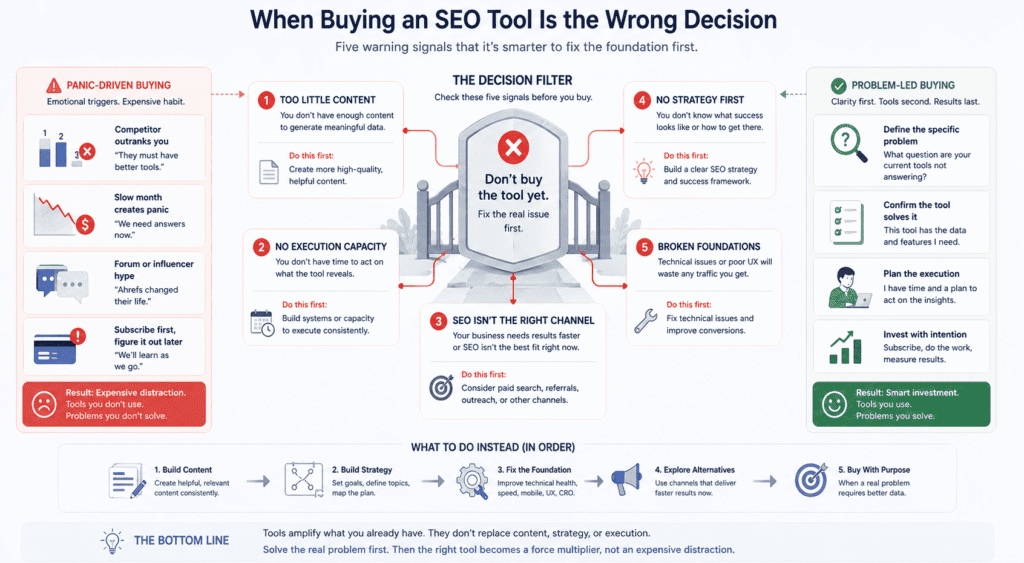
Buying an SEO tool is the wrong decision entirely in five specific situations.
First, if your site has almost no content yet — a tool amplifies existing momentum, it doesn’t create it. Eight published pages and a neglected blog don’t have a tool problem, they have a content problem.
Second, if you don’t have time to act on what the tool tells you. The constraint for most small businesses isn’t information — it’s execution capacity. A freelance writer producing consistent content will move your rankings more than a platform you log into twice a month and feel guilty about.
Third, if SEO isn’t the right channel for your business right now. SEO takes 12 to 24 months minimum before returns become reliable. A startup needing revenue in 90 days, a hyper-local business in a tiny market, or a product nobody knows to search for yet will get better returns from paid search, referrals, or direct outreach — faster, on a timeline that actually matters.
Fourth, if you don’t have a strategy before you subscribe. Tools execute strategy, they don’t create it. Walking into Semrush without knowing what success looks like in six months turns data into paralysis. A few hours with an SEO consultant building a framework first is worth more than 12 months of platform access you don’t know how to prioritize.
Fifth, if your website has conversion or technical problems that more traffic won’t fix. Driving organic visitors to a site that loads slowly, looks broken on mobile, or has no clear call to action doesn’t grow revenue — it just confirms the funnel is broken. Fix the site before buying the tool.
The thread connecting all five: SEO tools get purchased most often when people feel behind — a competitor outranks you, a slow month creates panic, someone in a forum mentions Ahrefs like it changed their life. That feeling is understandable but it’s a terrible basis for a software decision. The businesses that actually get value from these tools almost always share one thing before they subscribe — they know exactly what problem they’re trying to solve. The tool helps them solve it faster. That clarity is what makes the difference between a subscription that compounds into real growth and one you cancel after four months wondering what you paid for.
FAQ: SEO Tools for Small Businesses
The questions below come up constantly from small business owners trying to figure out SEO without an agency or a dedicated marketing team. Straight answers, no padding.
What is the best SEO tool for a small business just starting out?
Google Search Console — and it’s not close. Free, accurate, and the only tool that shows you exactly how Google sees your site right now. Most businesses at the start don’t have a data problem. They have a content problem. Search Console gives you more than enough to work with until you’ve built enough of a foundation that a paid tool has something real to analyze. The conversation about upgrading becomes worth having once you have 20 or more published pieces and some pages actually starting to rank. Before that, you’re mostly paying for anxiety.
Is Semrush worth it for a small business?
For most small businesses doing their own SEO — probably not at full price. Semrush was built for agencies juggling multiple clients and in-house teams who live inside the platform daily. The feature set is genuinely impressive. It’s also mostly irrelevant if you’re one person fitting SEO in between running an actual business. You’ll use 20% of it and pay for 100%. SE Ranking or Mangools will handle what most small businesses actually need at a fraction of the cost. If you’re committed to using it seriously and consistently, then yes — it earns its price. But “committed to using it seriously” is doing a lot of work in that sentence.
Can I do SEO without any paid tools?
Yes. More businesses should try this before spending anything. Search Console, Ahrefs Webmaster Tools, and Google’s own search results give you a genuinely useful picture of your SEO situation at zero cost. The real ceiling of free tools is competitor research — you can’t see what other sites rank for or surface long-tail keyword opportunities with the same precision. But that ceiling is further away than most people assume, especially in the first year. Start free. Stay free until you hit a specific wall you can name clearly. Then upgrade to solve that specific problem — not because a paid tool feels like the next logical step.
How much should a small business spend on SEO tools?
Somewhere between zero and $50 a month covers the honest range for most small businesses. Free if you’re early stage and still building content volume. Mangools or SE Ranking’s entry tier if you need keyword research and reliable rank tracking. The $100 to $150 range makes sense when SEO is genuinely a primary growth channel and someone is spending real focused time on it every week — not squeezing it in. Above $200 a month, the more important question is whether that money produces better returns spent on content production or link building instead of platform access. For most small businesses, it does.
What’s the difference between Ahrefs and Semrush — which one should I pick?
Less difference than the comparison articles make it seem, but here’s the honest version: Ahrefs has better backlink data and a keyword explorer that most practitioners actually prefer when they’re doing serious research. Semrush has a broader surface area — content tools, local SEO add-ons, social features — which is useful if you want one platform touching multiple areas, and overwhelming if you just want to do keyword research and track rankings. For a small business choosing between them: Ahrefs if competitive research and keyword depth are the priority. Semrush if you want breadth and don’t mind paying for features you might not use. Mangools if neither fits the budget and you want something that does the core job without the enterprise price tag.
If you’re still weighing both platforms seriously and want a side-by-side breakdown that goes deeper than feature lists and pricing pages, our Semrush vs Ahrefs comparison covers exactly where each tool wins, where each one falls short, and which one makes more sense depending on what stage your SEO is actually at.
Is Ahrefs too complicated for someone who isn’t an SEO expert?
The learning curve is real but it’s not the barrier people make it out to be. What actually trips people up with Ahrefs isn’t the complexity — it’s logging in without a specific question. Walk in knowing you want to find low-competition keywords in a particular topic area, or understand why a competitor outranks you for a specific term, and it’s one of the most efficient tools available. Walk in with a vague goal of “doing better at SEO” and two hours disappear into features you didn’t need. The tool is fine. The strategy problem gets blamed on the tool.
If you’re starting from scratch with Ahrefs and want a practical walkthrough of the features that actually matter for a small business, our Ahrefs for beginners guide covers exactly that — without assuming you already know what a keyword difficulty score means or why a DR of 40 should or shouldn’t intimidate you.
Do I need a separate tool for local SEO?
If local search is genuinely how most of your customers find you — restaurant, contractor, medical practice, any business tied to a geography — then yes, a dedicated local SEO tool is worth it. General platforms track organic rankings. They don’t tell you how you’re performing in the local pack, whether your citations are consistent, or what your Google Business Profile looks like compared to competitors. BrightLocal was built specifically for that gap and does things Ahrefs and Semrush don’t prioritize.
One thing worth saying before you spend anything though: no local SEO tool compensates for a Google Business Profile that’s half-finished, has outdated photos, and stopped responding to reviews eight months ago. Fix that first. The tool helps you manage and track a foundation that’s already solid — it doesn’t build the foundation.
Why does my SEO tool show different numbers than Google Search Console?
Because they’re measuring different things. Search Console gets its data directly from Google — it’s the most accurate picture available of your own site’s performance. Third-party tools estimate traffic, rankings, and search volumes using their own crawlers and data panels. These estimates are useful approximations, not exact figures. When the two disagree, trust Search Console for anything about your own site, every time. Where third-party tools earn their value is competitor research — sites you can’t access Search Console data for — and that’s where the estimates, imprecise as they are, become genuinely irreplaceable.
How long before I actually see results from using an SEO tool?
The tool shows you data immediately. Whether that data is moving in the right direction depends on the work, not the tool. New content typically takes three to six months to rank meaningfully — longer in competitive niches. Rank tracking becomes useful after 60 to 90 days when you have enough history to tell real trends from normal fluctuation. The most expensive mistake is checking rankings daily in the first month and making strategic changes based on movement that’s mostly just Google recalibrating. Set up the tracking, do the work consistently, check trends monthly rather than daily, and give it a full quarter before you decide anything is or isn’t working.
Finding the best SEO tools for small businesses is genuinely less important than most of this industry’s content suggests. The tools that move businesses forward are almost never the most sophisticated ones — they’re the ones that get opened regularly, used with a clear purpose, and actually inform decisions rather than just filling a dashboard with numbers that feel productive to look at. Every question above has a version of the same answer underneath it: know what you’re trying to solve, pick the simplest tool that solves it, and spend more energy on the work than on the tool selection.
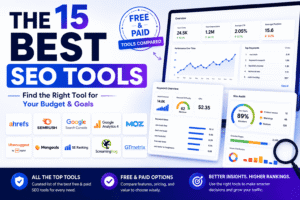
📖 Related: The 15 Best SEO Tools in 2026 (Free & Paid) For a complete overview of all the best SEO tools available this year — across every budget and use case — this guide covers all 15 in one place.
Disclosure: This article may contain affiliate links. If you make a purchase through these links, I may earn a commission at no extra cost to you. All opinions are based on hands-on testing and independent research.