
Most articles about Ahrefs start the same way. Here’s what it does, here are the features, here’s a screenshot of the dashboard, here’s our affiliate link. By paragraph three you’re reading a feature list dressed up as a guide. By paragraph six you’ve learned what every tool is called and have no clearer idea what to actually do with any of them.
This isn’t that kind of article.
What follows is written for people who are genuinely new to Ahrefs — not new to the internet, not new to running a website, but new to the specific experience of staring at a dashboard full of metrics and trying to figure out what they’re supposed to mean for your situation. It’s honest about what the tool does well and equally honest about where it falls short, where the numbers mislead you, and where most beginners waste the most time.
No affiliate link. No sponsored sections. No “Ahrefs is the best SEO tool ever made” opener. Just a straightforward attempt to give you the kind of introduction to this tool that most guides skip because it doesn’t convert as well as enthusiasm does.
If you’re expecting a walkthrough of every feature, this isn’t it. If you’re expecting someone to tell you Ahrefs will transform your traffic overnight, this definitely isn’t it.
But if you want to understand what the tool actually is, how to start using it without losing your mind, and whether it’s even worth paying for at your current stage — read on.
Table of Contents
It’s Not an SEO Tool. It’s a Research Tool That Happens to Do SEO.
Nobody tells you this when you sign up for Ahrefs for beginners content: the tool doesn’t actually do anything. It just shows you things. That sounds like a minor distinction, but it’s the reason so many people open it, feel completely lost, and quietly close the tab after 20 minutes.
The expectation most beginners bring is reasonable — you pay for a tool, the tool helps you rank higher. Except Ahrefs doesn’t work that way. It doesn’t give you a plan. It doesn’t tell you what to write or what to fix first. What it does is hand you an enormous amount of data about your site, your competitors, and your market — and then wait for you to figure out what to do with it.
That gap between data and decision is where most beginners get stuck.
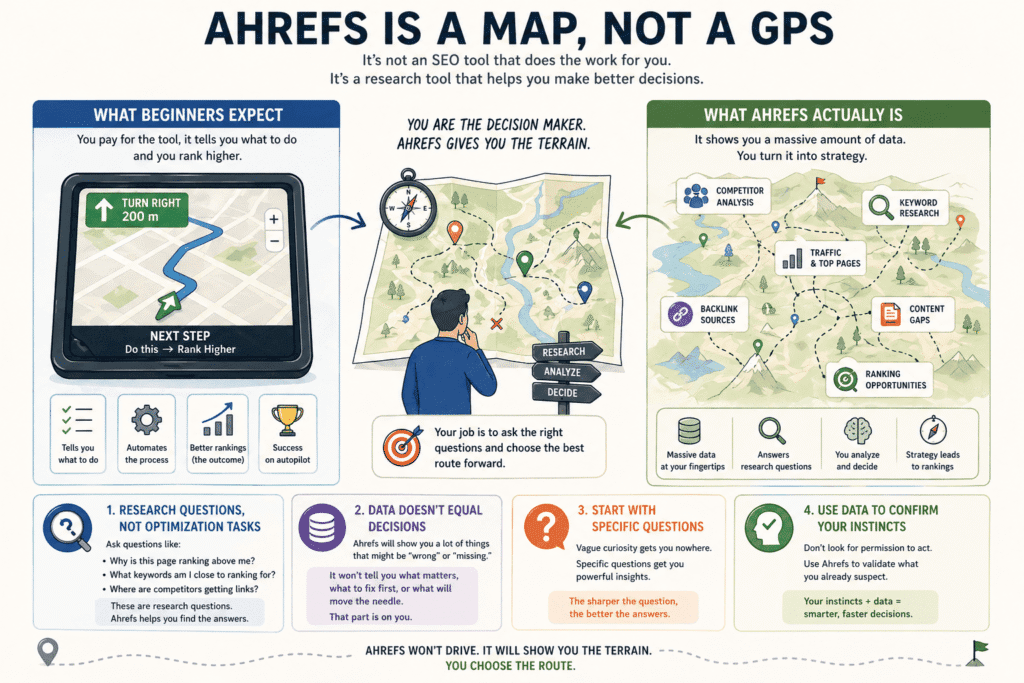
What actually helped me reframe it was stopping thinking about it as an SEO tool at all. Ahrefs is a research tool. The SEO part is almost incidental — it’s just that the questions it’s best at answering happen to be SEO questions. Why is that site ranking above me? What keywords am I almost ranking for but not quite? Where are my competitors getting their links from? These aren’t optimization tasks. They’re research questions. And once you treat them that way, the tool starts to feel less like a dashboard you’re supposed to master and more like a library you’re learning to navigate.
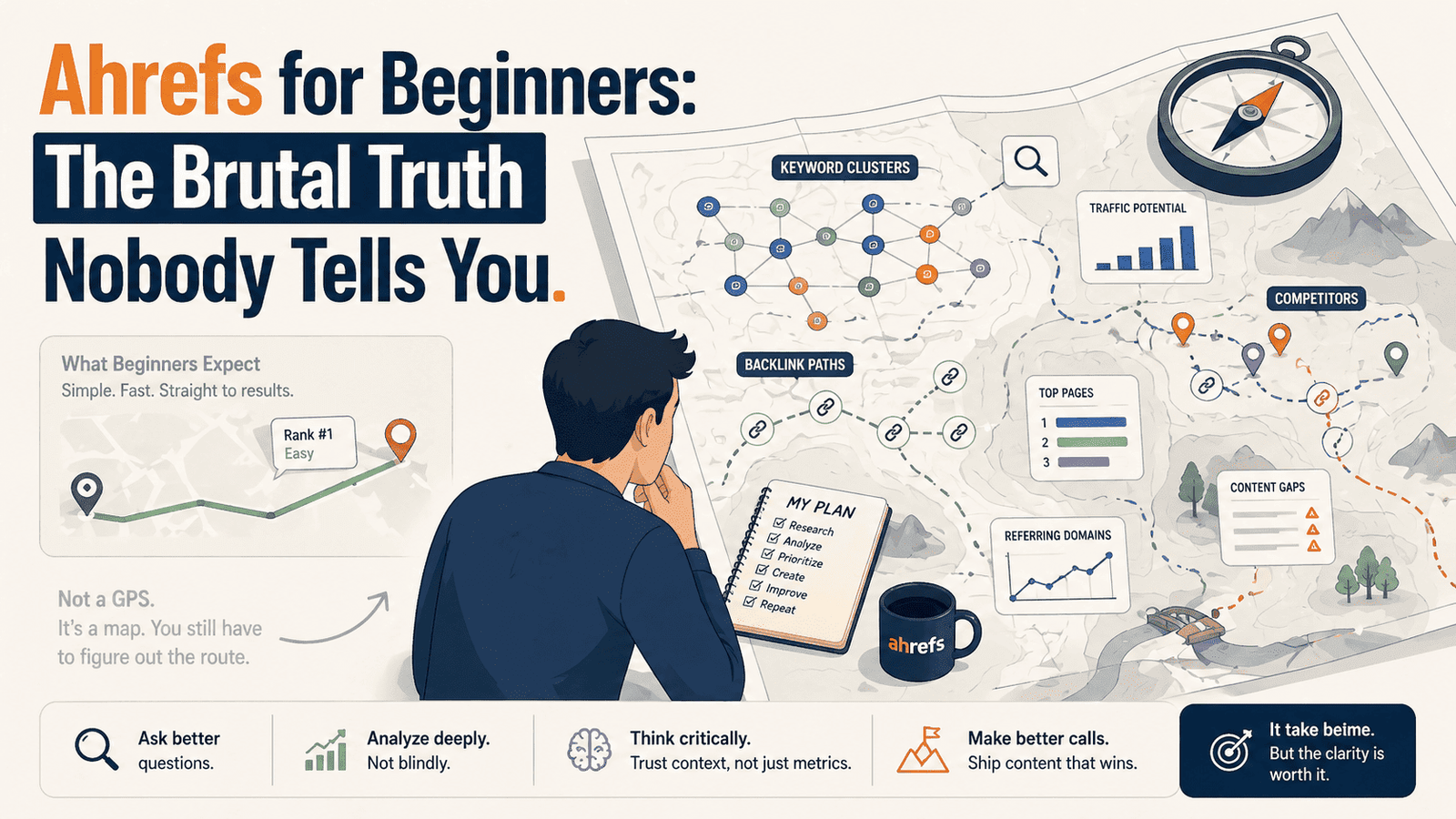
The analogy that actually stuck for me: Ahrefs is less like a GPS, more like a map. A GPS removes the thinking. A map just shows you the terrain — you still have to figure out the route. Most beginners want a GPS. Ahrefs is stubbornly, uncompromisingly a map.
There’s a version of using this tool that works really well for beginners — it just doesn’t look like what you’d expect. It looks like opening a competitor’s URL with a single question in mind. Not “what can I learn from this?” but something sharper, like “why is this specific page beating mine?” That specificity is everything. Vague curiosity gets you nowhere in Ahrefs. Pointed questions get you answers.
One more thing worth saying plainly: Ahrefs will show you a lot of things that are wrong with your site. It will not tell you which ones matter, in what order to fix them, or whether fixing them will actually move the needle. That part is still on you. Which sounds frustrating — and honestly, it is, at first. But it’s also what makes the tool genuinely useful once you develop your own instincts. You stop looking for permission to act and start using the data to confirm what you already suspect.
That’s a different relationship with an SEO tool than most beginners expect to have. But it’s the right one.
Related: Before you invest heavily in any SEO platform, it’s worth having a clear point of view on [whether tools or content should come first] — because the answer changes how you use everything else.
The First Thing Worth Doing (It’s Not What the Onboarding Tells You)
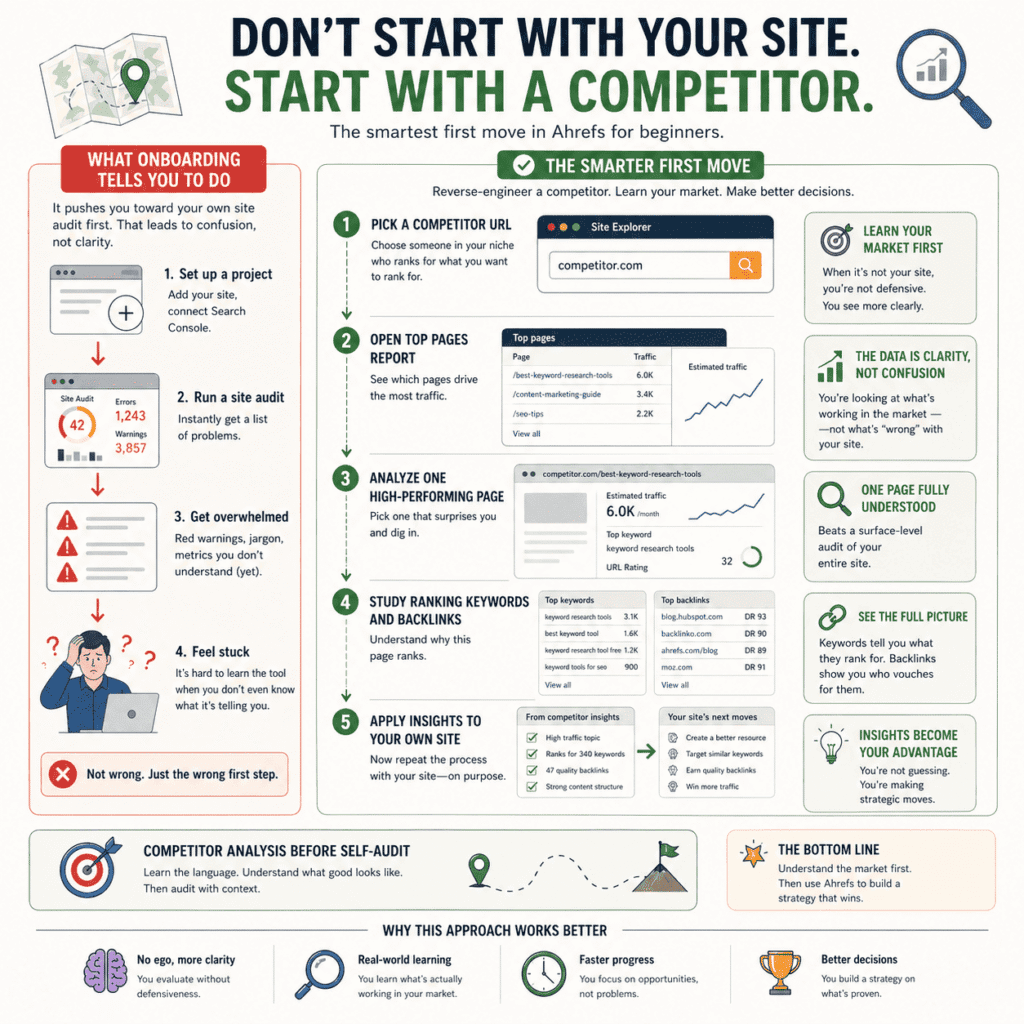
Ahrefs will tell you to start by setting up a project. Add your site, run a site audit, connect Search Console. And look — that stuff matters. But if you’re new to Ahrefs for beginners and you lead with your own site, you’ll spend your first hour staring at problems you don’t fully understand yet, written in a language you haven’t learned to read. It’s a fast way to feel stupid about a tool that isn’t actually that complicated.
Skip it. For now.
Type a competitor’s URL into Site Explorer instead. Someone in your niche. Someone whose content keeps showing up when you search for things you want to rank for. Don’t go in with a plan — just go in with mild irritation that they’re doing better than you. That’s enough.
What happens next is the part nobody puts in the tutorials. You start seeing things. This post gets 6,000 visits a month — why? You click in. It ranks for 340 keywords, most of them variations of one phrase you’ve never targeted. It has 47 backlinks, all from sites you’ve actually heard of. Suddenly you’re not learning a tool anymore. You’re learning your market. And the tool is just the thing you happen to be using to do it.
That’s a completely different experience than opening a site audit on your own two-month-old blog and watching it fill up with red warnings. Which, by the way, is what the onboarding pushes you toward. Ahrefs designed that flow for agencies and established site owners — people who already have a keyword strategy, a backlink profile, enough traffic history to make the data mean something. If you’re just starting out, that audit isn’t going to teach you anything useful. It’s just going to list everything that’s wrong with a site that hasn’t had time to be right yet.
There’s also something worth saying about why a competitor’s site works better as a learning object. When it’s not your site, you’re not defensive. You’re not attached to any of the decisions that were made. You can look at what’s working purely on its own terms — this page ranks, this one doesn’t, here’s roughly why — without the noise of your own ego getting in the way. You see more clearly because you have no stake in what you find.
In practice, what this looks like is simple. Pick one competitor. Open their site in Site Explorer. Look at their top pages by traffic. Pick one that surprises you and dig into it — what keywords drive it, where the links come from, how long it’s been ranking. Don’t try to analyze the whole site. One page, fully understood, is worth more than a surface-level audit of everything.
Then do the same thing with your own site. By that point, you’ll actually know what you’re looking for.
Keyword Difficulty Is Lying to You a Little Bit — Here’s How Much
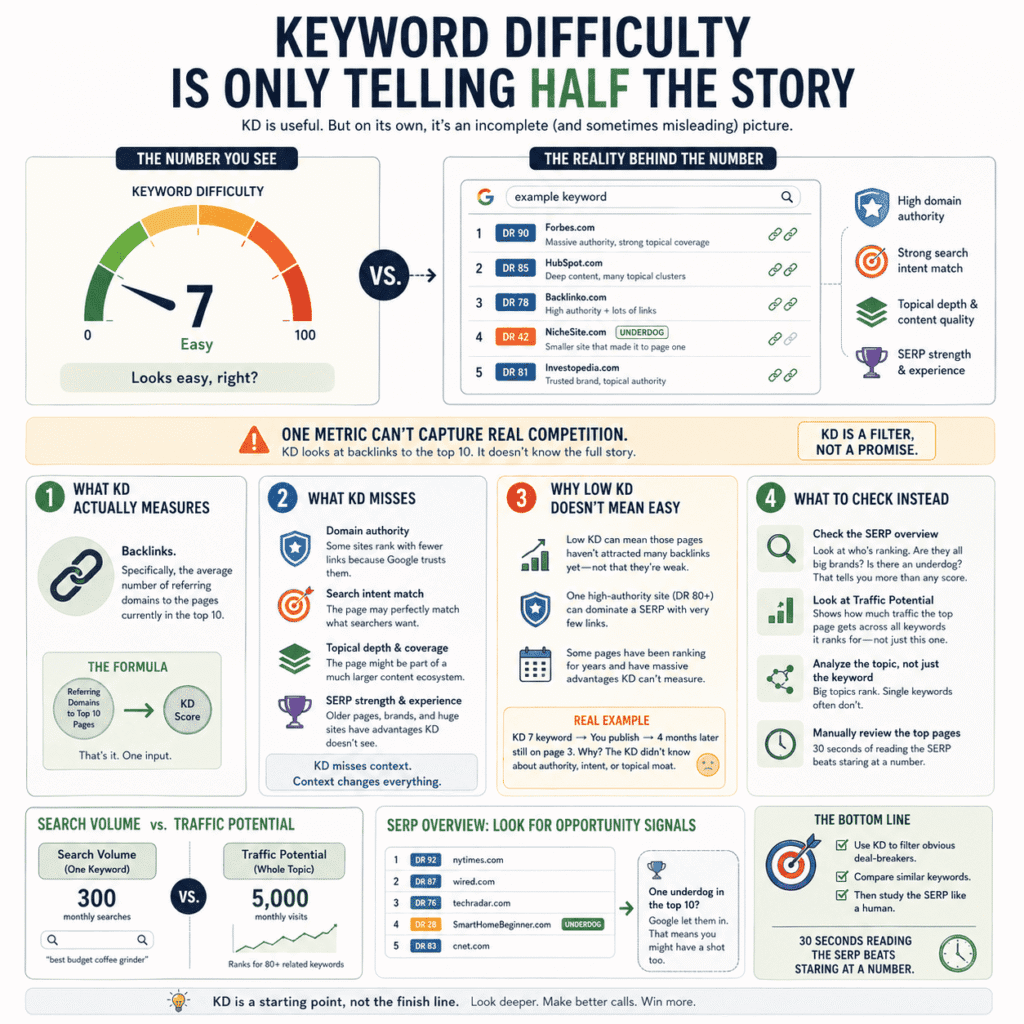
Every beginner does the same thing. They open Keywords Explorer, type something in, and immediately look at the KD score. Under 20? Good. Over 50? Skip it. It feels like a system. It’s not really a system — it’s a shortcut that will quietly mislead you for months if you don’t understand what KD is actually counting.
Here’s what it counts: backlinks. Specifically, the average number of referring domains pointing at the pages currently sitting in the top 10 for that keyword. That’s the whole formula. Not content quality. Not how well the page matches what the searcher actually wants. Not whether the sites ranking there have been around for a decade and have 200,000 pages indexed. Just — backlinks to the top 10. One number, one input.
Which means KD is often right in a general sense and wrong in the specific sense that matters to you.
The classic trap for anyone using Ahrefs for beginners keyword research goes like this. You find a keyword with a KD of 7. You write the post. You wait. Four months later it’s on page three and you’re confused because the difficulty score told you this was winnable. What you didn’t check — what almost nobody checks the first time — is who’s actually sitting in those top 10 spots. Sometimes a low KD just means those pages haven’t attracted many backlinks yet. It doesn’t mean they’re weak. One of them might be from a site with a DR of 90 that Google trusts so completely it barely needs links to rank for anything in your niche. Ahrefs can’t fit that context into a single number. No tool can.
This is the part that took me an embarrassingly long time to internalise. Low KD is not permission to rank. It’s just an absence of a specific obstacle. There are other obstacles. You have to go look for them manually.
What actually helps more than obsessing over KD is looking at Traffic Potential — which is buried slightly in the interface and gets far less attention than it deserves. Unlike search volume, which tells you how often a keyword gets searched, Traffic Potential shows you how much traffic the current top-ranking page gets across all the keywords it ranks for. The difference can be startling. A keyword might show 300 monthly searches but the page ranking first is pulling 5,000 visits because it ranks for 80 related variants at the same time. That’s the real prize — not the keyword, but the topic. KD doesn’t show you that.
The other habit worth building early: before you decide whether to target a keyword, open the SERP overview in Ahrefs and actually look at who’s ranking. Not the scores — the sites. Are they all publications you’ve heard of? Is there a smaller, scrappier site in there that somehow made it onto page one? Because one underdog in the top 10 tells you more about whether you have a shot than any metric does. It means Google let someone in who wasn’t supposed to be there. That happens more than the KD score implies.
Use KD for what it’s actually good at — eliminating obvious dead ends and doing rough comparisons between similar keywords. A KD of 9 versus a KD of 62 on otherwise equal keywords? Yes, that gap is real and meaningful. But a KD of 15 is not a promise. It’s just one data point from a formula that doesn’t know anything about your site, your niche, or the specific pages you’re up against.
Go look at those pages yourself. Thirty seconds of actually reading the SERP is worth more than staring at the number.
The Part Nobody Warns You About
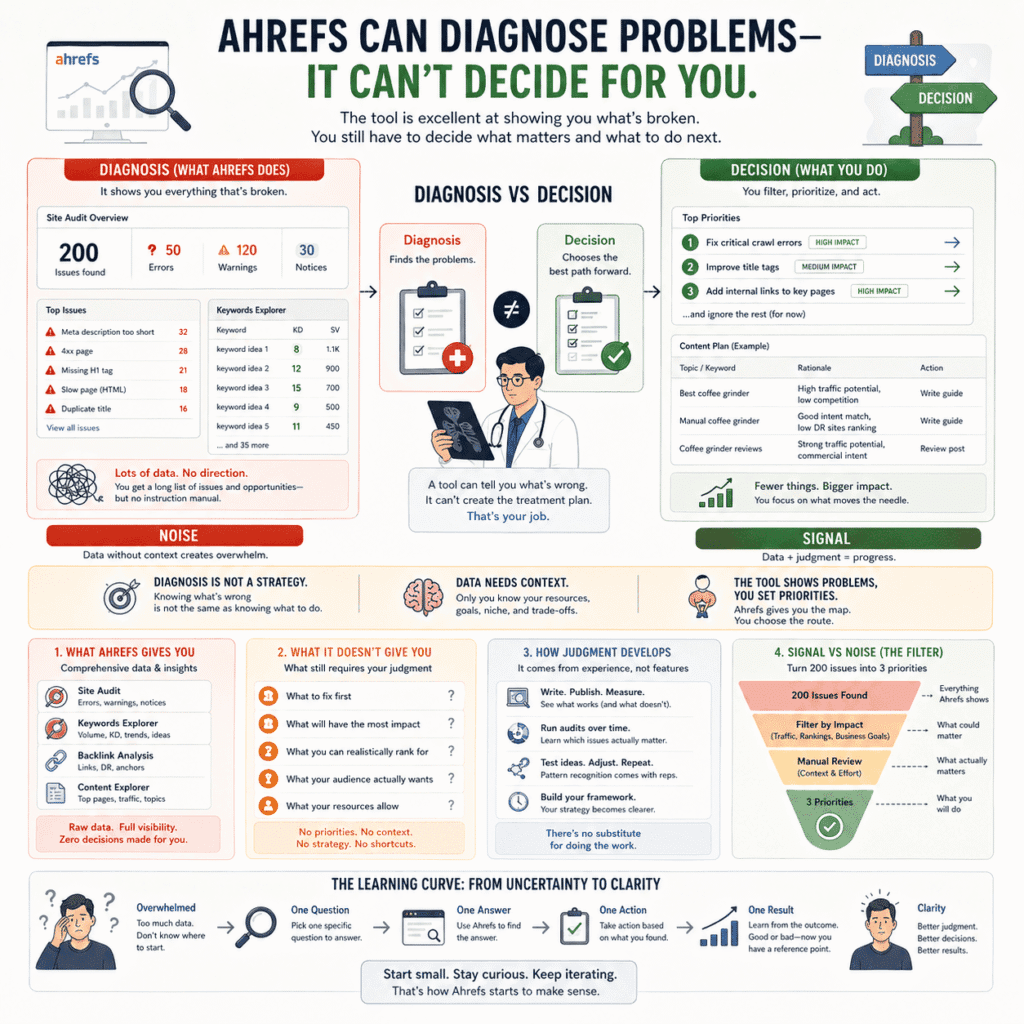
Ahrefs will show you everything that’s broken. It will not tell you what to do about it.
That sounds obvious written down. It didn’t feel obvious the first time I ran a site audit and watched the screen fill up with errors, warnings, and issues across four different categories — each one linking to another page explaining why it matters, each explanation raising two more questions I didn’t have answers to. The tool is extraordinarily good at diagnosis. It has no opinion whatsoever about treatment.
This is the part that doesn’t make it into the tutorials, probably because it’s not a feature. It’s an absence of a feature. And absences are hard to demonstrate in a YouTube walkthrough.
What actually happens to most beginners — and this is almost universal — is something like this. You run your first site audit. Ahrefs comes back with 200 issues. Some are red, some are orange, some are just informational. You don’t know which ones Google actually cares about, which ones are cosmetic, which ones would take a developer to fix, or which ones have been sitting there for two years on every successful site in your niche without causing any visible damage. You just have a list. A long, slightly alarming list. And no instruction manual for what to do with it.
The same thing happens in Keywords Explorer. You find 40 keywords that look promising. Now what? Which one do you write about first? Which ones can realistically rank given where your site is right now? Which ones are too similar to each other to target separately? Ahrefs doesn’t answer any of that. It just shows you the 40 keywords and waits.
This isn’t a criticism of the tool, to be clear. Ahrefs was never designed to make decisions for you. It was designed for people who already have a framework for making decisions and need better data to inform them. The problem is that most beginner content — including a lot of Ahrefs for beginners guides — skips over this entirely and goes straight to “here’s how to find low-competition keywords” without acknowledging that finding them is actually the easy part.
The harder part is developing the judgment to know what to do with what you find.
And that judgment doesn’t come from the tool. It comes from writing posts and watching what happens. From noticing that the keywords you were most confident about didn’t rank, and the ones you almost skipped did. From running a site audit three months in a row and starting to recognise which issues actually moved when you fixed them and which ones sat there unchanged making no apparent difference. You learn to read Ahrefs the same way you learn to read anything — by spending time with it until the signal separates from the noise.
The practical implication of all this is worth saying directly: if you’re brand new to SEO and brand new to Ahrefs, the tool is going to surface more uncertainty than clarity for the first month or two. That’s not a malfunction. That’s just what it’s like before you have enough context to interpret what you’re seeing. A blood test result means nothing to someone who’s never seen one before. Give it to a doctor and it tells a story. Ahrefs data is the same — it needs someone with enough context to read it properly, and for a while, that person isn’t you yet.
That’s not an insult. It’s just the learning curve nobody draws on the diagram.
The thing that actually shortens it isn’t watching more tutorials or reading more documentation. It’s picking one specific question, finding the answer in Ahrefs, acting on it, and seeing what happens. Then doing that again. The tool starts making sense not because you studied it but because you used it on something real and got a result — good or bad — that gave you a reference point.
Start there. One question. One answer. One action.
Everything else in Ahrefs gets easier once you have a few of those reference points to work from.
Related: Getting lost in the data without a clear action plan is one of the [common mistakes that slow beginners down] — and it shows up in SEO just as much as anywhere else in marketing.
Three Things Worth Learning First, Three Things That Can Wait
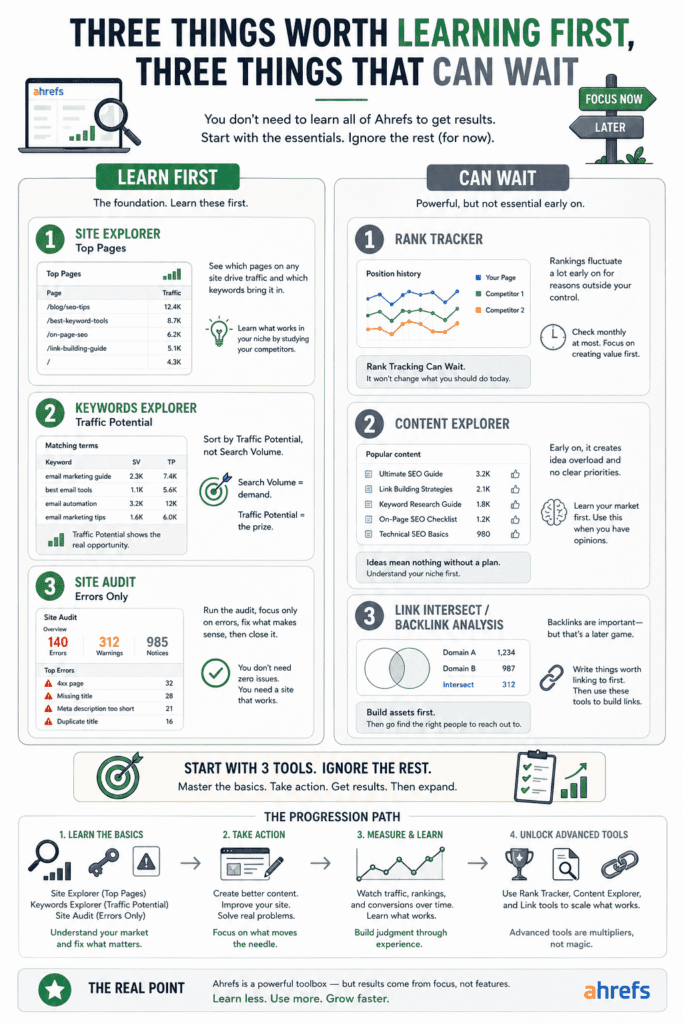
Every Ahrefs tutorial online tries to teach you the whole thing at once. Site Explorer, Keywords Explorer, Content Explorer, Rank Tracker, Site Audit, Competitive Analysis — all in the same video, all presented like you need to understand them before you can do anything useful. You finish the tutorial knowing what everything is called and having no clearer idea what to actually open on Monday morning.
So here’s an opinionated answer to a question most guides don’t bother asking: what should you actually learn first?
Site Explorer — but just the Top Pages report
Site Explorer is enormous. Most of it can wait. The one corner worth living in early is the Top Pages report — it shows which pages on any site are pulling organic traffic and which keywords are responsible. That view, run on two or three competitors you actually care about, will teach you more about what works in your niche than any keyword research session. Don’t touch backlink analysis yet. Don’t go near Paid Search. Just Top Pages, on sites you’re already jealous of. Start there.
Keywords Explorer — and specifically, stop looking at search volume first
The default beginner move in Keywords Explorer is to search a term, sort by search volume, and work down the list. This reliably produces a list of keywords that are either too competitive, too broad, or both. The metric worth sorting by instead is Traffic Potential — it shows you what the actual traffic opportunity looks like if you rank, not just how often people type the phrase into Google. Search volume tells you about demand. Traffic Potential tells you about the prize. They’re different numbers and they tell different stories.
Site Audit — run it, note the errors, then close it
Run the audit once. When it comes back with 140 issues don’t try to fix all of them. Look only at what’s flagged as errors — not warnings, not informational notices, just errors — and fix the ones that make obvious sense for a site at your stage. Then genuinely close it and come back in a month. The trap is treating Site Audit like a checklist that needs to reach zero. It doesn’t. Some of what it flags will be irrelevant to a new site with 15 posts and 200 monthly visitors. The audit doesn’t know that. You have to.
Now the things that can wait — and I mean actually wait, not “deprioritise slightly.”
Rank Tracker
If your site is under six months old, checking keyword rankings regularly is mostly an anxiety generator dressed up as productivity. Rankings at that stage move around constantly for reasons that have nothing to do with anything you did or didn’t do. Set it up if you want the data for later, but check it monthly at most. Opening it every few days is like weighing yourself three times a day while on a diet — the fluctuations tell you nothing useful and they mess with your head.
Content Explorer
Content Explorer is genuinely one of the more interesting tools in Ahrefs for beginners — once you know your niche well enough to use it properly. Early on it just generates volume. You’ll come out of a session with 80 content ideas, no framework for prioritising them, and a vague sense that you should be writing more than you are. Learn your market first through Site Explorer and Keywords Explorer. Come back to Content Explorer when you already have opinions about what works — it’ll make a lot more sense when you’re not starting from zero.
Link Intersect and backlink analysis
Backlinks matter. Building them is slow, hard, and a completely separate discipline from learning to use Ahrefs. The backlink tools inside the platform are excellent — for people actively running link building campaigns who know exactly what they’re looking for. For a beginner still figuring out what to write and why, spending time in Link Intersect is like buying professional climbing gear before you’ve decided if you like hiking. Write things worth linking to first. Then come back and use these tools to figure out who to contact.
The real point underneath all of this is simpler than it sounds. Ahrefs is large because it was built for many different types of users with many different workflows. You don’t have many workflows yet. You have one site, a niche you’re still learning, and a handful of questions you need answered. Let your questions decide which parts of the tool you open — not the other way around. The rest of it will still be there when you need it.
Related: If paid search is part of your workflow alongside organic, [Semrush] handles that side of things better than Ahrefs does — it’s worth knowing the difference before you choose.
Your First 30 Minutes in Ahrefs — Do This, In This Order
Most people’s first session in Ahrefs is a disaster of good intentions. They open five tabs, run a site audit, start a keyword research session, get distracted by their Domain Rating, watch a tutorial halfway through, and close the browser forty minutes later having made zero decisions and feeling vaguely worse about their SEO than when they started.
Here’s a better way to spend the first thirty minutes.
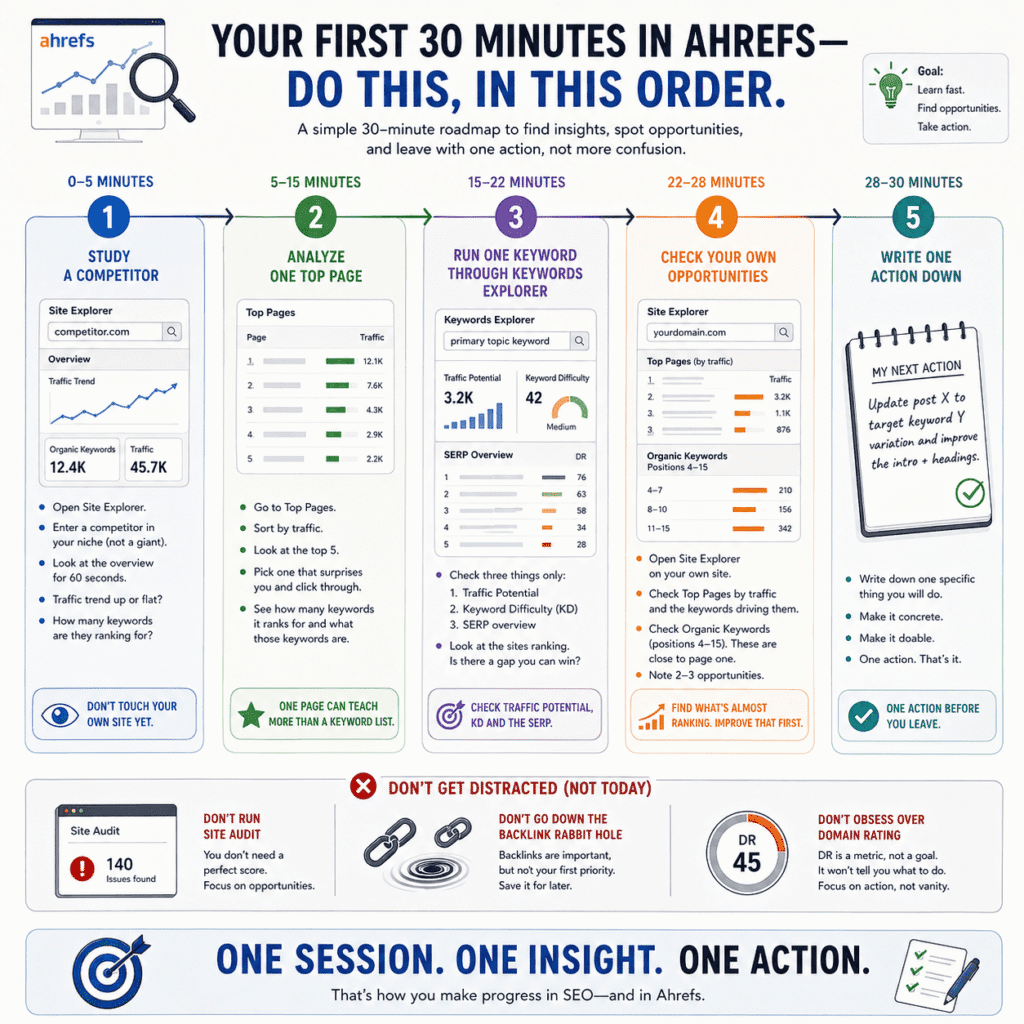
Minutes 0–5: Don’t touch your own site yet
Open Site Explorer. Type in a competitor — not a massive publication, not Forbes, but someone in your niche who’s clearly figured something out. A blog or site whose content keeps showing up when you search for things you want to rank for. Someone you’re mildly annoyed by in a productive way.
Don’t audit them. Don’t analyse their backlinks. Just look at the overview for sixty seconds. Traffic trend going up or flat? Roughly how many keywords are they ranking for? You’re not looking for anything specific yet. You’re just orienting yourself to what the data looks like on a site that’s working.
Minutes 5–15: Find the one page that’s doing the heavy lifting
Click into their Top Pages report. This shows you which pages are pulling the most organic traffic and which keywords are responsible. Sort by traffic. Look at the top five results.
Pick one that surprises you — a post that’s getting far more traffic than you’d expect for its topic — and click through to it. Look at how many keywords it ranks for. Look at what those keywords are. Notice whether they’re all variations of one core topic or spread across multiple different subjects. You’re not trying to copy this page. You’re trying to understand why one piece of content can do that much work. That understanding is worth more than any keyword list.
Minutes 15–22: Run one keyword through Keywords Explorer
Take the primary topic from that competitor page — the main thing it’s about — and put it into Keywords Explorer. Look at three things and three things only: Traffic Potential, Keyword Difficulty, and the SERP overview at the bottom.
Traffic Potential tells you the realistic ceiling if you rank. KD gives you a rough sense of competition. The SERP overview tells you who you’re actually up against — look at the sites ranking, not just the scores. Are any of them small? Are any of them recent? Is there a page in the top five that looks genuinely weaker than the others? That’s the real competitive analysis. Thirty seconds of looking at actual pages tells you more than staring at the KD score.
Don’t go down the rabbit hole of related keywords yet. One topic, three data points, SERP check. Done.
Minutes 22–28: Look at your own site — briefly
Now open Site Explorer on your own domain. Look at two things. First, your Top Pages by traffic — which of your posts is pulling the most visitors and what keywords are responsible? Second, your organic keywords report filtered to positions 4 through 15. These are the posts that are almost ranking — close enough to page one that a targeted improvement could actually move them. Note two or three of them. These are your first real opportunities and they’re more valuable than starting from scratch with a new keyword.
Don’t run the site audit yet. Don’t look at your backlinks. Don’t check your DR. None of that is actionable in your first session and all of it will distract you from the two things you just found that actually are.
Minutes 28–30: Write one thing down
Before you close the tab, write down one specific thing you’re going to do based on what you just saw. Not a vague intention — not “do more keyword research” or “improve my SEO.” Something concrete. Update this post to target this keyword variation. Write a post on this topic the competitor is ranking for that you haven’t covered. Fix the title tag on this page that’s sitting in position 8.
One action. Written down. Session over.
When the Numbers Stop Making Sense
There’s a specific moment most people hit with Ahrefs — usually somewhere between week two and week four — where the numbers stop adding up and you start wondering if you’ve been misreading everything from the beginning.
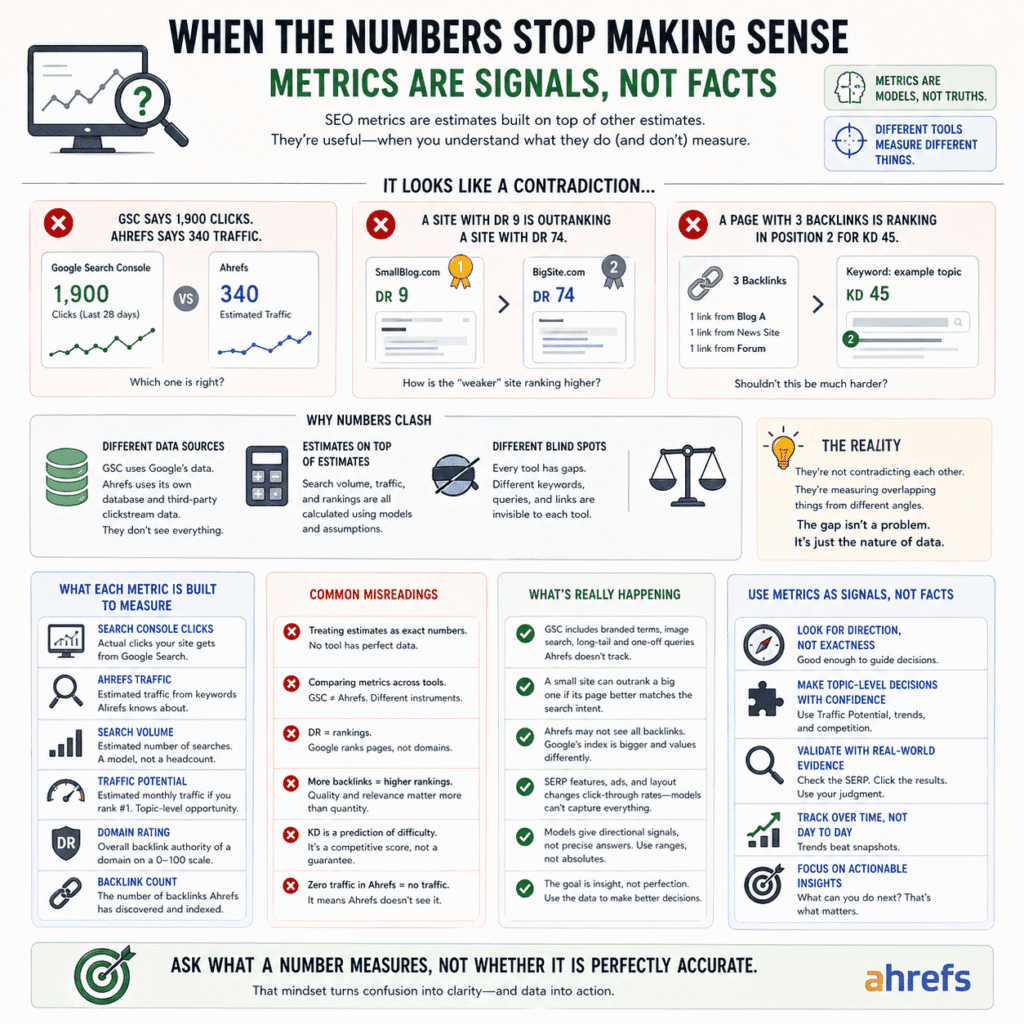
It goes something like this. Your Google Search Console says your site got 1,900 clicks last month. Ahrefs says your estimated traffic is 340. A competitor you’ve been watching has a Domain Rating of 9 and is outranking a site with a DR of 74. A page with three backlinks is sitting in position two for a keyword with a KD of 45. You wrote a post four months ago that Ahrefs shows as getting zero traffic, but GSC shows it getting impressions every week. None of it fits the model you’ve been building in your head. And the natural response — the almost unavoidable response — is to assume you’re doing something wrong.
You’re probably not doing anything wrong. The numbers are just more approximate than the interface makes them look.
Ahrefs doesn’t hide this exactly, but it doesn’t lead with it either. Everything you see in the tool is an estimate built on top of other estimates. Search volume comes from a model that combines Google Keyword Planner data with clickstream data from a sample of real users — neither of which gives you a clean, complete picture. Traffic estimates are calculated using ranking positions and assumed click-through rates, which swing wildly depending on what the actual SERP looks like. If there’s a featured snippet, a People Also Ask section, and three ads above the fold, the click-through rate for position three looks nothing like the baseline model assumes. Domain Rating is built on Ahrefs’ own backlink index, which is genuinely large but still a partial view of the web.
The GSC gap is the one that confuses people in Ahrefs for beginners most consistently, so it’s worth being specific about. GSC counts every click your site gets from Google search — branded queries, image search, queries Ahrefs doesn’t have in its database, long-tail searches that show up once a month. Ahrefs estimates traffic based only on keywords it knows about, at positions it has recently crawled. They are not measuring the same thing. They’re measuring overlapping things from different angles with different blind spots. Once you actually accept that — not intellectually acknowledge it, but genuinely accept it — the gap between them stops feeling like an accusation and starts feeling like data. Specifically: here’s roughly how much of your traffic is invisible to third-party tools.
The DR versus rankings thing is a different kind of confusion and honestly a more interesting one. A site with a DR of 11 sitting above a DR of 68 looks like a glitch until you remember that Google ranks pages, not websites. DR is a domain-level score. It tells you something about the overall backlink authority of the site, but nothing about whether that specific page, on that specific topic, written at that specific level of depth, actually answers what the person searching is looking for. A small site with one genuinely excellent page can beat a large site with a mediocre one. It happens constantly. Ahrefs’ DR doesn’t know the difference between a good page and a bad one. Google does — or at least it tries to.
The backlink numbers that don’t seem to match rankings are messier to explain but follow the same basic logic. Ahrefs crawls continuously but doesn’t see everything, and what it does see it doesn’t always weight the same way Google does. Three backlinks in Ahrefs might be ten backlinks in Google’s index — from sources that carry more signal than the raw count implies. Or the three links Ahrefs can see might be from domains Google has essentially stopped trusting. The count is less meaningful than most beginners assume. The quality and context of those links is the part that matters and the part that no tool can fully surface.
What took me a while to internalise — longer than I’d like to admit — is that the right question isn’t “is this number accurate.” It’s “what is this number actually built to measure.” Those sound similar but they produce completely different responses to confusion. The first question leads you to distrust the tool. The second leads you to understand it better. Traffic Potential is reliable enough to make topic-level decisions. Exact search volume for a single keyword is not reliable enough to bet your content calendar on. DR is useful for quickly sorting sites by rough authority. DR is not useful for predicting whether a specific page will rank.
Every metric has a job it was designed for and jobs it wasn’t. The numbers stop making sense when you give them the wrong assignment.
That’s not something you figure out by reading documentation. It’s something you figure out by spending three months being confused, noticing which numbers keep misleading you, and quietly adjusting how much weight you give them. The tool doesn’t get less confusing because you studied it harder. It gets less confusing because you used it on enough real things to develop a feel for where it tells the truth and where it approximates it.
There’s no faster route to that. Sorry.
Paying $129/Month as a Beginner — Honest Math
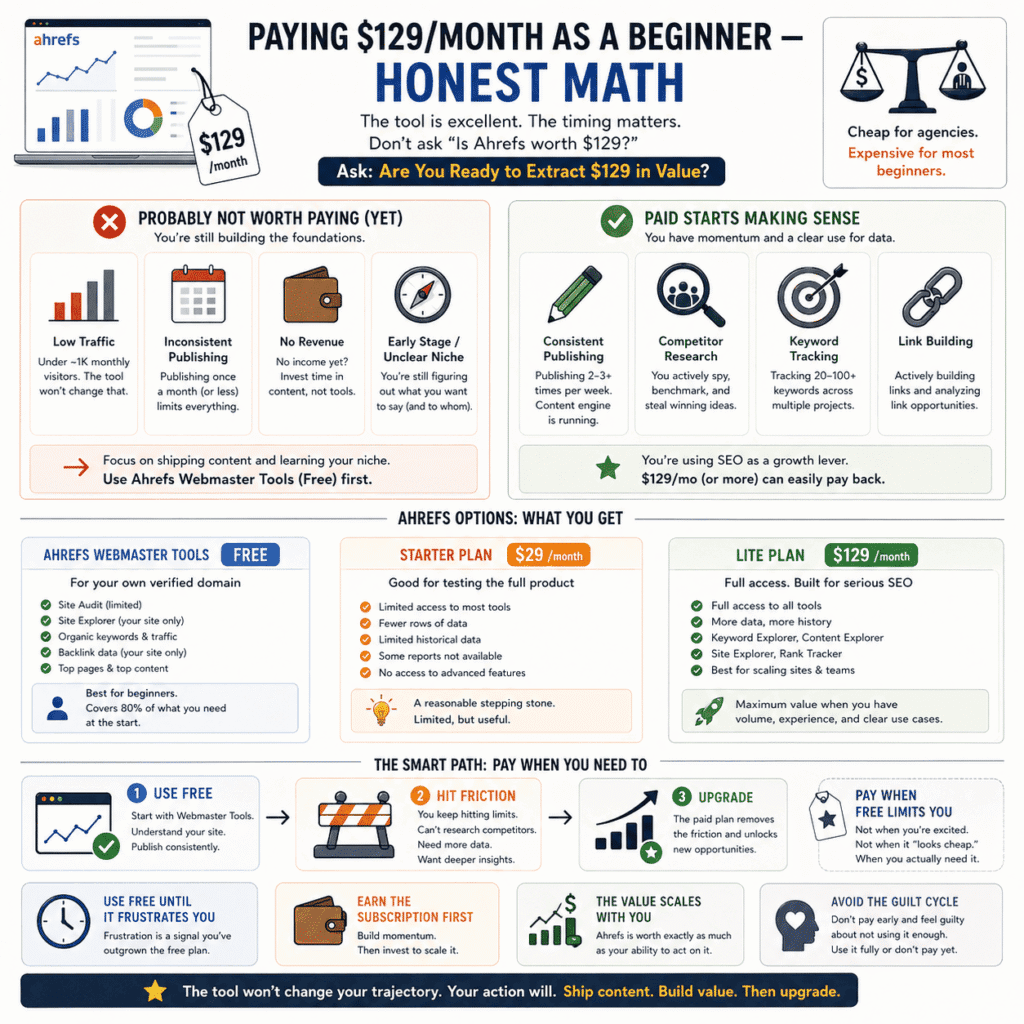
Before anything else: most articles about Ahrefs pricing have an affiliate link somewhere on the page. This one doesn’t. That matters because the honest answer to “should a beginner pay for Ahrefs” is frequently no, and that’s a hard answer to give when you’re earning 30% commission on every signup.
So. $129 a month. Is it worth it?
For a lot of beginners, not yet. And the “not yet” is doing real work in that sentence — this isn’t a criticism of the tool, which is genuinely excellent. It’s a timing problem. Ahrefs is worth exactly as much as your ability to act on what it shows you. If you’re publishing one post a month, still finding your niche, running a site with 300 visitors and no revenue, the subscription isn’t going to change your trajectory. A better keyword list doesn’t help if the bottleneck is that you’re not writing enough, or that you’re still figuring out what you’re actually trying to say.
The value scales with volume and momentum. Someone publishing three times a week, actively building links, tracking 50 keywords across two competing sites — that person is getting $129 worth of value easily, probably more. Someone opening the tool twice a month to poke around and feel productive is paying a lot of money for a dashboard they feel vaguely guilty about not using enough.
That’s a more common situation than anyone in the Ahrefs for beginners content space admits.
Here’s the thing almost every review buries or skips entirely: Ahrefs Webmaster Tools is free. Not a trial. Not a freemium version that cuts off after seven days. Free, permanently, for your own verified domain. You get Site Audit and Site Explorer data for your own site — which means you can see what keywords you’re ranking for, what pages are getting traffic, and what technical issues need fixing. You can’t do open-ended keyword research or spy on competitors at scale. But for a beginner whose primary job right now is understanding their own site and publishing consistently, that’s actually most of what you need.
Most beginners don’t need a $129/month plan. They need Ahrefs Webmaster Tools and a publishing schedule they can actually stick to.
There’s also a $29/month Starter plan that barely gets mentioned in most reviews — for reasons that probably have something to do with affiliate commission structures. It’s genuinely limited: fewer rows of data, restricted historical data, some reports locked off entirely. But if you’re at the stage where you want to feel out the full product before committing to a higher tier, it exists and it’s worth knowing about even if nobody’s incentivised to tell you.
The other framing worth sitting with: $129/month is cheap for what Ahrefs does and expensive for what most beginners actually extract from it. Those are both true at the same time. An agency running SEO for ten clients would laugh at $129. A blogger with a day job and 800 monthly visitors probably shouldn’t be spending it. The tool didn’t change between those two scenarios. The user did.
What I’d actually tell someone starting out — and this is genuinely what I’d say, not a softened version of it: start with Webmaster Tools. Use it until it frustrates you. Until you keep wanting to look at a competitor you can’t see, or research keywords outside your current content, or access data the free version won’t show you. That frustration is useful. It means you’ve grown into the tool rather than bought your way into feeling like you have. Pay when the free version is concretely in your way — not when you’re excited about SEO at 11pm on a Sunday and the annual plan looks reasonable.
Because here’s what actually happens when you subscribe too early. You open it enthusiastically for the first two weeks. Then life gets in the way. Then you open it once in week three to check something quickly. Then you notice the charge on your card in month two and feel a small, dull guilt about not using it more. Then you either cancel or decide to “really commit to it this month.”
Most people repeat that cycle two or three times before they’re actually ready.
Save yourself the guilt. Earn the subscription first.
Related: If you’re weighing up whether Ahrefs is even the right tool for your situation, it’s worth reading our [Semrush vs Ahrefs] breakdown before you commit to either subscription.
What “Getting Good at Ahrefs” Actually Looks Like
Most tutorials skip this part entirely. They show you how to use the features and leave you to figure out what progress is supposed to feel like — which means a lot of beginners spend months not knowing whether they’re getting better or just getting more comfortable being confused.
They’re different things. Here’s how to tell them apart.
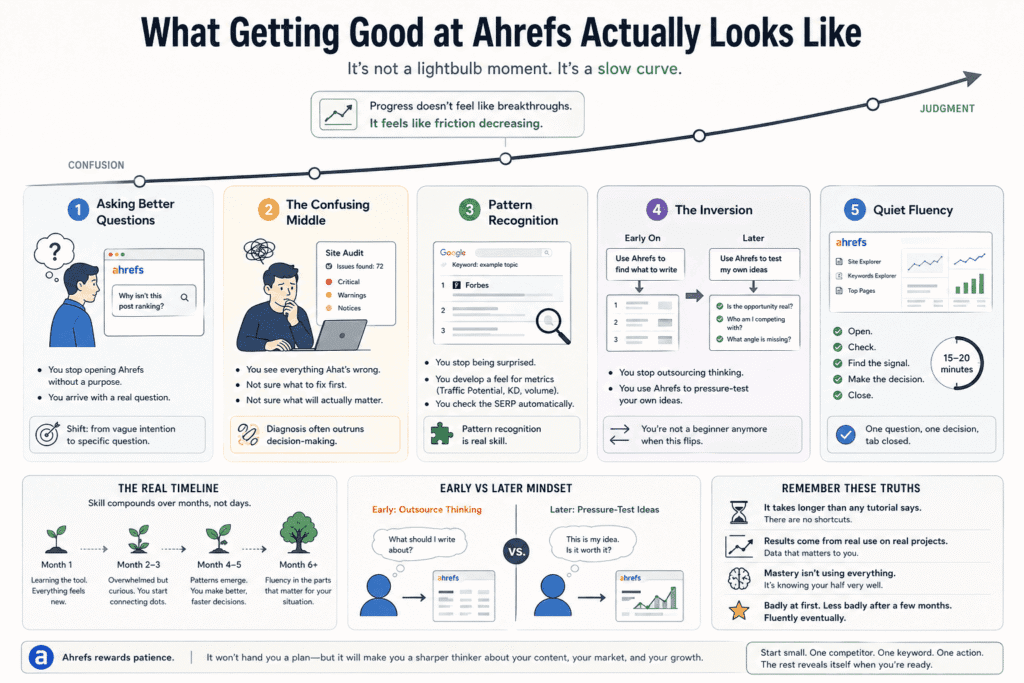
The earliest sign that something is shifting isn’t dramatic. It’s just that you start opening Ahrefs with an actual question. Not “I should probably do some SEO stuff” but something specific — why isn’t this post ranking, which of these two topics has more realistic traffic potential, where is this one competitor getting all their links from. That shift from vague intention to specific question is the first real sign you’re getting somewhere. The tool hasn’t changed. You have. And that change is worth more than learning five new features.
After that comes a phase nobody warns you about and it’s genuinely uncomfortable. You know enough to see everything that’s wrong — with your site, with your keyword strategy, with your content — but not quite enough to know what to fix first or whether fixing it will actually matter. Your site audit is full of issues you half-understand. Your keyword list has forty candidates and you can’t confidently prioritise any of them. It feels like getting worse at this, not better. It isn’t. It’s just that your ability to diagnose problems has outrun your ability to solve them. That gap is temporary. It closes. But it’s the phase where most people quietly give up, which is a shame because it means they quit right before the thing they were building toward.
The middle period — and for most people using Ahrefs for beginners content to self-teach, this runs from roughly month two to month five — is where the pattern recognition starts accumulating. You stop being surprised when a low-KD keyword has a Forbes result in position one. You develop a feel for what a Traffic Potential of 150 is actually worth versus one of 2,000. You click through to the actual SERP more automatically because you’ve been burned enough times by trusting the numbers without checking what’s behind them. None of this feels like learning. It feels like the tool getting slightly less annoying. That’s what skill acquisition actually feels like most of the time — not revelation, just friction slowly decreasing.
There’s a specific inversion that happens somewhere in there that’s worth paying attention to because it’s the clearest marker of real progress. Early on, you open Keywords Explorer hoping it’ll tell you what to write. You’re outsourcing the thinking to the tool. Later — and you’ll notice this quietly, not all at once — you arrive with a topic you’re already thinking about and you use Ahrefs to pressure-test it. Is the traffic opportunity real? Who am I actually competing with? What angle hasn’t been covered? You’ve gone from asking the tool what to do to using the tool to interrogate your own ideas. That’s the inversion. When it happens, you’re not a beginner anymore, even if you still feel like one sometimes.
What it looks like day to day once you’re there is genuinely undramatic. You open Site Explorer on a competitor. You look at what’s getting traffic recently. You check a few of those pages in Keywords Explorer, note something worth thinking about, close the tab, and go write. The whole thing takes fifteen or twenty minutes. There’s no moment where the dashboard suddenly makes sense. No feature that finally clicks. Just a quiet familiarity with a tool you’ve spent enough hours with that you stopped noticing you were using it.
That’s actually what good looks like. Fifteen minutes, a specific question, a decision made, tab closed.
The uncomfortable truth about the timeline: it takes longer than any course or tutorial will tell you, because no course or tutorial can give you the thing that actually does it — which is repeated contact with real data on a real site where the results actually matter to you. You can watch someone else use Ahrefs for twenty hours and still open it yourself and feel lost. The only thing that moves the needle is using it on your own stuff, making calls based on what you see, and living with the consequences long enough to know whether you called it right.
Badly at first. Less badly after a few months. Fluently eventually, in the specific corners of the tool that turned out to matter for your situation — probably not all of them, and that’s fine.
Most people who are genuinely good at Ahrefs have never opened half of it. They just know their half very well. That’s the version of mastery worth aiming for. Not comprehensive, not credentialed. Just functional enough to make better decisions than you would have made without it.
That’s the whole game, honestly.
Related: The question of whether Ahrefs is worth paying for is really a specific version of a broader question — [how to evaluate whether any marketing tool is worth the investment] at your current stage.
If there’s one thing worth taking from all of this, it’s that Ahrefs rewards patience in a way that most tools don’t. It doesn’t hand you a plan. It doesn’t tell you what to write or guarantee that anything you do will work. What it does — slowly, over months of actual use — is make you a sharper thinker about your content, your market, and the gap between where you are and where you want to be.
That’s not the pitch you’ll find on most Ahrefs review pages. But it’s the one that actually holds up six months in. Start small- One competitor, One keyword, One action. The rest of it reveals itself when you’re ready for it — and not before.
Related: Ahrefs is one piece of a larger puzzle — and if you want a clearer picture of [what actually moves the needle on traffic], it’s worth understanding the full landscape before you optimise any one part of it.
Disclosure: This article may contain affiliate links. If you make a purchase through these links, I may earn a commission at no extra cost to you. All opinions are based on hands-on testing and independent research.