

Why Small Business Emails Go to Spam in 2026 (and How to Fix It)
There’s a number your email platform shows you that feels reassuring and is almost completely misleading. Your delivery rate — that 97%, 98% figure at the top of every campaign report — tells you only that your email reached a server somewhere. Whether it reached an actual inbox is a different question, and for a lot of small businesses, the answer is worse than they think. Here’s what’s actually happening with email deliverability for small businesses in 2026, and what to do about it.
Table of Contents
Your Emails Might Be “Delivered” and Still Be Failing
There’s a number your email platform shows you that feels reassuring but is almost completely useless. It’s your delivery rate — that 97%, 98%, sometimes 99% figure sitting at the top of your campaign report. It looks like success. It isn’t.
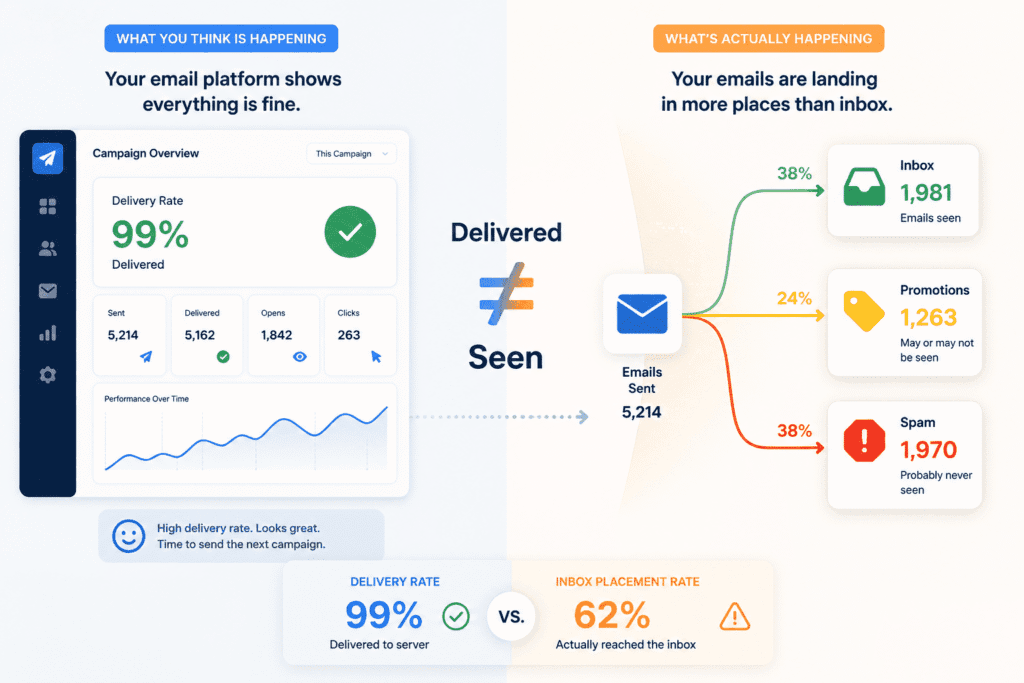
All that number tells you is that your email wasn’t bounced back. It reached a mail server. Beyond that, your platform has no idea what happened to it — and more importantly, neither do you. The distinction has a name: delivery rate measures whether your email reached a server. Inbox placement rate measures whether it reached an actual inbox. Most platforms report the first. Almost none show you the second.
Spam folders don’t send you a notification. Gmail doesn’t email you to say “hey, we quietly routed 400 of your subscribers to junk this morning.” It just happens. Your subscribers don’t see the email, don’t think to check spam, and you never find out. They didn’t unsubscribe. They didn’t complain. As far as your dashboard is concerned, everything went fine.
This is the part that catches most small business owners off guard — not that the problem exists, but how invisible it is. You keep sending. The platform keeps reporting healthy delivery rates. Open rates dip a little but nothing dramatic. Maybe you blame the subject line. Maybe you figure people are just busy. It can go on like this for months.
What you’re actually experiencing — though you’d have no reason to know it yet — is the difference between delivery and inbox placement. Delivery is whether your email arrived somewhere. Inbox placement is whether it arrived somewhere useful. This is one of the most misunderstood aspects of email deliverability for small businesses — most platforms track the first one, almost none of the tools small businesses actually use track the second.
And inbox placement can be quietly terrible while everything else looks fine.
The way most people find out they have a problem is embarrassing in retrospect. A client mentions they haven’t heard from you in a while. A customer calls to say they never got the invoice. You send a flash sale campaign that gets half the engagement of anything you’ve sent before and eventually someone on your list texts you: “just found your email in my spam, been going there for months.”
That’s not an early warning system. That’s damage control.
The tricky thing about deliverability issues is they rarely announce themselves. There’s no error, no red flag, no moment where something visibly breaks. It’s more like a slow puncture — you don’t notice until you’re already on the rim.
Why Email Deliverability for Small Businesses Is Harder Than Most Guides Admit
Your email platform is lying to you. Not maliciously — it just isn’t showing you the whole picture.
That 97% or 98% delivery rate at the top of your campaign report? All it confirms is that your email wasn’t bounced back. It reached a server somewhere. What happened after that — whether it landed in someone’s inbox, got buried in their spam folder, or vanished into a promotions tab nobody opens — your platform genuinely doesn’t know. And it’s not going to tell you that it doesn’t know.
Spam filters don’t file a report. Gmail doesn’t send you a heads up. There’s no notification, no error, no moment where something visibly breaks. Your subscribers don’t see the email, don’t check spam, don’t unsubscribe. They just never got it. And your dashboard still logs it as delivered.
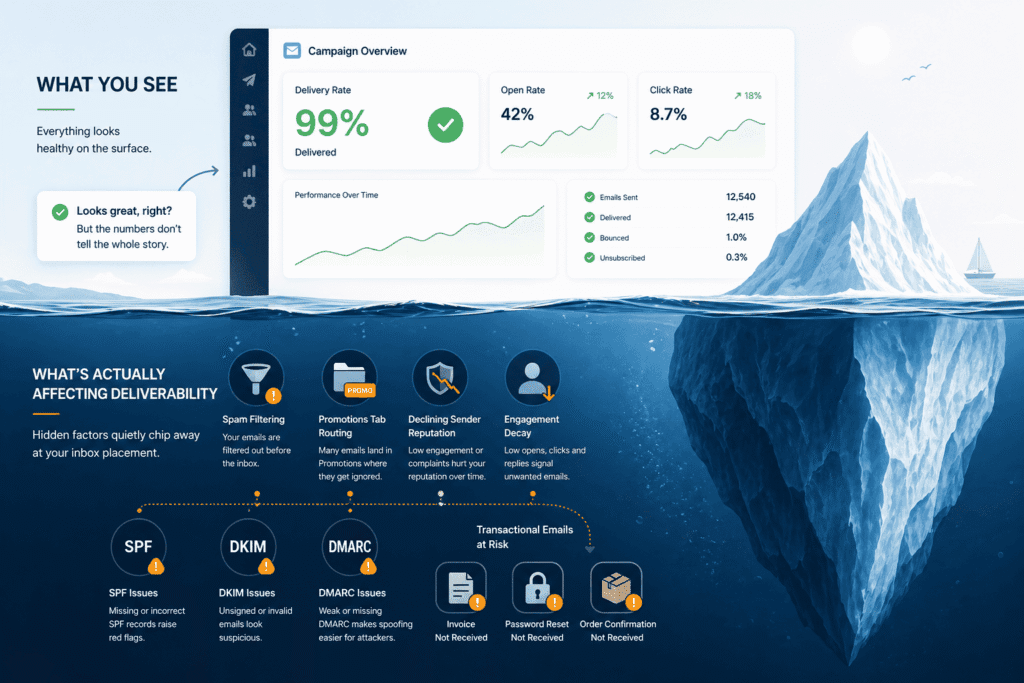
And this isn’t only a marketing email problem. Transactional emails — password resets, order confirmations, invoices, booking notifications — are just as vulnerable to deliverability failures, and the consequences are often more immediate. A customer who doesn’t receive their order confirmation calls your support line. A client who never gets the invoice doesn’t pay it. Deliverability issues don’t discriminate between the emails you send for marketing and the ones your business depends on operationally.
This is where a lot of small businesses get stuck without realising it. Open rates slip a little. You blame the subject line, or the time of day, or the fact that it went out on a Friday. You tweak a few things, send again, move on. Meanwhile a chunk of your list hasn’t seen a single email from you in months — and you’ve had no indication that anything is wrong.
The distinction that actually matters — and one that gets glossed over constantly in conversations about email deliverability for small businesses — is the difference between delivery and inbox placement. Delivery just means your email didn’t bounce. Inbox placement means it ended up somewhere a real person could actually find it. Most platforms measure the first. Almost none of the tools a typical small business uses measure the second.
Those are not the same thing. Not even close.
The way most people discover they have a problem is almost always retrospective. Someone emails you directly saying they haven’t heard from you in weeks. A loyal customer misses a promotion and mentions it in passing. Or — and this one stings — you find out because a subscriber texts you to say your emails have been going to their spam for the past three months. Not one email. Three months of emails.
By that point you’re not diagnosing a problem. You’re doing damage control on one that’s been running quietly in the background for a long time.
That’s what makes deliverability genuinely difficult — it fails silently. No alarms, no obvious signal, nothing that forces you to stop and look. Just a slow, invisible erosion that’s easy to miss until it isn’t.
What Actually Changed in 2024–2026: Gmail, Yahoo and the New Rules Small Businesses Missed
Most small businesses either missed this entirely or heard about it and decided it didn’t apply to them. Both were reasonable conclusions at the time. Both turned out to be costly.
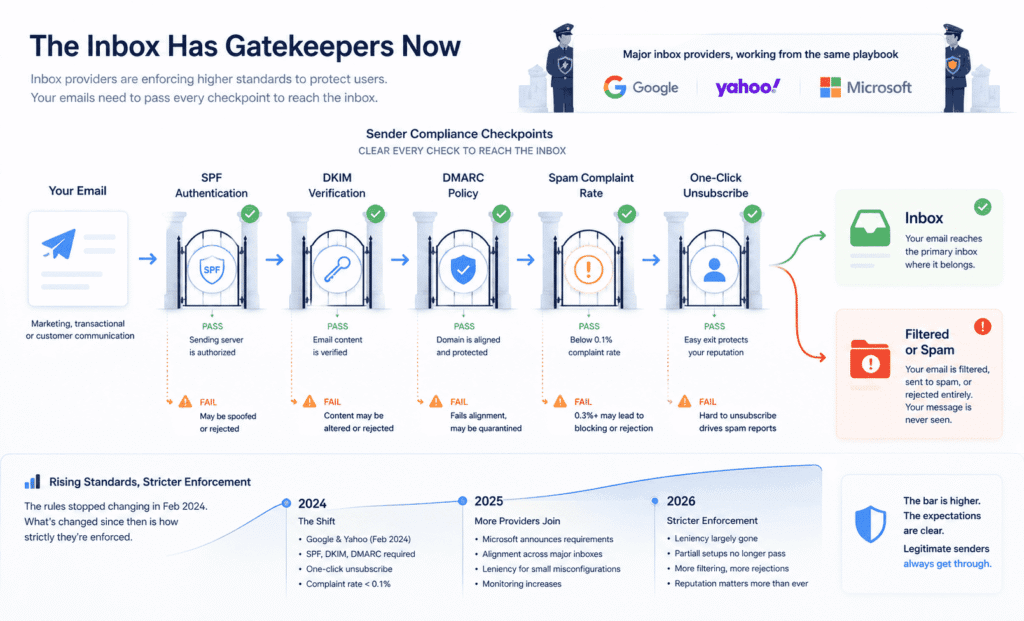
In late 2023, Google and Yahoo made a joint announcement that got a lot of attention in email marketing circles and almost none anywhere else. Starting February 2024, they were done treating authentication and spam compliance as recommendations. They were making them requirements — and unlike most tech company policy announcements, they actually followed through. The email industry coined a nickname for it almost immediately: Yahoogle. Which is either charming or ominous depending on how prepared you were.
The rules themselves weren’t complicated. Senders had to properly authenticate their emails using SPF, DKIM, and DMARC. They had to make unsubscribing genuinely easy — one click, no hoops. And they had to keep their spam complaint rate below 0.1%, with 0.3% being the point where emails stop being delivered at all and start being rejected outright.
Here’s where most small businesses checked out: Gmail defined a “bulk sender” as anyone sending more than 5,000 emails per day. If you’re a small business sending a weekly newsletter to 800 people, that threshold feels completely irrelevant. And technically, for the mandatory enforcement piece, it largely was.
But that’s a narrower reading than the situation deserves.
The 5,000-per-day threshold is where enforcement became compulsory — not where Gmail’s attention begins. Inbox providers have always evaluated every sender, regardless of volume. What changed is that the signals they now use to make those evaluations — authentication records, complaint rates, unsubscribe compliance — are being checked more rigorously for everyone, not just the big players. A small business sending 600 emails a week with broken DMARC records isn’t exempt from filtering. It’s just not being formally penalised under the bulk sender policy. The spam folder doesn’t make that distinction.
What’s also worth understanding is that the rules themselves stopped changing after February 2024. What’s changed since then is how strictly they’re being applied. In the early months, Gmail tolerated partial setups — an SPF record in place but DKIM missing for one of your sending tools, a DMARC record that technically existed but wasn’t properly configured. Those edge cases got a degree of leniency. By 2026, that leniency is largely gone. Issues that might have caused a mild dip in open rates two years ago are now causing clear, measurable deliverability failures.
This matters for small businesses in a very specific way. A lot of the initial coverage around the Gmail/Yahoo changes focused on email marketing platforms — Mailchimp, Klaviyo, HubSpot — and how they were updating their systems to help users comply. Many small business owners read that, assumed their platform had handled it, and moved on. Sometimes that assumption was correct. Often it wasn’t, because compliance isn’t just about what your email platform does — it’s about how your domain is configured, and that sits with you, not them.
And then in early 2025, Microsoft quietly released its own bulk sender requirements — which barely made the news outside of deliverability specialist blogs. That’s now three of the largest inbox providers operating from roughly the same playbook. The window for running a half-configured email setup without consequences has gotten considerably smaller.
The one-click unsubscribe requirement tends to get treated as a minor technical footnote, but the reasoning behind it is actually worth understanding. Making it easy for someone to leave your list is how you protect your sender reputation. A subscriber who unsubscribes costs you a contact. A subscriber who can’t find the unsubscribe button and clicks “Report Spam” instead costs you something much harder to recover — your standing with every inbox provider that email touches. Gmail introduced this requirement specifically to give disengaged subscribers a less damaging exit. Used correctly, it works in your favour.
For small businesses navigating email deliverability, the uncomfortable reality is that the bar for being treated as a legitimate sender shifted significantly in 2024 — and has only gotten stricter since. Large businesses adapted quickly because they had people watching for exactly this kind of change. Small businesses largely didn’t, through no real fault of their own. The gap that created is still open, and for many, it’s a quiet but meaningful reason why deliverability has felt harder to maintain over the past year or two without an obvious explanation for why.
Related: If you’re reconsidering your platform in light of these changes and want to know how the most popular small business options compare on compliance and deliverability features, our Constant Contact vs MailerLite comparison covers exactly that.
The Authentication Foundation: SPF, DKIM and DMARC Explained for Non-Technical Owners
Late 2023, Google and Yahoo made a joint announcement. The email marketing world paid close attention. Almost everyone else didn’t.
Starting February 2024, both platforms were done treating proper email authentication as a suggestion. It was now a requirement — and unlike most tech policy announcements that quietly fade into irrelevance, they actually enforced it. The email industry gave it a nickname almost immediately: Yahoogle. Which tells you something about how the people closest to this space felt about it.
The requirements weren’t technically complicated. Authenticate your emails properly using SPF, DKIM, and DMARC. Make unsubscribing genuinely easy — one click, no confirmation pages, no buried links. And keep your spam complaint rate below 0.1%, because at 0.3% your emails don’t go to spam anymore — they get rejected entirely.
Most small businesses read “bulk sender” — Gmail’s threshold being 5,000 emails per day — and immediately stopped reading. Understandably. If you’re sending a weekly update to 600 customers, that number feels like it belongs to a different conversation entirely.
But here’s the thing that gets lost in that reading: the 5,000-per-day threshold is where mandatory enforcement begins, not where Gmail’s attention begins. Inbox providers have always filtered everyone. What changed is that the criteria they use to make those filtering decisions — authentication records, complaint rates, unsubscribe headers — are now being checked more aggressively across the board. Your send volume determines whether you fall under the formal policy. It doesn’t determine whether spam filters are paying attention to you.
What’s shifted most noticeably between 2024 and now isn’t the rules themselves — those haven’t changed. It’s the tolerance for imperfect compliance. In the early months of enforcement, Gmail gave some leniency to partial setups. An SPF record in place but DKIM missing on one of your sending tools. A DMARC record that existed but wasn’t properly aligned. Those gaps used to produce mild, easy-to-miss dips in performance. In 2026, the same gaps produce clear, measurable deliverability failures. The runway for “good enough” has shortened considerably.
There’s a specific misconception worth naming here, because it’s common and it causes real damage. When the Gmail and Yahoo changes first rolled out, most of the coverage focused on email marketing platforms — how Mailchimp was updating its systems, how Klaviyo was handling compliance for its users, what HubSpot was doing automatically on your behalf. A lot of small business owners absorbed that coverage, concluded that their platform had sorted it out, and moved on.
Sometimes that was true. Often it wasn’t — because your platform handles its own sending infrastructure, but your domain’s DNS records are your responsibility. SPF, DKIM, and DMARC live in your domain settings. Your platform can tell you what to add. It cannot add them for you, and it usually can’t tell you when something is misconfigured or missing for a different tool you’re also sending from. That gap — between what your platform does automatically and what actually needs to happen at the domain level — is where a surprising number of small businesses are still sitting, unknowingly, right now.
Then in early 2025, Microsoft released its own sender requirements. This one got almost no mainstream coverage — it was mostly specialist newsletters and deliverability blogs that picked it up. But it matters, because it means the three largest inbox providers are now working from roughly the same framework. This is no longer a Gmail-specific conversation.
The one-click unsubscribe rule tends to get mentioned last and treated as a minor checkbox. It deserves slightly more credit than that. The reason Gmail introduced it wasn’t bureaucratic — it was strategic. When someone can’t find the unsubscribe link, the path of least resistance is hitting “Report Spam.” That spam report damages your sender reputation across every inbox provider your emails touch. An unsubscribe costs you a contact. A spam report costs you your reputation. Making it easy to leave is genuinely in your interest, not just a compliance requirement.
For anyone thinking seriously about email deliverability for small businesses in 2026, the most useful reframe is this: the changes that happened in 2024 didn’t create new problems — they made existing ones harder to hide. If your authentication was solid and your list was clean, you barely noticed. If it wasn’t, you started noticing in ways that were frustratingly difficult to trace back to a single cause. That’s still true today, and the tolerance for ambiguity is only getting lower.
Sender Reputation and List Hygiene: The Two Things That Quietly Destroy Email Deliverability for Small Businesses
Most people, when they hear “sender reputation,” assume it’s something that happens to bad actors — spammers, phishing operations, businesses doing something obviously wrong. The uncomfortable truth is that it degrades quietly for completely ordinary businesses doing completely ordinary things.
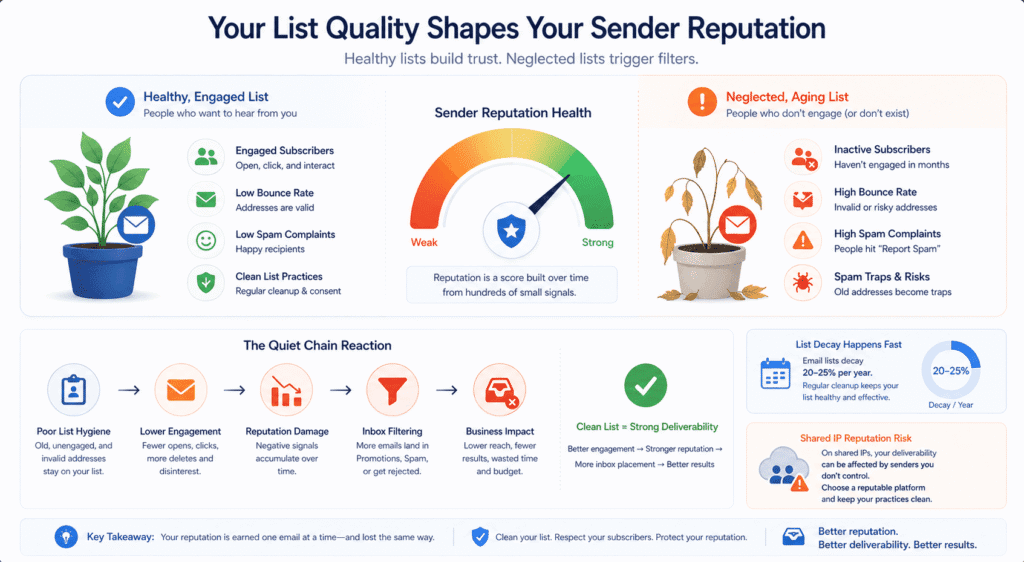
Here’s what reputation actually is in practical terms. Every time you send an email, Gmail, Yahoo, and Outlook are making a silent assessment. Not a dramatic one — just a quiet, ongoing tally of signals. How many people opened it. How many deleted it without looking. How many addresses didn’t exist. How many recipients hit “Report Spam.” None of this shows up in your email platform’s dashboard in a way that feels alarming. It just accumulates. And over time, that accumulation determines how much benefit of the doubt your emails get when they arrive — whether they sail into the inbox, drift toward the promotions tab, or get quietly deposited somewhere nobody checks.
What makes this particularly difficult for small businesses is the lag. Reputation doesn’t collapse suddenly. It erodes. You might have months of slow, invisible deterioration before anything looks noticeably wrong — and by the time open rates have dropped enough to feel like a real problem, the damage has usually been compounding for a while. Fixing it isn’t a weekend project either. A damaged domain reputation can take months of consistently clean sending behaviour to recover, during which every campaign you run is performing below what it should be.
The thing that causes most of this damage isn’t technical. It’s the list.
Small businesses accumulate email addresses the way they accumulate everything else — gradually, from everywhere, over years. The website opt-in form. The event sign-up sheet. The spreadsheet a former employee left behind. Old customers from five years ago. People who gave an address once to get a discount and have no memory of doing so. Most of this never gets cleaned because nobody thinks of an email list as something that needs maintenance. It just sits there growing, and a growing list feels like a good thing.
What nobody mentions is that email addresses decay at roughly 20–25% per year. People change jobs, abandon inboxes, switch providers. The address that was valid eighteen months ago might bounce today, or worse — might have been recycled into a spam trap. When you send to a list that hasn’t been cleaned in a couple of years, a meaningful chunk of what you’re sending is essentially going nowhere, and inbox providers are watching that happen and drawing conclusions about your practices.
Hard bounces — addresses that flat-out don’t exist — are the visible part of this problem. A high email bounce rate is bad, but at least it’s identifiable. You can see it in your platform’s reporting and act on it. The more insidious damage comes from addresses that don’t bounce at all but belong to people who haven’t opened anything in eighteen months.
There’s a specific reluctance a lot of small business owners have around deleting subscribers, and it’s completely understandable. You worked to build that list. Removing people from it feels like dismantling something. But the math runs the other way — a list of 800 genuinely engaged subscribers will outperform a list of 4,000 where 2,500 haven’t opened anything since 2023, on every metric that actually matters, including how inbox providers treat everything you send.
Spam traps deserve a mention here because they’re misunderstood in a specific way. Most people think of them as an obscure technical hazard that only affects bulk senders buying dodgy lists. In reality, spam traps end up in small business lists through completely mundane routes — old addresses that were legitimate when collected and later converted into traps, addresses scraped from public sources like event programmes or business directories, contacts imported from a spreadsheet whose origin nobody clearly remembers. Hitting one doesn’t cause a bounce. It sends a signal to the inbox provider that your list acquisition practices are questionable, which carries more weight than a standard hard bounce and is significantly harder to recover from.
There’s one more layer here that small businesses rarely think about until it becomes a problem: the difference between a shared IP and a dedicated IP. Most small businesses send email from shared IP addresses — meaning your emails go out from the same IP as other businesses using the same platform. In most cases this is fine, because reputable platforms manage their shared pools carefully. But it does mean your deliverability is partially tied to the behaviour of senders you’ve never heard of.
If another business on your shared IP runs a poorly managed campaign and generates a spike in spam complaints, your reputation can take a small hit through no fault of your own. This isn’t a reason to panic or immediately upgrade to a dedicated IP — dedicated IPs only make sense for businesses sending consistently high volumes, typically 100,000 emails per month or more, and require a warm-up period to build reputation from scratch. For most small businesses, staying on a shared IP with a reputable platform and keeping your own sending practices clean is the right call.
For anyone thinking seriously about email deliverability for small businesses, reputation and list hygiene aren’t really two separate topics that happen to be covered in the same section. Your list quality shapes your engagement. Your engagement shapes your reputation. Your reputation shapes whether the next email you send gets a fair look or gets filtered before anyone sees it. The businesses that figure this out tend to do so after something goes visibly wrong. The ones that don’t usually keep adjusting subject lines and send times, wondering why nothing quite works the way it used to.
Related: If list management and engagement segmentation are features you’re actively evaluating in a platform, our Constant Contact review covers how it handles both for small business senders specifically.
Good Businesses Get Flagged for Surprisingly Ordinary Mistakes
There’s a version of the spam problem that’s easy to understand — bulk mailers blasting unsolicited offers to purchased lists, phishing operations spoofing bank domains. Spam filters exist to catch those. What nobody mentions is how often they catch everyone else too.
The businesses with the most frustrating deliverability problems usually aren’t doing anything shady. They’re the ones who set something up three years ago and never went back to check it. Or made a completely reasonable decision that happens to look, to an automated filtering system with no capacity for context, exactly like something a spammer would do.
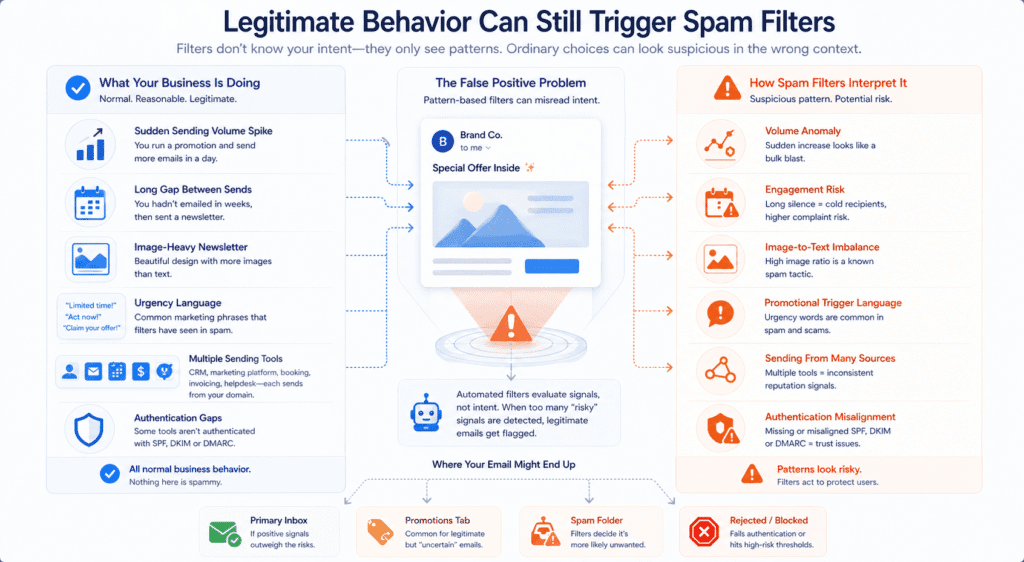
Sending volume is the obvious one. A small business runs a promotion, hasn’t emailed in six weeks, and sends to their full list in a single day — five times their normal volume. From a human perspective, that’s just a business running a sale. From Gmail’s perspective, it’s a sudden unexplained spike that looks indistinguishable from a spam blast. Spammers don’t warm up gradually and build sending history. They acquire a domain and immediately blast thousands of emails. So when a legitimate business mirrors that pattern — even for entirely innocent reasons — the filter doesn’t pause to consider intent. It just acts.
The silence that precedes a big send is often as damaging as the spike itself. Go quiet for two or three months, then come back with a newsletter to a list that’s been sitting untouched — and you’re sending to addresses that have gone cold or dead in the interim, to people who’ve forgotten they signed up, into an engagement environment that’s about as hostile as it gets. The spam complaints that follow aren’t because your email was bad. They’re because people with no memory of opting in treated your email exactly the way they’d treat spam — because from their perspective, that’s what it felt like.
Content is where things get genuinely unfair. Spam filters are trained on patterns, not intentions, and those patterns have been thoroughly poisoned by years of abuse. Words like “limited time,” “claim your offer,” “act now,” “you’ve been selected” — completely ordinary phrases in legitimate marketing — carry associations that filters have learned to treat with suspicion. Not because the words are inherently bad, but because they appear constantly in the emails filters were built to catch. A well-crafted promotional email can fail the same surface-level pattern checks as a scam simply because both use urgency language and exclamation marks and a call to action above the fold.
A SaaS company’s password reset emails kept getting flagged — the culprit being the phrase “suspicious activity detected,” a legitimate security warning that filters read as potentially threatening language. A password reset email. Getting caught by spam filters because it accurately described what it was. That’s the level of nuance — or lack of it — you’re dealing with.
Image-heavy emails are another one that surprises people. A beautifully designed newsletter with a large hero image, a branded header, and minimal body text looks polished and professional to anyone reading it. To a spam filter, a high ratio of images to text is a known evasion tactic — spammers used to hide their content inside images specifically to dodge keyword detection. That association got baked into filtering logic, and it largely stayed there even as filters grew more sophisticated in other ways. The email your designer spent two hours making look beautiful might be performing worse than a plain-text alternative nobody would call impressive — not because of the content, but because of how it’s constructed.
Then there’s the structural problem that almost nobody thinks about until it causes visible damage. Most small businesses, by the time they’ve been operating for a few years, are sending email from multiple tools simultaneously — a CRM, a marketing platform, a booking system, an invoicing tool, maybe a helpdesk. Each of those sends email from your domain. If your authentication records only cover some of them — which is the default, because nobody sets these things up together — emails from the unconfigured tools either fail authentication silently or get treated with suspicion by every inbox provider they touch. The tool still shows the email as sent. The dashboard still reports it as delivered. And somewhere downstream, it’s landing in spam or getting rejected outright.
Small business owners who set up email forwarding years ago are finding that forwarded messages now bounce because they fail authentication alignment checks — a feature that’s been a staple of small business setups for years and has quietly become a liability as enforcement has tightened.
For anyone trying to understand why their email deliverability feels unreliable despite doing nothing obviously wrong, this is usually the answer. Not a single dramatic failure, but an accumulation of ordinary decisions — a long gap between sends, a template built for aesthetics, a third-party tool nobody thought to authenticate — that each look slightly suspicious to a system making fast, pattern-based judgments at scale. The filter doesn’t know you’re a legitimate business. It only knows what your behaviour looks like. And sometimes, legitimate behaviour looks a lot like something else.
How to Diagnose Your Email Deliverability Problem Before You Try to Fix It
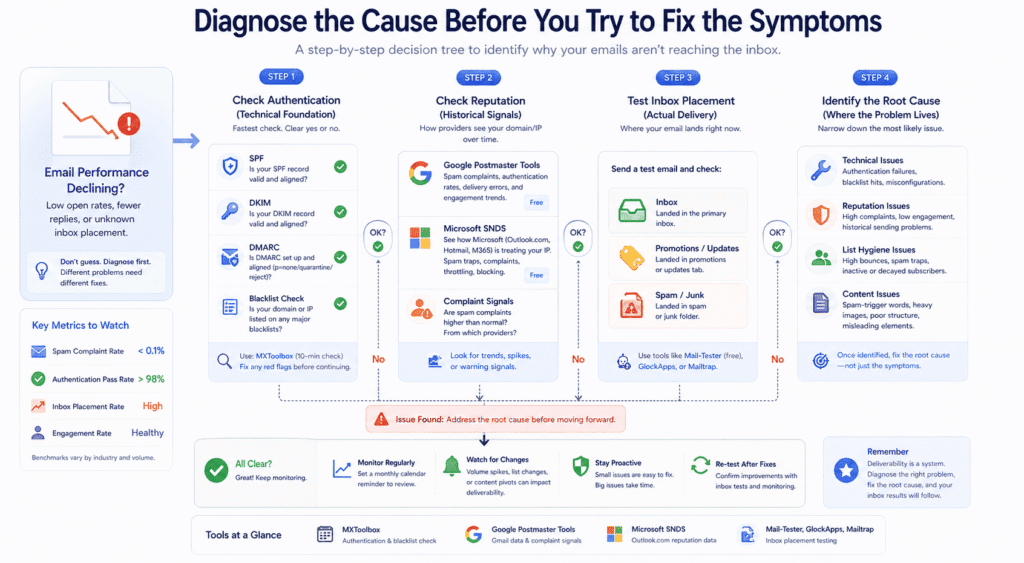
The instinct when something feels wrong with email performance is to start changing things. Different subject line. New template. Less frequent sending. Switch platforms. Some of this occasionally helps by accident. Mostly it just creates noise — you’ve changed too many variables at once to know what, if anything, actually made a difference.
The problem with guessing is that deliverability issues have genuinely different causes. Broken authentication is a different problem from a damaged domain reputation, which is a different problem from a list full of decayed addresses feeding spam traps. None of these have the same fix. Treating them interchangeably, or worse, treating symptoms while the actual cause sits untouched, is how businesses spend six months making incremental adjustments and end up more or less where they started.
So. Where to actually start.
Authentication is the fastest thing to check and the most clear-cut to interpret. Either your records are correctly set up or they aren’t — there’s no ambiguity. MXToolbox is the quickest route in: send a test email to their diagnostic address and you’ll get back a report showing whether your SPF, DKIM, and DMARC records exist, are correctly configured, and are aligned with each other. It simultaneously runs a blacklist check across the major databases. The whole thing takes about ten minutes and doesn’t require any technical background to read — red means something needs fixing, and it usually tells you what.
What MXToolbox won’t show you is how Gmail has been treating your domain over time. That’s a different question, and it needs a different tool.
Google Postmaster Tools is free, genuinely useful, and dramatically underused by small businesses. You verify your domain once — it involves adding a DNS record, which sounds more intimidating than it is — and after that you get access to data that Gmail doesn’t surface anywhere else. Spam complaint rates as Gmail actually measures them. Authentication pass rates. Delivery errors, broken down by type. The kind of information that makes a vague “something feels off with our email” problem suddenly a lot more specific.
A few things worth knowing before you set it up. Data only appears once you’re sending enough volume to Gmail addresses for patterns to be visible — very low-volume senders sometimes see empty dashboards, which is frustrating but not a sign the tool is broken. More importantly: Google quietly removed the Domain Reputation and IP Reputation dashboards from Postmaster Tools in September 2025.
If you’re reading older guides that tell you to check your “reputation colour” — High, Medium, Low, Bad — that specific feature no longer exists in its original form. It caused genuine confusion in the email community when it disappeared. The tool is still worth using, but it looks and behaves differently from how most guides describe it, which is something to be aware of before you go looking for a dashboard that isn’t there anymore.
For Outlook and Hotmail, the equivalent diagnostic is Microsoft’s SNDS — Smart Network Data Services — which shows how Microsoft’s servers are treating email from your IP, including spam trap hits, complaint rates, and whether your mail is being throttled. It’s less well known than Postmaster Tools, more technical to read, and almost nobody running small business email thinks to check it. If a meaningful portion of your list uses Outlook or Microsoft 365 email — which is extremely common in B2B contexts — skipping SNDS means you’re diagnosing half the problem at most.
Then there’s inbox placement testing, which is a different exercise from everything above and probably the most revealing. Authentication checks tell you whether your records are correct. Reputation tools tell you how providers have been scoring you historically. Inbox placement testing tells you where a specific email actually lands right now — not whether it was delivered, but whether it hit the inbox, the promotions tab, or spam — across different providers simultaneously.
Mail-Tester has a free version that’s useful for a quick check. GlockApps and Mailtrap go considerably deeper. The results are sometimes genuinely surprising: an email that lands cleanly in Gmail’s primary tab can simultaneously be sitting in Outlook’s junk folder with no visible explanation from the sender’s side.
What you’re trying to establish through all of this is which layer the problem lives in. Is it technical — something broken at the infrastructure level that’s causing authentication failures or blacklist hits? Is it reputational — historical sending behaviour that’s left Gmail or Yahoo treating your domain with suspicion? Is it the list — decayed contacts and disengaged subscribers quietly dragging your engagement signals down with every send? Or is it something in the content of the emails themselves triggering filter patterns before a human ever reads them?
For most small businesses going through this for the first time, the honest answer is usually more than one of these, with one root cause that’s been driving the others. List problems create reputation problems. Reputation problems make authentication issues harder to recover from. The diagnostic work isn’t about finding a single clean answer — it’s about understanding enough of the picture to fix things in the right order rather than the most obvious one.
The businesses that manage email deliverability for small businesses well over the long term aren’t necessarily the ones who set everything up perfectly from the start. They’re the ones who check periodically, notice when something has shifted, and understand what they’re actually looking at when they do. That’s a lower bar than it sounds — but it requires actually looking, which most people don’t do until something has already gone visibly wrong.
Fixing Deliverability: A Prioritized Checklist for Small Businesses
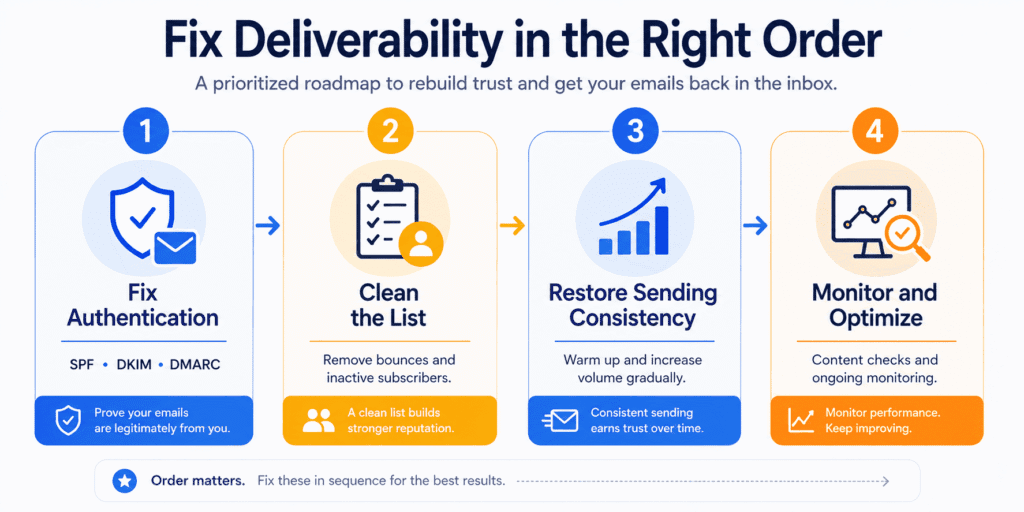
Before anything else — the order of what you fix matters almost as much as fixing it. Authentication problems and list problems and reputation problems all interact with each other, but they don’t have equal weight, and treating them as a flat list of equal tasks is how people spend weeks on the wrong things.
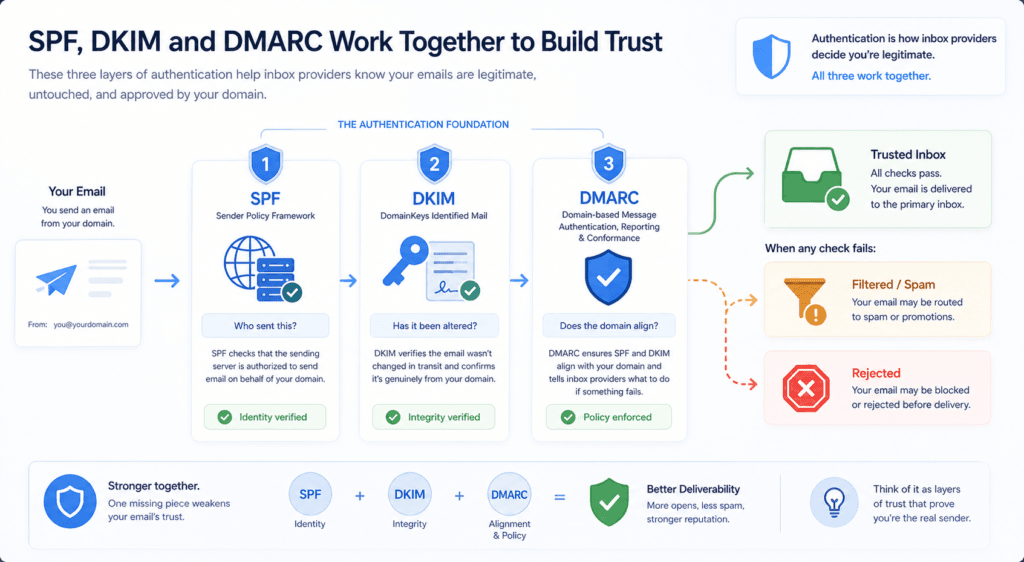
Start with authentication. Not because it’s exciting, but because nothing else you do matters much if inbox providers can’t verify that your emails are legitimately from you. SPF, DKIM, and DMARC are the three records that handle this — and the important thing to understand is that they work as a system, not independently. SPF tells receiving servers which systems are authorised to send on your behalf. DKIM adds a cryptographic signature proving the message wasn’t modified in transit. DMARC ties both together and tells inbox providers what to do when something fails.
Most people set up SPF first because it’s the simplest. Fine. But DKIM needs to be enabled for every tool that sends email from your domain — not just your main email platform. Your CRM. Your booking system. Your invoicing tool. Your helpdesk. Each one is sending email as your domain. If DKIM isn’t configured for them individually, those emails are going out unauthenticated, and most business owners have no idea this is happening because the tools still show everything as sent.
Two specific things that come up constantly and are worth naming directly. First, SPF has a hard cap of 10 DNS lookups. Go over that limit and SPF fails for every message — not occasionally, for all of them. If you’ve been adding tools for years without auditing your SPF record, check the lookup count before you do anything else. MXToolbox flags this in seconds.
Second — DMARC sequencing. The instinct is to set it up and immediately move to enforcement. Don’t. Start with p=none, which is monitoring mode — nothing gets blocked, you just start receiving reports showing which of your sending sources are failing authentication. Run it for a few weeks, find the legitimate services that are misconfigured, fix those first. Then move gradually to p=quarantine, then p=reject. Jumping straight to rejection without this groundwork is a reliable way to accidentally block your own email. It happens more than you’d think.
Once authentication is in order, the list is next — and this is where most small businesses have the most room to improve without touching anything technical. Hard bounces should be removed immediately after every send. No debate on this one. Beyond that, any subscriber who hasn’t opened or clicked anything across the last twelve months is actively working against you — not because they’re doing anything wrong, but because inbox providers watch engagement patterns and draw conclusions from them. Continued sending to disengaged addresses tells Gmail, quietly, that your recipients don’t want what you’re sending. That signal bleeds into how your emails are treated across the whole list, not just for those contacts.
Run a re-engagement campaign before you remove anyone. Keep it simple — one email, genuinely asking if they want to stay on the list, with an easy way to opt out. Some will come back. The ones who don’t? Remove them without sentiment. A list of 900 people who actually open things will outperform a list of 4,000 who don’t, on every metric that matters — including how inbox providers score everything you send going forward.
Sending consistency is something that barely gets mentioned in most guides and causes a disproportionate amount of damage for small businesses specifically. Long silences followed by large sends look like exactly the kind of behaviour spam filters are trained to catch. If you’ve been quiet for two months and you’re planning a significant campaign, don’t send to your full list on day one. Send to your most engaged segment first. Watch what happens over 48 hours. Then expand.
If you’ve experienced serious deliverability damage and are considering starting fresh with a new domain or subdomain, email warm-up is non-negotiable. This means starting with very low send volumes — sometimes as few as 50 emails per day — and increasing gradually over four to six weeks, allowing inbox providers to build a reputation picture of the new domain before you send at scale. The extra time this takes is trivial compared to the reputational cost of a volume spike that triggers filtering on a list you haven’t warmed back up.
Content is worth a look, though it sits lower in the priority order than most people assume. Check your image-to-text ratio — heavily designed emails with large hero images and minimal body text consistently underperform plainer alternatives on deliverability, for reasons discussed earlier in this article. Make sure your unsubscribe process is immediate and frictionless. Making it hard to unsubscribe increases spam complaints, and you don’t need many complaints to cause measurable damage to your sender reputation.
The maths here runs clearly in one direction: every subscriber who leaves cleanly costs you a contact; every subscriber who hits “Report Spam” because they couldn’t figure out how to leave costs you something much harder to recover.
On recovery timelines — set realistic expectations. A SaaS startup that fixed broken authentication and aggressively cleaned their list while pulling back on send volume needed eight weeks of consistent, disciplined sending before their reputation stabilised. By month three, open rates had recovered and revenue per send had improved — even though the list was 60,000 contacts smaller than when they started. That’s roughly what genuine recovery looks like for a business that’s been dealing with compounding problems. Not a weekend task. Not instant. But not permanent damage either, if you work through it in the right order.
The last thing — and it’s the one most often left off fix-it guides because it’s not a fix so much as a habit — is monitoring after the fact. Deliverability problems don’t usually announce themselves; they develop slowly while everything looks roughly normal on the surface. Checking Google Postmaster Tools once a month takes fifteen minutes and catches reputation shifts before they become crises.
Running your domain through MXToolbox quarterly confirms your authentication records haven’t drifted as you’ve added tools and changed platforms. The businesses that stay on top of email deliverability for small businesses over the long term aren’t necessarily the ones who set everything up perfectly — they’re the ones who look occasionally, catch things early, and don’t wait for a visible problem to start paying attention.
If you’re not yet on a platform that gives you clear sending data and honest list management tools, our MailerLite review covers whether it’s worth considering for small businesses taking deliverability seriously.
Email Is Becoming Reputation-Driven — The Goal Isn’t Avoiding Spam, It’s Earning Placement
For most of email’s history, deliverability was a compliance problem. Don’t do the obviously bad things, authenticate properly, keep your complaint rate below the threshold. Do all that and your emails would reach the inbox. That model has been quietly shifting for a while, and by 2026 it’s shifted enough that the old mental model is genuinely insufficient.
The question inbox providers are asking has changed. It used to be: is this email legitimate? It’s increasingly: do recipients actually want it? Those sound similar. They’re not.
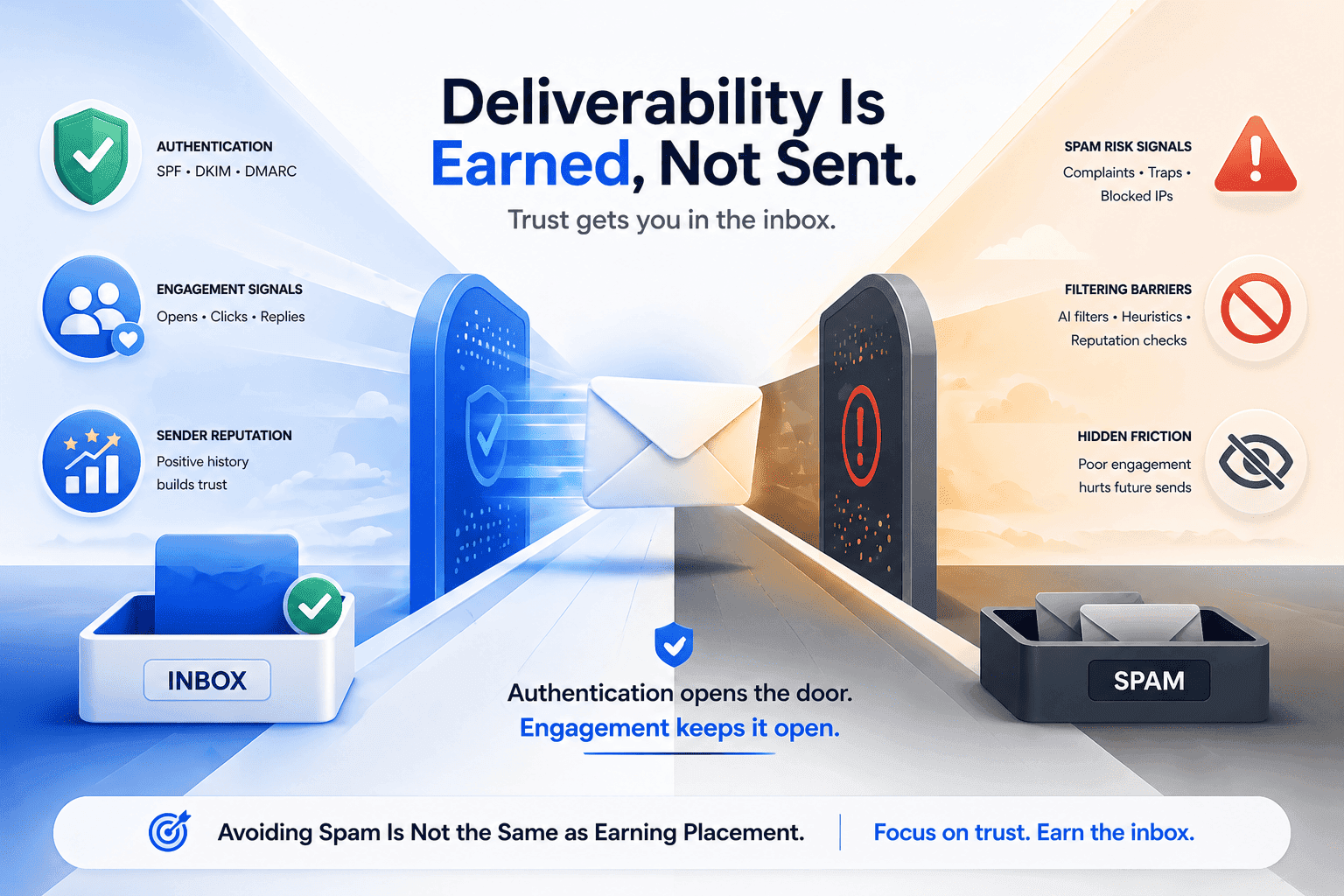
Authentication still matters — without it you’re not in the conversation at all. But authentication grants entry, not inbox placement. Once your technical setup is clean, the next layer of evaluation is behavioural: whether recipients open your emails, click them, reply, or move them out of spam voluntarily. Gmail has been weighting these engagement signals more heavily for several years running. What’s changed recently is how little tolerance there is for senders who pass the technical checks but generate weak or declining engagement. Passing authentication used to buy you significant benefit of the doubt. It buys you less of it now.
This is the part that checklist-style deliverability advice doesn’t really address. Fix your SPF, clean your list, check your DMARC — all of that is necessary and none of it is sufficient on its own. What keeps you in the inbox over time isn’t a configuration. It’s whether your recipients are actually glad your email arrived.
There’s a specific thing worth saying about spam complaints that most people get wrong. The instinct is to treat them as random — some percentage of people are just going to hit that button regardless of what you do, and there’s limited control over it. In practice, a rising spam complaint rate is almost always a drift signal.
The thresholds matter here and are worth knowing precisely: keep your spam complaint rate below 0.1% — that’s one complaint per thousand emails sent. At 0.3%, Gmail and Yahoo begin rejecting your emails outright, not filtering them — rejecting them. Something in your programme has moved away from what subscribers originally expected when they signed up. The sending frequency increased without warning. The content shifted. The emails kept arriving from a promotion someone joined fourteen months ago and completely forgot about. None of that is intentional — it’s just what happens when you’re not paying attention to the gap between what you promised and what you’re delivering.
Inbox providers don’t care about intent. They care about the complaint rate. And a complaint rate that creeps above 0.1% — even briefly — triggers filtering changes that can take months to fully reverse.
The less obvious side of this is that positive engagement signals do active work in your favour, not just neutral work. Recipients who consistently open, click, or reply are sending Gmail and Outlook a signal that has real weight in how your future emails get treated. It’s not just about maintaining your current standing — those positive signals build a buffer. A sender with strong engagement history gets more tolerance for the occasional underperforming campaign, the subject line that misses, the send that goes out at a bad moment. A sender with weak engagement history gets none of that. Every imperfect send lands harder.
What this means practically is something the email marketing world has been saying for years but that’s now mechanically true in a way it wasn’t before: a smaller list of genuinely engaged subscribers is worth more than a large list of people who tolerate your emails. Not philosophically. Measurably, in terms of inbox placement, domain reputation, and the compounding effect of engagement signals over time. The businesses that figured this out early — often through painful experience with a bloated list that slowly wrecked their deliverability — tend to be religious about list hygiene in a way that looks excessive until you understand why they got there.
There’s a direction this is all moving that’s worth being honest about. Gmail is already experimenting with filtering that varies by individual recipient based on their own history with a specific sender. The implication, if that becomes standard, is that deliverability stops being purely a domain-level question and becomes a per-recipient question — whether this particular person, based on whether they’ve ever opened anything you’ve sent them, sees your next email at all. That’s not fully here yet. But the trajectory is clear enough that the businesses investing now in genuine engagement — not open rate tricks, not subject line optimisation, but actually sending email their subscribers want to receive — are building something that holds up as filtering gets more granular.
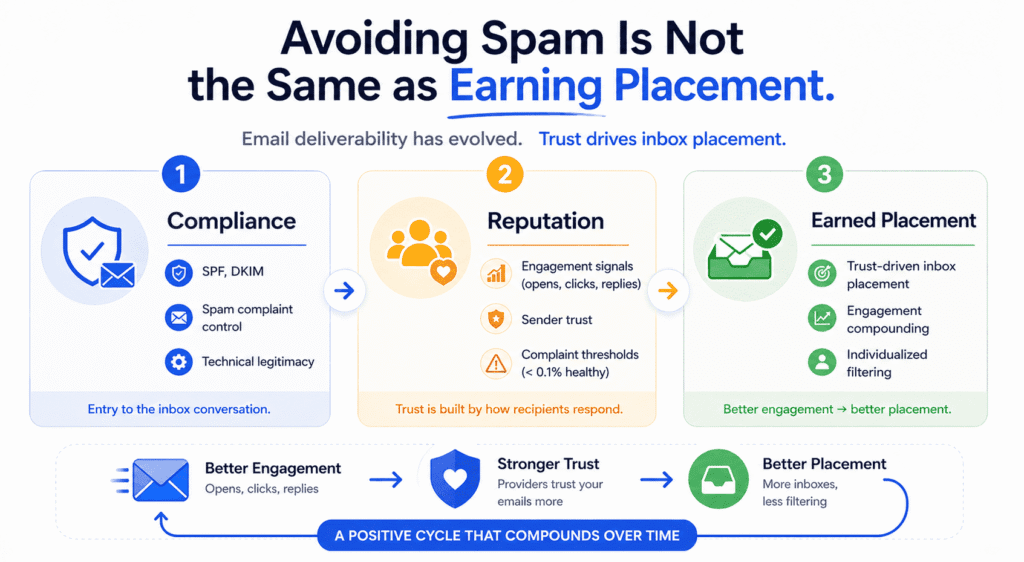
For anyone thinking about email deliverability for small businesses in 2026 and beyond, the honest reframe is this: the technical layer is a prerequisite, not a strategy. Getting authentication right, keeping your list clean, staying off blacklists — that’s the floor. What lives above the floor is whether you’ve given inbox providers a reason to trust you, based on how real people actually respond to what you send. That’s harder to fix with a checklist. It’s also the thing that matters most.
Related: If you’re weighing up which platform gives you the strongest foundation for long-term deliverability, our MailerLite vs ActiveCampaign comparison breaks down how both handle the sending infrastructure and list tools that matter most.
Disclosure: This article may contain affiliate links. If you make a purchase through these links, I may earn a commission at no extra cost to you. All opinions are based on hands-on testing and independent research.
I savor, result in I discovered exactly what I
used to be taking a look for. You’ve ended my four day long hunt!
God Bless you man. Have a great day. Bye
So glad the post was exactly what you needed! Four days is a long search — happy it was worth the wait. Hope you have a great day too, and feel free to come back anytime!
Your method of explaining the whole thing in this
piece of writing is truly good, every one be able
to easily be aware of it, Thanks a lot.
Thank you so much! Making complex topics easy to understand for everyone is exactly what I aim for, so that feedback really hits home. Glad it was clear and helpful — hope to see you back for more!