

Somewhere between “my website isn’t getting traffic” and “I need to hire an SEO agency,” there’s a middle ground that most small business owners skip entirely — actually understanding what’s happening with their site before spending money on fixing it.
Doing a complete SEO audit for a small business website isn’t a technical exercise reserved for developers and marketing specialists. It’s a structured way of looking at your own site clearly — understanding what Google sees when it crawls it, whether the right people are finding it, and where the gap is between current performance and what the site could reasonably be doing.
This guide covers everything that belongs in a thorough audit: technical health and crawlability, on-page SEO fundamentals, site speed and mobile experience, content gaps and search intent, tracking and data integrity, local SEO signals, and backlink profile — along with how to turn what you find into a prioritised plan that actually gets implemented rather than filed away.
The goal isn’t to turn you into an SEO specialist. It’s to give you enough understanding to diagnose the real problems, ignore the noise, and make decisions about where to focus — whether you’re doing the work yourself or briefing someone else to do it for you. Most small business websites have three or four things genuinely holding them back. This is how you find them.
Table of Contents
Before You Start: The Tools You Actually Need and How Long This Will Take
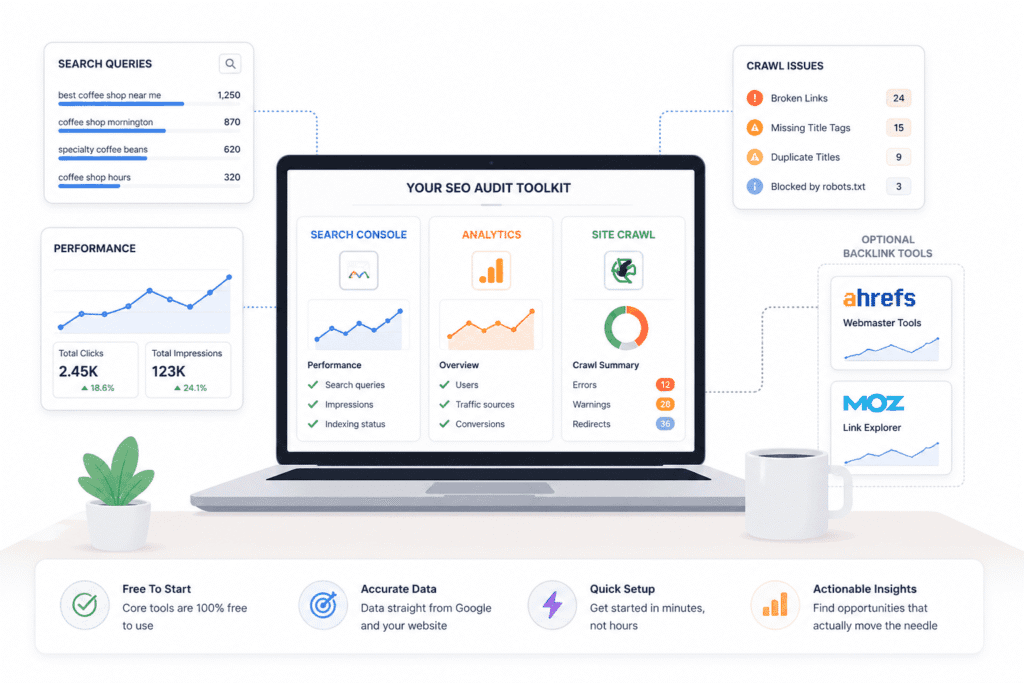
To run a complete SEO audit for a small business website you need three tools: Google Search Console for search performance data, Google Analytics 4 for on-site behaviour and conversion tracking, and Screaming Frog’s free tier for technical crawl data. For backlinks, add Ahrefs Webmaster Tools or Moz’s free tier. A small site audit takes three to five hours.
Most people either over-prepare for an SEO audit — downloading five tools, watching three YouTube tutorials, building a spreadsheet before they’ve looked at anything — or they underprepare and just start Googling things as they go. Neither works particularly well.
You don’t need much to do a complete SEO audit for a small business website properly. Three tools, maybe four if you want backlink data. The rest is just knowing where to look.
The Tools That Actually Matter
Start with Google Search Console — a Google Search Console SEO audit is the single most revealing thing a small business can do with free tools, and it’s where the most consequential tracking gaps tend to surface first.. If it’s not connected to your site yet, that’s already your first audit finding — you’ve had no visibility into how Google sees your site, which means any changes you’ve made in the last year were essentially guesses. Once it’s set up, GSC shows you which pages are indexed, what people are actually typing to find you, and whether Google has run into any problems crawling your site. No third-party tool can replicate this because the data comes directly from Google. It’s also free, which is almost suspiciously good.
Google Analytics 4 sits alongside it. Where Search Console covers what happens in Google, GA4 covers what happens on your site once someone arrives. For audit purposes you’re mainly using it to see which pages are pulling real traffic, how people are moving through the site, and — this matters more than people realise — whether your tracking is even set up correctly. A misconfigured GA4 property is more common than you’d think, and it means every decision you’ve made based on that data is built on shaky ground.
The third tool is Screaming Frog. It crawls your site the way a search engine does and comes back with a list of technical issues — broken links, missing or duplicate title tags, pages that are accidentally blocked from Google, redirect chains. The free version handles up to 500 URLs, which covers the vast majority of small business sites. If yours is bigger, the paid version is about $230 a year. Worth it for a proper audit, annoying if you’re only going to use it once.
For backlinks you’ll need something separate — Ahrefs Webmaster Tools or the free tier of Moz both give you enough to work with without paying for a full subscription. Neither is perfect but both are honest enough for what you need at this stage.
The trap most people fall into is adding more tools thinking it’ll give them a clearer picture. Usually it just gives them more tabs and more conflicting numbers. Stick with what’s above and actually use it well.
If you’re new to Ahrefs and want to understand how to get the most from it beyond the audit, this beginner’s guide to Ahrefs walks through the core features without assuming any prior experience.
How Long This Actually Takes
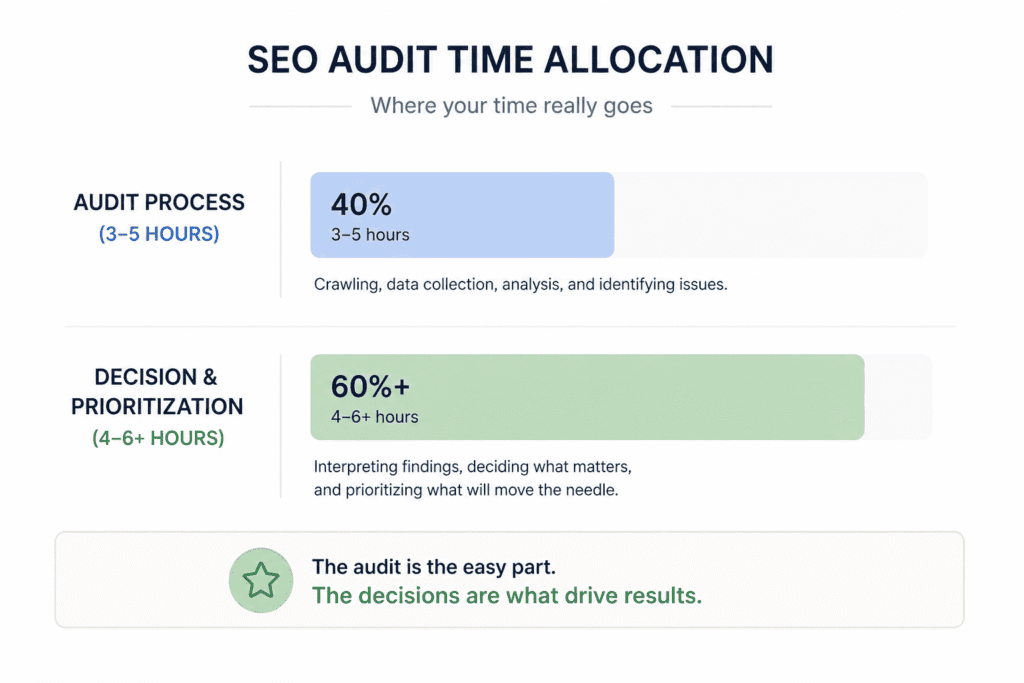
The audit itself is not what takes the time. Deciding what to do with what you find is.
For a small site — somewhere under 50 pages — you can get through everything in a focused afternoon. Three to five hours if you’re not constantly second-guessing yourself. The crawl takes minutes. Reviewing your GSC data, checking on-page elements, going through your content — that’s where the time goes, but none of it is slow if you have a clear process.
Bigger sites, say 50 to 200 pages, stretch it to a day or two. The process is identical, there’s just more of it. The content review in particular gets tedious at scale because you’re making a judgment call on every page.
What nobody tells you is that the prioritisation phase — taking your list of findings and deciding what to actually fix — tends to take as long as the audit itself. Screaming Frog will find 40 issues on most sites. Some of them matter. Most don’t. Working out which is which requires a bit of experience, and if it’s your first time doing a complete SEO audit for a small business website, give yourself extra time. Not because it’s hard, but because the first audit always surfaces something unexpected that sends you off to investigate something else entirely.
That’s normal. Go with it.
If you want a broader view of what’s available beyond the audit essentials, this guide to the best SEO tools for small businesses covers the full landscape — paid and free — with honest assessments of what’s worth the money at the small business level.
Your Website Probably Has Three or Four Real Problems — The Audit Is Just How You Find Them
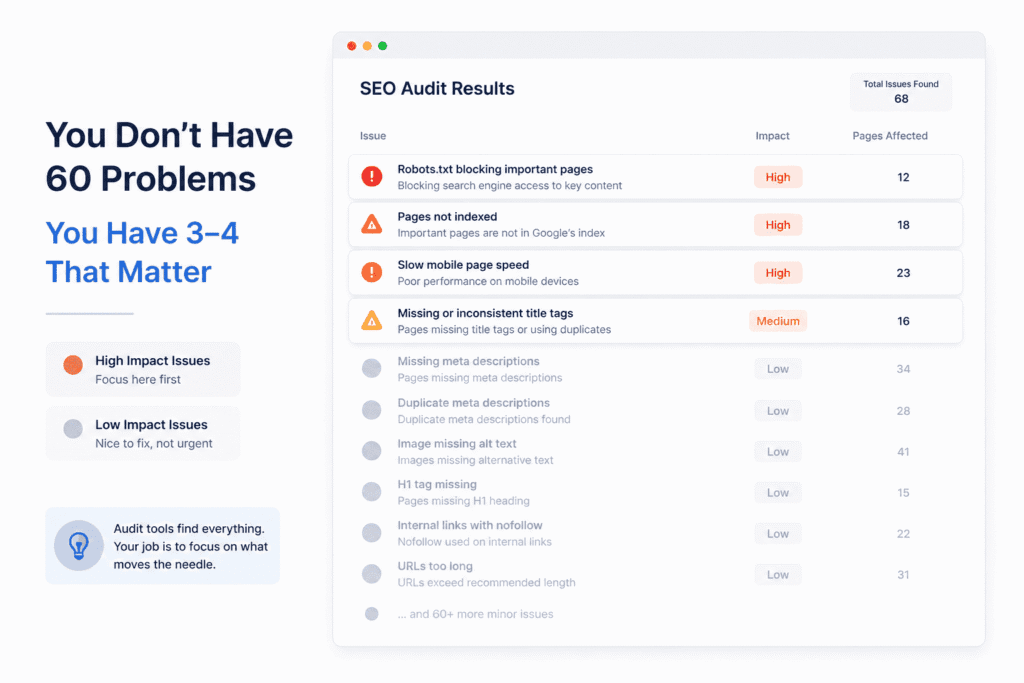
Run your first crawl on a small business website and you’ll typically come back with somewhere between 40 and 80 flagged issues. It looks catastrophic. It usually isn’t.
Most small business websites don’t have 60 problems. They have three or four problems that actually matter, and a long tail of minor inconsistencies that the tools flag because that’s what tools do — they flag everything, without any sense of proportion or priority. The crawl doesn’t know that your missing meta description on the contact page is essentially harmless. It reports it the same way it reports a robots.txt misconfiguration that’s quietly blocking your entire site from Google. Same colour. Same row in the spreadsheet. Completely different level of consequence.
This is the part that trips people up most. Not the audit itself, but the assumption that a longer list of findings means a more broken website. It doesn’t. It usually just means you’re looking at a lot of noise alongside a small number of things that genuinely need attention.
In practice, the real problems on most small business sites tend to come from the same few places. Pages that aren’t being indexed properly. Content that doesn’t reflect how real customers search — not because it’s badly written, but because it was written from the inside out, using the language the business uses rather than the language customers type into Google. Mobile performance that’s slow enough to lose people who were already interested. Local signals — Google Business Profile, citations, consistency across directories — that are incomplete or contradictory. One or two of these is usually doing most of the damage.
What makes a complete SEO audit for a small business website genuinely useful isn’t the volume of findings — it’s the ability to look at everything and decide what to leave alone. That sounds counterintuitive, but the sites that improve most after an audit are rarely the ones that fixed everything on the list. They’re the ones where someone made a deliberate call to focus on the two or three things most likely to move the needle, and actually followed through on those.
There’s also a version of this where the audit comes back relatively clean — no major technical issues, reasonable content, decent local presence — and the site still isn’t performing. That happens. Sometimes the honest answer is that the content isn’t distinctive enough to earn rankings, or the business is trying to compete in a space where the established players have years of authority built up. An audit can tell you what’s technically wrong. It can’t always tell you why you’re losing to a competitor whose website is objectively worse than yours. That’s a real limitation worth knowing before you go in.
So approach this with a specific mindset: you’re not trying to find everything. You’re trying to find the small number of things that are holding the site back the most. Everything else can wait — or be ignored entirely.
Start With the Crawl — But Know What You’re Actually Looking At
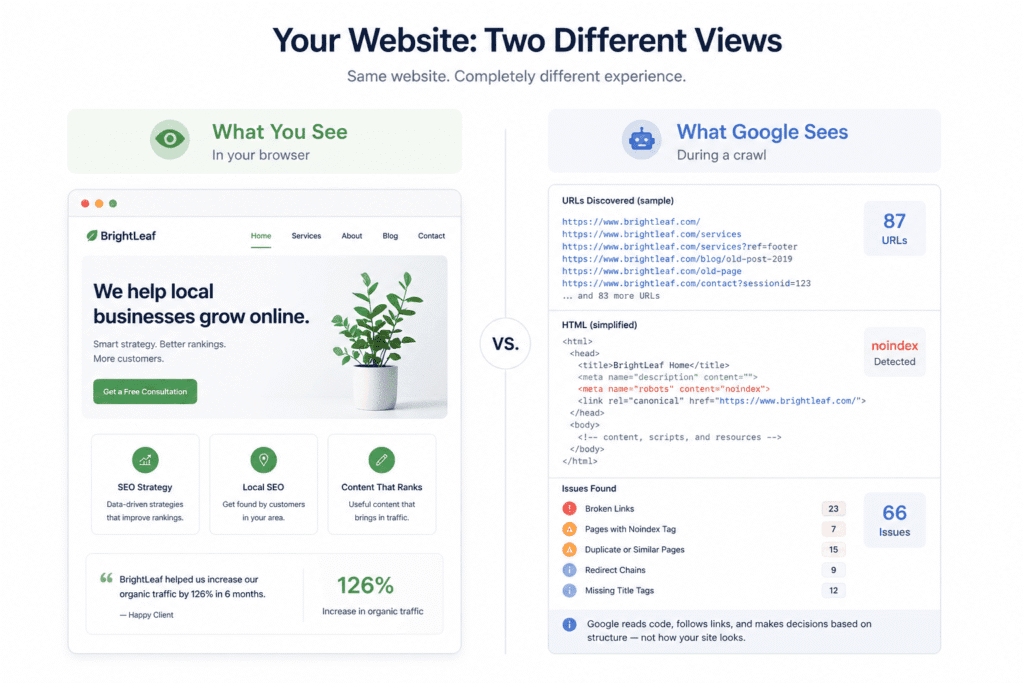
A website crawl shows you broken links, duplicate or missing title tags, pages accidentally blocked from Google, redirect chains, and pages that exist but shouldn’t. It reveals the gap between how your site looks when you browse it and how a search engine actually experiences it.
The version of your website you see when you browse it is not the version Google sees. A technical SEO audit starts here — with understanding the gap between how the site looks to you and how it’s actually being crawled and interpreted. Your browser is filling in gaps, loading cached assets, and generally making everything look more functional than it might actually be. A crawl removes all of that and shows you the site as a search engine encounters it — which is sometimes a different place entirely.
What a Crawl Reveals That You Can’t See Just by Browsing Your Own Site
The thing that surprises people most when they run their first crawl isn’t broken links or missing title tags. It’s how many pages their site actually has. A business owner who thinks they have a clean 20-page website will often find the crawl returning 80 or 90 URLs — old blog posts, duplicate pages generated by URL parameters, a services page that exists in three slightly different versions because someone changed the URL structure two years ago and forgot to clean up the originals. None of this is visible when you’re clicking around the site normally. You’d never stumble across most of it.
This matters because Google is crawling all of it. Every page the crawler finds is a page Google has to make a decision about — index it, ignore it, try to understand how it relates to everything else. The more low-quality or redundant pages your site has, the more of Google’s attention gets spent on things that aren’t helping you. It’s not that one extra old page tanks your rankings. It’s that a site full of orphaned, thin, or duplicate content creates a murkier picture of what your site is actually about.
The other thing a crawl catches that you genuinely can’t find manually is the noindex tag left behind after a redesign. This is one of those problems that’s embarrassingly common and completely invisible until you look for it. During a site rebuild, developers will often set important pages to noindex temporarily to prevent half-finished content from showing up in Google. Then the site goes live and nobody removes the tags. The pages look fine. They’re just not in Google’s index. You’d only know if you checked — and most people don’t.
What a crawl won’t give you is context. It’ll tell you a page has no title tag but not whether the page should exist at all. It’ll flag a redirect chain but not tell you whether the URL it’s pointing to is the right destination. Running a complete SEO audit for a small business website means using the crawl as a starting point, not a verdict. The findings need a human to interpret them — and that’s the part that takes actual judgment.
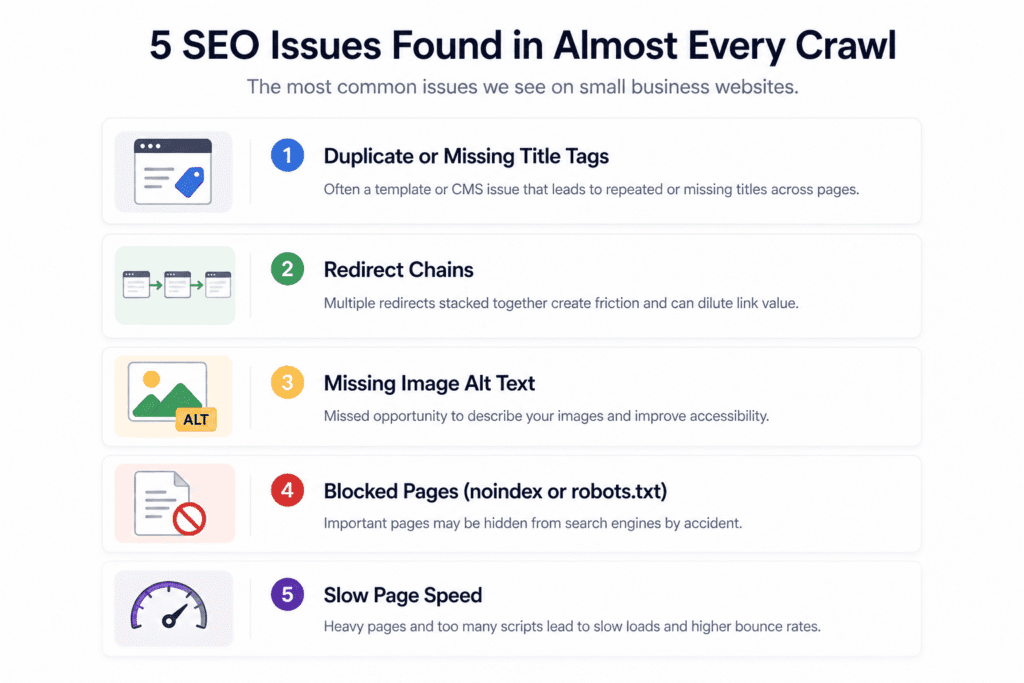
Five Things That Show Up in Almost Every Small Business Crawl
These aren’t the most dramatic SEO issues you’ll ever encounter. They’re just the ones that appear so consistently it’s almost predictable.
Duplicate or missing title tags — usually a template problem. The site was built with a default title that never got updated across every page, or the CMS generated the same title structure for an entire category of pages. It’s not a crisis but it’s also a missed opportunity on every page it affects, and it’s usually a quick fix once you know where to look.
Redirect chains are almost universal on any site that’s been through a redesign or a URL restructure. The problem isn’t the redirect — it’s three redirects stacked on top of each other because nobody cleaned up the previous ones when the new ones were added. Every extra hop adds a small amount of friction and bleeds a small amount of link value. Clean them up where you can, but don’t lose a week to it.
Images without alt text show up everywhere. For a lot of small businesses this is actually a meaningful gap rather than a cosmetic one — a plumber’s site with twenty photos of completed jobs and no alt text is missing a legitimate opportunity to reinforce what the site is about and where the work was done. It also matters for accessibility, which is increasingly something Google pays attention to.
Unintentionally blocked pages — noindex tags or disallow rules in robots.txt that were meant to be temporary — are less frequent but more damaging when they appear. A key service page that isn’t being indexed is a service you’re invisible for in search. Worth checking every time.
Slow, heavy pages round it out. The crawl will flag page size but you’ll want PageSpeed Insights to get the full picture. What you’re looking for at this stage is anything obviously out of proportion — a homepage that’s loading several megabytes of images, a page with a dozen third-party scripts running. These aren’t just SEO problems. A page that takes five seconds to load on a phone is a page most people leave before it finishes — and that’s a conversion problem before it’s ever a ranking problem.
None of this requires an SEO specialist to fix. Most of it requires access to your CMS, some patience, and a clear list of what to address first.
On-Page SEO — The Basics That Still Matter More Than Most People Admit
There’s a version of on-page SEO that’s been turned into a scoring game — keyword density percentages, readability grades, colour-coded dashboards telling you your page is a 73 out of 100. Most of it is noise. The actual fundamentals are less exciting and more durable than any of that suggests.
Title Tags and Meta Descriptions — What Good Actually Looks Like in 2026
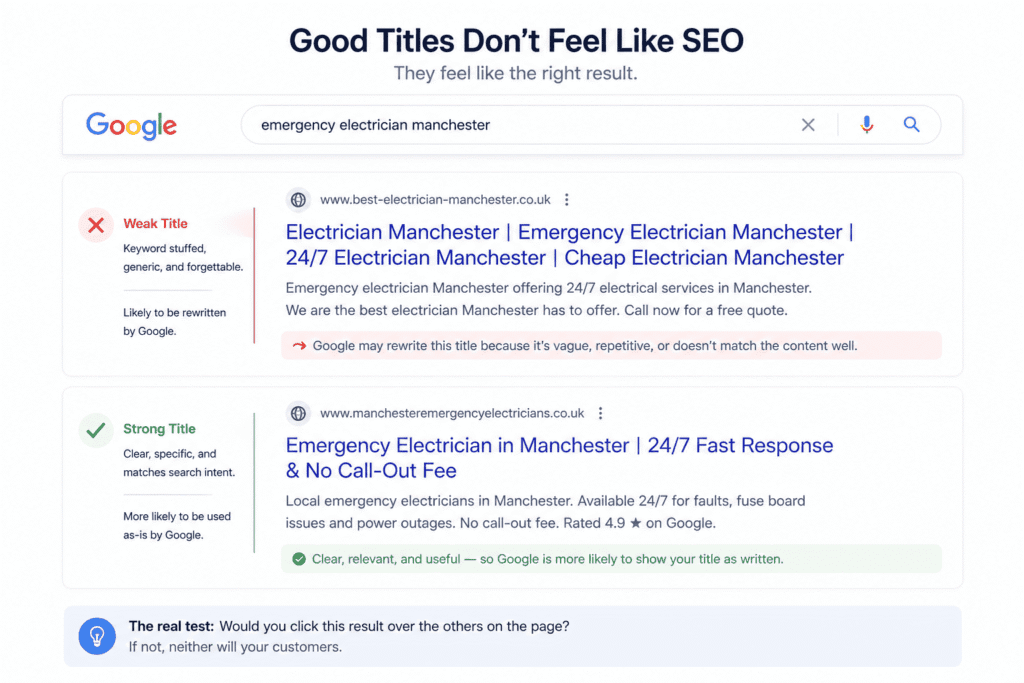
If you want to understand what your title tag is actually doing, search for one of your services in Google and look at the results. Not at your ranking — at how your listing reads compared to everything around it. Does it say something specific and useful, or does it sound like every other result on the page? That’s the real test, and it’s more informative than any character count guideline.
The keyword still belongs in the title — not because placing it there tricks an algorithm, but because someone who types “emergency electrician Manchester” and sees those words reflected back in your title immediately knows they’re in the right place. The match creates trust before they’ve clicked anything. Where people go wrong is treating the title as a keyword container rather than a first impression. “Electrician Manchester | Emergency & Domestic | Available 24/7 | Call Now” technically hits the right notes and reads like it was generated by someone who’d never spoken to a customer.
What’s shifted in 2026 is how aggressively Google rewrites titles it doesn’t trust. If your title is vague, stuffed, or doesn’t reflect what’s actually on the page, Google will often substitute something from your H1 or pull a line from your body copy. You can see this happening in Search Console — your title in the HTML doesn’t match what’s appearing in search results. When Google rewrites your title, it’s not a glitch. It’s a signal that your title wasn’t doing its job.
Meta descriptions are genuinely optional in a way that title tags aren’t — Google ignores them and writes its own often enough that some people don’t bother. That’s a defensible position. The case for writing them anyway is that when Google does use yours, particularly on branded searches or queries where your description closely mirrors the search term, it’s the only marketing copy you have in that moment. Someone is deciding between your result and the one next to it based partly on what that snippet says. Twenty minutes of decent copywriting per page is a reasonable investment for that.
Header Structure, Internal Linking, and Why They’re About Usability as Much as SEO
Here’s something that gets lost in the technical SEO conversation: Google ranks pages that people find useful, and people find pages useful when they can actually navigate them. Header structure and internal linking are SEO topics, but the reason they matter is much simpler than most explanations make it sound.
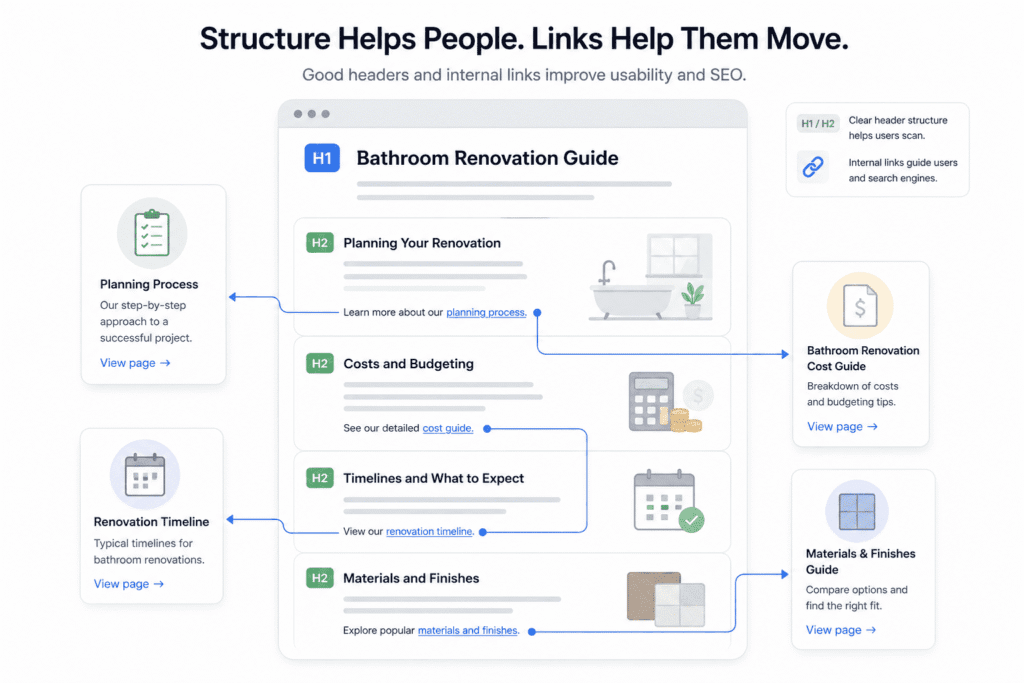
A page with a clear H1 and logical subheadings is easier to scan. Someone who lands on your bathroom renovation page and can immediately see sections on planning, costs, timelines and materials is more likely to stay, read, and eventually contact you. Someone who lands on the same page and finds an unbroken wall of text is more likely to hit the back button — and that behaviour, repeated across enough visitors, is something Google notices. The SEO case for good structure is really just the usability case with different language attached to it.
Internal linking is where most small business sites leave the most value on the table, quietly and consistently. The typical pattern is a site where every page links to the homepage and the contact page, and almost nothing else links to anything else. Google crawls the homepage easily and then has to work considerably harder to find and understand everything beyond it. More practically, a visitor who lands on your loft conversion page and has no obvious path to your planning permission guide or your cost calculator is a visitor you’re making work harder than necessary — and most of them won’t bother.
The way to think about internal linking at the small business level isn’t strategic in any complicated sense. When you’re writing or editing a page, ask whether there’s another page on the site that’s genuinely relevant to what someone reading this might want next. If yes, link to it. That’s essentially the whole framework, and doing it consistently across a site makes a noticeable difference over time.
Thin Content, Duplicate Pages, and the Pages Quietly Diluting Your Site’s Authority
This section of a complete SEO audit for a small business website is where people tend to get defensive — nobody likes being told their content isn’t good enough. So it’s worth being precise about what thin content actually means, because it’s not about length and it’s not a judgment on the business.
Thin content is any page that doesn’t give a visitor something they couldn’t find just as easily somewhere else. It’s the service page that describes what plumbers do in three generic paragraphs without mentioning the area served, the types of jobs taken on, pricing ballparks, or anything else that might help someone decide whether to call. It’s the blog post that covers a topic so superficially that it answers nothing. Word count is irrelevant — a 150-word page that directly answers a specific question is not thin. A 700-word page that restates the same vague point in slightly different ways is.
The duplicate content situation is usually less deliberate. A site accessible on both www and non-www without a proper redirect. Service pages that are nearly identical because the services themselves are similar and the copy was templated across all of them. Google doesn’t issue penalties for this the way some people imagine, but it does have to pick a winner — and it won’t always pick the page you’d choose. More commonly it just splits whatever ranking signals exist across multiple versions of the same content, weakening all of them.
What makes this worth taking seriously is the cumulative effect. One underperforming page on a 35-page site is background noise. Six or seven of them starts to affect how Google perceives the site overall. You’ll sometimes see this reflected in GSC — pages that are indexed but get essentially zero impressions, sitting there doing nothing, occasionally confusing Google’s understanding of what the site is actually about.
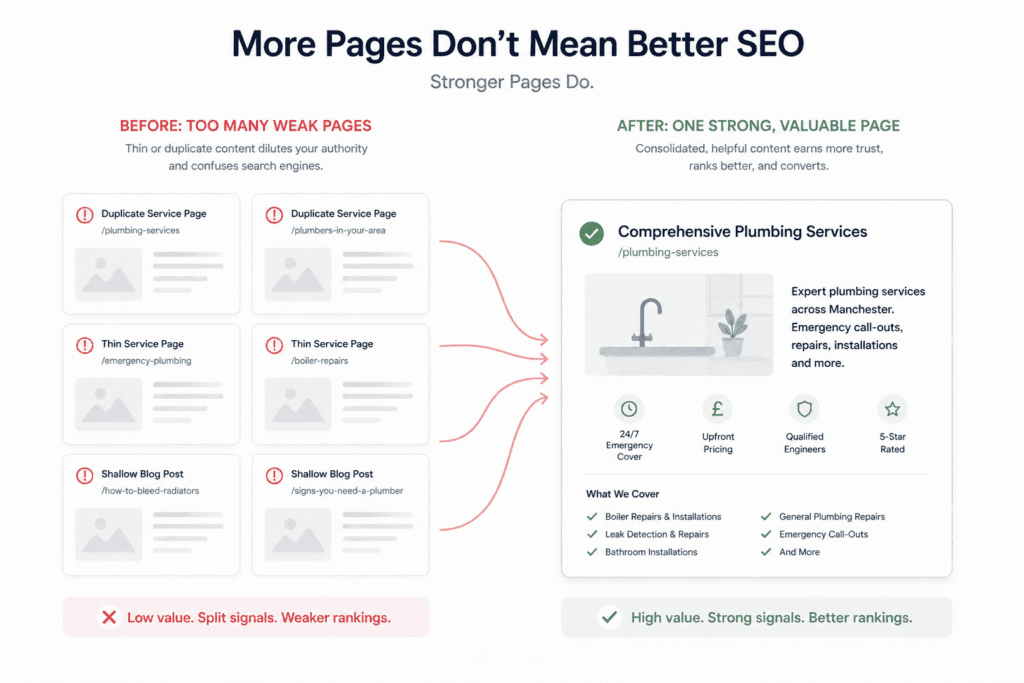
The response isn’t always to rewrite everything. Consolidating two weak pages into one stronger one is often better than trying to fix both separately. Occasionally the right move is a noindex tag on a page that needs to exist for business reasons but has no value in search. Sometimes it really is just deletion and a redirect to something more useful. The goal in this part of the audit isn’t to produce more content — it’s to end up with a site where every page is earning its place.
The Speed and Mobile Check Nobody Takes Seriously Enough
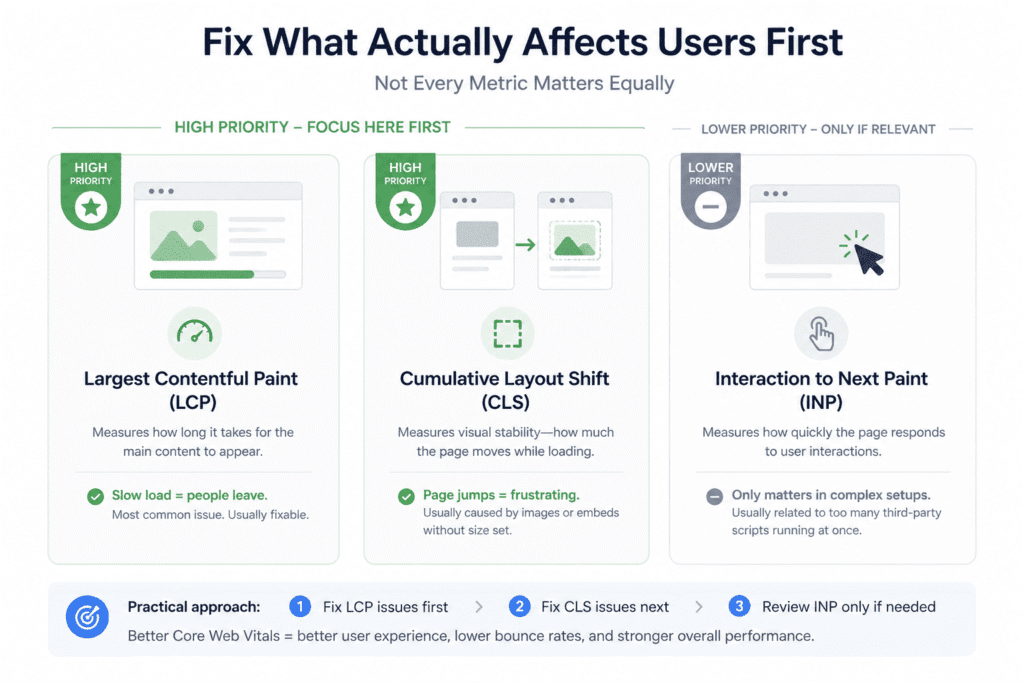
The Core Web Vitals metrics worth prioritising for most small business sites are Largest Contentful Paint (page load speed) and Cumulative Layout Shift (page stability). Interaction to Next Paint matters mainly on sites running multiple third-party scripts simultaneously. A poor mobile experience costs visitors who were already looking for the service.
Every small business owner who’s been through any kind of SEO conversation has heard that speed matters and mobile is important. Almost nobody acts on it with any urgency — partly because the tools that measure it speak in a language that feels designed for developers, and partly because a slow site fails quietly rather than obviously. There’s no error message. Just people leaving.
Core Web Vitals — The Ones Worth Fixing vs. The Ones You Can Ignore
PageSpeed Insights will give you a score and a list of recommendations, some of which are actionable and some of which are essentially asking you to rebuild your site from scratch. The skill is knowing which is which, because chasing a perfect score is both impossible for most small business sites and also completely unnecessary.
The metric that’s most likely to be genuinely broken — and most fixable — is Largest Contentful Paint, which measures how long it takes for the main content of a page to appear. A poor LCP score almost always traces back to the same small set of causes: images that haven’t been compressed or converted to a modern format, a hosting environment that’s too slow for the traffic it’s serving, or a page trying to load too many things before it loads the content someone actually came to see. None of these require a developer to address. They require someone willing to spend a few hours on it.
Cumulative Layout Shift — the metric for how much a page jumps around while loading — is worth fixing when it’s bad because the experience it’s measuring is genuinely annoying. You know it when you experience it: you’re about to tap something and the page shifts and you hit the wrong thing. On most small business sites it comes from images without specified dimensions, or third-party embeds that load late and shove everything else down the page. Fixable, but not the priority if your load time is the bigger problem.
Interaction to Next Paint is the one most small business sites can worry about least — unless the site is running a heavy page builder, three chat widgets, a cookie consent tool, a marketing pixel, and a live booking system all on the same page. If that’s the case, the INP score is just the most visible symptom of a broader problem, which is that the site has accumulated layers of third-party scripts over time and nobody has ever audited whether all of them are still necessary. That audit is worth doing regardless of what the score says.
The honest thing to say about Core Web Vitals as a ranking factor is that the evidence has always been more modest than Google’s initial announcements implied. Improving your scores probably won’t rescue a site with thin content or no backlinks. What it will do is remove a legitimate weakness, reduce the number of people abandoning the page before it loads, and make the site better to use — which tends to produce downstream benefits that are harder to attribute directly but real nonetheless.
What a Bad Mobile Experience Is Actually Costing You in Real Terms
Here’s a practical way to think about this rather than an abstract one. A significant portion of the people searching for your services right now are doing it on a phone, in a moment of actual need — not browsing leisurely on a laptop in the evening. They’re in a situation. They need something. They have maybe thirty seconds of patience before they move on to the next option.
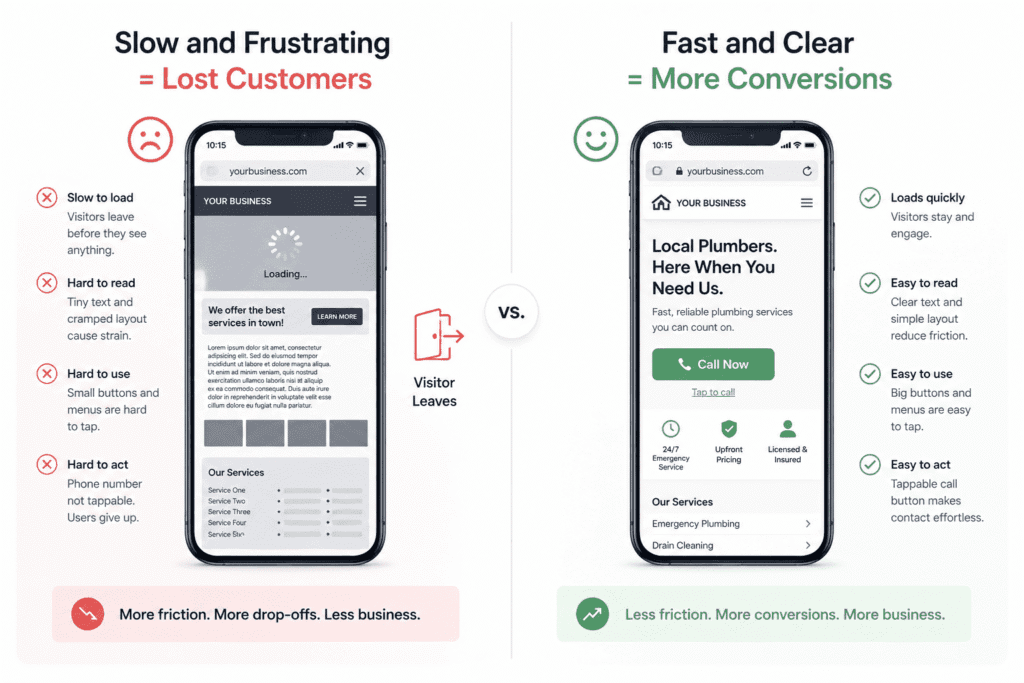
If your site takes five seconds to load on a mobile connection, a meaningful percentage of those people never see it. If it loads but the layout is a cramped version of the desktop design, if the text requires zooming, if the phone number is an image rather than a tappable link — each of those is a small piece of friction that compounds. Nobody thinks “this site has a poor Cumulative Layout Shift score.” They think “this site is annoying” and they leave. The SEO framing is just a technical description of something with very practical consequences.
What’s underappreciated in this conversation is how often mobile problems are invisible to the people who own the site. You built it or reviewed it on a desktop. You know where everything is. When you check it on your phone you’re doing so with a fast connection and the familiarity of someone who designed the thing. You’re not experiencing it the way a stranger does.
The most useful thing you can do during this part of a complete SEO audit for a small business website is pick up an older mid-range phone — not your current one — turn off WiFi, and actually try to use the site as a customer would. Find a service. Read a page. Try to make contact. You will notice things that no tool flagged. A navigation menu that’s technically functional but requires frustrating precision to use. A contact form that’s nearly impossible to fill in on a small screen. A hero image that takes up the entire viewport and buries everything else below the fold.
Google Search Console’s mobile usability report will surface the technical failures — text too small to read, clickable elements too close together, content wider than the viewport. Fix those first because they’re the floor. But the things that actually cost you customers aren’t always the ones that show up in a report. They’re the ones you find by using the site badly, on purpose, until you feel the friction yourself.
Are Your Pages Targeting the Right Terms — and the Right Intent?
Keyword research gets talked about as though it’s the hard part. In practice, most small business owners have at least a rough sense of what terms they want to rank for. The part that gets less attention — and causes more quiet damage — is whether the pages built around those terms actually match what someone searching them is trying to do.
The Difference Between a Keyword Gap and an Intent Mismatch
A keyword gap is the simpler problem. It’s a topic your customers search for regularly that your site simply doesn’t cover. You find it, you build the page, you move on. The work is obvious once you know the gap exists.
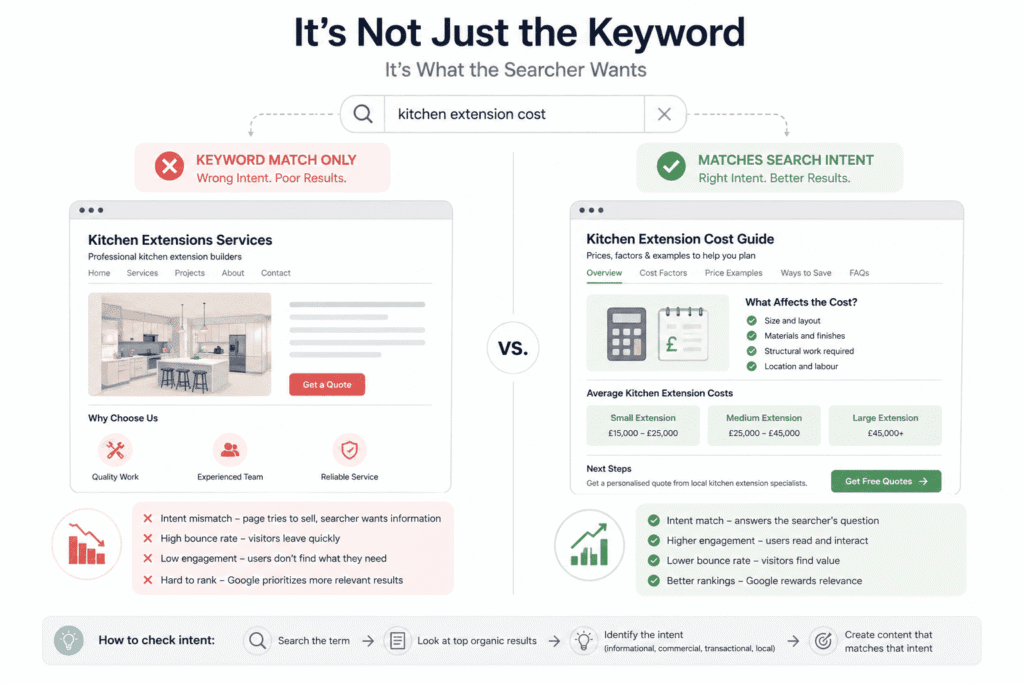
An intent mismatch is harder to spot because everything looks like it’s in order. The page exists. The term is in the title. The content mentions it repeatedly. And the page still isn’t ranking, or it ranks but gets ignored, or people land on it and leave immediately. The issue isn’t what the page is about — it’s what the page is for, and whether that matches what someone typing that search term is actually trying to accomplish.
Google has spent years getting better at understanding this distinction, often better than the people publishing content. Type almost any search term into Google and look at what ranks. Not the ads — the organic results. The format, angle, and depth of those results is Google’s interpretation of what that search means. A query dominated by how-to guides is telling you something. A query where every result is a local business with a phone number and a map is telling you something different. A query where the top results are all comparison pages is telling you something else again.
The place this bites small businesses most often is with service pages targeting terms that have quietly shifted toward informational intent. “Kitchen extension cost” is a good example — it sounds transactional, like someone ready to spend money, but the results page is full of cost guides and estimator tools because most people typing it are still researching, not ready to commit. A services page targeting that term is trying to sell to someone who came to learn, and that mismatch shows up in the data as a high bounce rate and low time on page, even if the page itself is well-written.
The middle ground is actually where the most interesting opportunities sit. Queries with mixed intent — where some searchers want information and others want to hire someone — can be served by a single page if it’s structured thoughtfully. Useful content upfront that answers the question, clear pathway to contact once trust is built. Not complicated in principle. Consistently underdone in practice.
For a more comprehensive keyword and intent analysis beyond what GSC provides, this Semrush review covers how the platform handles keyword research, position tracking, and content gap analysis — useful context if you’re considering investing in a paid tool after completing the audit.
How to Check Whether Your Existing Pages Are Ranking for What You Think They Are
This is the part of a complete SEO audit for a small business website that tends to produce the most uncomfortable realisations — not because the findings are catastrophic, but because they reveal how differently Google has interpreted pages compared to how the business intended them.
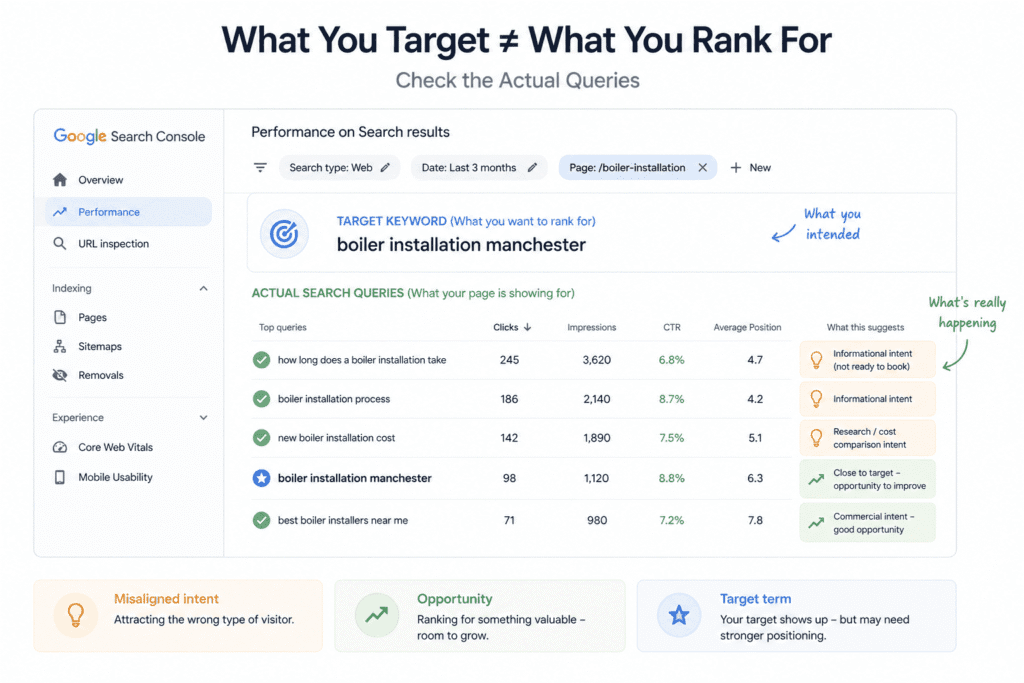
Go into Google Search Console, pull up the Performance report, and filter it by a specific page — one of your core service pages. Look at the actual queries it’s appearing for. Most people expect to see their target keyword sitting at the top. What they usually find is a spread of loosely related terms, some of which make sense and some of which suggest the page is being read in a way that’s slightly off from the intention.
A heating engineer’s boiler installation page appearing primarily for “how long does a boiler installation take” rather than “boiler installation [city]” is a real problem — not because that informational traffic is worthless, but because it means the page is attracting people in research mode rather than people ready to book. The page is positioned wrong for its own goal. No amount of tweaking the meta title fixes that. The content itself is signalling the wrong intent, and that’s what needs to change.
What’s equally worth looking for — and easier to miss because it feels like a problem rather than an opportunity — is a page that’s accidentally ranking for something more valuable than its original target. A page written about one topic picking up impressions for a closely related commercial term it barely touches. That’s not a mistake to fix, it’s a signal to follow. A focused rewrite that gives that term more weight can sometimes convert a marginal ranking into a meaningful one, without building anything new.
The honest limitation here is that GSC only shows you what’s already happening. It tells you which searches your pages are appearing in — it says nothing about the searches you’re completely absent from. For that you need keyword research running alongside the GSC analysis, not as a separate exercise but as the other half of the same question. GSC tells you where you are. Keyword research tells you where you could be. Looking at one without the other gives you half a picture, and half a picture tends to produce half-measures.
Content Audit — Less About What You’ve Written, More About What You Haven’t
The instinct when auditing content is to open every page and ask whether it’s good enough. But a proper website content audit starts one step earlier — with whether you’re covering the right topics at all.. That question matters, but it’s the second question. The first question is whether you’re covering the right territory at all — because a site full of well-written pages on the wrong topics is still a site that’s invisible to the people you’re trying to reach.
Finding the Topics Your Customers Are Searching For That Your Site Doesn’t Cover
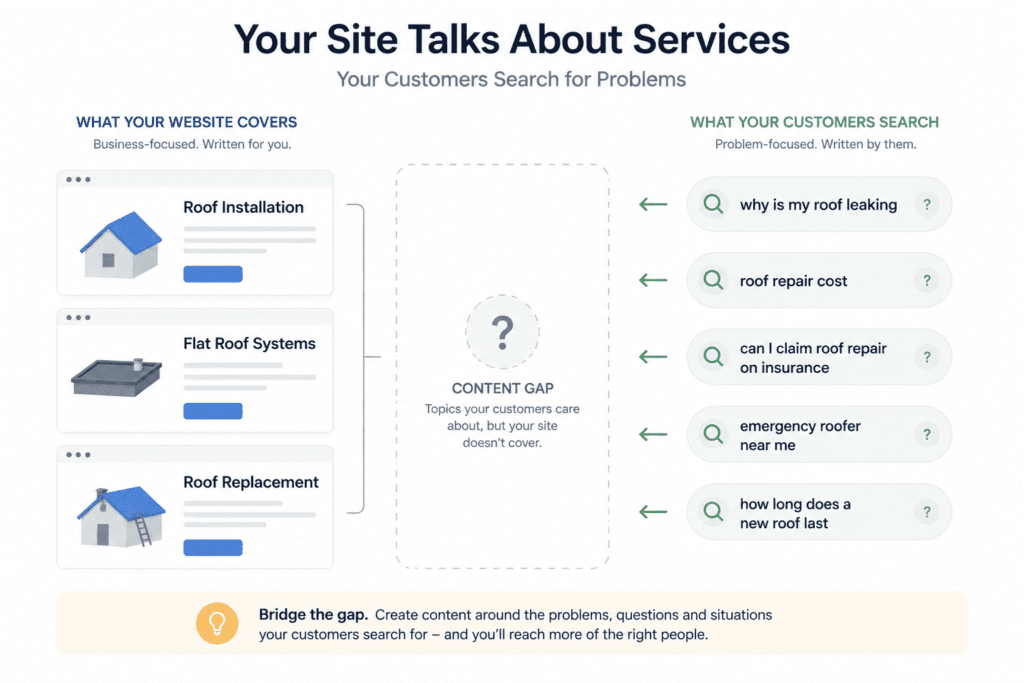
Almost every small business website is written from the perspective of the person who knows the business best. Services are described using internal terminology. Pages are organised around how the business thinks about its own offering. None of this is careless — it’s just a natural consequence of writing about something you know deeply. The problem is that customers come at it from the opposite direction. They don’t know your terminology. They know their problem, and they search for it in the language of someone who has that problem, not someone who solves it for a living.
A roofing company with pages titled “Pitched Roof Installation,” “Flat Roof Systems,” and “Roof Replacement Services” has described their work accurately. But people in their area are typing “why does my roof leak after heavy rain,” “how much does a new roof cost,” “can I claim roof repair on insurance,” and “emergency roofer [town].” Those searches represent real people with real urgency and real money to spend. If none of those topics appear anywhere on the site, every one of those searches sends someone to a competitor — not because the competitor is better, but because their site speaks the customer’s language and this one doesn’t.
Finding these gaps doesn’t require a expensive tools or a formal process. Google’s own search interface tells you a lot — autocomplete suggestions, the People Also Ask box, related searches at the bottom of the results page. These aren’t SEO tricks, they’re a direct readout of what real people are actually typing. Spend an hour searching for your own services the way a customer would and you’ll find topics your site ignores that your customers clearly care about.
For businesses serving a specific geographic area, location isn’t just a modifier to add to existing pages — it’s a content angle in its own right. Not the cynical version of this, where the same template page gets duplicated fifty times with different town names swapped in. Google stopped being fooled by that years ago. The version that actually works is content that reflects genuine local knowledge — the planning restrictions specific to your council, the particular challenges of the housing stock in your area, the local suppliers or materials you actually use. Content that someone operating outside that area couldn’t have written is content Google treats differently to content that could have been written by anyone anywhere.
Deciding What to Update, Consolidate, or Cut Entirely
This is where the content audit gets uncomfortable, particularly the cutting conversation. Most business owners are reluctant to delete content they spent time creating, which is understandable. But a page that attracts no traffic, serves no conversion purpose, and adds nothing to the site’s credibility isn’t sitting there harmlessly. It’s part of what Google sees when it tries to form a view of what this site is about and how useful it is — and enough of these pages creates a cumulative drag that’s hard to see in any individual case but real across the site as a whole.
Working out what to do with each page isn’t complicated in principle. Is it getting any meaningful traffic? Is it ranking for anything worth ranking for? Does it serve visitors who arrive through other pages? Does it say something useful that isn’t said better elsewhere on the site? If the honest answer to all four questions is no, the page is a candidate for removal. If it answers yes to one or two, it’s probably worth updating. If it’s doing well on most of them, leave it alone and look at what makes it work.
Consolidation gets underused. Sites that have been publishing content for a few years without a clear strategy almost always end up with clusters of overlapping pages — three blog posts on the same topic, each covering it at roughly the same depth, none of them comprehensive enough to rank well. Individually they’re too thin. Combined, they might actually be useful. Merging them into a single more substantial piece, with redirects from the others, gives Google one clear page to assess rather than three weak signals to average out. It’s not a guaranteed win but it’s the right default when the overlap is obvious.
The cutting conversation is the one that running a complete SEO audit for a small business website tends to bring to a head — because the audit makes visible what was easy to ignore before. Old landing pages for promotions that ended two years ago. Blog posts on topics tangentially related to the business that someone published during a “we need to do content marketing” phase. Location pages for areas the business stopped serving. None of these announce themselves as problems. They just sit there, indexed, occasionally crawled, contributing to a version of the site that’s slightly less coherent than it would be without them.
The blog archive situation deserves a specific mention because it’s so common and so consistently avoided. A business publishes regularly for eighteen months, stops, and never goes back. The posts range from genuinely useful to barely relevant to actively embarrassing in hindsight. Two years later nobody has touched any of it. Going through that archive carefully is one of the less glamorous parts of a content audit and one of the more valuable ones — not because old content is inherently bad, but because the weak posts and the strong posts are treated as part of the same site by Google, and that affects how it weighs the whole thing. Keep what’s worth keeping. Update what’s nearly there. Delete what’s pulling the rest of it down.
If you want a tool that helps you optimise individual pages against what’s currently ranking, this Surfer SEO review covers how it works in practice — particularly useful once you’ve identified which pages are worth improving from the audit.
Tracking and Data Integrity — The Part That Makes Everything Else Unreliable If Broken
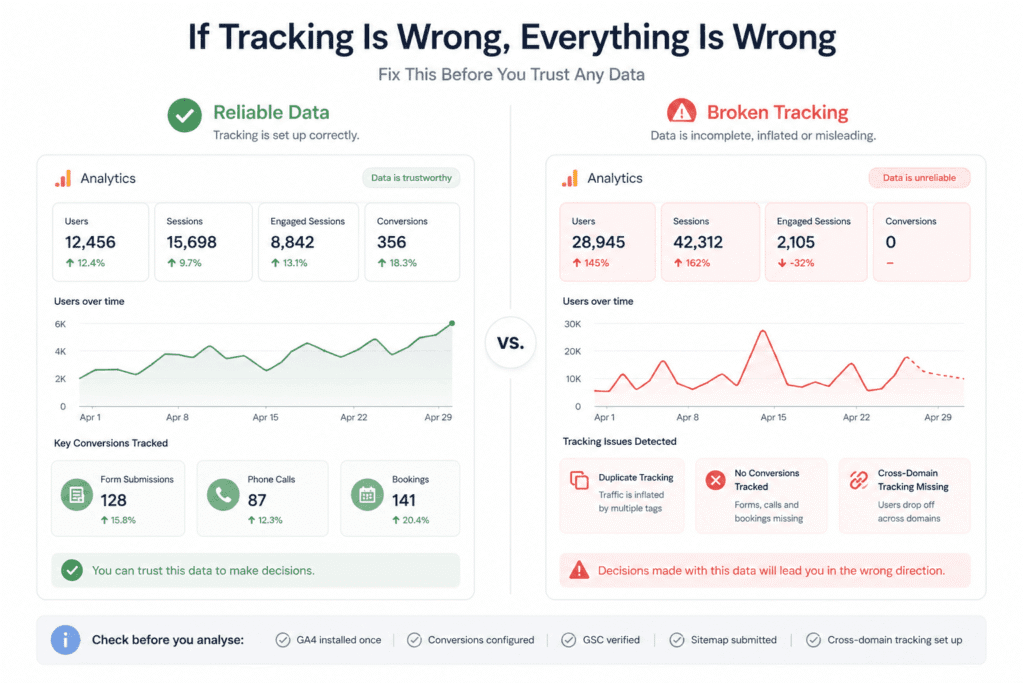
The most common tracking errors on small business sites are duplicate GA4 tags inflating traffic data, contact form submissions not set up as conversion events, phone calls not being tracked, and cross-domain tracking not configured for third-party booking or payment platforms.
There’s a version of this audit where you work through every other section carefully, draw sensible conclusions, prioritise the right fixes — and then discover that the data you based all of it on has been wrong for eighteen months. Broken tracking doesn’t fail loudly. The dashboards still load, the graphs still move, and nothing tells you that what you’re looking at is fiction.
How to Verify GSC and GA4 Are Set Up Correctly and Actually Capturing the Right Data
The assumption most people operate on is that if tracking was set up at some point, it’s still working. Sometimes that holds. More often, something has quietly broken along the way — a site migration that didn’t carry the tags across, a theme update that overwrote the header code, a developer who rebuilt the site on a new platform and assumed someone else was handling the analytics. The setup that worked fine two years ago may not be the setup that exists today.
With Google Search Console, start at Settings and check the verification status before you look at a single piece of data. GSC offers several verification methods and some of them are fragile — an HTML tag that vanished when the site was redesigned, a DNS record that lapsed when the domain changed registrars. If verification has failed and nobody caught it, there’s a gap in your GSC data that the platform doesn’t flag prominently. You’d only know by looking, which most people don’t.
While you’re in GSC, check the sitemap. Go to Sitemaps, look at how many URLs were submitted and how many Google has actually indexed. For a small, well-linked site the gap might be minimal. For a site with pages that don’t have strong internal links pointing to them — which covers most small business sites that have grown organically over time — a sitemap is often the only reliable signal to Google that certain pages exist. A large discrepancy between submitted and indexed URLs is a conversation worth having with whoever manages the site.
GA4 is harder to verify, and the migration from Universal Analytics left a lot of small business properties in genuinely messy states. Some businesses ended up with both old and new tracking running simultaneously. Some ended up with neither. Some ended up with GA4 installed but configured so minimally that it reports on sessions and nothing else.
The check that matters most in GA4 isn’t whether it’s installed — it’s whether conversions are set up. Go to your conversion events and look at what’s there. If the list consists of “session_start” and “first_visit,” the tracking is technically alive and practically useless. It’s measuring the fact that people arrived, not whether any of them did anything. Phone clicks, form submissions, booking completions, quote requests — if those aren’t configured as conversion events, you have no performance data. You have an audience report dressed up as analytics.
The Most Common Tracking Errors on Small Business Sites and How to Spot Them
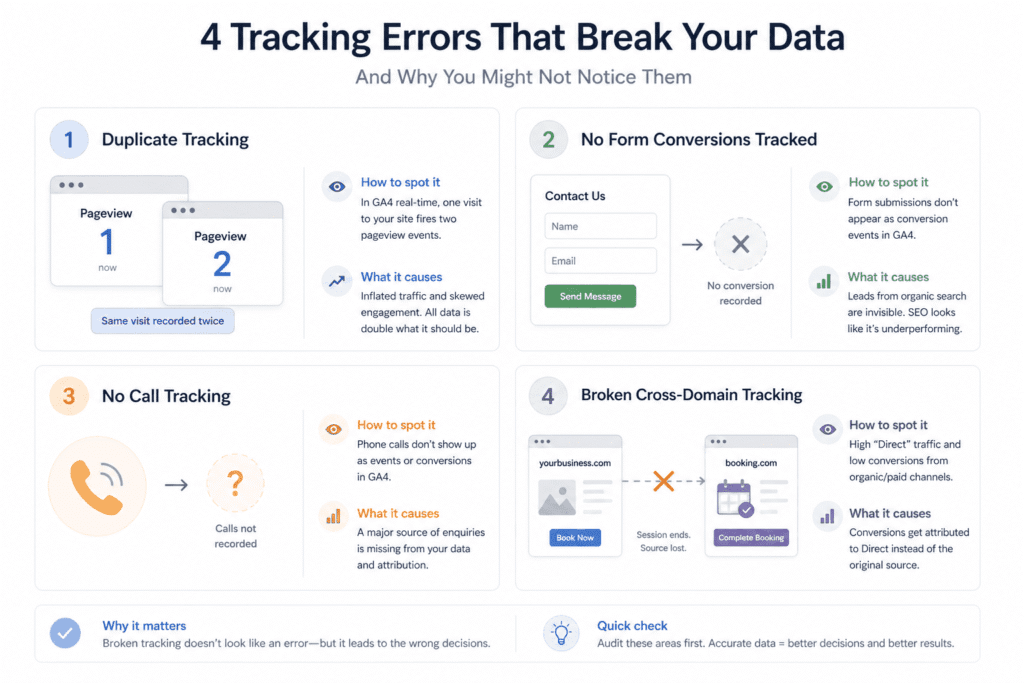
Duplicate tags are everywhere, and they’re invisible unless you’re looking for them. The GA4 tag gets added via Google Tag Manager, and then someone separately adds it to the site header as well, and every pageview fires twice. Traffic numbers look strong. Engagement metrics look weak. Any analysis of which pages are working is based on data that’s been inflated by a factor of two. The quickest way to check is to open your own site, look at the GA4 real-time report, and count how many pageview events fire from a single page visit. One is correct. Two means a duplicate.
Contact form submissions not being tracked is the one that causes the most damage over time — specifically because it makes organic search look less valuable than it actually is. Most small business contact forms redirect to a thank-you page on submission. If nobody set up a conversion event for that page visit, every lead that came through the form is invisible in the data. The business looks at GA4, sees modest results from organic traffic, and draws the wrong conclusion about whether SEO is working — when SEO has been generating enquiries consistently, they just weren’t being counted.
Phone calls are a related gap that’s worth raising during any complete SEO audit for a small business website, particularly for trades, professional services, and local businesses where calling is the primary way customers make contact. If there’s no call tracking in place, a significant portion of conversions — sometimes the majority — simply doesn’t exist in the data. You’re evaluating the performance of the entire channel based on form fills and online transactions, while the phone rings with customers who found you through search and nobody’s connecting those calls to anything. Tools like CallRail handle this without much setup. Google’s own call tracking works if the business runs Search Ads. Either way, unmeasured calls are a blind spot worth closing.
Cross-domain tracking is the issue that tends to surface on sites that use a third-party booking system or an external payment platform. When a customer moves from the main site to an external domain to complete a transaction, GA4 — without specific configuration — loses the referral source at that point and records the conversion as a direct visit. If your GA4 property consistently shows unusually high direct traffic and lower-than-expected conversions from organic and paid channels, cross-domain tracking is worth checking before anything else. The fix requires configuring GA4 to recognise the external domain as part of the same journey, which is a one-time setup that permanently improves the accuracy of attribution data going forward.
None of these errors look like errors from the outside. The numbers move. The reports generate. Nothing breaks visibly. The only difference between working tracking and broken tracking is whether the decisions you make from it are grounded in reality — and that’s not a difference you can see until you go looking.
Local SEO Deserves Its Own Section Because It’s Half the Battle for Most Small Businesses
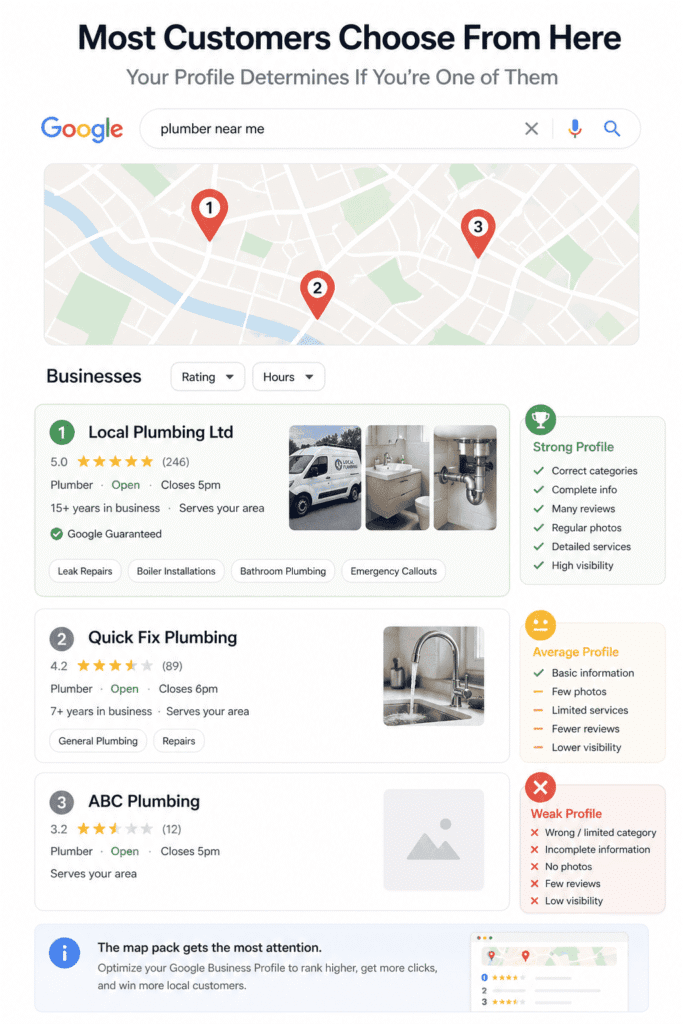
For a plumber, a solicitor, a landscaper, or any business that serves customers in a defined geographic area, the three or four listings in Google’s map pack are often worth more than everything below them combined. Most people searching for a local service never scroll past the map pack. They pick from what’s there, or they refine the search. Understanding what puts a business into those results — and what keeps it out — is a more valuable use of audit time than most of the technical work that gets prioritised ahead of it.
A local SEO audit follows a different logic to the rest of this process — the signals that matter, the tools that surface them, and the fixes that produce results are specific enough to warrant treating it as its own discipline rather than a subsection of the technical review.
Google Business Profile Audit — What Most People Miss
The majority of Google Business Profiles were set up once, given some basic information and a few photos, and then left. Which means the majority of profiles are underperforming in ways that are entirely fixable and almost entirely ignored.
The business category is where the most ranking potential is consistently being left on the table. The primary category is one of the strongest signals Google’s local algorithm uses, and most businesses either chose it hastily during initial setup or accepted whatever Google suggested without thinking it through. A kitchen design company that primarily does fitted kitchens but has “Interior Designer” as their primary category is effectively telling Google they do something adjacent to what they actually do. Worth fixing before anything else.
Secondary categories are the follow-on that most profiles skip. A business can legitimately add several, each representing a real service and a real set of searches. A builder who does loft conversions, extensions, and garage conversions can have a category for each. Most have one. Every missing secondary category is a category of local searches the profile isn’t eligible to appear for — not a grey area, just an oversight.
The services section inside the profile gets treated like a formality. Fields get filled with brief, vague descriptions or left blank entirely. This is indexable content that Google reads to understand what the business does — treating it like an admin task rather than a content opportunity is a consistent pattern on underperforming profiles. Write actual descriptions. Use the language customers use. Be specific about what’s offered, how it works, and where.
Photos are the gap that surprises people most when they look at profiles that are actually performing well in competitive local markets. Not the number of photos — the type. Profiles with real images of actual work consistently outperform profiles with a logo and a couple of stock images, and the difference in click-through and direction requests is meaningful enough that this is one of the higher-return tasks in a local SEO audit. Recent photos of completed jobs, the team, the premises, the process. Nothing staged, nothing generic. The visual evidence that a real business operates here.
One thing most guides don’t mention about the profile is that Google can and does edit it without asking. Categories get suggested and sometimes applied. Descriptions get modified. Opening hours get updated based on user suggestions. If you haven’t logged into the profile in six months, there’s a reasonable chance something has changed that you didn’t authorise — and some of those changes affect how the profile appears in search. Worth checking as part of any audit.
NAP Consistency, Local Citations, and Why Reviews Are an SEO Signal Too
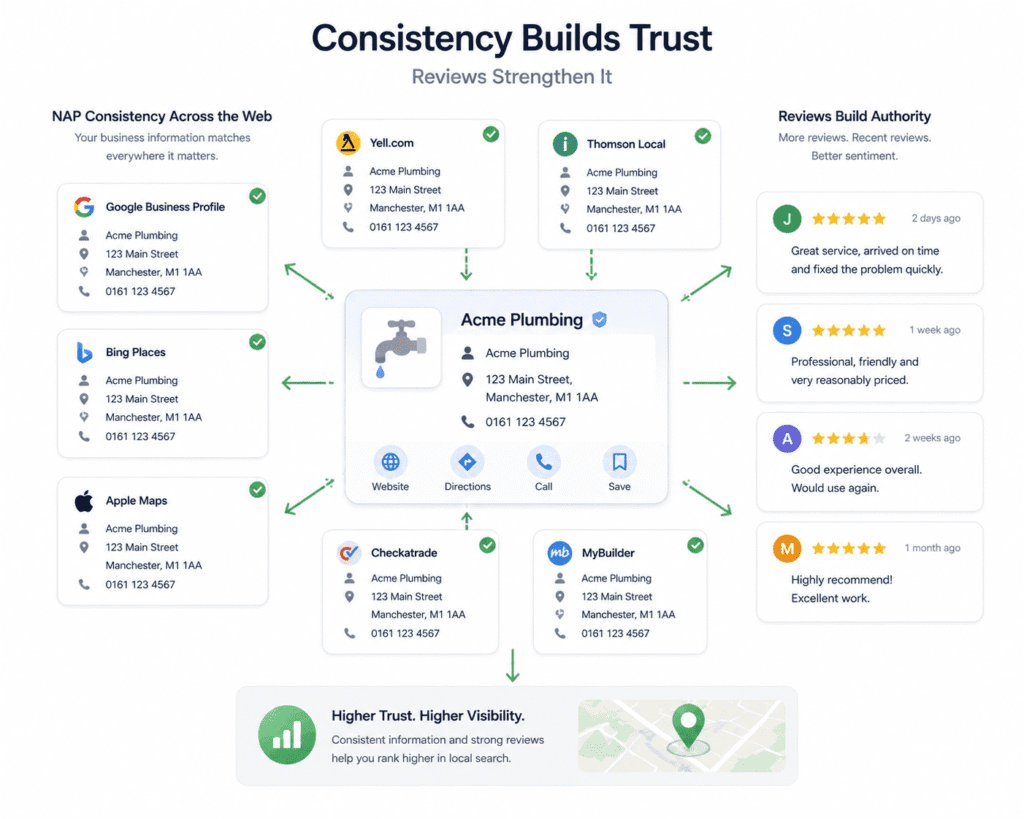
NAP consistency — the business name, address, and phone number appearing identically across every platform it’s listed on — sounds like a minor housekeeping task until you see what the citation landscape actually looks like for a business that’s been operating for several years. Phone numbers change. Addresses change. The business name gets abbreviated differently in different places. By the time you audit it properly, most established businesses have at least a handful of contradictions sitting across directories, map platforms, and industry listings — each one a small inconsistency in the web of signals Google uses to verify that the business is where it claims to be and operating as it claims to operate.
Doing this manually is slow and incomplete. Tools like BrightLocal or Whitespark will pull citation data across the main sources and show you where discrepancies exist. Neither is free, but both are inexpensive enough for a one-time audit. If budget is a constraint, searching the business name and address directly in Google and working through the results covers the platforms that carry the most weight — Google Business Profile, Bing Places, Apple Maps, Yell, and any industry-specific directories that send real traffic.
The citations that matter are on platforms that carry genuine authority and relevance. Chasing perfect consistency across every obscure directory that’s ever listed the business is a time sink with minimal return. Get the major platforms right, get the industry-relevant ones right, and move on.
Reviews are the part of local SEO that sits at the intersection of rankings and reputation, which makes them harder to treat purely as a technical task — but that’s what they are, in part. The number of reviews, how recent they are, and the overall sentiment are factors in how prominently a profile appears in local results. A business with fifty reviews from the past year consistently outranks an otherwise identical business with ten reviews from three years ago. That’s not a theory — it’s a pattern visible in almost any competitive local market.
What most businesses handle poorly isn’t collecting reviews — it’s responding to them. Every response to a review is public. Future customers read them, often specifically to see how the business handles criticism. A negative review that gets a measured, professional response does considerably less damage than one that gets ignored — and a defensive or dismissive response does more damage than the original review. The response is part of the profile in the same way the review is, and it gets evaluated accordingly.
During a complete SEO audit for a small business website, the relationship between the website and the Google Business Profile is worth examining specifically. They need to be consistent with each other in ways that go beyond just matching the phone number — the same service descriptions, the same geographic areas, the same signals about what the business does and where it does it. Google cross-references them. A profile claiming to serve a wider area than the website acknowledges, or describing services the website doesn’t mention, creates contradictions that affect how confidently Google surfaces the profile. The website and the profile are being read together, and inconsistencies between them are noticed.
Backlinks — What’s Worth Your Attention and What’s Just a Number on a Dashboard
Backlinks are the part of SEO that generates the most misplaced urgency. Agencies sell link building packages to businesses that don’t need them yet. Business owners check their Domain Authority score the way people check their follower count — frequently, anxiously, and without a clear sense of what the number actually means. The backlink conversation in most small business SEO audits is less about finding problems and more about calibrating what actually deserves attention versus what’s just a metric that looks important because a dashboard chose to display it prominently.
How to Read Your Backlink Profile Without Getting Distracted by Vanity Metrics
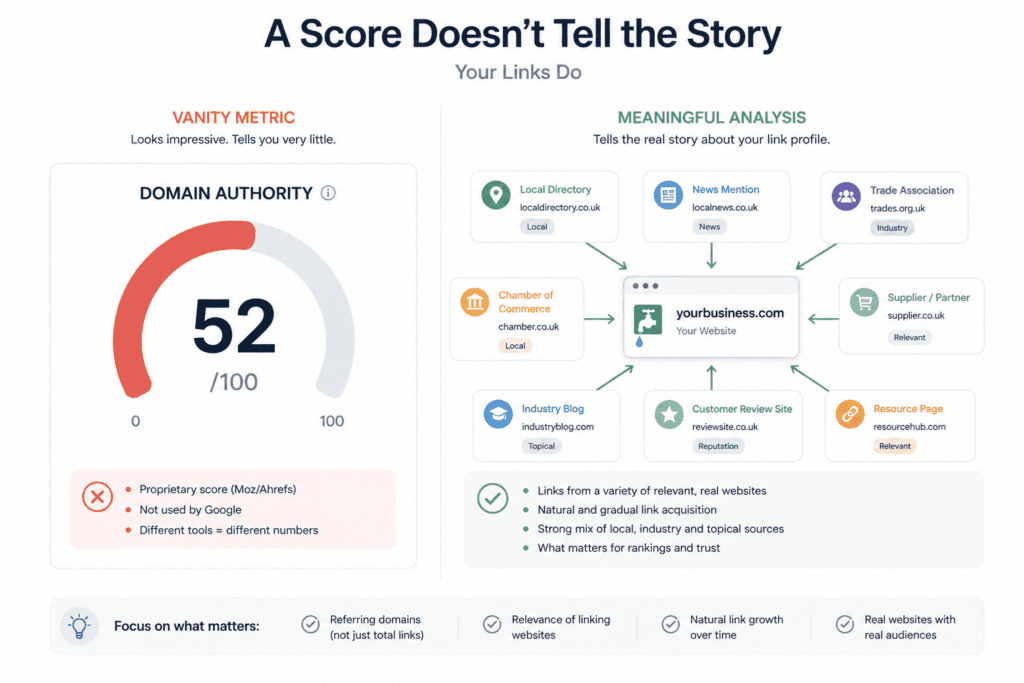
Domain Authority and Domain Rating are proprietary scores created by Moz and Ahrefs respectively. They’re models — attempts to estimate how Google might value a site’s link profile based on publicly observable signals. They correlate with ranking ability often enough to be directionally useful. They are not what Google uses, they don’t update in real time, and two different tools will give you two different scores for the same site. Using them as a primary measure of SEO health is like judging a restaurant by its Tripadvisor ranking without looking at what anyone actually said.
What’s more instructive than any aggregate score is the texture of the profile itself. Pull the backlink report in Ahrefs Webmaster Tools or Moz’s free tier and look at the actual links. Where are they coming from — sites that exist for a purpose and have real readers, or sites that appear to exist primarily to host outbound links? Are they topically connected to what the business does, or are they generic directories sitting alongside links to businesses in completely unrelated industries? Did they arrive gradually over several years, or did a cluster of them appear within a short window and then stop?
For most small businesses that haven’t done any deliberate link building, the profile reads predictably. Local business directories. A trade association membership page. A supplier who lists recommended installers. Maybe a local newspaper article from three years ago. This is not a weak profile — it’s a profile that looks exactly like what a real local business accumulates through the normal course of operating. Google is reasonably good at recognising this pattern and treating it accordingly. The absence of a hundred high-authority links doesn’t mean the site is at a disadvantage in local search, where the competition often has equally modest profiles.
The metric worth paying attention to over the DA score is referring domains — the number of distinct websites linking to the site. A backlink profile with links from a wide range of different sources is healthier than one with the same number of links concentrated across two or three domains, regardless of what authority scores say. Concentration suggests either a thin profile or something that was built rather than earned — and the distribution pattern often tells you more about the history of the site’s link acquisition than any single number does.
If you haven’t used Ahrefs before, this Ahrefs for beginners guide covers how to navigate the interface and interpret the backlink data without getting lost in the metrics.
Red Flags Worth Addressing vs. Noise You Can Safely Ignore
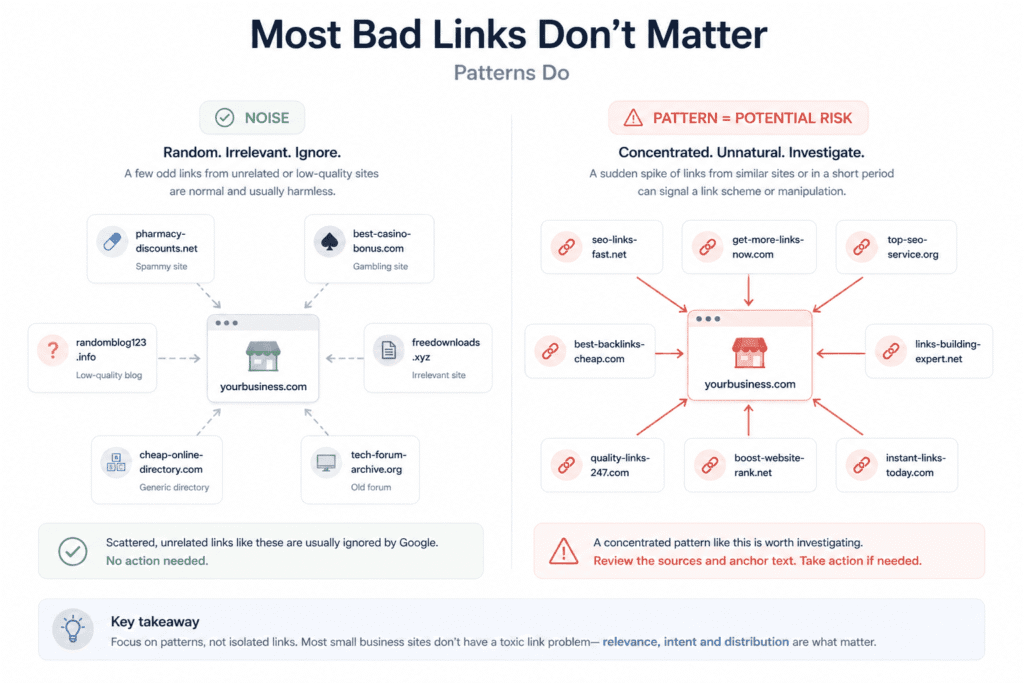
The honest starting point here is that most small business sites don’t have a meaningful toxic link problem, and treating every unusual-looking link in the backlink report as a threat is a waste of time that occasionally causes active damage. Google has spent years getting better at ignoring low-quality links rather than penalising the sites they point to. The cluster of links from gambling sites and pharmaceutical directories that shows up in almost every backlink report is, in most cases, background noise — seen, disregarded, no action required.
The disavow tool gets reached for far too readily. It exists for sites that were manually penalised for unnatural links, or for sites that had genuinely aggressive link schemes built pointing at them. Using it as routine maintenance — submitting a disavow file because some links look odd — is how businesses accidentally weaken profiles that were working fine, by disavowing legitimate links alongside suspicious ones without realising it. Unless Google Search Console contains a manual action specifically citing unnatural inbound links, the disavow file almost certainly doesn’t need to be touched.
What is worth a second look is a sudden, concentrated spike in new links appearing over a short period — particularly if they’re coming from a group of sites with similar characteristics. This pattern can indicate a link scheme that a previous SEO provider built and didn’t disclose, or occasionally a negative SEO attempt, though the latter is less common than the SEO industry’s anxiety about it suggests. The signal isn’t a handful of odd links — it’s a pattern that has the fingerprints of construction rather than accumulation.
Anchor text is worth a brief review during a complete SEO audit for a small business website. A natural profile has most anchors as the business name, the bare URL, or phrases like “here” and “this site” — because that’s how people link when they’re not thinking about SEO. A profile where a disproportionate share of anchors are exact commercial keyword phrases suggests that at some point, someone was building links with deliberate keyword targeting in mind. This was standard practice for years and is still fairly common in profiles of businesses that worked with SEO agencies before 2015 or so. It’s not an automatic problem but it’s worth knowing about, and worth not replicating with any future link acquisition.
The links that are actually worth pursuing — separate from the audit itself — are the ones that would make sense as a business decision regardless of SEO. A mention in local press. A listing in a relevant trade body’s directory. A partner or supplier who links to businesses they work with. A local business association membership that includes a website listing. None of these require an outreach campaign or a link building budget. They require being a visible, active member of the business community the company operates in — which tends to produce links as a byproduct rather than a primary goal, which is roughly how Google prefers it.
Most small businesses that are underperforming in search have a content problem or a local signals problem well before they have a link problem. The backlink audit is worth doing because occasionally it surfaces something that matters — a manual penalty nobody knew about, a concentrated spam pattern from a previous agency, an anchor text profile that’s creating unnecessary risk. But going into this part of the audit expecting to find the reason the site isn’t ranking is usually the wrong expectation. The backlink profile is one chapter of the story, and for most small businesses it’s one of the shorter ones.
If the audit convinces you that a paid backlink and keyword tool is worth the investment, the Semrush vs Ahrefs breakdown covers the difference in backlink data quality, keyword coverage, and overall value at the small business level.
Turning a List of Issues Into an Actual Plan
At the end of a thorough audit, most people have a document full of findings and no clear sense of what to actually do on Monday morning. The audit answered the question “what’s wrong.” It didn’t answer “what do I fix first, what can wait six months, and what can I safely ignore forever” — and that second set of questions is where most of the value either gets created or lost.
A Simple Effort-vs-Impact Framework for Prioritising Fixes
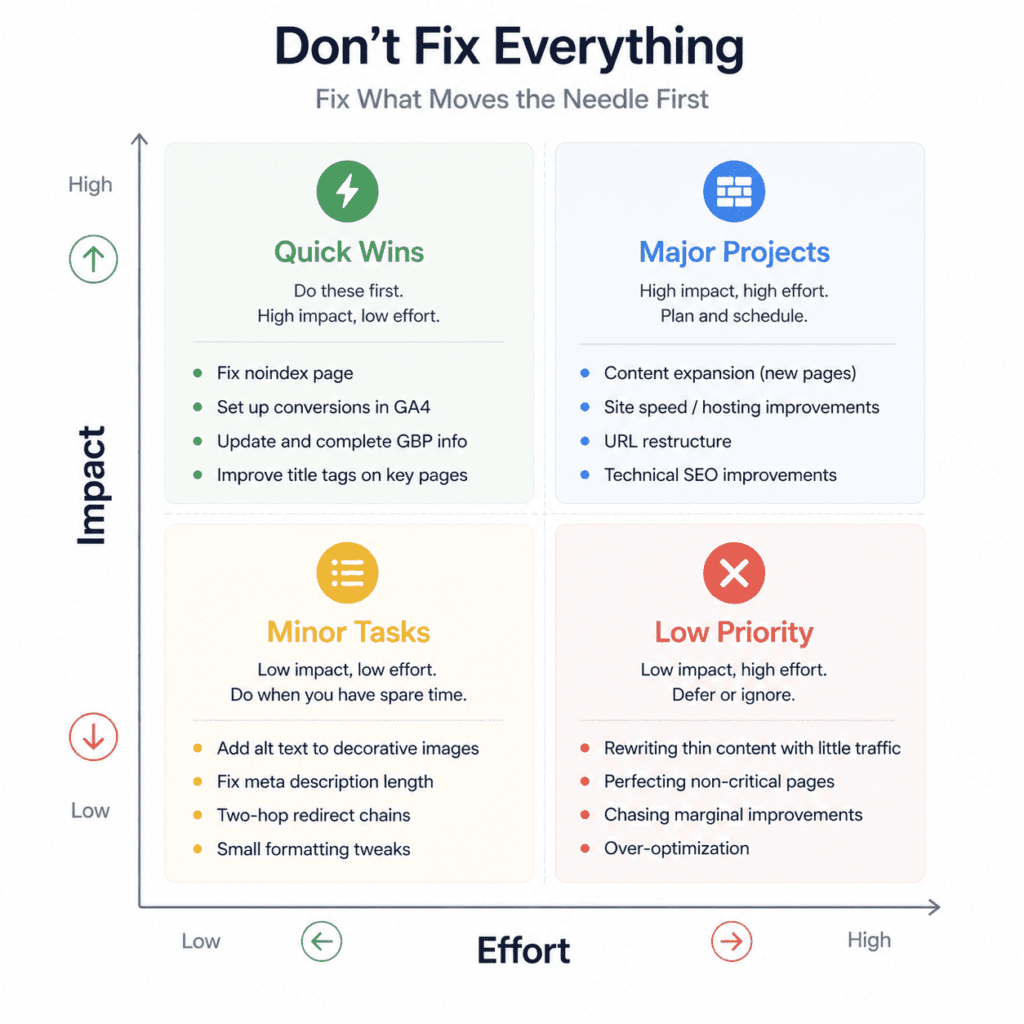
There’s a version of prioritisation that involves spreadsheets, weighted scoring systems, and colour-coded matrices. It produces a satisfying document and rarely gets used after the first week. The version that actually gets acted on is simpler: for each finding, make a rough call on how hard it is to fix and how much difference fixing it is likely to make. That’s the whole framework. The point isn’t precision — it’s having a principled reason to put some things before others instead of starting with whatever feels most urgent or most recently discovered.
The fixes that are relatively quick and genuinely consequential are where the first few weeks of work should go. On most small business sites, this cluster tends to include the same kinds of things: pages that are accidentally noindexed, conversion events missing from GA4, Google Business Profile fields that are incomplete or wrong, title tags on important pages that are vague or duplicated across the site. None of these feel like significant SEO work. Most of them take an afternoon and produce observable results within a few weeks — which matters not just for outcomes but for the momentum that keeps the rest of the work from stalling.
The bigger, more structural fixes — a content gap that requires building several pages, a hosting environment that needs to change to solve a speed problem, a URL restructure that’s been needed for two years — belong on the plan with honest timelines attached. Not “we’ll get to this” but a specific window, a specific person responsible, and a realistic sense of how long it actually takes. The reason these projects don’t get done isn’t usually lack of intent — it’s that they get scheduled alongside the quick fixes and then deprioritised when the quick fixes take longer than expected. Separating them into a distinct phase, to be started once the immediate priorities are addressed, is more honest about how attention actually works.
The findings that genuinely belong at the bottom of the list — or off it entirely — are the ones that are time-consuming to fix and unlikely to affect anything that matters. A two-hop redirect chain. A meta description that’s four characters over the suggested length. Alt text missing on a decorative image that contributes nothing to the page’s content. These show up in every crawl and every audit report because tools flag everything with equal visual weight. Fixing them isn’t wrong, it’s just not worth doing while higher-impact issues remain. The implicit assumption in most audit outputs — that everything found deserves to be fixed — isn’t true, and acting on it is how businesses spend three months on cosmetic improvements while the real problems sit untouched.
One dimension that gets consistently overlooked in prioritisation is how reversible each fix is. Updating a page title or adding a conversion event in GA4 is low-risk — if something unexpected happens, the change takes five minutes to undo. Restructuring URL patterns across a large section of the site is high-risk — a misconfigured redirect at scale can cause damage that takes weeks to diagnose and recover from. High-risk changes deserve more preparation, more testing, and more caution than the audit findings themselves usually suggest. The fact that something needs fixing doesn’t determine how carefully it should be fixed.
What a One-Page Audit Summary Looks Like — and Why It’s the Most Useful Output
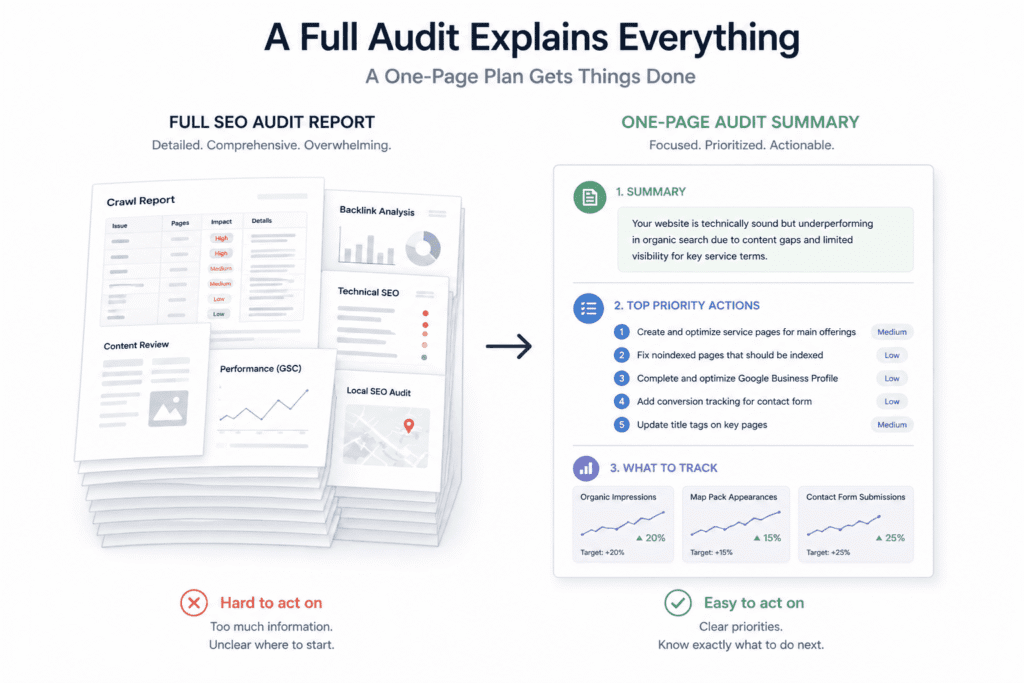
A full audit produces a lot of material. The crawl report alone can run to hundreds of rows. The GSC data, the content review, the tracking findings, the local SEO audit — together they represent a significant body of reference information that’s genuinely useful when working on specific issues. As a document to hand to a business owner or a web developer and say “start here,” it’s close to useless. The volume obscures the priorities, the technical language creates distance, and the person who needs to act on it doesn’t know where to look first.
The output that produces the most consistent follow-through from a complete SEO audit for a small business website is a single page — not a summary of the full report, but a distillation of the handful of things that actually matter enough to act on in the next sixty days.
At the top of that page: two or three sentences describing the site’s actual situation in plain language. Not a score, not a grade, not “your site has 47 issues.” Something that gives the business owner an honest sense of where they are — what’s working, what’s the main thing holding performance back, and what kind of problem it is. A clear characterisation of the situation is more useful than any metric because it orients every subsequent decision. If the summary says the site is technically sound but largely invisible for commercial search terms because the content doesn’t reflect how customers search, every fix on the list below it makes sense in context.
Below that, three to five specific actions in priority order. Not a comprehensive list — just the things most likely to produce meaningful improvement if completed in the next two months. Each one described in plain language: what needs to change, where, and a rough sense of the effort involved. The list should be short enough that completing it feels achievable — because a list that feels achievable gets worked through, and a list of twenty-five items in no particular order sits in a folder and gets ignored.
The last thing worth including is a short note on what to watch — the two or three numbers in GSC or GA4 that should move if the priority fixes are working. Organic impressions for the target pages. Map pack appearances for the main service terms. Conversion events for the contact form. Deciding what success looks like before the work starts means the results get evaluated honestly rather than retrofitted to whatever happened. It also means the business knows when something isn’t working and needs a different approach, rather than continuing to invest in a direction that isn’t producing anything.
The full audit is the reference document. The one-page summary is what gets acted on. Most audits produce only the first one and assume the second will take care of itself. It doesn’t.
If the audit reveals gaps that require more capability than free tools provide, the best SEO tools for small businesses breaks down which paid options are worth considering and at what stage of growth they start to make sense.
Two Things an SEO Audit Can’t Tell You
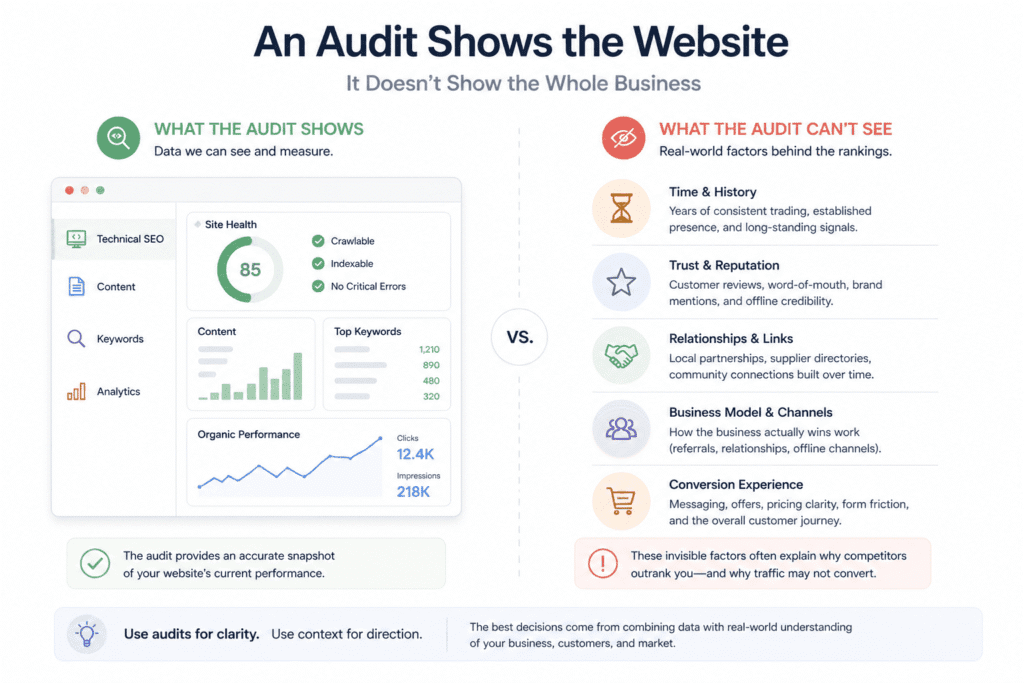
Every tool has edges where it stops being useful, and an SEO audit is no different. These aren’t disclaimers — they’re genuine blind spots that affect how the findings should be read and what decisions should follow from them.
The first is why a competitor with a worse website is outranking you.
This comes up constantly and the audit never explains it satisfactorily, which frustrates people who’ve done careful work and expected the results to follow. The crawl can tell you your site is technically sound. GSC can confirm your pages are indexed and appearing for the right terms. The content review can show that your pages are more thorough than the competitor’s. And yet they’re above you, and have been for as long as you’ve been paying attention.
What the audit can’t see is the depth of history Google has built up around that business. Eight years of consistent trading in the same location. A hundred and forty reviews written by real customers across a decade. Local press mentions that nobody would call a link building strategy — they’re just what happens when a business is embedded in a community long enough. A backlink from the local council’s supplier directory that’s been there since 2014. None of these show up as dramatic findings in any tool. They accumulate quietly, and Google’s confidence in a business grows in proportion to the weight and age of those signals in a way that a point-in-time audit simply cannot capture.
The instinct when faced with an unexplained competitor is to look harder for the hidden variable — the technical edge, the link profile gap, the content angle that’s being missed. Sometimes that search is productive. Often it leads to increasingly marginal optimisations that don’t change anything, because the real explanation is just time. The competitor has been there longer. Google has had more opportunity to develop confidence in them. That’s not a satisfying answer and it’s not one an audit can deliver — but recognising it is the difference between a realistic improvement plan and one that keeps promising results that aren’t coming.
The second thing is whether SEO is actually the right problem to be working on.
An audit assumes the goal is more organic traffic and better rankings, and that improving those things will produce better business outcomes. That’s often true. It isn’t always.
A site generating decent organic traffic with poor conversion rates has a different problem. The audit will flag high bounce rates and low engagement on certain pages, but it won’t explain that the contact form is asking for information people don’t want to give before a first conversation, or that the homepage reads like it was written for industry peers rather than the customers the business is trying to attract, or that the pricing structure is confusing enough that people leave to get a quote from somewhere clearer. Improving rankings for a page that doesn’t convert sends more people through a door that doesn’t open properly. The SEO work and the conversion problem need addressing together, and an audit that focuses purely on rankings can improve one while leaving the other completely untouched.
There’s also a version of this where the business model itself doesn’t run primarily through search. A management consultant whose clients come through speaking engagements and professional introductions. An architect whose projects come through developer relationships built over years. A specialist who gets referrals from a small network of GPs. For these businesses, the organic search channel is real but secondary — and a technically perfect website optimised for every relevant keyword may produce a modest improvement in enquiries and nothing close to what the time and investment suggested it would. The audit can’t tell you this because it doesn’t know how the business actually acquires customers. That context has to come from outside the data.
Running a complete SEO audit for a small business website gives you an accurate picture of the site as it currently stands — what’s working, what isn’t, what’s missing. That picture is only as useful as the questions being asked of it. If the audit is being used to inform a realistic plan for a business where search genuinely drives customer acquisition, it’s one of the most productive things the business can do. If it’s being used to solve a growth problem that actually lives somewhere else — in the conversion path, in the offer, in the sales process — it will produce findings that look actionable and results that don’t quite arrive. Knowing the difference before the work starts is worth more than any individual finding in the report.
📖 Related: The 15 Best SEO Tools in 2026 (Free & Paid) A complete guide to the best SEO audit tools available in 2026 — including free options like Screaming Frog and Google Search Console, and when to upgrade to a paid platform.
Frequently Asked Questions
How long does an SEO audit take for a small business website?
For a site under 50 pages, a thorough audit takes between three and five focused hours — covering the technical crawl, Search Console and Analytics review, on-page assessment, content gaps, local SEO signals, and backlink profile. Sites in the 50 to 200 page range take closer to one to two full days. The audit itself is usually faster than deciding what to do with what you find.
What does an SEO audit include?
A complete SEO audit for a small business website covers technical health (crawlability, indexing, site speed, mobile usability), on-page elements (title tags, headers, internal linking, content quality), search intent alignment, tracking and data integrity, local SEO signals (Google Business Profile, NAP consistency, reviews), and backlink profile. It ends with a prioritised list of fixes rather than an exhaustive catalogue of every issue found.
Can I do an SEO audit myself?
Yes — the tools required are either free or low cost, and the process doesn’t require technical expertise for the majority of findings. Google Search Console, Google Analytics 4, and Screaming Frog’s free tier cover most of what a small business site needs. The harder part isn’t running the tools — it’s interpreting the output and knowing which findings actually matter versus which ones are noise.
How much does an SEO audit cost?
A DIY audit using free tools costs nothing beyond the time involved. A professional audit from an SEO consultant or agency typically ranges from £300 to £2,000 for a small business site, depending on depth, site size, and what’s included in the deliverable. The most expensive audits aren’t always the most useful — a focused audit with a clear prioritised output often produces better results than a comprehensive report that nobody acts on.
How often should I audit my website for SEO?
A full audit once a year is reasonable for most small business sites that aren’t changing rapidly. A lighter review — checking GSC for new crawl errors, verifying conversion tracking, reviewing any significant drops in impressions or rankings — is worth doing quarterly. Any major site change (redesign, migration, new CMS, URL restructure) warrants an immediate audit regardless of when the last one was done.
What’s the difference between a technical SEO audit and a full SEO audit?
A technical SEO audit focuses specifically on crawlability, indexing, site speed, mobile usability, and structural issues — essentially what a search engine encounters when it visits the site. A full SEO audit includes all of that plus content quality and gaps, search intent alignment, local SEO signals, backlink profile, and tracking integrity. For most small business sites, a full audit is more useful because the biggest opportunities are often in content and local signals rather than technical issues.
If you’re trying to decide between the two leading paid platforms, this Semrush vs Ahrefs comparison breaks down exactly how they differ and which makes more sense depending on what the business needs most.
Disclosure: This article may contain affiliate links. If you make a purchase through these links, I may earn a commission at no extra cost to you. All opinions are based on hands-on testing and independent research.



This guide perfectly captures the frustration of small business owners skipping the diagnostic phase before handing over budget to an agency. I particularly appreciate the emphasis on finding just those three or four core issues, as it prevents the overwhelming trap of trying to fix everything at once. The focus on turning audit findings into an actionable, prioritized plan is exactly what makes this approach so practical for real-world implementation.
Thank you — you’ve summarized the core philosophy of the guide better than I could! That ‘fix everything at once’ trap is exactly where a lot of small business owners lose momentum and confidence. Narrowing it down to three or four high-impact issues keeps things manageable and builds early wins that sustain the process. Really glad the prioritization framework came through clearly!
Very useful guide. A lot of small businesses try to improve rankings without first understanding the technical and structural issues affecting their visibility. A proper SEO audit can make a massive difference over time.
Absolutely spot on! So many small businesses jump straight into content or link building without fixing the foundation first. A thorough SEO audit really is the starting point for any meaningful progress. Glad the guide was useful!
This is a really thorough breakdown. The point about narrowing down to three or four core issues before touching anything else resonates — I had been doing the opposite for years and spinning my wheels. The speed section pushed me to revisit some old product demo videos that were quietly hurting our Core Web Vitals; we ended up running them through video upscaler free and trimming the heaviest pages. Definitely keeping this guide bookmarked.
Glad it clicked — the “fix everything at once” trap is one of the most common reasons audits stall. Once you’ve been through it a few times you start to see how much time gets lost chasing warnings that barely move the needle.
The video angle is worth highlighting though — embedded product demos are one of the sneakiest LCP killers because they feel like content, not dead weight. Lazy-loading or replacing the heaviest ones with a thumbnail-plus-play setup can make a significant difference without losing the asset entirely.
Good to hear the Core Web Vitals are in better shape. Bookmark it and come back when the next audit cycle rolls around.
Thanks for breaking this down so clearly. The advice to pick three or four real problems first instead of trying to fix everything at once really resonated with me, and the Core Web Vitals checklist is something I will run on our own site this week. I had a similar experience narrowing down issues where prioritising the biggest speed and accessibility wins gave much better results than chasing every warning. Looking forward to applying this approach on a few smaller projects.
That’s exactly the pattern — chasing every warning is how audits turn into rabbit holes that never close. Speed and accessibility wins tend to compound too, since they often overlap (images that hurt LCP are frequently the same ones missing alt text).
Curious how the Core Web Vitals check goes on your site — if you hit anything unexpected, drop it back here. Those edge cases are often where the real learning happens.
I really appreciate the framing of starting with three or four real problems before trying to fix everything at once. The speed and Core Web Vitals section was the biggest eye-opener on my last site audit, and I will be keeping a short running checklist the next time I go through the guide.
That checklist habit is underrated — most people do one audit, fix the obvious stuff, and never revisit. A short running list keeps the site from drifting back into the same issues three months later.
Core Web Vitals tends to be the section that surprises people most. The scores feel abstract until you’re staring at a 4-second LCP on a page you thought was fine. Glad it landed.
Good luck on the next audit — if anything comes up that the guide doesn’t cover, drop it here.
Great reminder to focus on three or four real problems instead of trying to fix everything at once — the Core Web Vitals and crawlability sections really hit home for me. I recently went through a similar audit for a small client site and ended up leaning on ASCII Art Generator to put together some lightweight header art for their docs page, which loaded instantly and didn’t drag the speed score down. It’s a nice example of how a tiny creative choice can fit neatly into a performance-first plan.
I really liked the advice to narrow things down to three or four real problems before touching anything else. The Core Web Vitals section was especially useful since I had been skipping that part. While working through audits like this I also keep a small ASCII art tool handy for README headers and changelogs, and it has made my documentation pages feel a lot more consistent.
Glad the Core Web Vitals section clicked — that’s one of the most skipped parts of an audit, usually because the scoring feels abstract until you actually see it affect a page. Once you start connecting those scores to real user experience (especially on mobile), it becomes hard to ignore.
The “three or four real problems first” framing exists precisely because audit fatigue is real. A 47-issue Screaming Frog export is demoralizing for most small business owners — prioritization is the actual skill.
On the documentation side — keeping audit notes consistent is a good habit, whatever system works for you.
This is a great reminder that most small business sites have three or four real problems, not fifty. In my own experience, narrowing the audit to the crawl, the on-page basics, and Core Web Vitals usually surfaces the issues that actually move rankings. Thank you for putting the focus on prioritisation rather than exhaustive checklists.
The part about narrowing down to three or four real issues before trying to fix everything really resonates. I have been guilty of running through the whole checklist at once and ending up with a long list of half-done fixes. The reminder to actually check Core Web Vitals on real mobile pages, not just the lab test, is something I keep forgetting to do.
The half-done fixes problem is real — a checklist of 30 partially resolved issues is worse than 4 fully closed ones because you never get the compounding effect of actually shipping a fix.
The mobile field data point is one of the most commonly skipped steps, mostly because the lab scores in PageSpeed Insights feel authoritative. But lab tests run on a simulated connection in a controlled environment — field data is what real users on real devices actually experienced. Those two numbers can be surprisingly far apart, especially on sites with a lot of third-party scripts.
Next time you’re in Search Console, the Core Web Vitals report under Experience is the fastest way to see field data segmented by mobile and desktop without leaving Google’s ecosystem.
Thanks for laying this out so clearly — I especially appreciated the part about diagnosing three or four real problems first instead of trying to fix everything at once. The Core Web Vitals reminder to look at real field data rather than just the lab scores was something I had been getting wrong on my own site. I’ll be running this exact audit next week before touching anything else.
Good order of operations — running the audit before touching anything is exactly the right call. It’s easy to start fixing what feels broken rather than what’s actually costing you.
The field data vs. lab scores distinction is worth keeping in mind when you do. If your Search Console is showing URL-level Core Web Vitals failures, that’s your starting point — those are real users on real devices, not a simulation. Lab scores tell you what could be a problem; field data tells you what is.
Good luck with it next week.
Really appreciate the advice to narrow things down to three or four real problems instead of trying to fix everything at once — that mindset alone made my last audit far less overwhelming. The Core Web Vitals section hit home too, since my mobile speed was quietly dragging down pages I thought were fine. When I got to the content gaps part I realised most of my thin pages just needed some visual variety, so I started turning a few of my music clips into short videos with an AI generator to keep visitors engaged longer. Thanks for such a practical, no-fluff guide.
Glad the prioritization framing helped — audit overwhelm is usually a scoping problem more than a skills problem. Once you cap the active fixes at three or four, the whole process feels manageable.
The mobile Core Web Vitals finding is a common one on sites that look fine on desktop. A lot of LCP issues only show up under real mobile conditions because the bottleneck is network latency on the heaviest above-the-fold element, not rendering speed.
On thin content — adding genuine depth is usually more durable than adding engagement signals. Dwell time helps, but search engines are increasingly good at distinguishing pages that answer questions from pages that just hold attention. Worth making sure the content gaps are closed substantively, not just visually.
Really helpful framework — the “pick three or four real problems first” approach is something I wish I had internalised earlier. I used to bounce between tools and warnings and never finish anything. The Core Web Vitals section alone pushed me to revisit our own product pages; trimming and re-exporting most of our screenshots gave bigger LCP gains than I expected. Bookmarking this one.
The tool-bouncing trap is hard to break out of because it feels productive — you’re always doing something. The shift happens when you start measuring closes instead of starts.
The screenshot finding is a good one to flag. Unoptimized images are probably the single most underestimated LCP factor on product pages specifically, because product shots tend to be high-resolution exports that nobody ever revisited after upload. A re-export at the right dimensions with modern compression (WebP where you can) often moves the needle more than anything else on the page.
Glad it pushed you to actually run the check rather than just read through it.