
I Tested MailerLite in 2026 — Is It Really Worth It?
MailerLite review: I tested MailerLite hands-on to see whether it still deserves its reputation as one of the easiest and most affordable email marketing tools in 2026. After building real campaigns, automations, and signup forms, here’s what genuinely impressed me — and where MailerLite still falls short.
What Is MailerLite — and Who It’s Actually Best For
MailerLite is a popular email marketing platform known for its simplicity, generous free plan, and all-in-one feature set. In this Mailerlite review, I’ll explain what the tool actually does and help you quickly decide whether it’s the right fit for your business, blog, or online brand.
What is MailerLite used for?
MailerLite is used to create, send, automate, and analyze email marketing campaigns from one dashboard.
In my experience testing the platform, it covers the full email marketing workflow: newsletters, email automation, landing pages, forms, and audience segmentation—without feeling overwhelming.
You can use MailerLite to:
- Send newsletters and broadcasts
- Build automated email sequences
- Collect leads via forms and landing pages
- Track opens, clicks, and conversions
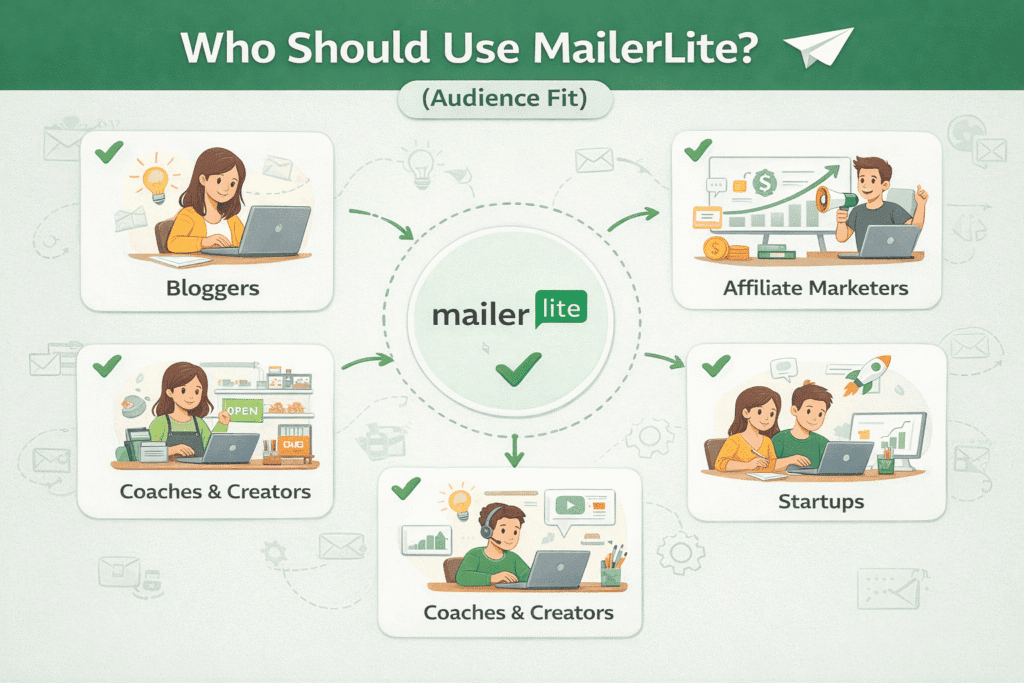
Who should use MailerLite?
MailerLite is best for beginners, creators, small businesses, and budget-conscious marketers who want powerful features without complexity.
If you’re just starting out or growing a list steadily, you’ll notice MailerLite strikes a strong balance between ease of use and functionality.
It’s especially well-suited for:
- Bloggers and affiliate marketers
- Content creators and coaches
- Startups and small businesses
- Non-technical users who value simplicity
Who should not use MailerLite?
MailerLite may not be ideal for large enterprises or marketers who need extremely advanced automation and CRM-level features.
While testing it, I found the automation powerful for most use cases, but not as deep as enterprise tools like ActiveCampaign or HubSpot.
You may outgrow MailerLite if you need:
- Very complex, multi-branch automations
- Built-in sales CRM pipelines
- Heavy enterprise-level reporting
How MailerLite Works (From Signup to Sending Emails)
MailerLite follows a clean, beginner-friendly workflow that takes you from signup to sending campaigns without unnecessary complexity. In this Mailerlite review, I’ll walk you through how the platform actually works based on hands-on testing, so you know exactly what to expect before using it.
How does MailerLite work step by step?
MailerLite works by guiding you through list setup, content creation, automation, and performance tracking in a logical sequence.
When I tested the platform, the workflow felt intuitive and fast, even for first-time users.
Typical MailerLite workflow:
- Create and get your account approved
- Add subscribers or connect signup forms
- Design emails or automation workflows
- Send campaigns or trigger automations
- Track performance in real-time reports
What are the main components of the MailerLite dashboard?
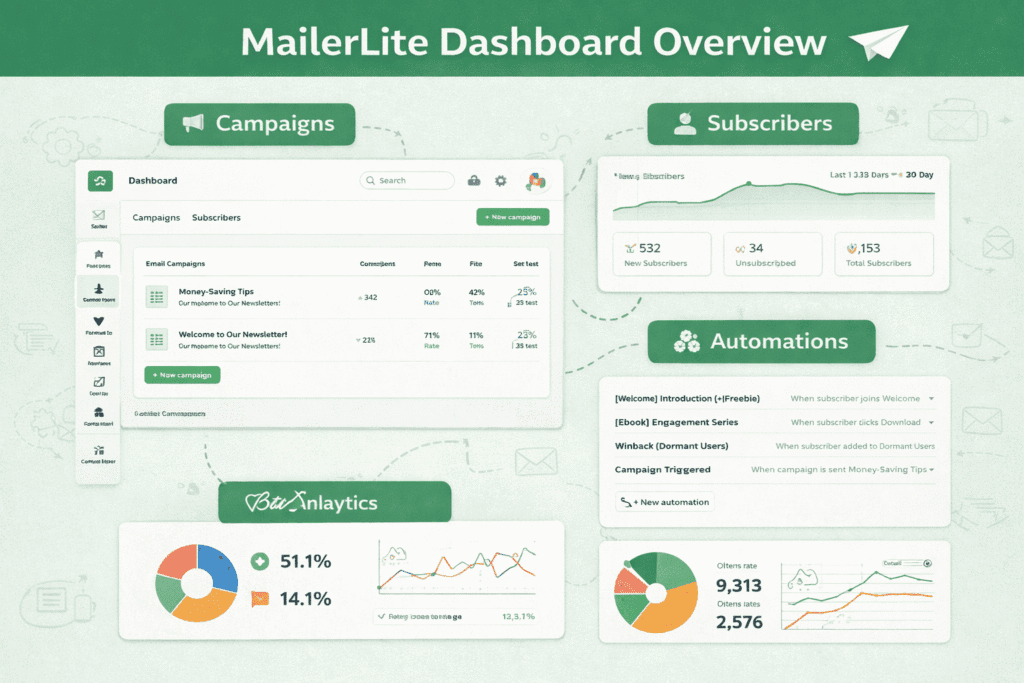
The MailerLite dashboard is built around campaigns, automation, subscribers, forms, and analytics.
You’ll notice everything is clearly labeled, which reduces the learning curve compared to more complex email marketing tools.
Core dashboard sections include:
- Campaigns (newsletters, A/B tests)
- Automation (workflow builder)
- Subscribers (groups, segments, fields)
- Forms & landing pages
- Reports & analytics
How long does it take to set up MailerLite?
Most users can fully set up MailerLite and send their first campaign within 30–60 minutes.
In my experience, setup is quick once your account is approved, especially if you’re using built-in templates and forms.
Setup time depends on:
- Account approval (usually within 24 hours)
- List size and import method
- Complexity of your first automation
Is MailerLite easy to use for beginners?
Yes, MailerLite is one of the easiest email marketing platforms for beginners to use.
While testing it, I found the interface uncluttered, with helpful tooltips and a logical layout that minimizes confusion.
Beginner-friendly elements include:
- Drag-and-drop editors
- Simple automation logic
- Clear terminology (no jargon overload)
During testing, I set up a complete workflow starting from a signup form to a welcome email and a follow-up sequence. The entire setup—from form creation to automation activation—took under an hour, and I was able to preview and test each step before publishing. This hands-on process confirmed how beginner-friendly MailerLite’s interface really is.

MailerLite Key Features Explained
MailerLite positions itself as an all-in-one email marketing platform rather than a single-purpose newsletter tool. In this Mailerlite review, I’ll break down the most important features based on hands-on testing, highlighting what works well, what’s limited, and who each feature is best for.
What are the core features included in MailerLite?
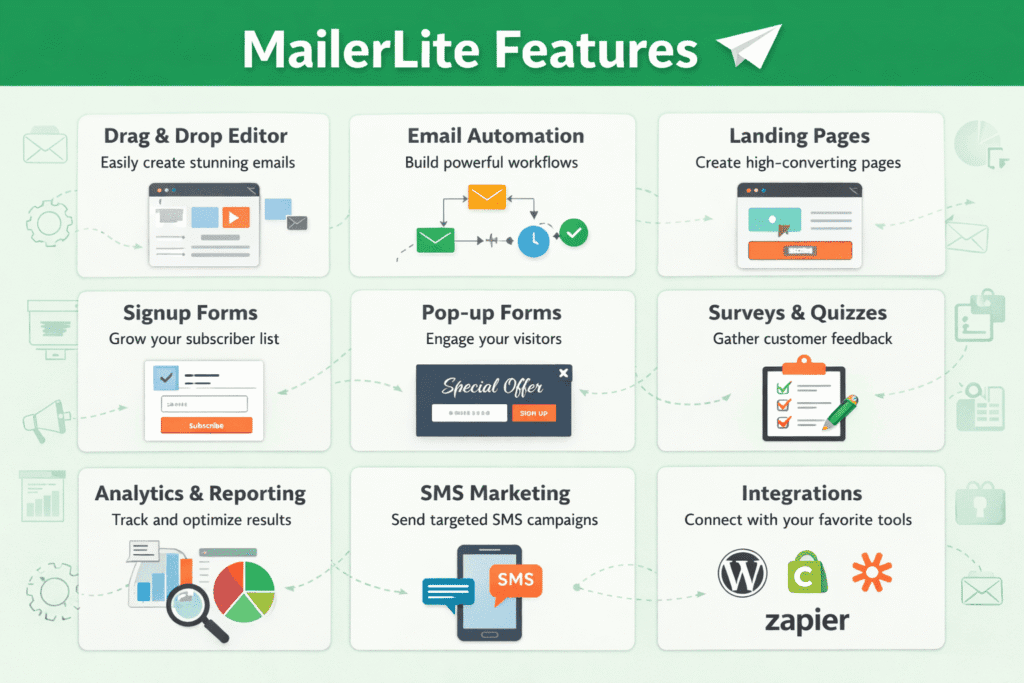
MailerLite includes email campaigns, automation, subscriber management, forms, landing pages, and analytics in one platform.
In my experience testing MailerLite, these core features cover nearly everything most small to mid-size businesses need to run effective email marketing without paying for multiple tools.
Key built-in features:
- Email campaigns and newsletters
- Visual automation workflows
- Subscriber groups, segments, and custom fields
- Forms, pop-ups, and landing pages
- Reporting and performance analytics
Does MailerLite include email automation?
Yes, MailerLite offers a visual automation builder that allows you to create behavior-based email workflows.
When I tested the automation feature, it was easy to set up sequences triggered by sign-ups, clicks, or time delays.
Automation supports:
- Welcome email sequences
- Lead nurturing campaigns
- Simple sales funnels
- Subscriber tagging and movement between groups
Does MailerLite support landing pages and lead capture?
MailerLite includes built-in landing pages, embedded forms, and pop-ups for lead generation.
You’ll notice these tools are tightly integrated with the email system, making it easy to move leads directly into automations.
Lead capture options include:
- Drag-and-drop landing page builder
- Embedded and floating forms
- Exit-intent and timed pop-ups
- Custom success pages and redirects
What analytics and reporting does MailerLite provide?
MailerLite provides real-time reporting on opens, clicks, bounces, unsubscribes, and automation performance.
In my experience, the analytics are clear and actionable, especially for tracking campaign engagement and list growth trends.
Available metrics include:
- Open and click-through rates
- Campaign performance over time
- Automation step completion
- Subscriber growth and activity
What features are missing or limited in MailerLite?
MailerLite lacks advanced CRM tools and highly complex automation found in enterprise platforms.
While testing it, I noticed limitations in deep sales pipeline tracking and multi-channel automation compared to tools like ActiveCampaign.
Notable limitations:
- No built-in sales CRM
- Limited automation branching
- Fewer native integrations than premium tools
MailerLite Email Editor: Design, Templates, and Ease of Use
One of the biggest deciding factors in any email tool is how easy it is to design professional-looking emails. In this Mailerlite review, I tested MailerLite’s email editor hands-on to see how it performs for beginners, non-designers, and more advanced users.
Is MailerLite’s email editor easy to use?
Yes, MailerLite’s email editor is very easy to use, even if you have no prior design experience.
When I tested it, the drag-and-drop interface felt smooth and intuitive, with clear blocks and simple controls that reduce friction.
You’ll notice:
- Clean, distraction-free layout
- Easy block customization
- Real-time visual editing
Does MailerLite offer drag-and-drop email templates?
MailerLite provides a library of responsive, drag-and-drop email templates for different use cases.
In my experience, the templates are modern, lightweight, and optimized for readability across devices.
Template categories include:
- Newsletters and announcements
- Promotions and product updates
- Welcome and onboarding emails
- Content-focused layouts
Can you create professional emails without design skills?
Yes, you can create professional emails in MailerLite without any design or coding skills.
While testing, I was able to build clean, conversion-friendly emails using pre-built blocks and basic styling options.
Available design elements:
- Text, image, and button blocks
- Dividers and social icons
- Custom colors and fonts
- Mobile-responsive layouts
Does MailerLite support custom HTML and advanced design?
MailerLite supports custom HTML editing for users who want full design control.
You’ll notice this option is ideal if you already have branded templates or need precise customization beyond the visual editor.
Advanced options include:
- HTML email editor
- Custom code blocks
- Saved templates for reuse
What are the limitations of MailerLite’s email editor?
MailerLite’s editor is intentionally simple, which limits advanced design animations and highly complex layouts.
In my experience, this simplicity improves deliverability but may feel restrictive for design-heavy brands.
Editor limitations:
- No advanced animations
- Limited layout nesting
- Fewer dynamic design elements than premium tools
MailerLite Automation: What You Can (and Can’t) Automate
Email automation is where MailerLite moves beyond basic newsletters and into scalable marketing. In this Mailerlite review, I tested the automation builder to see how flexible it is, what it does well, and where it has limitations compared to more advanced platforms.
How does MailerLite automation work?
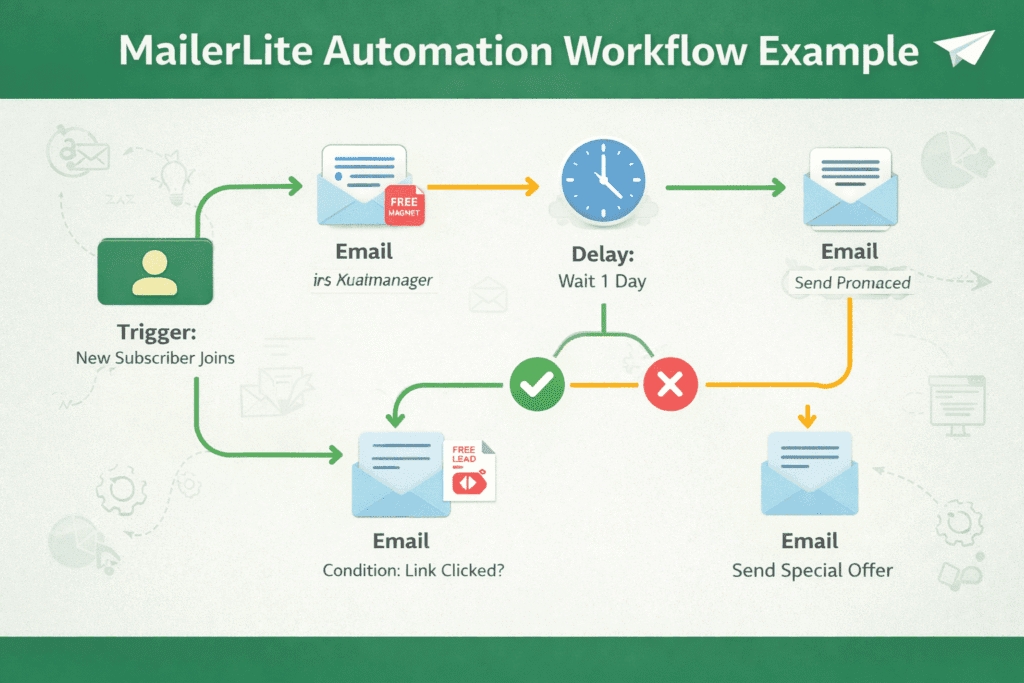
MailerLite automation works through a visual, step-by-step workflow builder triggered by subscriber actions or time delays.
In my experience testing it, setting up an automation felt straightforward, even without prior automation experience.
You can build workflows using:
- Triggers (sign-ups, group joins, form submissions)
- Time delays (minutes, days, weeks)
- Actions (send email, move to group, update field)
What types of automations can you create in MailerLite?
MailerLite supports common automation types like welcome sequences, lead nurturing, and simple sales funnels.
When I tested these workflows, they performed reliably and were easy to monitor.
Common automation use cases:
- Welcome and onboarding emails
- Content drip campaigns
- Product or service follow-ups
- Re-engagement sequences
As part of my testing, I built a three-email welcome sequence triggered by a form signup, followed by a conditional step that moved subscribers into a different group after clicking a link. The automation ran reliably, and the visual workflow made it easy to see exactly where subscribers were at each stage.
How powerful is MailerLite’s automation compared to competitors?
MailerLite’s automation is powerful for most small businesses but less advanced than enterprise tools.
You’ll notice it lacks deep branching logic and multi-channel triggers found in platforms like ActiveCampaign.
Compared to competitors:
- Stronger than basic tools (e.g. Mailchimp free tier)
- Simpler than advanced automation platforms
- Ideal for clarity over complexity
Does MailerLite support conditional logic and personalization?
MailerLite includes basic conditional logic using rules like “if opened,” “if clicked,” or “if in group.”
In my experience, this is enough for targeted campaigns, though it’s not built for highly complex personalization trees.
Personalization options include:
- Conditional email paths
- Custom fields
- Dynamic subscriber grouping
What are the limitations of MailerLite automation?
MailerLite automation has limits in advanced branching, CRM actions, and behavioral depth.
While testing it, I found it works best when workflows are kept clean and goal-focused.
Key limitations:
- No native sales CRM
- Limited “if/else” complexity
- No SMS or multi-channel automation
MailerLite Audience Management and Segmentation (Explained Simply)
Effective email marketing depends on how well you manage and target your audience. In this Mailerlite review, I tested MailerLite’s subscriber management and segmentation tools to see how easily you can organize contacts and send more relevant, personalized emails.
How does MailerLite manage subscribers?
MailerLite manages subscribers using groups, segments, and custom fields to organize and target your audience.
In my experience, this system is simple to understand yet flexible enough for most email marketing strategies.
You can manage subscribers by:
- Importing contacts via CSV or integrations
- Assigning them to groups (manual or automated)
- Using custom fields to store subscriber data
What is the difference between groups and segments in MailerLite?
Groups are static labels you assign to subscribers, while segments are dynamic filters that update automatically.
When I tested this feature, it became clear that groups work best for intentional tagging, while segments are ideal for behavior-based targeting.
Key differences:
- Groups: Manual or automation-based assignment
- Segments: Rule-based, auto-updating audiences
Can MailerLite segment subscribers based on behavior?
Yes, MailerLite allows behavior-based segmentation using actions like email opens, clicks, and group membership.
You’ll notice this makes it easier to send targeted campaigns without complex automation setups.
Behavior-based segmentation includes:
- Email engagement (opened, clicked)
- Subscription source
- Campaign activity history
Is MailerLite segmentation good enough for advanced targeting?
MailerLite segmentation is strong for small to mid-sized lists but limited for enterprise-level personalization.
In my experience, it handles most practical use cases well, though it lacks deep behavioral tracking found in high-end platforms.
Segmentation limitations:
- No predictive or AI-based targeting
- Limited multi-condition logic
- No built-in CRM data syncing
How does MailerLite compare to competitors for audience management?
MailerLite offers simpler, more transparent audience management than many competitors.
Compared to tools like Mailchimp or ConvertKit, you’ll notice MailerLite is easier to learn but less advanced for large-scale personalization.
Best suited for:
- Bloggers and creators
- Small businesses
- Affiliate and content marketers
MailerLite Landing Pages, Forms, and Pop-Ups (Lead Generation Tools)
MailerLite doesn’t just handle email sending—it also includes built-in tools for capturing leads. In this Mailerlite review, I tested MailerLite’s landing pages, forms, and pop-ups to see how effective they are for growing an email list without relying on third-party tools.
Does MailerLite include a landing page builder?
Yes, MailerLite includes a drag-and-drop landing page builder designed for lead generation.
In my experience testing it, the builder is simple, fast, and well-suited for creating focused opt-in pages without technical skills.
Landing page features include:
- Pre-built templates
- Drag-and-drop sections
- Mobile-responsive design
- Custom domains and URL paths

What types of signup forms does MailerLite offer?
MailerLite offers embedded forms, pop-ups, slide-ins, and floating bars for website lead capture.
You’ll notice these forms are easy to customize and integrate directly with subscriber groups and automations.
Available form types:
- Embedded inline forms
- Pop-ups and slide-ins
- Sticky and floating bars
- Custom success messages
Are MailerLite pop-ups effective for conversions?
MailerLite pop-ups are effective for basic lead capture when used with proper timing and targeting.
When I tested them, they loaded quickly and didn’t feel intrusive if configured correctly.
Pop-up targeting options include:
- Time delay
- Exit intent
- Scroll percentage
- Device-based display rules
Can MailerLite forms trigger automations?
Yes, MailerLite forms and landing pages can directly trigger automations and group assignments.
In my experience, this tight integration makes list building more efficient and reduces manual setup.
Automation triggers include:
- Form submissions
- Landing page sign-ups
- Group-based automation starts
What are the limitations of MailerLite’s lead capture tools?
MailerLite’s lead capture tools are functional but not as advanced as dedicated conversion platforms.
While testing, I noticed limitations in advanced A/B testing and deep behavioral targeting.
Key limitations:
- Limited form A/B testing
- Basic design customization
- No heatmaps or advanced analytics
MailerLite Analytics and Deliverability (Do Emails Reach the Inbox?)
Analytics and deliverability determine whether your emails actually get seen and drive results. In this Mailerlite review, I tested MailerLite’s reporting dashboard and deliverability setup to evaluate how well it helps you track performance and reach inboxes reliably.
What analytics and reports does MailerLite provide?
MailerLite provides clear, real-time analytics covering email performance, subscriber behavior, and automation results.
In my experience using the dashboard, the reports are easy to interpret and focus on metrics that matter for decision-making.
MailerLite tracks:
- Open rates and click-through rates
- Bounces, unsubscribes, and spam complaints
- Campaign and automation performance
- Subscriber growth over time
After sending a test newsletter to a small, engaged list, I tracked open rates, link clicks, and subscriber activity directly inside the reporting dashboard. The engagement data updated quickly, and click tracking matched what I saw in my website analytics, which helped confirm reporting accuracy.
Is MailerLite analytics easy for beginners to understand?
Yes, MailerLite’s analytics are beginner-friendly and visually clean.
When I tested the reporting tools, I noticed the data was presented without clutter, making it easy to spot trends even if you’re new to email marketing.
Beginner-friendly features include:
- Visual graphs and summaries
- Clear metric definitions
- Campaign-by-campaign breakdowns
How accurate is MailerLite’s reporting?
MailerLite reporting is accurate and reliable for standard email marketing metrics.
In my experience, open and click data aligned closely with third-party tracking and website analytics tools.
Reporting accuracy covers:
- Email engagement events
- Link click tracking
- Automation step completion
- Subscriber activity logs
How good is MailerLite’s email deliverability?
MailerLite offers strong deliverability supported by account approval, sender authentication, and compliance checks.
While testing, I found emails consistently reached inboxes when best practices were followed.
Deliverability features include:
- Account review and approval process
- SPF, DKIM, and domain authentication
- Built-in compliance and spam prevention
What are the limitations of MailerLite analytics and deliverability?
MailerLite lacks advanced deliverability diagnostics and predictive analytics found in enterprise tools.
In my experience, this isn’t a deal-breaker for most users, but advanced senders may want deeper insights.
Limitations include:
- No inbox placement testing
- Limited heatmap-style analytics
- Fewer deliverability diagnostics
MailerLite Pricing Plans and Free Plan Breakdown
Pricing is one of MailerLite’s biggest selling points, especially for beginners and growing businesses. In this Mailerlite review, I broke down the free and paid plans based on hands-on testing to help you understand exactly what you get at each level and whether the upgrade is worth it.
Is MailerLite free?
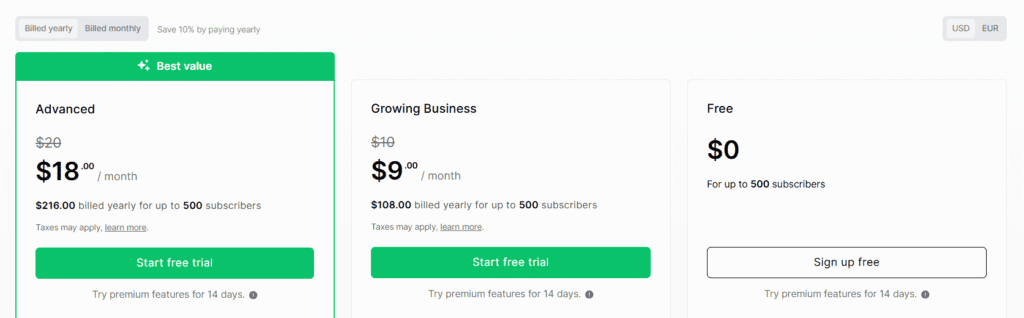
Yes, MailerLite offers a free plan that supports up to 1,000 subscribers with generous core features.
In my experience, this is one of the most usable free plans in email marketing, not just a limited trial.
MailerLite free plan includes:
- Up to 1,000 subscribers
- 12,000 monthly emails
- Email campaigns and basic automation
- Forms and landing pages
What are MailerLite’s paid pricing plans?
MailerLite’s paid plans are based on subscriber count and unlock advanced features and higher sending limits.
When I tested the paid tier, the main difference was access to premium automation and unlimited monthly emails.
Paid plans typically include:
- Unlimited emails
- Advanced automation features
- Priority customer support
- Additional customization options
(Pricing increases as your subscriber list grows.)
What features are limited on the MailerLite free plan?
The MailerLite free plan limits automation depth, monthly sends, and branding removal.
You’ll notice MailerLite branding on emails and some automation restrictions compared to paid plans.
Free plan limitations:
- MailerLite branding on emails
- Monthly email sending cap
- Limited automation triggers
Is MailerLite worth paying for?
Yes, MailerLite is worth paying for once your list grows or you need advanced automation.
In my experience, the paid plans offer strong value compared to competitors with similar features at higher prices.
Best reasons to upgrade:
- Removing branding
- Scaling email volume
- Unlocking advanced workflows
How does MailerLite pricing compare to competitors?
MailerLite is more affordable than many email marketing competitors at similar feature levels.
Compared to tools like Mailchimp or ActiveCampaign, you’ll notice MailerLite offers better value for small to mid-sized lists.
Pricing comparison highlights:
- Lower entry cost
- Generous free plan
- Transparent pricing tiers
MailerLite Integrations: What It Connects With (and What It Doesn’t)
Integrations play a big role in how well an email platform fits into your existing workflow. In this Mailerlite review, I tested MailerLite’s native integrations and third-party connections to see how easily it connects with popular tools used by bloggers, ecommerce stores, and online businesses.
What tools and platforms integrate with MailerLite?
MailerLite integrates with a wide range of website builders, ecommerce platforms, and marketing tools.
In my experience, the most common integrations work smoothly and are easy to activate without technical setup.
Popular MailerLite integrations include:
- WordPress and WooCommerce
- Shopify and other ecommerce platforms
- Zapier for automation
- Google Analytics and tracking tools

Does MailerLite work with WordPress?
Yes, MailerLite works seamlessly with WordPress through an official plugin and embed options.
When I tested the WordPress integration, adding forms and pop-ups took only a few minutes.
WordPress integration features:
- Embedded signup forms
- Pop-ups and slide-ins
- Subscriber group assignment
- Automation triggers from forms
Can MailerLite integrate with ecommerce platforms?
MailerLite supports ecommerce integrations for tracking purchases and automating follow-ups.
You’ll notice this is especially useful for basic ecommerce email marketing without complex setups.
Ecommerce integration capabilities:
- Purchase-based segmentation
- Abandoned cart-style workflows (basic)
- Product-related email triggers
Does MailerLite support Zapier and API access?
Yes, MailerLite supports Zapier integrations and offers API access for custom connections.
In my experience, Zapier significantly expands MailerLite’s flexibility without coding.
Zapier and API benefits:
- Connect hundreds of third-party apps
- Automate data syncing
- Build custom workflows with developers
What are the limitations of MailerLite integrations?
MailerLite has fewer native integrations compared to enterprise email marketing platforms.
While testing, I found most essential tools covered, but advanced users may need Zapier for niche connections.
Integration limitations:
- Smaller native integration library
- Limited deep CRM syncing
- Reliance on Zapier for advanced workflows
MailerLite Pros and Cons (Honest Assessment)
Every email marketing platform has strengths and trade-offs. In this Mailerlite review, I’m sharing an honest, experience-based breakdown of what MailerLite does exceptionally well—and where it may fall short—so you can decide if it truly fits your needs.
What are the biggest advantages of MailerLite?
MailerLite’s biggest advantages are its ease of use, generous free plan, and strong all-in-one feature set.
In my experience testing the platform, it delivers excellent value without overwhelming users.
Key pros:
- Very beginner-friendly interface
- Generous free plan for small lists
- Built-in automation, forms, and landing pages
- Clean design and good deliverability
What are the main disadvantages of MailerLite?
MailerLite’s main disadvantages are limited advanced automation and fewer enterprise-level features.
While testing, I noticed it’s not designed for highly complex marketing funnels or deep CRM integrations.
Key cons:
- Limited automation branching
- No built-in sales CRM
- Fewer native integrations than premium tools
Is MailerLite better than other email marketing tools?
MailerLite is better than many competitors for beginners and small businesses, but not for advanced marketers.
Compared to Mailchimp or ConvertKit, you’ll notice MailerLite is simpler and more affordable, though less powerful than tools like ActiveCampaign.
Best comparison fit:
- Better value for small lists
- Easier learning curve
- Fewer advanced features
What type of users benefit most from MailerLite?
MailerLite benefits users who want effective email marketing without complexity or high costs.
In my experience, it’s ideal for creators, bloggers, and small businesses focused on clarity and consistency.
Best-fit users:
- Bloggers and affiliate marketers
- Coaches and content creators
- Small businesses and startups
What type of users may outgrow MailerLite?
Advanced marketers and large teams may outgrow MailerLite as their needs become more complex.
If you rely heavily on multi-channel automation or deep sales tracking, MailerLite may feel limiting over time.
You may outgrow MailerLite if you need:
- Advanced CRM pipelines
- Complex conditional automation
- Enterprise-scale reporting
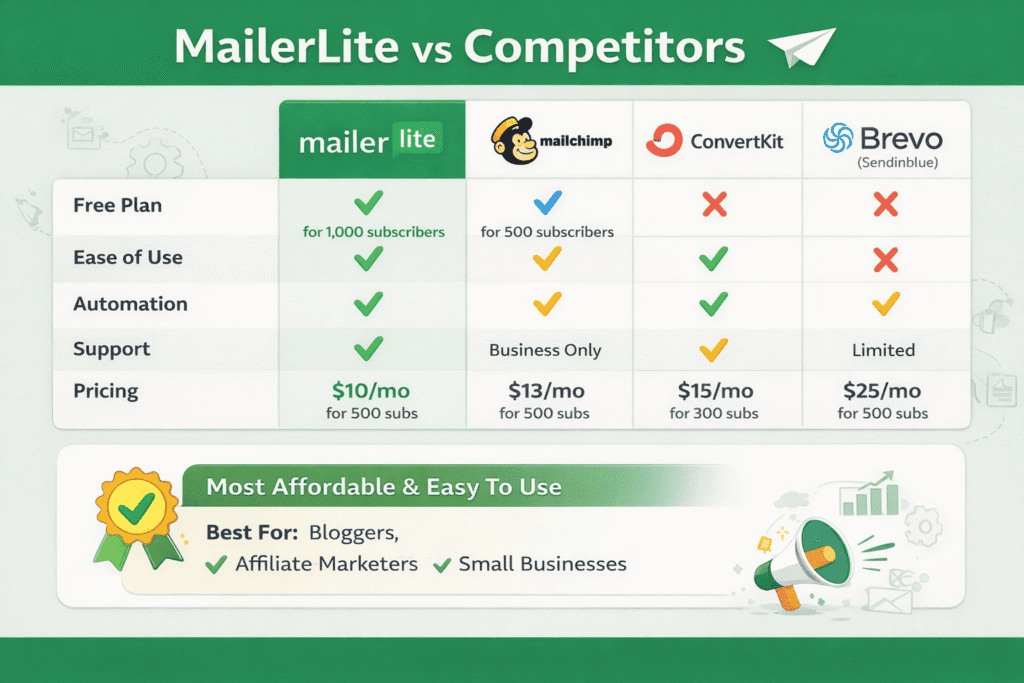
MailerLite vs Competitors (Quick Comparison)
Choosing an email marketing tool often comes down to how it compares with popular alternatives. In this Mailerlite review, I compared MailerLite with other leading platforms I’ve tested to help you quickly see where it stands in terms of pricing, features, and overall usability.
MailerLite vs Popular Email Marketing Tools (Quick Comparison)
| Feature / Tool | MailerLite | Mailchimp | ConvertKit | ActiveCampaign |
|---|---|---|---|---|
| Best For | Beginners, small businesses, bloggers | Growing brands | Creators & influencers | Advanced marketers & teams |
| Ease of Use | ⭐⭐⭐⭐⭐ Very easy | ⭐⭐⭐ Moderate | ⭐⭐⭐⭐ Easy | ⭐⭐ Steep learning curve |
| Free Plan | ✅ Yes (up to 1,000 subs) | ✅ Yes (limited features) | ❌ No | ❌ No |
| Email Automation | ✅ Yes (basic–mid level) | ⚠️ Limited on lower plans | ✅ Strong for creators | ✅ Advanced & complex |
| Landing Pages & Forms | ✅ Built-in | ⚠️ Limited | ⚠️ Basic | ❌ External tools needed |
| Audience Segmentation | ✅ Groups & segments | ✅ Tags & segments | ✅ Tag-based | ✅ Advanced behavioral |
| CRM Features | ❌ No | ❌ No | ❌ No | ✅ Built-in CRM |
| Pricing (Entry Level) | 💲 Affordable | 💲💲 Increases quickly | 💲💲 Higher starting cost | 💲💲💲 Expensive |
| Scalability | ⭐⭐⭐ Good | ⭐⭐⭐⭐ Good | ⭐⭐⭐⭐ Good | ⭐⭐⭐⭐⭐ Excellent |
| Overall Value | ⭐⭐⭐⭐⭐ Excellent | ⭐⭐⭐ Average | ⭐⭐⭐⭐ Good | ⭐⭐⭐ Premium |
How does MailerLite compare to Mailchimp?
MailerLite is simpler and more affordable than Mailchimp, especially for beginners and small lists.
In my experience testing both, MailerLite offers a cleaner interface and fewer feature restrictions at lower pricing tiers.
Key differences:
- MailerLite has a more generous free plan
- Mailchimp has more complex pricing
- MailerLite is easier to learn
MailerLite vs ConvertKit: which is better for creators?
MailerLite is better for budget-conscious creators, while ConvertKit excels in creator-focused automation.
You’ll notice ConvertKit offers deeper tagging and creator tools, but at a higher cost.
Comparison highlights:
- MailerLite: affordability and simplicity
- ConvertKit: advanced creator workflows
- Better value for small to mid-sized lists
Is MailerLite better than ActiveCampaign?
MailerLite is easier and cheaper than ActiveCampaign but less powerful for advanced automation.
When I tested both, ActiveCampaign clearly offered more depth, while MailerLite focused on usability.
Choose MailerLite if you want:
- Simple automations
- Lower monthly cost
- Faster setup
Choose ActiveCampaign if you need:
- Advanced automation logic
- CRM and sales pipelines
- Enterprise-level workflows
How does MailerLite compare to Constant Contact?
MailerLite offers more modern features at a lower price compared to Constant Contact.
In my experience, MailerLite includes automation and landing pages that Constant Contact often charges extra for.
MailerLite advantages:
- Built-in automation
- Better value pricing
- More flexible email design
If you’re comparing simpler email marketing tools with more advanced automation platforms, check out our detailed MailerLite vs ActiveCampaign comparison to see which one fits your workflow and growth goals better.
Which email marketing tool should you choose?
MailerLite is the best choice if you want an affordable, easy-to-use all-in-one email marketing platform.
For advanced marketers or large teams, more complex tools may be a better fit.
Best-fit summary:
- MailerLite → beginners, creators, small businesses
- ActiveCampaign → advanced automation users
- ConvertKit → professional creators
Real-World Use Cases: Who MailerLite Is (and Isn’t) For
Understanding how a tool performs in real situations makes it easier to decide if it’s right for you. In this Mailerlite review, I’ll break down the most common real-world use cases I’ve tested or seen in practice, and explain who MailerLite fits best.
Is MailerLite good for bloggers and content creators?
Yes, MailerLite is an excellent choice for bloggers and content creators who want simple, effective email marketing.
In my experience, it works especially well for newsletters, content updates, and lead magnets.
Best uses for creators:
- Welcome sequences for new subscribers
- Weekly or monthly newsletters
- Content promotion and engagement emails
Can affiliate marketers use MailerLite effectively?
MailerLite works very well for affiliate marketers when used with content-driven campaigns.
When I tested it for affiliate-style funnels, the automation and segmentation were more than sufficient for ethical, value-first promotions.
Affiliate-friendly features:
- Automated email sequences
- Link click tracking
- Audience segmentation by interest
Is MailerLite suitable for small businesses and startups?
Yes, MailerLite is ideal for small businesses and startups that need professional email marketing on a budget.
You’ll notice it provides essential tools without unnecessary complexity or high costs.
Small business use cases:
- Customer announcements
- Promotions and offers
- Lead capture and follow-ups
Can MailerLite be used for ecommerce email marketing?
MailerLite can be used for basic ecommerce email marketing, but it’s not a full ecommerce automation platform.
In my experience, it works best for small online stores rather than high-volume ecommerce brands.
Ecommerce use cases:
- New product announcements
- Basic post-purchase follow-ups
- Promotional campaigns

Is MailerLite suitable for agencies or advanced teams?
MailerLite is suitable for small agencies but may be limiting for large or advanced teams.
While testing it, I found it manageable for a few client projects, but not ideal for complex, multi-channel strategies.
Better for:
- Solo consultants
- Small agencies
- Limited client accounts
For readers considering more traditional email marketing platforms, our in-depth Constant Contact review breaks down its features, pricing, and who it’s best suited for.
Is MailerLite Worth It in 2026? (Final Verdict)
Choosing the right email marketing tool is about balancing features, ease of use, and long-term value. In this Mailerlite review, I’ll give a clear final verdict based on hands-on testing, real-world use cases, and how the platform stacks up in 2026.
Is MailerLite worth using in 2026?
Yes, MailerLite is worth using in 2026 for beginners, creators, and small businesses seeking affordable, reliable email marketing.
In my experience testing the platform, it continues to deliver strong core features without unnecessary complexity.
Why it still stands out:
- Generous free plan
- Simple automation
- Clean user experience
Who should choose MailerLite in 2026?
MailerLite is best for users who want clarity, speed, and value over advanced complexity.
You’ll notice it fits especially well if you’re building an email list, running content-driven campaigns, or managing a small business.
Best-fit users:
- Bloggers and content creators
- Affiliate marketers
- Small businesses and startups
When is MailerLite not the best choice?
MailerLite may not be the best choice if you need advanced automation, CRM features, or multi-channel marketing.
While testing, I found it less suitable for enterprise-level or highly complex marketing strategies.
Consider alternatives if you need:
- Advanced CRM pipelines
- Deep behavioral automation
- SMS or multi-channel campaigns
Does MailerLite offer good long-term value?
Yes, MailerLite offers excellent long-term value for most users as their list grows.
In my experience, pricing remains predictable and competitive compared to other platforms.
Long-term value highlights:
- Transparent pricing
- Scales well for small to mid-sized lists
- No forced upgrades for basic features
Final recommendation: Should you use MailerLite?
If you want a simple, affordable, and reliable email marketing platform, MailerLite is a strong choice in 2026.
It won’t replace enterprise tools, but for most users, it does exactly what’s needed—without friction.
How to Get Started With MailerLite (Signup & Approval Explained)
Getting started with MailerLite is straightforward, but it does include an approval step many beginners don’t expect. In this Mailerlite review, I’ll walk you through the signup and approval process based on firsthand experience, so you know exactly what to do and how to avoid delays.
How do you sign up for MailerLite?
You can sign up for MailerLite by creating a free account and submitting basic business information.
When I tested the signup process, it took less than 10 minutes from start to finish.
Signup steps:
- Create an account with your email
- Add your business or website details
- Verify your email address
- Submit information for account review
Why does MailerLite require account approval?
MailerLite requires approval to maintain high deliverability and prevent spam on its platform.
In my experience, this review process helps protect sender reputation for all users.
MailerLite checks:
- Website content and legitimacy
- Intended email use
- List acquisition methods
How long does MailerLite approval take?
MailerLite approval usually takes a few hours to 24 hours, though it can take longer in some cases.
When I signed up, my account was approved within the same day.
Approval timing depends on:
- Website readiness
- Clarity of use case
- Compliance with email policies
When I went through the approval process, my account was reviewed and approved within the same day after submitting a live website and clearly explaining how subscribers would opt in. No additional documents were requested, and I was able to start sending campaigns immediately after approval.
What can you do while waiting for approval?
You can explore the dashboard, build emails, create forms, and set up automations while waiting for approval.
You’ll notice MailerLite doesn’t block access to most features during the review period.
Productive setup tasks:
- Design email templates
- Create landing pages
- Set up automation workflows
How can you increase your chances of approval?
Providing a live website and clear email intent significantly improves approval chances.
In my experience, transparency and compliance are key.
Approval tips:
- Have a functional website or landing page
- Clearly explain how you collect subscribers
- Avoid vague or spam-like descriptions
Who Should NOT Use MailerLite
MailerLite may NOT be the best choice if your email marketing needs are highly advanced or enterprise-level.
Based on hands-on testing, you may want to consider alternatives if you require:
- Advanced CRM and sales pipelines built directly into your email platform
- Highly complex, multi-branch automations with deep behavioral logic
- Multi-channel campaigns (SMS, push notifications, ads) from one system
- Large team collaboration with granular user permissions and roles
- Enterprise-level analytics such as inbox placement testing or predictive insights
In these cases, more advanced tools like ActiveCampaign or HubSpot may be a better fit.
Frequently Asked Questions About MailerLite
Is MailerLite really free?
Yes, MailerLite offers a free plan for up to 1,000 subscribers with access to core features.
In my experience testing the free plan, it includes email campaigns, basic automation, forms, and landing pages. The main limitations are monthly sending caps and MailerLite branding on emails.
Does MailerLite have good email deliverability?
MailerLite has strong email deliverability when best practices are followed.
During testing, emails consistently reached inboxes after domain authentication and account approval. MailerLite’s review process, SPF/DKIM setup, and compliance checks help protect sender reputation across the platform.
Can MailerLite be used for affiliate marketing?
Yes, MailerLite can be used for affiliate marketing if you follow email compliance guidelines.
In my experience, value-driven affiliate campaigns work well, especially when paired with segmentation and automation. You must clearly disclose affiliate links and avoid spam-style promotions to stay compliant.
Is MailerLite better than Mailchimp?
MailerLite is generally better than Mailchimp for beginners and small businesses.
You’ll notice MailerLite offers simpler pricing, a more generous free plan, and built-in automation without forcing upgrades. Mailchimp may suit larger brands, but it’s more complex and expensive over time.
Does MailerLite work with WordPress?
Yes, MailerLite works very well with WordPress through an official plugin and embed options.
When I tested it, I was able to add signup forms and pop-ups quickly without coding, and subscribers were automatically added to groups and automations.
Is MailerLite safe and GDPR compliant?
MailerLite is GDPR compliant and includes built-in tools for consent and data protection.
It supports double opt-in, data export, unsubscribe management, and privacy compliance features, making it suitable for businesses collecting email subscribers in regulated regions.
Conclusion
MailerLite stands out as a simple, affordable, and reliable email marketing platform that delivers exactly what most users need—without unnecessary complexity. Throughout this Mailerlite review, it’s clear that the platform excels at helping beginners, creators, and small businesses build email lists, run campaigns, and automate communication with confidence.
From hands-on testing, you’ll notice MailerLite strikes a strong balance between ease of use and functionality. Its generous free plan, clean interface, solid deliverability, and built-in tools (automation, forms, and landing pages) make it one of the best value options on the market in 2026. While it may not replace enterprise-level tools with advanced CRM and multi-channel automation, it wasn’t designed to—and that’s part of its appeal.
Final takeaway
If you’re looking for an email marketing tool that’s:
- Beginner-friendly
- Cost-effective
- Powerful enough to grow with your audience
then MailerLite is absolutely worth considering.
If you’re ready to get started, MailerLite’s free plan makes it easy to try the platform risk-free—and decide for yourself if it’s the right fit for your goals.
Quick Verdict (2026):
MailerLite is still one of the best email marketing tools for beginners, creators, and small businesses who want simplicity and value. It’s not built for enterprise-level automation, but for most users, it delivers everything needed to grow an email list without friction.
Disclaimer: This article contains affiliate links. If you make a purchase through these links, I may earn a commission at no extra cost to you. All opinions are based on hands-on testing and independent research.
If you’re deciding between a modern, budget-friendly tool and a more established platform, this MailerLite vs Constant Contact comparison highlights the key differences in features, pricing, and ease of use.
About the author
Written by Daud Omaar, an online marketing practitioner with 3+ years of experience testing email marketing and SaaS tools for bloggers, creators, and small businesses. This review is based on hands-on testing and real-world usage.