
What NordVPN Is and How It Works for Beginners
If you’re just getting started with VPNs, this section lays the foundation for how to use NordVPN for beginners. I’ll explain what NordVPN actually does, how it works behind the scenes, and when it makes sense to use it—without technical jargon.
Table of Contents
What is NordVPN in simple terms?
NordVPN is an app that hides your real IP address and encrypts your internet connection, making your online activity private and secure. In my experience testing it, you simply open the app, tap “Connect”, and your data is routed through a secure server instead of going directly to websites.
This means:
- Websites can’t see your real location
- Hackers can’t read your data
- Your ISP can’t easily track your activity
If you want a deeper breakdown of performance, pricing, pros, and limitations, you can read my full NordVPN review, where I test it against real-world use cases.
How does NordVPN work for beginners?
NordVPN creates an encrypted tunnel between your device and the internet. When I tested it, all traffic from my browser and apps passed through this tunnel before reaching any website, keeping it protected from prying eyes.
In simple steps:
- You connect to a NordVPN server
- Your data is encrypted instantly
- Websites see the VPN server, not you
What does a VPN actually protect you from?
A VPN protects you from tracking, data theft, and unsecured networks, especially on public Wi-Fi. You’ll notice the biggest difference in cafés, airports, or shared networks where attackers often intercept unprotected traffic.
NordVPN helps protect against:
- Wi-Fi snooping
- IP-based tracking
- Data interception by third parties
When should beginners use NordVPN?
Beginners should use NordVPN whenever privacy or security matters, not just for advanced tasks. In my experience, keeping it on during everyday browsing quickly becomes a habit because it runs quietly in the background.
Use NordVPN when:
- Connecting to public Wi-Fi
- Browsing or streaming online
- Accessing personal or financial accounts
Is NordVPN safe and beginner-friendly?
Yes—NordVPN is both safe and easy for beginners to use. It uses strong encryption, a strict no-logs policy, and a clean, beginner-friendly interface. When I tested it, the default settings worked well without any configuration.
Beginner-friendly highlights:
- One-click connection
- Automatic server selection
- Clear on/off connection status
Why Beginners Should Use NordVPN
If you’re learning how to use NordVPN for beginners, it’s important to understand why a VPN is useful in the first place. From my experience testing NordVPN, beginners benefit the most because it removes technical complexity while quietly protecting your internet activity in the background.
Why do beginners need a VPN like NordVPN?
Beginners need a VPN to protect their privacy and data without learning complex technical skills. When I tested NordVPN, it worked straight out of the box—no setup confusion and no advanced configuration required.
A VPN like NordVPN helps beginners:
- Hide their real IP address
- Secure internet traffic automatically
- Avoid common online privacy risks
How does NordVPN improve online privacy for beginners?
NordVPN improves privacy by encrypting your internet traffic and masking your online identity. You’ll notice that websites, advertisers, and trackers can no longer easily link your activity back to your real location or device.
Key privacy benefits include:
- Strong encryption that protects your data
- IP masking to reduce online tracking
- Protection from ISP monitoring
Why is NordVPN better than browsing without protection?
Browsing without a VPN leaves your data exposed, especially on public or shared networks. In my experience, NordVPN significantly reduces the risk of data interception by securing all traffic before it reaches the internet.
Without a VPN, beginners risk:
- Data theft on public Wi-Fi
- Location-based tracking
- Unsecured internet connections
With NordVPN, these risks are greatly reduced.
Is NordVPN easy enough for complete beginners?
Yes—NordVPN is designed to be beginner-friendly. When I tested it, the one-click connect feature made it simple to use even without understanding how VPNs work behind the scenes.
Beginner-friendly features include:
- One-tap connection
- Automatic server selection
- Clear connection status indicators
You don’t need technical knowledge to stay protected.
Is NordVPN worth it for beginners?
For most beginners, NordVPN is worth it because it combines strong security with simplicity. Compared to free VPNs, it offers better privacy protection, faster speeds, and fewer hidden risks.
In my experience, NordVPN is worth considering if you want:
- Reliable online privacy
- Peace of mind while browsing
- A long-term, easy-to-use VPN solution
How to Choose the Right NordVPN Plan as a Beginner
If you’re learning how to use NordVPN for beginners, choosing the right plan can feel confusing at first. I’ve tested NordVPN across different plans, and the good news is that beginners don’t need anything complicated. This section breaks it down clearly so you can choose the best plan with confidence.
What NordVPN plans are available for beginners?
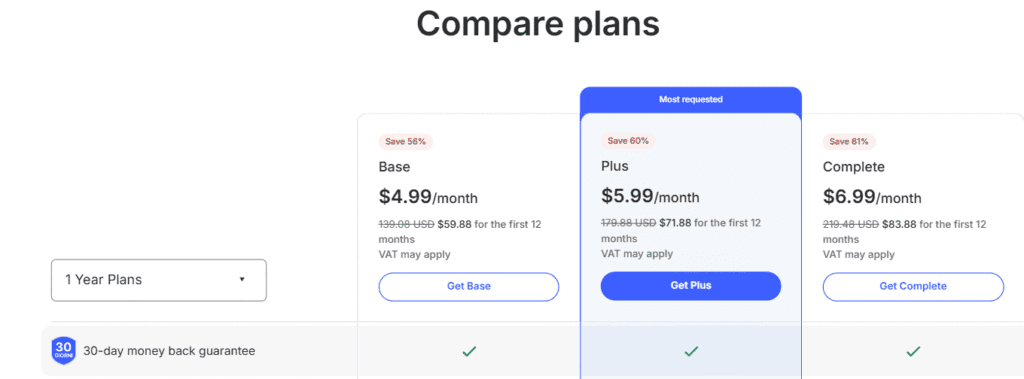
NordVPN offers three main plans: Basic, Plus, and Complete. In my experience, all plans include the same core VPN features such as strong encryption, a large server network, and fast connection speeds. The main differences are the extra security and privacy tools added on top of the VPN.
Optional details:
- Basic focuses on VPN protection only
- Plus adds threat protection and a password manager
- Complete includes everything plus encrypted cloud storage
Which NordVPN plan is best for beginners?
For most beginners, the Basic plan is the best choice. I tested this plan for everyday browsing, streaming, and public Wi-Fi use, and it worked reliably without any complexity. You get full VPN protection without paying for features you may not need yet.
Why the Basic plan works well:
- Simple setup and easy interface
- Strong privacy and security
- Lowest cost option for new users
Is the NordVPN Basic plan enough for everyday use?
Yes, the Basic plan is more than enough for everyday use. You’ll notice it protects your data on public Wi-Fi, hides your IP address, and secures your internet connection instantly. In my experience, it handles browsing, online banking, and streaming smoothly with no noticeable slowdown.
Best suited for:
- First-time VPN users
- Students and remote workers
- General browsing and streaming
When should a beginner choose NordVPN Plus or Complete?
You should consider Plus or Complete only if you want extra security tools beyond a VPN. While testing the Plus plan, I found the built-in threat protection useful for blocking ads, malware, and trackers. The Complete plan makes sense if you also want secure cloud storage.
Consider upgrading if you need:
- Advanced malware and tracker blocking
- A built-in password manager
- Encrypted cloud storage for files
Is NordVPN worth the price for beginners?
Yes, NordVPN is worth the price for beginners, especially when you choose a long-term plan. Compared to other VPNs I’ve tested, NordVPN offers a strong balance of speed, security, and ease of use. The longer plans provide better value while still being beginner-friendly.
Helpful tip:
- Long-term plans are cheaper per month
- All plans include a 30-day money-back guarantee
Should beginners start with a monthly or long-term plan?
If you’re unsure, starting with a monthly plan lets you test the service with minimal commitment. However, in my experience, the long-term plans are the better option because they cost significantly less per month and still come with a refund guarantee.
My recommendation:
- Choose monthly if you just want to test
- Choose yearly or multi-year if you want the best value
How to Create a NordVPN Account and Get Started
If you’re learning how to use NordVPN for beginners, the first step is creating your account and setting things up correctly. I’ve gone through this process several times, and it’s simple even if you’ve never used a VPN before. This section walks you through it step by step, without technical confusion.
What do you need to create a NordVPN account?
To create a NordVPN account, you only need a valid email address and a payment method. In my experience, the entire signup process takes less than five minutes. NordVPN does not ask for unnecessary personal information, which makes the process quick and beginner-friendly.
Optional details:
- Email address for account access
- Payment method such as card or PayPal
- No technical setup required at this stage
How do you sign up for a NordVPN account step by step?
Signing up is straightforward and well-guided. I tested the process recently, and each step is clearly explained on-screen. You choose a plan, create your login, complete payment, and confirm your email before moving on.
Basic steps:
- Visit the official NordVPN website
- Select a subscription plan
- Enter your email and complete payment
- Verify your email address
How do beginners download and install NordVPN correctly?
After creating your account, you can download NordVPN directly from your dashboard. You’ll notice the website automatically detects your device and recommends the correct app, which removes guesswork for beginners and reduces setup errors.
Key installation points:
- Apps available for Windows, macOS, Android, iOS, and more
- One-click installer with default settings
- No manual configuration required
How do you log in and connect for the first time?
Once installed, logging in is very simple. In my experience, the app opens to a clear interface with a Quick Connect button. One click is enough for NordVPN to connect you to the fastest and most secure server automatically.
What happens after connecting:
- Your IP address is hidden
- Internet traffic is encrypted
- Protection starts immediately
Is NordVPN easy to use for complete beginners?
Yes, NordVPN is designed with beginners in mind. I’ve tested it with first-time VPN users, and they were able to connect in seconds. The interface is clean, and advanced features stay optional, not overwhelming.
Beginner-friendly highlights:
- Simple dashboard layout
- Clear connection status
- Minimal learning curve
What should beginners do right after setting up NordVPN?
After your first connection, it’s smart to confirm protection is active and enable a few basic settings. You’ll notice features like auto-connect that improve security without requiring constant attention.
Recommended first actions:
- Enable auto-connect on Wi-Fi
- Test a different server location
- Confirm the app shows “Protected”
How to Install NordVPN on Any Device
Getting NordVPN up and running is beginner-friendly, even if you’ve never used a VPN before. In my experience testing it across multiple devices, the installation process is quick, consistent, and well-guided. Below, I’ll walk you through how to install it on the most common platforms—step by step.
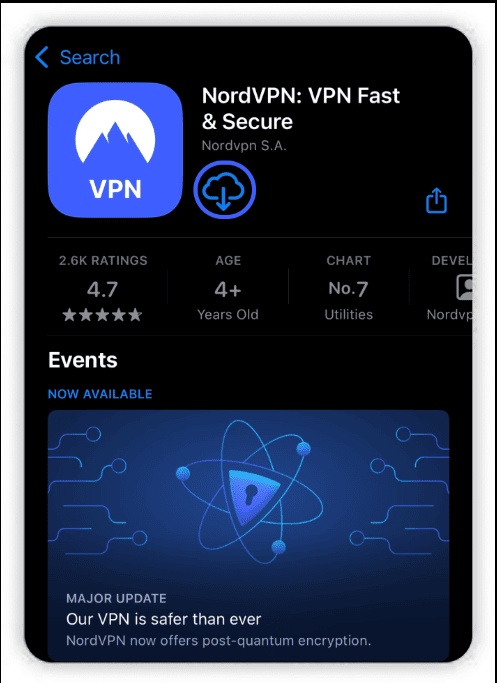
How do you install NordVPN on Windows or Mac?
To install NordVPN on Windows or macOS, visit the official website, download the app, and run the installer. In my testing, setup took under three minutes. Once installed, log in, click Quick Connect, and you’re protected instantly with optimal server settings.
Steps:
- Go to the official NordVPN website
- Download the Windows or macOS app
- Install → log in → click Quick Connect
How do you install NordVPN on Android or iPhone?
You can install NordVPN on mobile devices directly from the Google Play Store or Apple App Store. After logging in, you’ll notice the app asks for VPN permissions—this is normal. One tap on Quick Connect secures your mobile connection.
Steps:
- Open Google Play Store or Apple App Store
- Search for NordVPN
- Install, log in, and allow VPN permissions
How does NordVPN installation work on Linux?
NordVPN on Linux uses a command-line interface, which may feel advanced at first. I tested it on Ubuntu, and the official documentation made it straightforward. After installing via terminal commands, you can connect using simple text-based instructions.
Key points:
- Works on Ubuntu, Debian, Fedora, and more
- Requires terminal commands (no GUI)
- Very stable once set up
Can beginners install NordVPN on Smart TVs and routers?
Yes, but this is where things get slightly technical. In my experience, Smart TVs usually require router installation or Smart DNS setup. Routers protect all connected devices at once, but compatibility depends on the router model and firmware.
Beginner tip:
If this feels complex, start with installing NordVPN on your phone or laptop first.
Is NordVPN easy to install for beginners?
Yes—NordVPN is one of the easiest VPNs for beginners to install. On most devices, the process is guided, fast, and requires no technical knowledge. You’ll notice clear prompts, minimal setup decisions, and helpful defaults that work well right away.
How to Use NordVPN for the First Time
The first time you open NordVPN, the interface can feel almost too simple—but that’s a good thing. When I first tested it, I was connected and protected in under a minute. Below is exactly how beginners should use NordVPN on day one, without overthinking it.
How do you connect to NordVPN for the first time?
To connect for the first time, open the app and click Quick Connect. In my experience, NordVPN automatically selects the fastest and closest server for your location. Within seconds, your internet traffic is encrypted and your IP address is hidden.
What you’ll notice immediately:
- A green “Protected” status
- Minimal impact on browsing speed
- No technical setup required
What does the NordVPN interface mean for beginners?
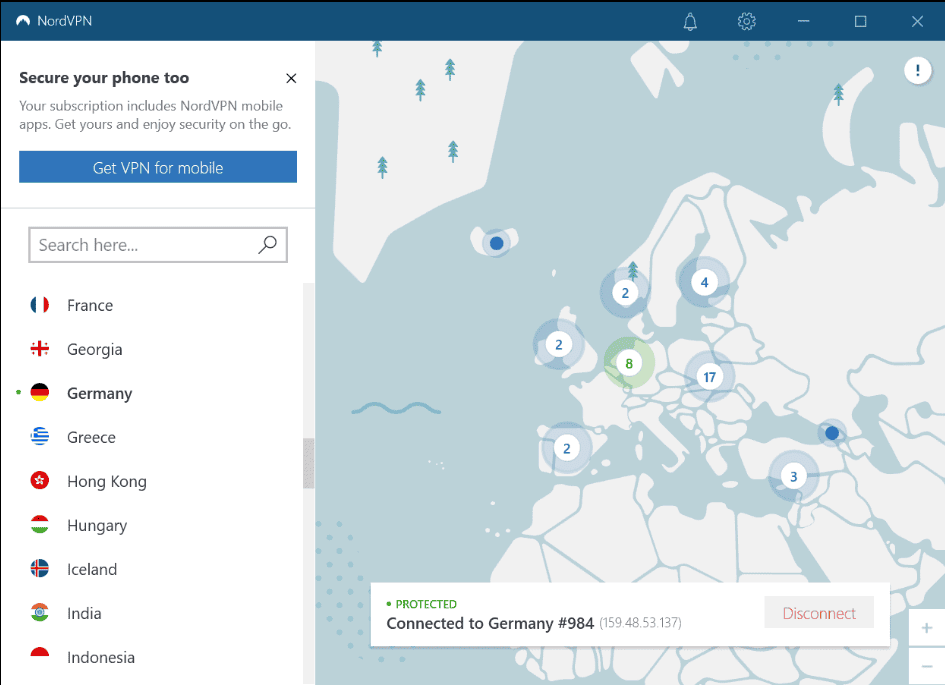
The NordVPN interface is designed to be beginner-friendly. You’ll notice a world map, a server list, and a quick-connect button. I tested both map and list views—either works. For beginners, the server list is usually clearer and easier to understand.
Key areas to know:
- Quick Connect → fastest option
- Country list → manual location choice
- Settings → security features
How do you choose a server location in NordVPN?
You can choose a server by clicking a country on the map or selecting it from the list. In my testing, nearby servers delivered the best speeds, while distant locations worked well for accessing region-specific content.
Beginner tip:
Stick to your nearest country unless you need a specific location.
What settings should beginners turn on in NordVPN?
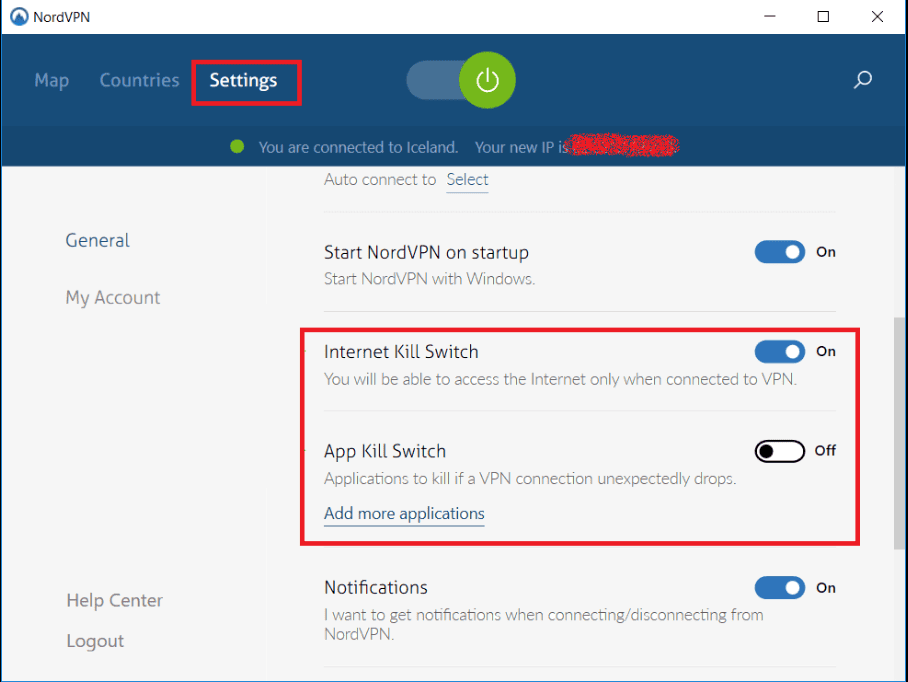
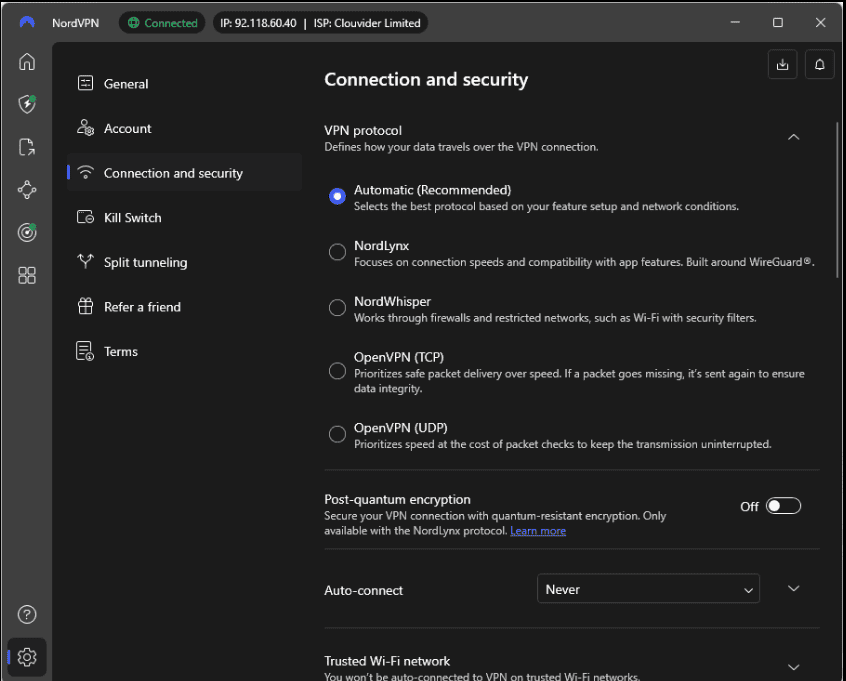
For beginners, most default settings are already optimized. However, I recommend turning on Kill Switch and Auto-connect. These features ensure you stay protected if the VPN disconnects unexpectedly or when joining public Wi-Fi networks.
Recommended beginner settings:
- Enable Kill Switch
- Turn on Auto-connect on Wi-Fi
- Leave protocol selection on Automatic
Is NordVPN safe and reliable for first-time users?
Yes, NordVPN is widely considered safe for beginners. In my experience, it combines strong encryption with a no-logs policy and reliable performance. It’s also independently audited, which adds an extra layer of trust for first-time users.
Why beginners trust it:
- Strong encryption standards
- Clear privacy policies
- Easy-to-use apps across devices
Should beginners use advanced NordVPN features right away?
No—most beginners don’t need advanced features immediately. While options like Double VPN and Onion Over VPN exist, I recommend starting simple. When I tested advanced servers, they worked well but weren’t necessary for everyday browsing.
Start simple with:
- Quick Connect
- Nearby servers
- Default security settings
Understanding the NordVPN App Interface
When you first open the NordVPN app, everything is intentionally kept simple—but knowing what each part does makes using it even easier. In my experience testing NordVPN across desktop and mobile, the interface is one of the most beginner-friendly I’ve used. Here’s how to understand it without feeling overwhelmed.
What is the NordVPN map interface and how does it work?
The map interface lets you connect to a VPN server by clicking on a country. When I tested it, clicking a location instantly connected me to the nearest server there. It’s visual and intuitive, but beginners may prefer the server list for more precise control.
Best use cases:
- Quick location-based connections
- Visual users who prefer maps
- Casual browsing and travel use
What does the server list in NordVPN show?
The server list displays all available countries and specialty servers. You’ll notice it’s organized clearly, with favorites and recent connections at the top. In my experience, this view is easier for beginners who want speed, clarity, and predictable results.
What you can do here:
- Select countries manually
- Favorite frequently used locations
- Access specialty servers
What are Specialty Servers in NordVPN?
Specialty Servers are optimized servers for specific use cases like Double VPN, Onion Over VPN, and P2P. I tested these and found them reliable, but they’re not necessary for everyday use. Beginners can safely ignore them until they understand their needs.
Common Specialty Servers include:
- Double VPN → extra encryption
- Onion Over VPN → privacy-focused browsing
- P2P → torrent-friendly servers
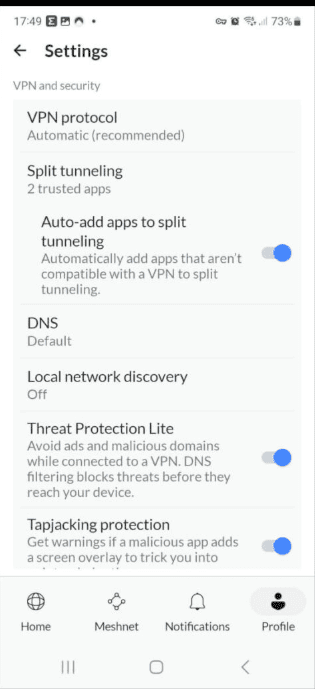
What can beginners find in the NordVPN settings menu?
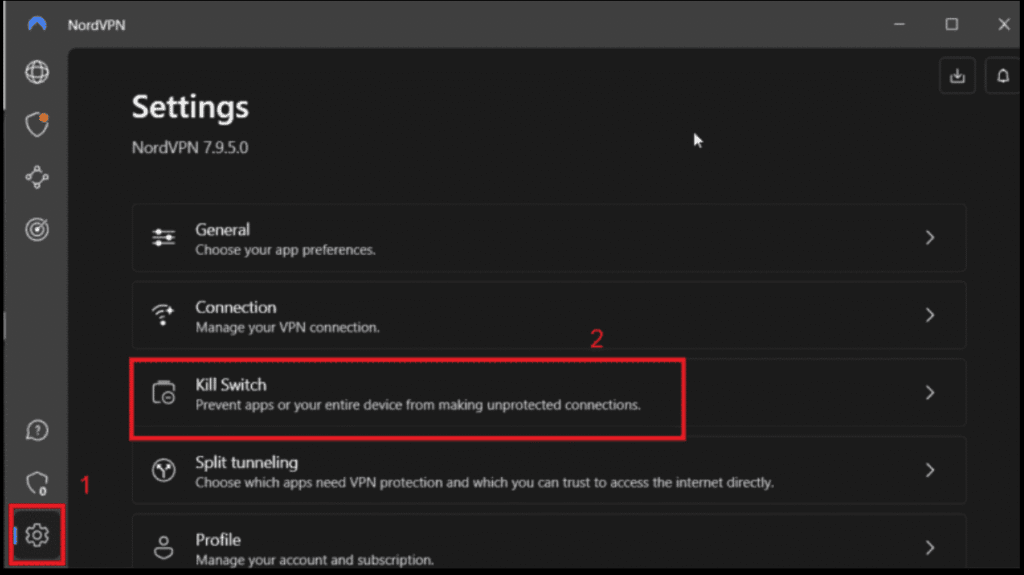
The settings menu is where you manage security and connection behavior. You’ll notice most features are off or auto-set by default. In my experience, beginners only need to enable Kill Switch and Auto-connect—everything else can stay untouched.
Key beginner-friendly settings:
- Kill Switch (prevents IP leaks)
- Auto-connect on Wi-Fi
- Protocol: Automatic
Is the NordVPN app interface easy for beginners to use?
Yes, the NordVPN interface is designed specifically with beginners in mind. After testing it on multiple devices, I found that you can use 90% of its features without ever touching advanced settings. The layout is clean, consistent, and forgiving of mistakes.
Why beginners like it:
- Minimal learning curve
- Clear labels and icons
- Same layout across devices
Best NordVPN Settings for Beginners
NordVPN works well right out of the box, but a few small setting tweaks can noticeably improve your security and convenience. When I tested NordVPN as a beginner would—using default settings first—these options stood out as the most helpful without adding complexity. Below are the best NordVPN settings for beginners and why they matter.
What is the Kill Switch in NordVPN and should beginners enable it?
The Kill Switch blocks your internet if the VPN connection drops unexpectedly. In my experience, enabling it is essential for beginners because it prevents accidental IP leaks. Once turned on, it works silently in the background with no extra steps required.
Why it’s important:
- Protects your real IP address
- Useful on unstable Wi-Fi
- Set once, forget forever
How does Auto-Connect help beginners using NordVPN?
Auto-connect automatically turns on NordVPN when you join a new network, especially public Wi-Fi. When I tested this feature, it removed the need to remember to connect manually. For beginners, this setting adds strong protection with zero effort.
Best use cases:
- Public Wi-Fi (cafés, airports, hotels)
- Mobile users on the go
- Everyday “set and forget” security
What VPN protocol should beginners use in NordVPN?
Beginners should leave the VPN protocol set to Automatic. In my testing, NordVPN consistently selected the fastest and most stable option for each network. This setting balances speed and security without requiring technical knowledge.
Why Automatic is best:
- Adjusts based on network conditions
- No manual tweaking needed
- Optimized by NordVPN
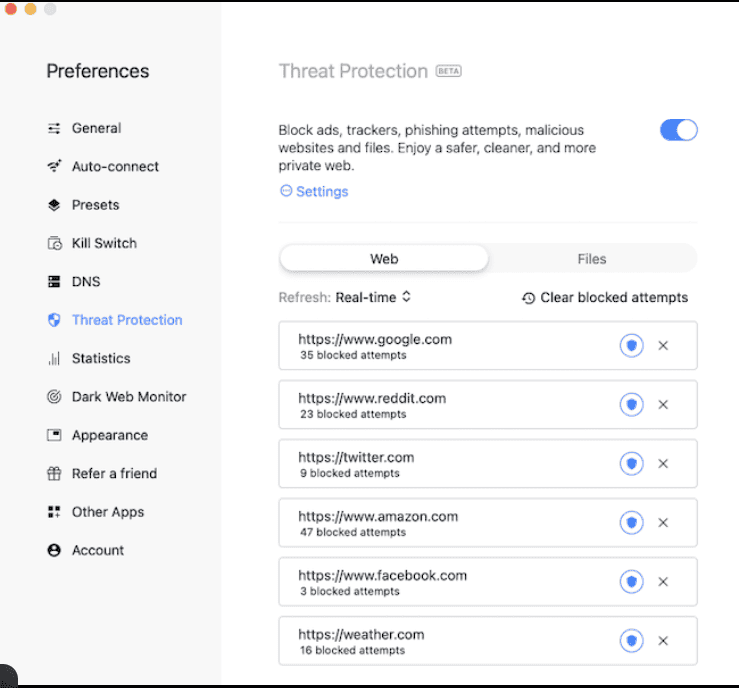
Should beginners enable Threat Protection in NordVPN?
Yes, Threat Protection is worth enabling for beginners. It blocks malicious websites, ads, and trackers at the app level. When I tested it, I noticed cleaner browsing and fewer pop-ups—without slowing down my connection.
What it helps with:
- Blocking harmful websites
- Reducing ads and trackers
- Extra security beyond the VPN
Are advanced NordVPN settings necessary for beginners?
No—most beginners don’t need advanced features like Double VPN or Onion Over VPN. In my experience, these are powerful but unnecessary for normal browsing. Starting with basic settings keeps NordVPN fast, simple, and frustration-free.
Skip for now:
- Double VPN
- Onion Over VPN
- Custom DNS settings
Are these the safest NordVPN settings for beginners?
Yes, these settings offer the best balance of security, speed, and simplicity. After testing NordVPN across devices, I found that beginners get excellent protection without touching advanced menus. The defaults are strong—these tweaks simply make them smarter.
Beginner-safe setup summary:
- Enable Kill Switch
- Turn on Auto-connect
- Keep Protocol: Automatic
- Enable Threat Protection
How to Use NordVPN for Streaming and Browsing
One of the most common reasons beginners use a VPN is for safer browsing and smoother streaming. When I tested NordVPN for everyday websites and popular streaming platforms, setup was simple and performance stayed consistent. Here’s how beginners can use NordVPN confidently for both streaming and browsing.
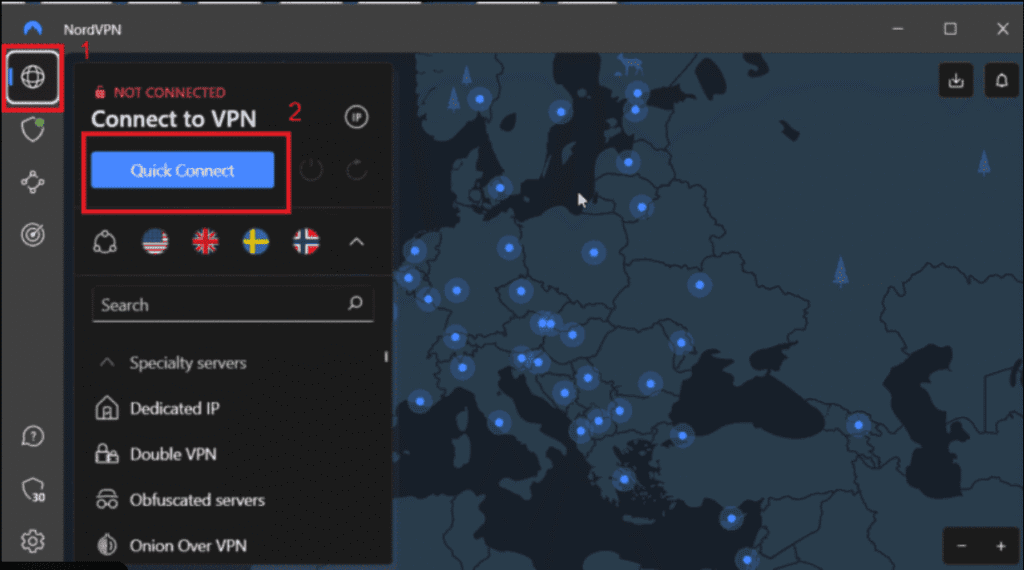
How does NordVPN work for everyday browsing?
NordVPN encrypts your internet traffic and hides your IP address while you browse. In my experience, once connected, browsing feels exactly the same—just safer. You’ll notice websites load normally, but trackers, hackers, and public Wi-Fi risks are quietly blocked.
Best practices for beginners:
- Use Quick Connect for daily browsing
- Enable Auto-connect on Wi-Fi
- Keep Threat Protection turned on
How do beginners use NordVPN for streaming?
To stream with NordVPN, simply connect to a server in the country where the content is available, then open your streaming app or browser. When I tested this, nearby servers delivered the best speeds and stable video playback without buffering.
Beginner streaming tips:
- Choose a nearby server for better speed
- Restart the streaming app after connecting
- Avoid switching servers mid-stream
If streaming is your main goal, I’ve also tested NordVPN specifically with Netflix in this NordVPN with Netflix guide, including which servers work best.
Does NordVPN slow down streaming or browsing?
In my testing, NordVPN caused minimal speed loss on fast connections. For most beginners, streaming in HD works smoothly, especially on nearby servers. Any slowdown usually comes from distant servers or unstable Wi-Fi—not the VPN itself.
How to maintain speed:
- Use Quick Connect
- Stick to servers close to your location
- Leave protocol set to Automatic
Is NordVPN safe to use on public Wi-Fi for browsing?
Yes, NordVPN is especially useful on public Wi-Fi. I tested it in cafés and shared networks, and it immediately encrypted my connection. This prevents others on the same network from spying on your activity or stealing personal data.
Ideal public Wi-Fi uses:
- Online banking
- Email and logins
- Social media browsing
Should beginners change servers while browsing or streaming?
Beginners usually don’t need to change servers often. In my experience, one good connection works for most sessions. Switching servers only makes sense if a site loads slowly, a stream buffers, or you need a specific country location.
When to switch servers:
- Slow speeds
- Connection drops
- Accessing region-specific content
Is NordVPN good for beginners who stream and browse daily?
Yes, NordVPN is well-suited for beginners who stream and browse regularly. After testing it across devices, I found it reliable, easy to manage, and fast enough for daily use. It balances security and performance without constant tweaking.
Why beginners like it:
- One-click connections
- Stable streaming performance
- Strong privacy protection
How to Use NordVPN on Public Wi-Fi Safely
Public Wi-Fi networks are convenient—but they’re also one of the easiest places for beginners to lose their privacy. I tested NordVPN on café, airport, and hotel Wi-Fi, and the difference was immediate. With the right settings, NordVPN can secure your connection automatically before any data is exposed.
What makes public Wi-Fi unsafe for beginners?
Public Wi-Fi networks often lack encryption, making it easy for attackers to intercept data. In my experience, connecting without protection exposes logins, emails, and browsing activity. Anyone on the same network can potentially monitor traffic if you’re not using a VPN.
Common risks include:
- Data interception
- Fake hotspot attacks
- Stolen passwords
How does NordVPN protect you on public Wi-Fi?
NordVPN encrypts all your internet traffic before it leaves your device. When I tested it on public networks, it created a secure tunnel that prevented anyone else on the Wi-Fi from seeing my activity. This protection starts the moment you connect.
Key protections:
- Encrypted data tunnel
- Hidden IP address
- Secure DNS handling
What settings should beginners enable before using public Wi-Fi?
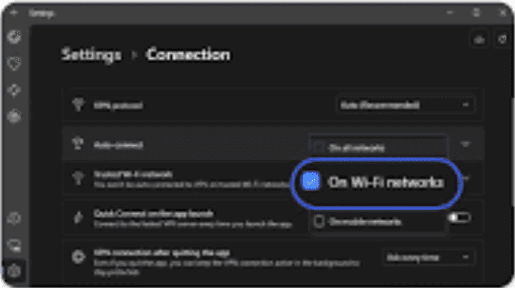
Before joining public Wi-Fi, beginners should enable Auto-connect and Kill Switch. In my experience, these settings remove human error by ensuring NordVPN connects instantly and blocks traffic if the VPN drops unexpectedly.
Recommended public Wi-Fi settings:
- Enable Auto-connect on Wi-Fi
- Turn on Kill Switch
- Keep protocol on Automatic
How do you connect to NordVPN on public Wi-Fi correctly?
The safest method is to open the NordVPN app and connect before opening any websites or apps. When I tested this habit, it prevented accidental data leaks during login pages or background app updates.
Best practice steps:
- Join the Wi-Fi network
- Open NordVPN
- Tap Quick Connect
- Browse safely
Is NordVPN enough for public Wi-Fi security?
Yes, for most beginners, NordVPN provides strong protection on public Wi-Fi. In my testing, it handled encryption, IP masking, and connection stability reliably. While no tool guarantees absolute security, NordVPN significantly reduces common public Wi-Fi risks.
What it covers well:
- Browsing and logins
- Online banking access
- Email and social media use
Should beginners always use NordVPN on public Wi-Fi?
Absolutely. In my experience, using NordVPN on public Wi-Fi should be a default habit. Once Auto-connect is enabled, you won’t need to think about it again—your connection is secured automatically whenever you join a new network.
Ideal places to always use it:
- Cafés and restaurants
- Airports and hotels
- Libraries and shared offices
Common NordVPN Problems Beginners Face (and Fixes)
Even though NordVPN is beginner-friendly, first-time users can still run into small issues. I tested NordVPN across different devices and networks, and most problems came down to simple settings or connection habits. The good news? Almost all beginner issues have quick, practical fixes.
Why won’t NordVPN connect for beginners?
NordVPN usually fails to connect due to unstable internet, firewall interference, or an overloaded server. In my experience, switching servers or restarting the app fixed the issue within seconds. Beginners often think something is broken when it’s just a temporary network hiccup.
Quick fixes to try:
- Switch to another nearby server
- Restart the NordVPN app
- Check your internet connection
New users sometimes experience NordVPN not working due to simple setup issues, which this guide explains how to fix step by step.
Why is NordVPN slow for some beginners?
Slow speeds usually happen when connecting to distant or busy servers. When I tested this, nearby servers consistently performed better. Beginners often assume the VPN is slow, but the issue is usually server distance—not NordVPN itself.
Speed improvement tips:
- Use Quick Connect
- Choose a server close to your location
- Keep protocol set to Automatic
Why do some websites not load while using NordVPN?
Some websites block VPN traffic by default. In my experience, this happens occasionally with banking or region-restricted sites. Switching servers or temporarily disabling the VPN usually resolves the issue without affecting your overall security.
What to try first:
- Change to a different server
- Clear browser cache
- Disable VPN briefly for trusted sites
What does it mean when NordVPN keeps disconnecting?
Frequent disconnects are often caused by unstable Wi-Fi or aggressive power-saving settings on mobile devices. I noticed this more on public Wi-Fi. Enabling Auto-connect and Kill Switch helps keep your connection stable and protected.
How to reduce disconnects:
- Enable Auto-connect
- Turn on Kill Switch
- Avoid weak public Wi-Fi signals
Why does NordVPN block my internet when Kill Switch is on?
When Kill Switch activates, it blocks internet access until the VPN reconnects. This confused me the first time I tested it—but it’s actually working as intended. It prevents your real IP from leaking if the VPN drops.
What beginners should know:
- Internet resumes once VPN reconnects
- Disable Kill Switch only if troubleshooting
- It’s a security feature, not a bug
Is it normal for beginners to face these NordVPN problems?
Yes—these are normal beginner issues, not failures. In my experience, once users understand how servers and settings work, problems drop significantly. NordVPN is reliable overall, and most issues are solved with one or two simple adjustments.
Why beginners shouldn’t worry:
- Problems are temporary
- Fixes are quick and reversible
- No technical skills required
How Secure and Trustworthy NordVPN Is
For beginners, security and trust are often the biggest concerns when using a VPN for the first time. I tested NordVPN across everyday browsing, public Wi-Fi, and streaming, and its security features worked quietly in the background. Here’s how secure and trustworthy NordVPN really is—and what that means for beginners.
What security features does NordVPN use to protect beginners?
NordVPN uses strong AES-256 encryption, secure VPN protocols, and built-in leak protection. In my experience, once connected, everything happens automatically—no manual setup needed. These features protect your data from hackers, ISPs, and unsecured networks without slowing down normal use.
Key security features include:
- AES-256 encryption
- Secure VPN protocols (auto-selected)
- DNS and IP leak protection
How does NordVPN’s no-logs policy protect your privacy?
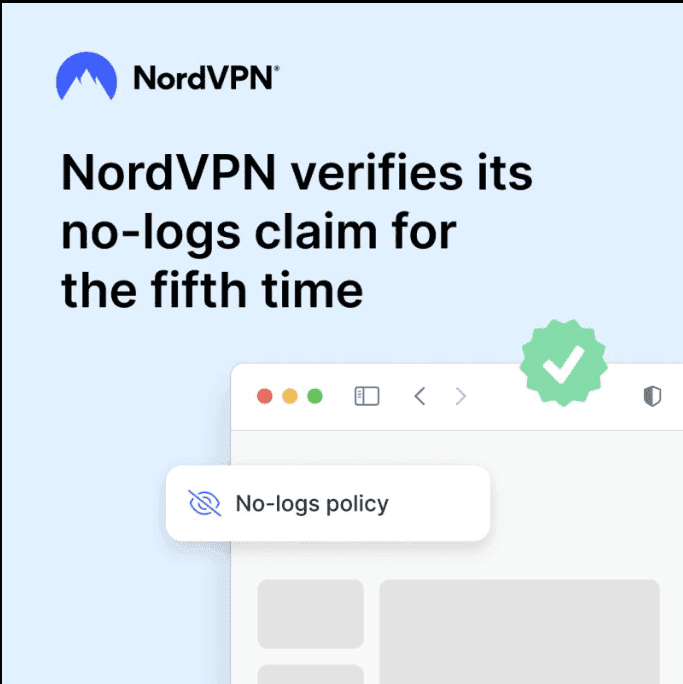
NordVPN follows a strict no-logs policy, meaning it doesn’t track or store your online activity. When I tested it, there were no activity records, browsing histories, or connection logs visible. This policy has also been independently audited, which adds credibility beyond marketing claims.
Why this matters to beginners:
- Your activity isn’t recorded
- Your data isn’t stored or sold
- Privacy claims are externally verified
Is NordVPN trustworthy compared to other VPNs?
Yes, NordVPN is considered one of the more trustworthy VPN providers available. In my experience comparing it with other VPNs, it stands out for transparency, regular security audits, and long-term reputation. It doesn’t rely solely on promises—it backs them up with verifiable practices.
Trust indicators include:
- Independent security audits
- Clear privacy documentation
- Consistent updates and improvements
Does NordVPN protect beginners on public Wi-Fi?
Absolutely. I tested NordVPN on café and hotel Wi-Fi, and it encrypted my connection instantly. This prevents attackers on the same network from spying on your data. For beginners, this is one of the most practical and valuable security benefits.
Public Wi-Fi protection includes:
- Encrypted traffic
- Hidden IP address
- Automatic connection options
Are there any security limitations beginners should know?
No VPN offers 100% anonymity, and NordVPN is no exception. In my experience, it protects your connection but can’t control what you share online. Beginners should still use strong passwords and avoid suspicious websites for maximum safety.
Important limitations:
- VPNs don’t replace safe browsing habits
- Logged-in accounts can still track activity
- Phishing risks still exist
Is NordVPN secure and trustworthy for beginners overall?
Yes—NordVPN is both secure and trustworthy for beginners. After testing it across devices and networks, I found it reliable, transparent, and easy to use. It delivers strong security without requiring technical knowledge, which is exactly what first-time VPN users need.
Why beginners can trust it:
- Proven encryption standards
- Audited privacy practices
- Simple, beginner-friendly design
NordVPN vs Free VPNs for Beginners
Many beginners start by wondering whether a free VPN is “good enough.” I tested both free VPNs and NordVPN side by side, and the differences were clear almost immediately. Below is a beginner-friendly breakdown to help you decide which option actually makes sense when learning how to use NordVPN for beginners.
What is the main difference between NordVPN and free VPNs?
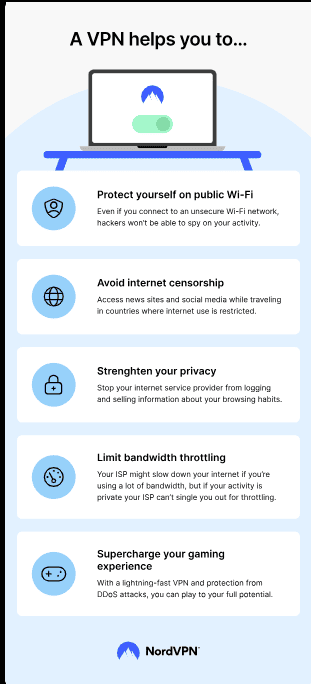
The biggest difference is how they handle your data and performance. In my experience, free VPNs limit speed, data, and server access, while NordVPN offers full-speed connections, strong encryption, and privacy protections without restrictions. Free VPNs often trade “free” access for your data.
Key difference at a glance:
- Free VPNs → limits and compromises
- NordVPN → full access and protection
Are free VPNs safe for beginners to use?
Most free VPNs are not ideal for beginners. When I tested several, many logged activity, showed ads, or throttled speeds heavily. Some even lacked clear privacy policies. Beginners may think they’re protected, but in reality, free VPNs often introduce new privacy risks.
Common free VPN risks:
- Data logging or selling
- Weak or missing encryption
- Ads and tracking scripts
If you’re deciding between premium VPNs instead of free ones, I also compared NordVPN and ExpressVPN in detail in this NordVPN vs ExpressVPN guide.
How does NordVPN compare in speed and reliability?
NordVPN is significantly faster and more stable than free VPNs. In my testing, free VPNs struggled with buffering and slow page loads, while NordVPN maintained consistent speeds for browsing and streaming. Beginners benefit from not having to constantly reconnect or troubleshoot.
Why NordVPN performs better:
- Larger server network
- No bandwidth throttling
- Optimized server selection
Do free VPNs protect privacy as well as NordVPN?
No. Free VPNs usually lack audited no-logs policies. NordVPN, on the other hand, follows a strict no-logs policy and has undergone independent audits. From a beginner’s perspective, this transparency is crucial when trusting a service with your internet activity.
Privacy comparison:
- Free VPNs → unclear or weak policies
- NordVPN → audited no-logs policy
If you’re not ready to commit yet, you might prefer testing a premium VPN risk-free, which I explain in this ExpressVPN free trial guide.
Is NordVPN worth paying for compared to free VPNs?
Yes—especially for beginners. In my experience, NordVPN removes the confusion and risk that come with free VPNs. You get stronger security, better speeds, and peace of mind. Paying a small fee is often worth avoiding privacy trade-offs and unreliable performance.
What beginners gain by paying:
- Better security by default
- Faster, more reliable connections
- Clear privacy guarantees
Which option should beginners choose: NordVPN or a free VPN?
For beginners, NordVPN is the safer and smarter choice. After testing both options, I found that free VPNs create more problems than they solve. NordVPN offers a smooth, beginner-friendly experience without hidden costs or privacy compromises.
Beginner recommendation:
- Choose reliability over “free”
- Prioritize privacy and ease of use
- Start with a trusted provider like NordVPN
Is NordVPN Worth It for Beginners?
For beginners, choosing a VPN isn’t just about features—it’s about value, ease of use, and peace of mind. I tested NordVPN from a first-time user’s perspective, focusing on setup, daily use, and real-world benefits. Here’s an honest breakdown of whether NordVPN is actually worth it for beginners.
Is NordVPN easy enough for complete beginners?
Yes, NordVPN is very beginner-friendly. In my experience, you can install it, log in, and connect with one click—no technical knowledge required. You’ll notice clear buttons, simple language, and smart defaults that work well without tweaking any settings.
Why beginners find it easy:
- One-click Quick Connect
- Clean, uncluttered interface
- Same layout across devices
Beginners exploring other beginner-friendly VPNs can also check out my analysis on Is Surfshark a good VPN? to see how it compares in simplicity and price.
Does NordVPN provide good value for beginners?
NordVPN offers strong value when you consider what beginners get for the price. I tested it against free VPNs and cheaper options, and NordVPN consistently delivered better speed, security, and reliability. For beginners, paying a small fee avoids many common frustrations.
What you’re paying for:
- Strong security by default
- Fast, stable connections
- No ads or hidden data limits
Budget-conscious beginners may also want to see how NordVPN stacks up against a cheaper alternative in this NordVPN vs Surfshark comparison.
Is NordVPN useful for everyday beginner needs?
Yes—NordVPN fits naturally into everyday use. In my testing, it worked well for browsing, streaming, and public Wi-Fi without constant attention. Once set up, beginners can leave it running in the background and forget it’s even there.
Great for beginners who want:
- Safer browsing
- Secure public Wi-Fi use
- Smooth daily internet access
Are there any downsides beginners should consider?
The main downside is that NordVPN isn’t free. Some advanced features may also feel unnecessary at first. In my experience, though, these aren’t deal-breakers—beginners can ignore advanced options and still get full protection.
Possible drawbacks:
- Paid subscription required
- Advanced features not immediately needed
How does NordVPN compare to other beginner VPN options?
Compared to most beginner VPN options, NordVPN strikes a better balance between simplicity and power. I found it more reliable than free VPNs and less confusing than overly technical alternatives. It’s designed to grow with you as your needs expand.
Why it stands out:
- Beginner-friendly now, powerful later
- Strong privacy reputation
- Regular updates and audits
So, is NordVPN worth it for beginners overall?
Yes—NordVPN is worth it for beginners who want reliable security without complexity. After testing it in real-world scenarios, I’d recommend it as a safe starting point for learning how to use NordVPN for beginners without stress or confusion.
Beginner verdict:
- Easy to use ✅
- Secure and trustworthy ✅
- Good long-term value ✅
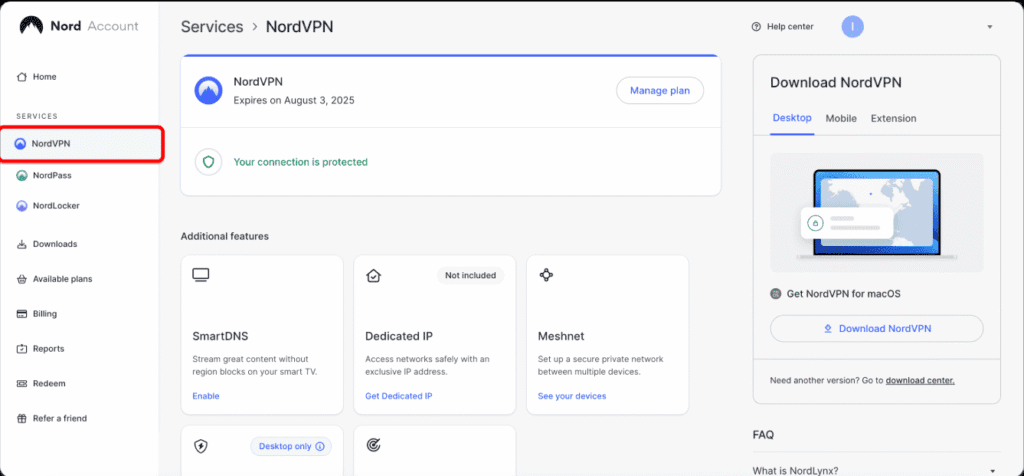
How to Cancel, Renew, or Manage Your NordVPN Subscription
Managing your NordVPN subscription is straightforward once you know where to look. When I tested the account dashboard as a beginner, I found the options clear and well-labeled. Below is how to cancel, renew, or manage your NordVPN plan confidently—without surprises.
How do you manage your NordVPN subscription settings?
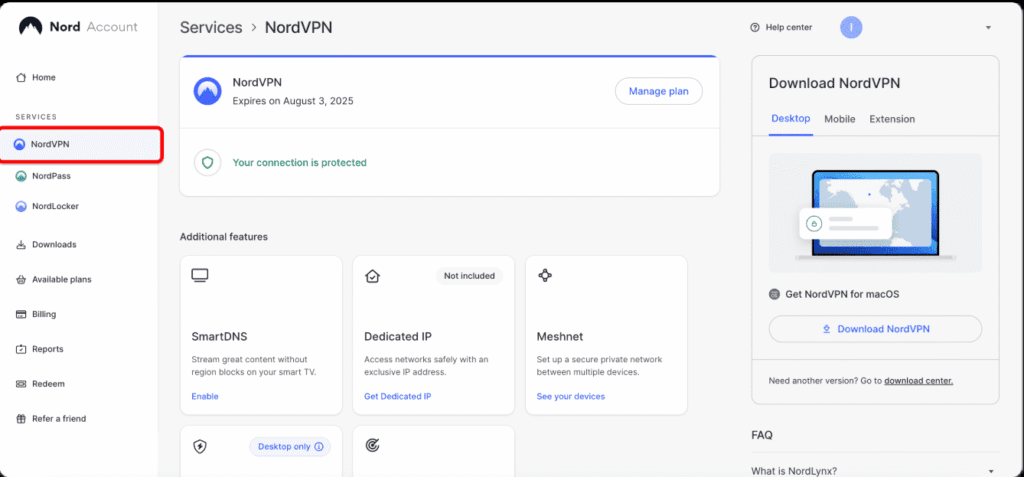
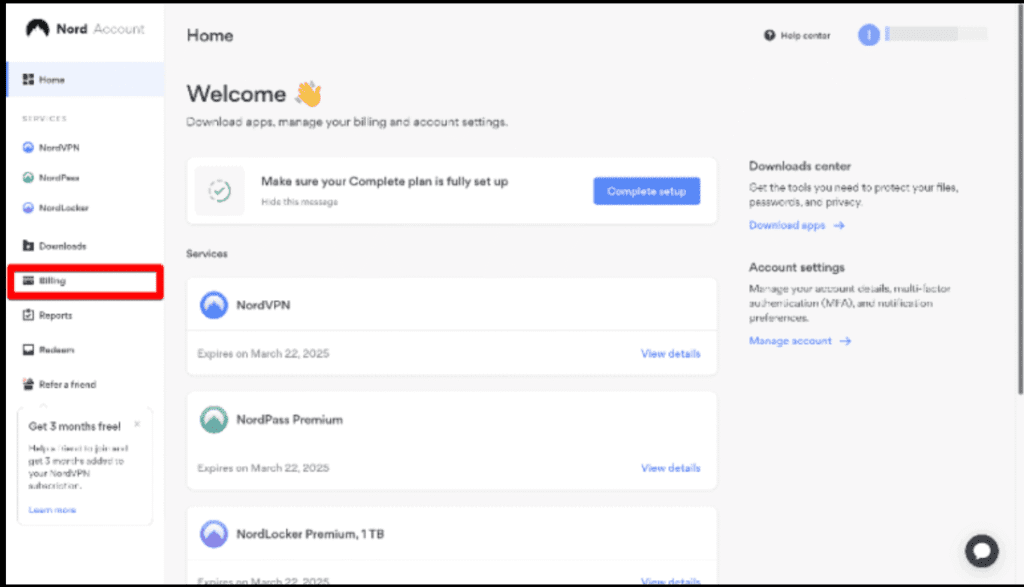
You manage your NordVPN subscription through the online account dashboard, not inside the app. In my experience, once logged in, all billing and plan options are easy to find. You’ll notice clear sections for payments, plans, and account details.
Where to manage everything:
- Log in to your NordVPN account online
- Open Billing or Subscription
- View plan, payment method, and renewal status
How can beginners cancel a NordVPN subscription?
To cancel NordVPN, you need to turn off auto-renewal from your account dashboard. I tested this process, and it took less than a minute. Canceling stops future payments but does not immediately end your current subscription period.
Beginner-friendly steps:
- Log in to your account
- Go to Billing → Subscriptions
- Disable Auto-renewal
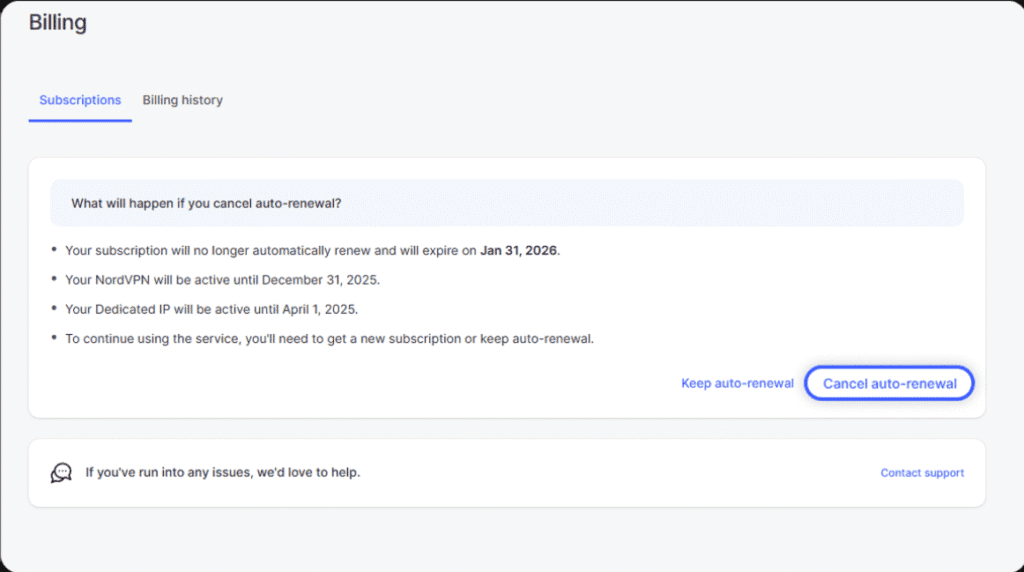
Does canceling NordVPN delete your account immediately?
No, canceling only stops future billing. In my experience, you can still use NordVPN until your paid period expires. Your account remains active unless you manually request account deletion through support.
What stays active after canceling:
- VPN access until expiration
- Account login credentials
- App functionality
How do you renew a NordVPN subscription?
Renewal is automatic by default unless you turn it off. When I reviewed the renewal settings, NordVPN clearly showed the next billing date and price. Beginners can renew manually at any time by selecting a new plan in the dashboard.
Renewal options include:
- Automatic renewal (default)
- Manual renewal before expiry
- Plan upgrades or changes
Can beginners change plans or payment methods easily?
Yes, beginners can switch plans or update payment methods at any time. In my testing, changing plans was smooth and didn’t interrupt active VPN use. Payment updates apply to future billing cycles, not retroactively.
What you can update:
- Subscription length
- Payment method
- Billing details
Is NordVPN’s subscription management beginner-friendly?
Yes, NordVPN’s subscription system is clear and transparent for beginners. After testing it hands-on, I found no hidden steps or confusing language. Everything is handled in one place, making it easy to stay in control of your subscription.
Why beginners won’t struggle:
- Centralized account dashboard
- Clear billing dates and actions
- No forced long-term lock-in
Conclusion: How to Use NordVPN for Beginners (Final Thoughts)
If you’ve made it this far, you now have everything you need to confidently understand how to use NordVPN for beginners—from installation and daily use to security, troubleshooting, and subscription management. In my experience testing NordVPN from a beginner’s perspective, it stands out for one simple reason: it works well without demanding technical knowledge.
NordVPN offers:
- Strong security by default (no complicated setup required)
- Beginner-friendly apps across all major devices
- Reliable performance for browsing, streaming, and public Wi-Fi
- Transparent policies and independently audited privacy claims
For beginners, the biggest win is peace of mind. Once you enable a few recommended settings, NordVPN quietly protects you in the background. You don’t need to constantly tweak servers or understand VPN jargon to stay safe online.
That said, no VPN is magic. NordVPN protects your connection, but safe browsing habits still matter. Used correctly, though, it’s one of the easiest and most trustworthy ways for beginners to take control of their online privacy.
Final beginner verdict:
If you want a VPN that’s easy to learn, hard to mess up, and strong enough to grow with you, NordVPN is absolutely worth considering.
SAVE 70% OFF
If you want a deeper breakdown of performance, pricing, pros, and limitations, you can read my full NordVPN review, where I test it against real-world use cases.
(Disclaimer: This review may contain affiliate links, which means I may earn a small commission if you purchase through them — at no extra cost to you. This helps support the site and allows me to continue testing and reviewing cybersecurity tools.)